What Is Internal and External Linking in SEO?
Internal links connect pages across your own website, while external links point readers to useful resources on other domains. This guide explains how internal links, outbound links, backlinks, anchor text, site architecture, and link attributes work together in SEO.
Sahar
Content Writer
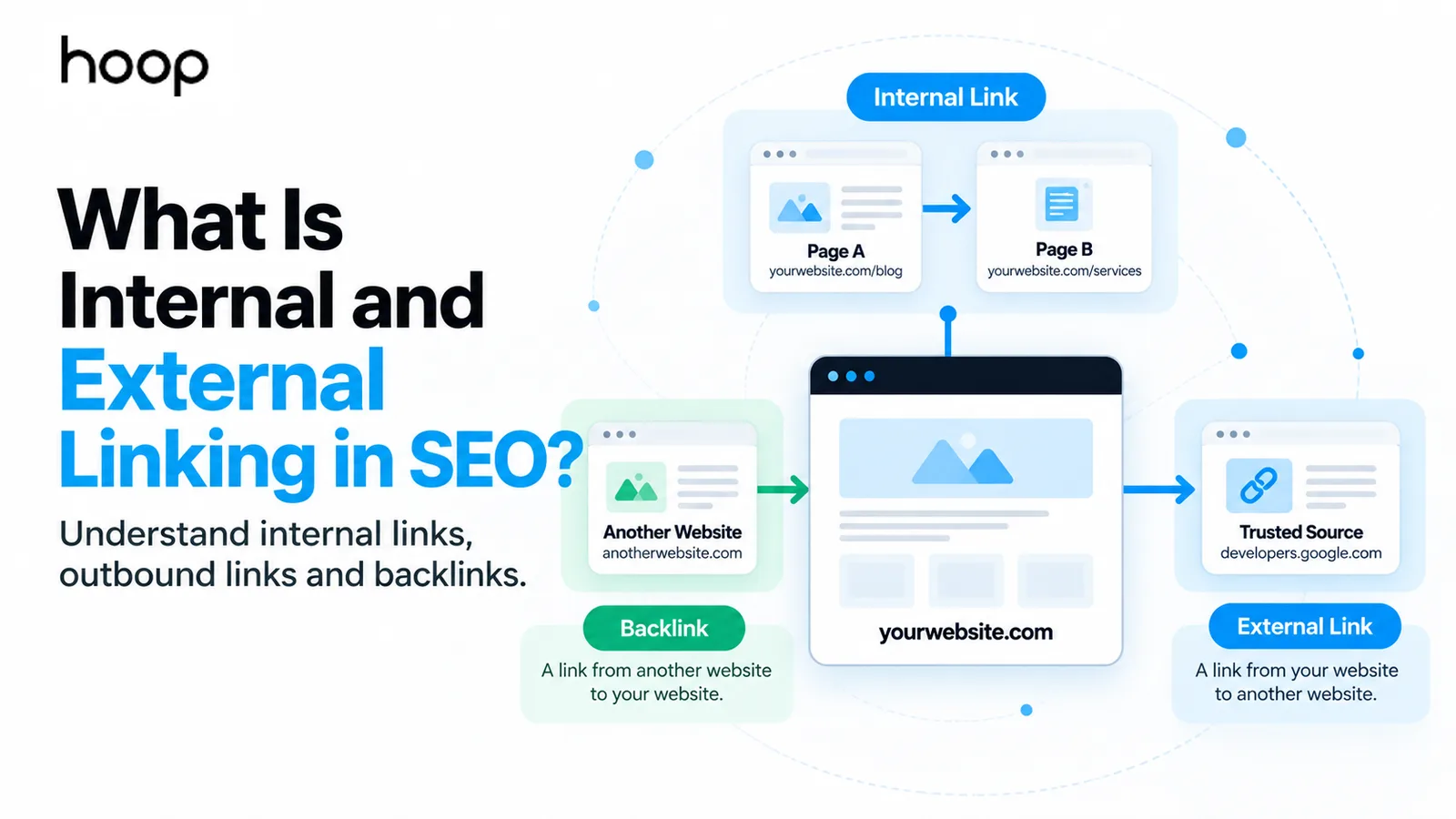
Internal links connect pages on your own website, while external links send users to a different domain. Backlinks work in the opposite direction: another website links to yours.
Each link type serves a different SEO purpose. Internal links shape site structure and discovery. External links support sources and context. Backlinks bring authority signals from other websites.
What Is Internal Linking in SEO?
Internal linking in SEO means adding hyperlinks between pages on the same website. A link from a blog post to a service page is an internal link.
Internal links help people continue their journey without returning to search. Search engines also follow these links to discover pages and understand relationships across the site.
A good internal linking structure connects important pages through clear paths. The structure should reflect your services, products, categories, topics, and conversion goals.
Contextual internal links
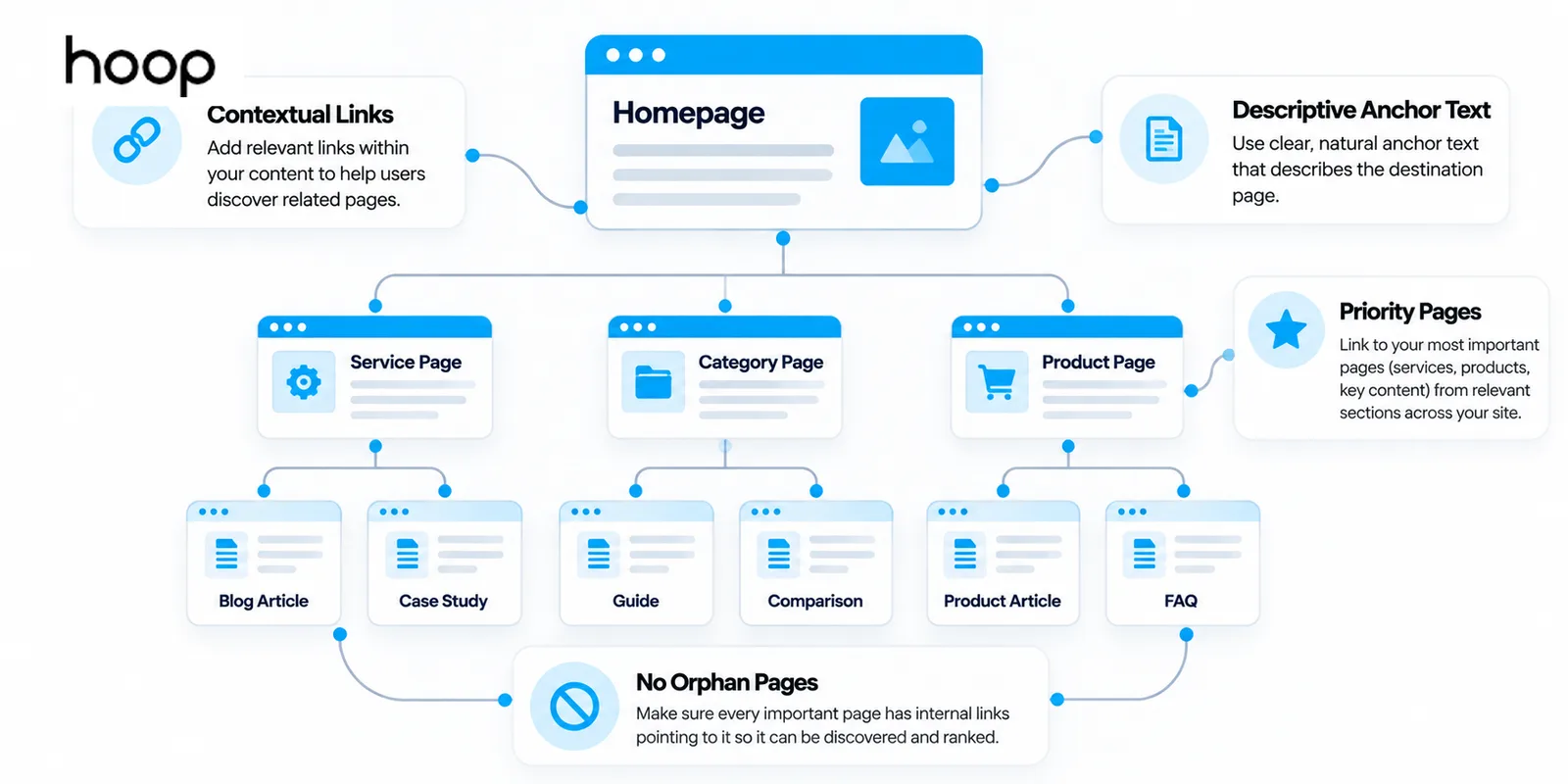
Contextual internal links appear inside page content. A paragraph about technical audits can link naturally to a technical SEO service or a deeper guide.
Contextual links give the destination meaning because surrounding text explains why the linked page matters. These links also create useful routes between related topics.
Navigational and structural internal links
Structural internal links appear in navigation menus, breadcrumbs, sidebars, category structures, product grids, and footers. These links define how users move through the site.
Navigation should expose the pages people need most. Breadcrumbs clarify hierarchy. Category links help users narrow choices. Footer links should support navigation rather than repeat every URL.
What Is External Linking in SEO?
External linking in SEO means linking from your website to a page on another domain. These links are also called outbound links or outgoing links.
A blog can link to original research, official documentation, a government source, a tool, or another useful resource. The external destination should improve the reader’s understanding.
External links do not need to appear on every page. Add an external link when a source, definition, tool, or reference makes the page more useful or verifiable.
External Links vs Backlinks: What Is the Difference?
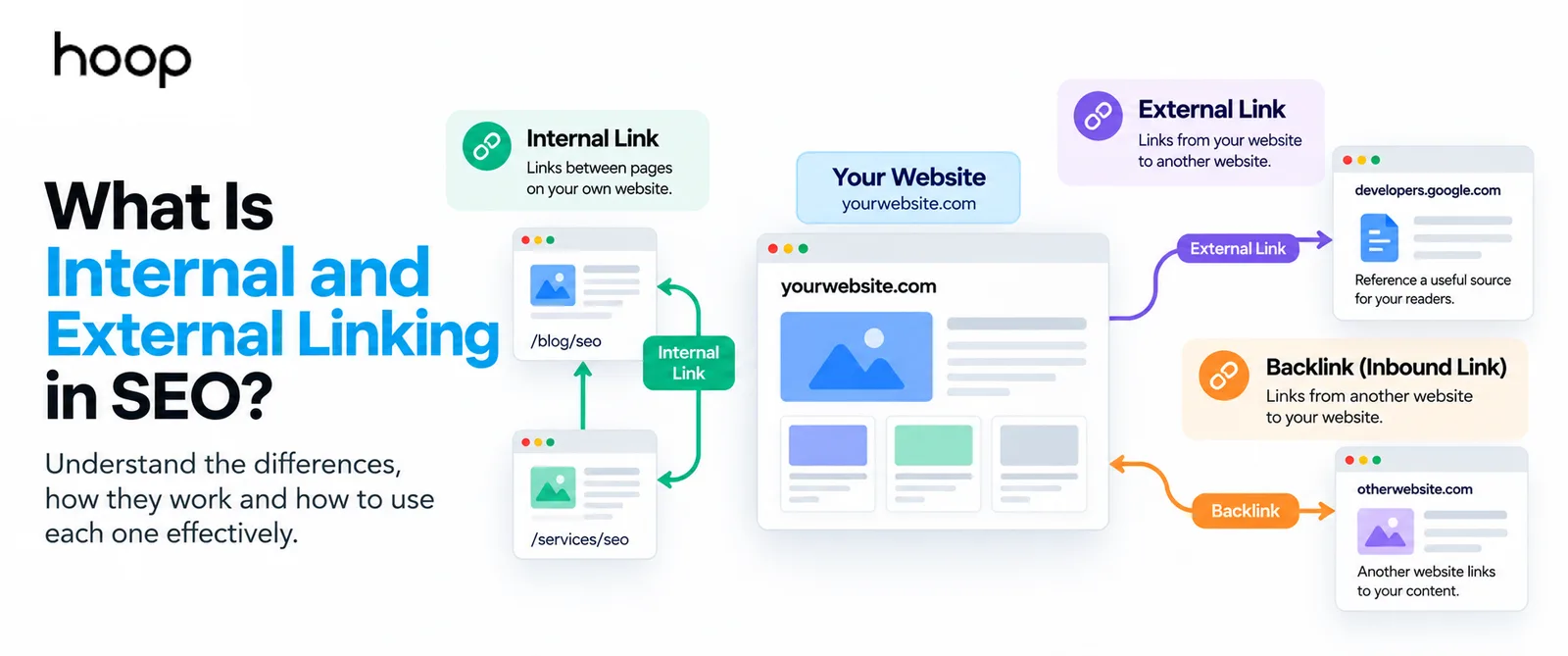
An external link points away from your website. A backlink points toward your website from another domain. The same hyperlink can have both labels from different perspectives.
If Hoop links to Google, Hoop creates an outbound external link. Google receives an inbound link from Hoop. If another publisher links to Hoop, Hoop receives a backlink.
The distinction matters because you control outbound links and internal links directly. Backlinks depend on other websites choosing to reference your pages.
Why Are Internal Links Important for SEO?
Internal links help search engines find pages, understand site structure, and identify which pages receive repeated support from related content. Internal links also improve user navigation.
Internal links support discovery and crawlability
Search engines discover many URLs by following links from pages they already know. A valuable page with no internal path can become difficult for users and crawlers to find.
Google recommends linking every page you care about from at least one other findable page. That rule makes orphan-page prevention a basic part of technical SEO.
Internal links show structure and importance
Links reveal how pages relate. A service page linked from several relevant guides receives clearer structural support than an isolated page with no contextual connections.
Internal links also distribute some authority that pages receive through backlinks. A strong informational page can support a related commercial page through a natural internal link.
Internal links improve user journeys
A useful internal link gives the reader a logical next step. A guide can lead to a service, a category can lead to products, and a product can lead to support content.
Your internal links should help users complete tasks. Do not insert links only to increase a link count.
Where Should You Add Internal Links?
Add internal links where users naturally need another page. Common locations include navigation, breadcrumbs, body copy, product cards, category pages, calls to action, and related-content modules.
Contextual body links usually provide the clearest meaning because nearby text explains the relationship. Navigation links support broad access, while contextual links support specific next steps.
Blogs should not receive all the attention. Ecommerce stores should connect categories, products, buying guides, and support pages. Service websites should connect guides, services, case studies, and contact paths.
Internal linking for service websites
Service websites should link informational content to relevant commercial pages without forcing a sales jump. A guide about local rankings can support a local SEO service when the reader reaches that need.
Service pages should also connect to proof and supporting resources. Case studies, process pages, FAQs, pricing information, and related services can help visitors evaluate the offer without restarting their search.
Internal linking for ecommerce websites
Ecommerce sites need links across categories, subcategories, products, buying guides, and support content. Category pages should expose useful product paths, while guides should point readers toward relevant commercial choices.
Avoid creating thousands of automatic links from every product to every related category. Large stores need controlled rules so filters, variants, and recommendations do not overwhelm useful navigation.
Internal linking for blogs and resource hubs
Blogs should connect topic clusters instead of operating as isolated articles. A broad guide can link to narrower explanations, while supporting articles can link back to the primary resource.
This structure helps readers explore a topic in depth and gives search engines clearer relationships between related pages. The links should follow subject relevance rather than publication date alone.
How to Build an Internal Linking Strategy
To build an internal linking strategy, map your priority pages first, then connect those pages to relevant supporting content. Review both outgoing and incoming internal links.
- Map your priority pages. Identify the services, products, categories, and strategic guides that deserve stronger visibility.
- Connect related pages. Link pages when the destination genuinely extends the topic or helps the user complete a task.
- Support every new page in both directions. Add links from the new page to useful older pages, then update relevant older pages to link back.
- Fix weak paths. Repair broken links, replace redirected internal URLs, and connect orphan pages to the main site structure.
- Review the structure regularly. Recheck priority pages after new launches, migrations, category changes, or major content growth.
A consistent SEO blog writing process should include internal linking during publishing, not months later during cleanup.
What Anchor Text Should You Use?
Anchor text is the clickable text inside a hyperlink. Good anchor text describes the destination clearly and stays concise enough to read naturally.
Use descriptive phrases such as “technical SEO audit” instead of generic phrases such as “click here.” The reader should understand the destination before opening the link.
Internal anchor text can use relevant keywords naturally because you control the site context. Avoid repeating the same exact phrase everywhere when another natural description fits better.
External anchor text should describe the cited source or resource. A research citation should name the study, organization, tool, or topic instead of using vague wording.
How Many Internal Links Should a Page Have?
There is no universal ideal number of internal links. The right number depends on page length, topic depth, navigation, and how many relevant destinations genuinely help the reader.
A focused 600-word service page may need only 2 or 3 contextual internal links. A 3,000-word guide can support more because the article covers more subtopics.
Do not add 20 links merely to meet a quota. Too many competing links can weaken clarity and make the page harder to scan.
What Are External Links Used For?
External links give readers access to sources or resources that your page should not reproduce. Strong outbound links usually support evidence, definitions, tools, standards, or original data.
External links support claims with sources
Link directly to the source that supports the claim. A government report, official documentation page, original study, or standards body usually provides stronger evidence than a second-hand summary.
Google’s link best practices explain that external links can establish trustworthiness when they cite useful sources and give readers clear context.
External links send users to useful resources
Some resources belong outside your website. A software tutorial can link to official documentation. A legal article can link to legislation. A product guide can link to a standards specification.
The external destination should solve a reader need that your own page does not address fully. That standard keeps outbound links purposeful.
Does Every Page Need External Links?
No. Every page does not need an external link. A page should link outward only when another source genuinely improves the content or supports a claim.
A product page can work without any external citation. A research-heavy guide usually benefits from links to primary evidence. Context should decide the link, not an SEO plugin score.
Should You Link to Competitors?
You can link to a competitor when the destination genuinely supports the reader, but the link should have a clear editorial reason. Do not add competitor links simply to appear balanced or authoritative.
Prefer primary sources when they exist. Link to official documentation, original research, standards, or source data before citing a competitor summary of the same information.
A useful competitor comparison can still deserve a link when the source adds unique evidence. Editorial value should decide the citation, not fear of sending a visitor away.
Do External Links Hurt SEO?
No. A relevant outbound link does not automatically harm the source page. Linking to a useful resource can improve transparency and help readers verify information.
Do not avoid citations because you fear losing all page authority. Use normal links for sources you trust. Apply special link attributes only when the relationship calls for them.
Internal Links vs External Links vs Backlinks
The 3 link types work in different directions. The table below shows the distinction from your website’s perspective.
| Link Type | Starts From | Points To | Main SEO Purpose |
|---|---|---|---|
| Internal | Your website | Your website | Navigation, discovery, structure, and internal authority distribution |
| External | Your website | Another website | Sources, context, tools, references, and reader value |
| Backlink | Another website | Your website | External authority, discovery, referral traffic, and credibility signals |
Are Internal Links More Important Than Backlinks?
Internal links and backlinks solve different problems, so one does not replace the other. Internal links organize authority already inside the site. Backlinks bring external signals into the site.
A page with strong backlinks can support other relevant pages through internal links. A well-linked site without meaningful external authority can still struggle on competitive searches.
For competitive campaigns, link building services can strengthen the external side while internal links distribute that authority across relevant pages.
What Link Attributes Should You Know?
A standard HTML link needs no special rel attribute. Search engines can normally crawl and interpret the link when the anchor element contains a valid href destination.
Use rel="sponsored" for advertisements or paid placements. Use rel="ugc" for user-generated content, such as forum posts or comments. Use rel="nofollow" when other values do not fit and you do not want normal association with the destination.
Do not add nofollow to every external link by default. Trusted editorial citations can remain standard links. Paid relationships need the correct qualification.
What Are Common Linking Mistakes?
Most linking problems come from weak relevance, broken paths, or automated rules that ignore context. Review the user journey before changing large numbers of links.
- Forcing irrelevant internal links only to hit a target count.
- Using vague anchor text that hides the destination topic.
- Leaving valuable pages orphaned from the main site structure.
- Linking internally through old URLs that immediately redirect.
- Citing weak external sources when a primary source exists.
- Failing to qualify sponsored or user-generated links correctly.
How Do You Audit Internal and External Links?
Start with a site crawl, then review the pages that matter most to traffic and conversions. Check both the technical path and the editorial reason for each important link.
Google Search Console shows top internal links and external linking data. Crawlers such as Screaming Frog can identify broken links, redirects, orphan candidates, crawl depth, and weak internal paths.
A smaller stable site can review linking each quarter. A large ecommerce site or fast publishing operation should review links more frequently because new URLs create new relationships.
The audit should answer 4 questions: Can users reach important pages? Can crawlers follow the links? Does anchor text describe destinations? Do external sources deserve the citation?
Build a Stronger Linking Structure
Internal and external linking work best when each link has a clear reason. Connect related pages, cite reliable sources, use descriptive anchor text, and keep important pages inside the site structure.
If your website needs a cleaner architecture, stronger internal linking, and a coordinated backlink strategy, explore Hoop Interactive’s complete SEO services and build the full search foundation together.
“Your internal links should help users complete tasks. Do not insert links only to increase a link count.”
Key takeaways
- 01Direction decides the name: an external link out is a backlink to whoever receives it.
- 02There is no ideal internal link count — relevance and page depth decide.
- 03Outbound links to good sources do not hurt rankings; add them when they help the reader.
- 04Every page you care about needs at least one internal link, or it is orphaned.
Written by
Sahar
Content Writer
Frequently Asked
Questions
Everything you need to know before booking a strategy call. Can't find your answer? Contact us directly.
Internal linking means connecting one page of your website to another page on the same website. The links help users and search engines move through your content.
External linking means sending a user from your website to another domain. Writers usually use external links for sources, tools, references, or useful supporting information.
An external link goes from your site to another website. A backlink comes from another website to your site. Direction determines the name.
There is no fixed ideal number. Add internal links when they help readers reach relevant pages and support a clear site structure.
External links do not create an automatic ranking boost simply because they point to authoritative websites. Useful citations can strengthen trust, context, and reader value.