What Is Technical SEO? Crawling, Indexing and Speed
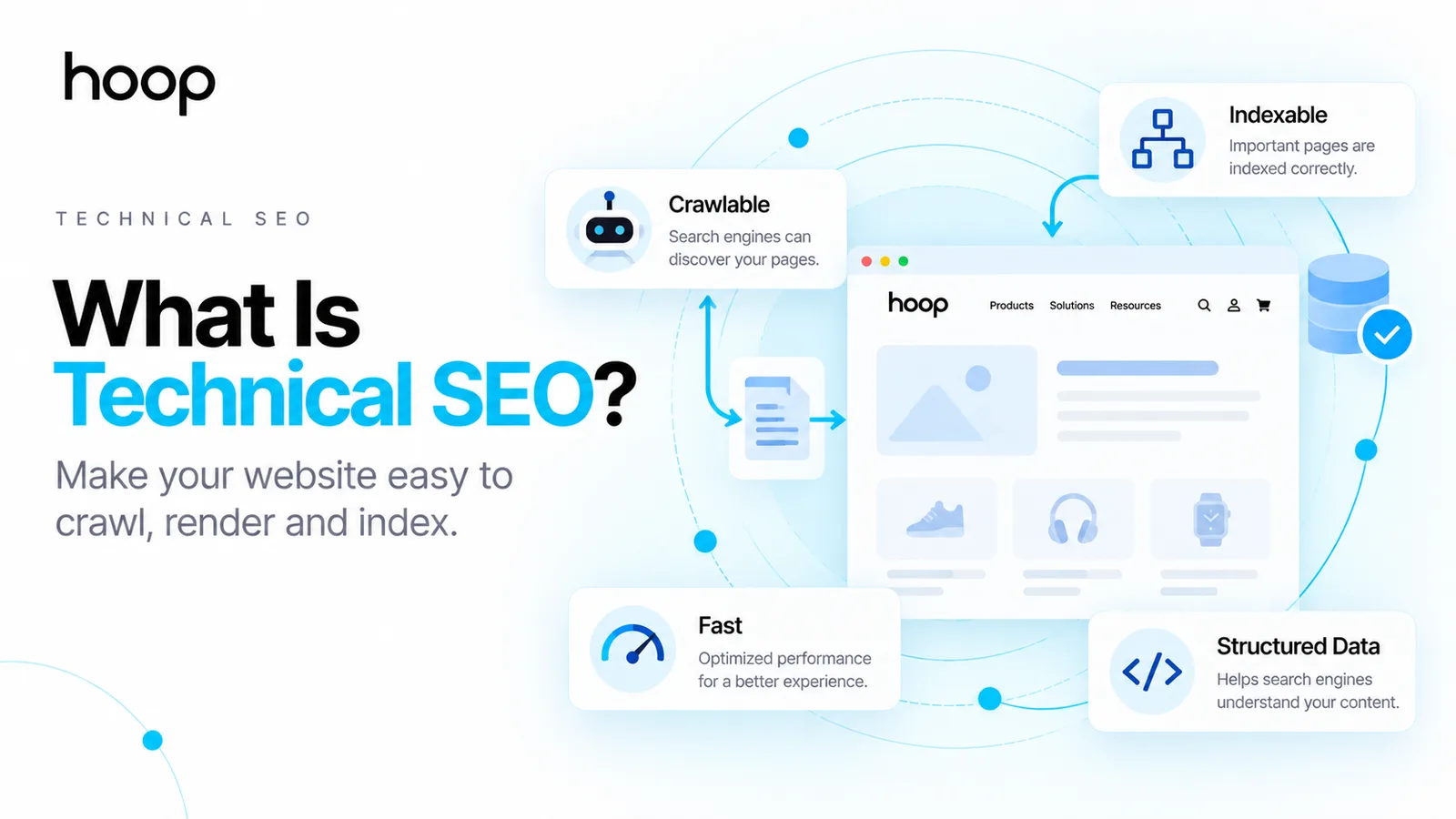
Technical SEO helps search engines discover, crawl, render, understand, and index the pages you want found. This guide explains the core systems, common problems, audit priorities, and tools without turning the subject into developer jargon.
Sahar
Content Writer
Technical SEO is the work that helps search engines discover, crawl, render, understand, and index your important pages correctly. The goal is to remove technical barriers before those barriers limit search visibility.
A page can contain excellent writing and strong backlinks but still stay invisible. A blocked page, wrong canonical, broken redirect, or indexing directive can stop progress before relevance matters.
Technical SEO also supports users. Fast pages, secure connections, stable layouts, and clear site architecture make websites easier to use.
The field sounds developer-heavy because many issues involve servers, code, and browser behavior. You can still understand the core system without becoming a software engineer.
What Does Technical SEO Actually Do?
Technical SEO makes your website accessible and understandable to search systems. The work focuses on how machines reach pages and process technical signals.
Search engines need to complete several jobs before a page can appear for a query. Search engines first discover a URL. They then crawl the URL and process its content. Search systems can render page resources when required. They finally decide whether the page belongs in the index.
Technical SEO improves that path. The work can remove accidental blocks, consolidate duplicate URLs, repair broken navigation, and clarify which pages matter.
Technical SEO does not replace content strategy. Technical SEO also does not replace links or brand authority. The technical layer gives strong content a fair chance to compete.
Google Search Central explains how crawling and indexing fit into Google Search. Clear technical signals help search systems process important pages.
How Do Search Engines Process a Website?
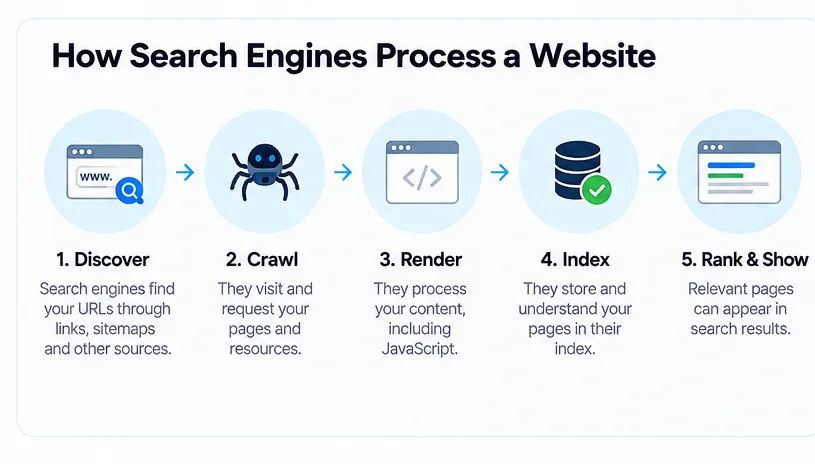
Search engines move through discovery, crawling, rendering, indexing, and retrieval before users see a result. Each stage can fail for different reasons.
Crawling discovers and fetches pages
Crawling starts when a search crawler finds a URL through links, sitemaps, previous crawls, or other discovery sources. Googlebot then requests the page from the server.
Internal links help crawlers find deeper pages. XML sitemaps provide another discovery path for important URLs.
A robots.txt rule can block crawler access to selected paths. Server errors can also prevent crawlers from receiving a usable page.
Rendering processes the page experience
Rendering processes the page after retrieval. Modern websites often use JavaScript to build menus, product grids, filters, or primary content.
Google can render JavaScript, but rendering still depends on accessible resources and successful server responses. A broken script can change what search systems receive.
Mission-critical content should remain easy for search systems to access. Clear HTML also reduces unnecessary complexity across search and other machine systems.
Indexing stores and interprets eligible pages
Indexing happens after Google processes a page and evaluates the page for storage in its search index. A crawled page does not automatically become indexed.
A noindex directive can prevent indexing. Duplicate pages can trigger canonical selection. Thin or low-value pages can also remain outside the index.
Google Search Console shows indexing information through URL Inspection and page indexing reports. Those reports help you separate discovery problems from indexing problems.
What Does Technical SEO Include?
Technical SEO covers the systems that control access, page identity, site structure, rendering, performance, and machine-readable signals. The exact workload changes by website.
Crawlability and indexability
Crawlability asks whether search crawlers can reach important pages. Indexability asks whether those pages remain eligible for inclusion in search indexes.
Common controls include robots.txt, meta robots directives, authentication, server responses, XML sitemaps, and canonical tags.
A technical SEO audit should check these controls before minor formatting issues. A blocked revenue page matters more than an isolated missing description.
Hoop’s SEO audit guide explains how audits rank findings by impact, effort, confidence, and business value.
Site architecture and internal linking
Site architecture controls how pages connect. Strong architecture helps users and crawlers move from broad sections to detailed pages.
Internal links support discovery and distribute authority across the site. Clear navigation also reduces orphan pages with no meaningful internal path.
Large websites need extra control. Ecommerce filters, archives, search pages, and parameter URLs can create thousands of crawlable variations.
Technical signals and page experience
Technical signals include canonical tags, redirects, HTTP status codes, structured data, HTTPS, mobile behavior, and page performance.
Core Web Vitals measure important user-experience signals. Current metrics include Largest Contentful Paint, Interaction to Next Paint, and Cumulative Layout Shift.
Good scores support page experience, but perfect scores do not guarantee rankings. Relevance, quality, authority, and intent still matter.
Technical SEO vs On-Page SEO: What Is the Difference?
Technical SEO focuses on site access and processing, while on-page SEO focuses on the meaning and optimization of individual pages. The 2 disciplines overlap in several areas.
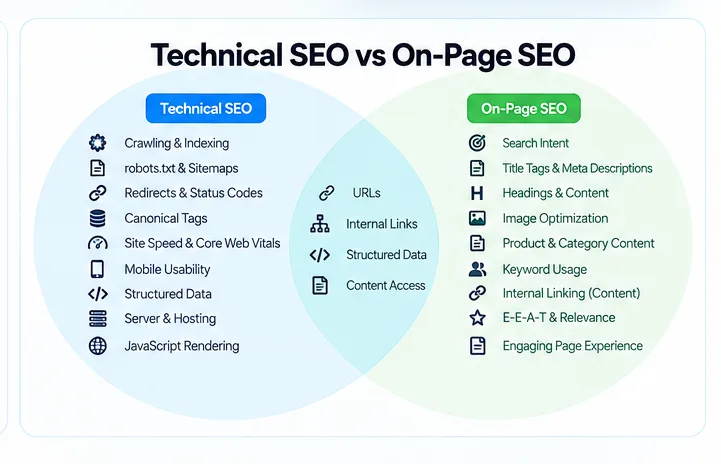
On-page SEO covers titles, headings, copy, search intent, image context, and topical relevance. Technical SEO covers crawling, indexing, redirects, canonicals, rendering, status codes, and infrastructure.
Some tasks sit between both areas. Internal linking affects page context and crawl paths. URL structure affects usability and technical consistency. Structured data can describe page content through technical markup.
The distinction matters because different problems need different fixes. Better copy cannot fix a noindex tag. A perfect sitemap cannot fix weak content.
Why Is Technical SEO Important?
Technical SEO matters because technical failures can block valuable pages before ranking signals receive a chance to work. One mistake can affect 1 page or thousands.
A wrong noindex directive can remove an important landing page from search. A template-level canonical error can point thousands of pages elsewhere.
Redirect mistakes can waste link value after migrations. Broken internal links can isolate pages. Server errors can interrupt crawling across large sections.
Large sites face higher risk because templates multiply mistakes. Hoop’s enterprise SEO services address technical changes where one template can affect thousands of URLs.
Technical health also supports users. Secure HTTPS connections, stable layouts, quick responses, and clear navigation improve real browsing experiences.
Is Technical SEO Just About Website Speed?
No. Website speed represents only one part of technical SEO. Crawlability and indexability usually deserve attention before small performance refinements.
A fast page cannot rank when a noindex directive excludes the page. A perfect performance score cannot repair a canonical pointing to the wrong URL.
Page speed still matters. Slow pages can frustrate users and create weaker experiences. Performance problems can also become expensive across large templates.
Treat speed as part of a wider technical system. Start with access, indexing, architecture, page identity, and server health.
What Do robots.txt and XML Sitemaps Do?
robots.txt controls crawler access, while an XML sitemap helps search engines discover important URLs. The 2 files solve different problems.
A robots.txt file can allow or disallow crawler access to specific paths. Blocking a URL in robots.txt does not guarantee removal from search results.
Google can sometimes know about a blocked URL through external or internal links. Use proper indexing controls when you need a page excluded from search.
An XML sitemap lists URLs you want search engines to discover. A sitemap does not force indexing. Search engines still evaluate each page independently.
Keep sitemaps focused on canonical, indexable URLs. Remove redirected, blocked, duplicate, or intentionally excluded pages from standard sitemap feeds.
What Are Canonical Tags and Why Do They Matter?
Canonical tags signal which URL you prefer when multiple URLs contain the same or very similar content. Search engines can still choose another canonical.
Duplicate URLs often appear through filters, tracking parameters, product variations, protocol differences, and alternate site paths.
For example, a product category can exist at a clean URL and several parameter-based URLs. A canonical signal can point those versions toward the preferred category.
Canonicalization also uses other signals. Redirects, internal links, sitemap inclusion, HTTPS, and page similarity can influence Google’s selected canonical.
A canonical tag is a signal, not an absolute command. Consistent signals create clearer page identity.
What Do Redirects and Status Codes Tell Search Engines?
HTTP status codes tell crawlers what happened when they requested a URL. Redirects tell browsers and crawlers where a resource moved.
A 200 status means the request succeeded. A 301 status signals a permanent redirect. A 404 status means the requested resource was not found.
A 410 status says the resource was intentionally removed. A 5xx response signals a server-side failure.
Not every 404 requires a redirect. A removed page with no replacement can return a genuine 404 or 410.
Redirect old URLs when a relevant replacement exists. Avoid redirect chains when one direct redirect can reach the final destination.
How Does JavaScript Affect Technical SEO?
JavaScript can change what search systems see after the initial HTML loads. Modern search engines can render JavaScript, but implementation still matters.
A page can load navigation, text, links, products, or structured data through scripts. Broken resources can therefore change the rendered page.
Server responses also matter. Google documentation notes that pages with successful 200 responses are candidates for rendering. Non-200 responses can behave differently.
Keep essential content and links reliable. Test important templates with Search Console URL Inspection and browser developer tools.
JavaScript itself is not an SEO problem. Poor implementation creates the problem.
How Does Structured Data Fit In?
Structured data gives search systems explicit machine-readable information about page content and entities. Schema markup can support eligible rich-result features.
Examples include Product, Breadcrumb, Article, Organization, and LocalBusiness markup. Each schema type requires specific properties and guidelines.
Structured data does not guarantee higher rankings. Valid markup also does not guarantee a rich result.
Use Google’s Rich Results Test for supported search features. Keep structured data consistent with visible page content.
Do You Need to Fix Every Technical SEO Error?
No. Fix issues based on search impact, business value, scale, and confidence. Crawlers report conditions, not guaranteed ranking losses.
A broken internal link used across 10,000 pages deserves attention. A harmless warning on one unused archive page can wait.
Start with problems that block important pages. Then address problems that dilute signals, waste crawling, damage user journeys, or affect large templates.
Prioritization prevents technical SEO from becoming endless maintenance. The goal is better search performance, not a perfect audit score.
How to Perform a Basic Technical SEO Audit
To perform a basic technical SEO audit, check indexation first, crawl the site, then validate directives, page identity, errors, performance, and structured data.
| Task | Typical Timing | Method | Difficulty |
|---|---|---|---|
| Check indexation | 30–60 minutes | Search Console and URL Inspection | Easy |
| Crawl the website | 1–4 hours | Screaming Frog, Sitebulb, Ahrefs, or Semrush | Moderate |
| Review directives | 30–90 minutes | robots.txt, meta robots, headers | Moderate |
| Check canonicals | 1–2 hours | Crawl data and URL Inspection | Moderate |
| Review redirects | 1–3 hours | Status-code reports and redirect maps | Moderate |
| Inspect internal links | 1–3 hours | Crawl depth and orphan-page reports | Moderate |
| Review performance | 1–3 hours | PageSpeed Insights and field data | Moderate |
| Validate schema | 30–90 minutes | Rich Results Test and crawl reports | Easy |
| Test JavaScript | 1–3 hours | Rendered HTML and browser tools | Hard |
| Prioritize fixes | 1–2 hours | Impact, scale, effort, confidence | Hard |
Start with Google Search Console. Check whether important pages appear in the index and investigate excluded URLs that should rank.
Run a crawler next. Review status codes, canonical tags, internal links, crawl depth, directives, and duplicate patterns.
Inspect templates instead of treating every URL separately. One template fix can solve hundreds or thousands of repeated problems.
Validate changes after implementation. Recrawl affected sections and compare Search Console data after search engines process the updates.
What Technical SEO Tools Should You Use?
Use tools based on the question you need answered, not because one platform promises a complete score. No single tool sees everything.
Google Search Console helps you inspect indexing, crawl activity, search performance, and selected canonical information.
Screaming Frog and Sitebulb crawl websites like search bots and surface technical patterns. Ahrefs and Semrush combine crawling with broader SEO data.
PageSpeed Insights reports performance data and Core Web Vitals. Google’s Rich Results Test checks supported structured data implementations.
Server log analysis can show how real crawlers request pages. Log analysis becomes more useful on large or technically complex websites.
Does Technical SEO Require Coding?
No. You can diagnose many technical SEO issues without writing production code. Deeper fixes often require developer support.
SEO specialists should understand HTML basics, redirects, status codes, directives, canonicals, and browser behavior. That knowledge helps you explain problems accurately.
Advanced work can involve JavaScript frameworks, server configuration, content delivery networks, log files, APIs, and deployment systems.
The best workflow pairs SEO diagnosis with the right implementation owner. A clear recommendation should explain the problem, impact, scope, and expected result.
Does Every Website Need Technical SEO?
Yes, but every website does not need the same level of technical SEO work. Scale and complexity change the risk.
A 5-page service website usually needs clean indexing, HTTPS, redirects, sitemap coverage, structured navigation, and acceptable performance.
A 500,000-page marketplace needs much deeper control. Large sites can require crawl management, faceted-navigation rules, log analysis, templates, and automated quality checks.
Technical SEO should match the website you operate. More complexity creates more opportunities for technical mistakes to multiply.
How Often Should You Audit Technical SEO?
Audit frequency should match how often your website changes and how much revenue organic search influences. Static sites need fewer reviews than changing platforms.
Run checks after migrations, redesigns, domain changes, platform upgrades, major template releases, and navigation changes.
Fast-moving ecommerce, marketplace, news, SaaS, and enterprise websites benefit from ongoing monitoring. Small websites can use periodic reviews plus deployment checks.
Technical SEO is not a one-time setup. Websites change, software changes, and new pages introduce new failure points.
Build a Technical Foundation That Supports Growth
Technical SEO works when important pages stay accessible, indexable, fast, understandable, and connected. Strong foundations protect every content and authority investment built above them.
If technical issues are limiting visibility, Hoop’s SEO services team can audit the site, prioritize fixes, and coordinate implementation around measurable search outcomes.
“Better copy cannot fix a noindex tag. A perfect sitemap cannot fix weak content.”
Key takeaways
- 01A crawled page is not automatically an indexed page — the two failures need different fixes.
- 02robots.txt controls crawling; it does not reliably remove a URL from results.
- 03A canonical tag is a signal, not a command — consistent signals matter more than the tag alone.
- 04Fix by impact and scale. A warning on one archive page can wait; a template error cannot.
Written by
Sahar
Content Writer
Frequently Asked
Questions
Everything you need to know before booking a strategy call. Can't find your answer? Contact us directly.
Technical SEO helps search engines access, process, and index your website correctly. The work covers crawling, page identity, rendering, performance, and technical signals.
No. Technical SEO focuses on site access and processing. On-page SEO focuses on content, relevance, headings, titles, and page-level optimization.
No. Many audits require no coding. Complex implementation often needs developers who understand servers, JavaScript, templates, or infrastructure.
Yes, when technical problems limit discovery, indexing, signal consolidation, or user experience. Technical fixes cannot compensate for weak content or authority.
A technical SEO audit checks how search systems crawl, render, index, and understand a website. The audit then prioritizes fixes by impact and effort.