How to Become a Software Developer: A Practical Career Roadmap
Learn how to become a software developer through a practical roadmap covering programming, Git, APIs, projects, deployment, experience, and job preparation — the route matters less than the skills you can demonstrate.
Sahar
Content Writer
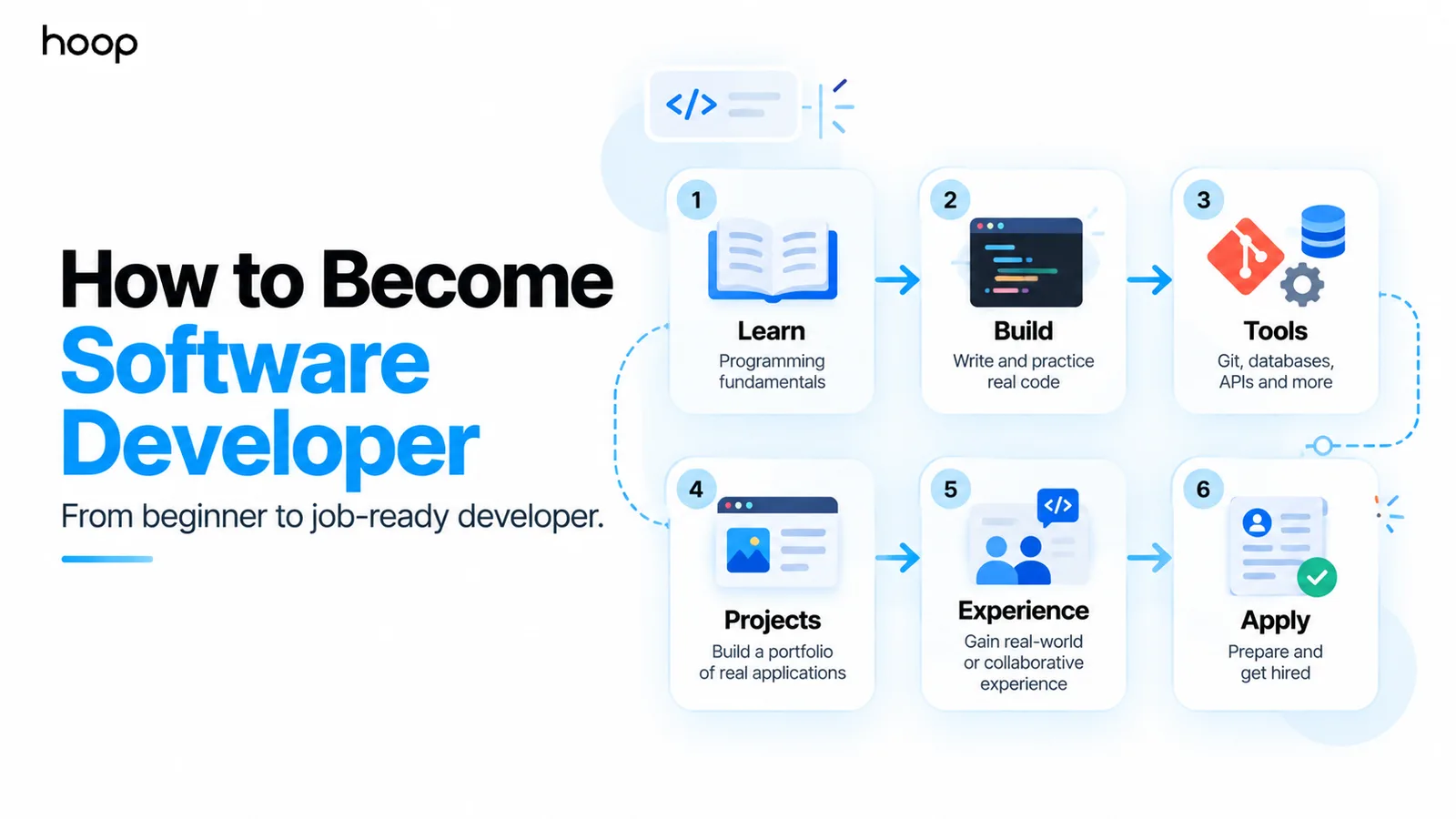
How to become a software developer starts with learning one technical path deeply enough to build complete software, not collecting dozens of languages. You need programming fundamentals, practical projects, development tools, real application concepts, and evidence that you can solve problems independently.
The path can include a Computer Science degree, structured courses, self-study, a bootcamp, or a mix of several options. The route matters less than the skills you can demonstrate. A strong candidate can read unfamiliar code, debug problems, work with data, use version control, test changes, and explain technical decisions.
This roadmap shows how to move from beginner exercises to job-ready software development without getting trapped in endless tutorials.
What Does It Actually Mean to Become a Software Developer?
Becoming a software developer means becoming capable of turning a real requirement into reliable software. Writing syntax is only one part of that process.
A professional developer usually needs to understand a problem, choose an approach, modify an existing codebase, connect systems, test the result, review changes, and help maintain the software after release. That requires more than memorizing programming commands.
The goal should therefore be independent problem solving with software. Your learning plan should gradually reduce how much step-by-step guidance you need.
Step 1: Choose the Software Development Path You Want
Choose one development direction before choosing a long list of technologies. Different developer roles require different stacks, project types, and supporting skills.
Common paths include frontend development, backend development, full-stack development, mobile development, cloud or platform engineering, and embedded software.
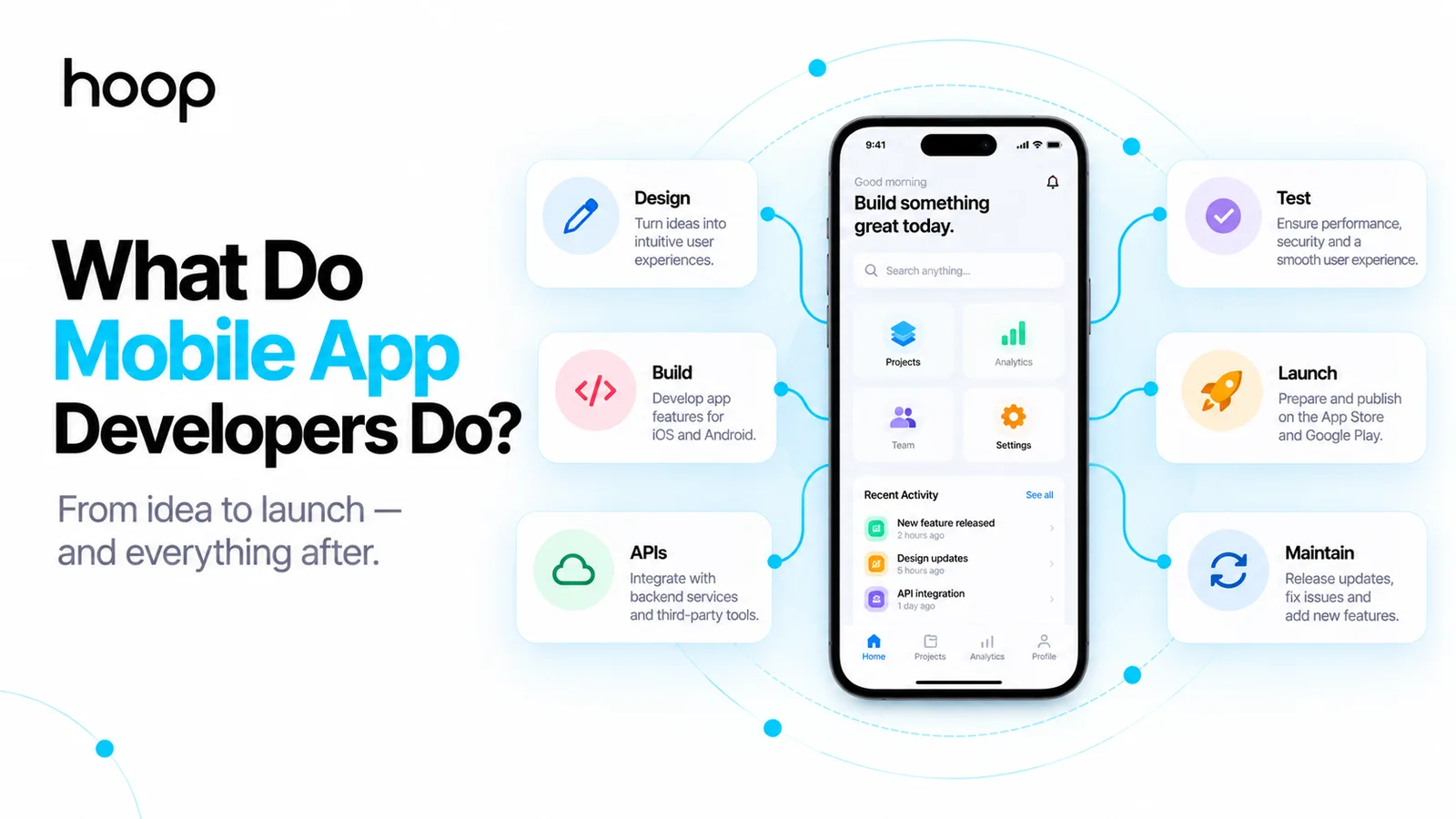
Frontend developers build browser interfaces with technologies such as HTML, CSS, JavaScript, TypeScript, and React. Backend developers work with APIs, databases, authentication, and business logic using languages such as Python, Java, C#, or JavaScript.
Full-stack developers work across both sides. Mobile developers build iOS, Android, or cross-platform applications. Hoop’s web application development work shows how frontend interfaces, backend systems, APIs, and databases operate as one product.
You do not need to choose a lifetime specialty on day 1. Pick a starting direction that gives your learning sequence a clear purpose.
Step 2: Learn One Programming Language Properly
Learn one language well enough to solve unfamiliar problems without constantly changing stacks. Beginners often slow their progress by moving between Python, JavaScript, Java, C#, and C++ before understanding any one language deeply.
Your first language should teach you variables, conditions, loops, functions, data structures, error handling, modules, and basic object-oriented or functional concepts where relevant.
Choose the language around your target path. JavaScript or TypeScript fits web development. Python works well for backend development and general programming. Java and C# remain common in large application environments. Kotlin and Swift suit native mobile development.
The exact first language matters less than consistent practice. You should reach the point where documentation helps you build instead of a tutorial telling you every line to type.
Step 3: Build Programming and Computer Science Fundamentals
Learn enough Computer Science to understand why your code works, not only how to reproduce it. You do not need to finish an entire university curriculum before building projects.
Start with data structures such as arrays, lists, stacks, queues, hash maps, trees, and graphs. Learn basic algorithmic thinking, complexity, recursion, and common searching or sorting ideas.
Then add practical foundations. Understand how the internet moves requests, how processes use memory, how databases store data, and how applications communicate across networks.
These concepts become much easier when a project gives them context. Study theory while you build rather than separating theory from practice for months.
Step 4: Start Building Projects Before You Feel Ready
Start projects as soon as you understand basic programming syntax. Projects expose the gaps that tutorials hide.
Begin with something small that contains your own decisions. A task tracker, expense tracker, simple booking tool, quiz application, or personal dashboard can work well.
Then increase complexity deliberately. A useful progression looks like this:
- Build a small application with core program logic.
- Add persistent data through a file or database.
- Connect an external Application Programming Interface (API).
- Add user accounts and authentication.
- Deploy the application and let another person use it.
Do not judge a project only by visual polish. The strongest learning happens when you encounter unclear requirements, broken code, data problems, failed deployments, and unexpected user behavior.
Step 5: Learn Git and GitHub Early
Use Git from your first serious project because version control is part of normal development work. Do not wait until you feel advanced.
Learn how to create a repository, make focused commits, create branches, merge changes, resolve conflicts, and open pull requests. GitHub or another hosted Git platform also gives you a visible history of how a project evolved.
A clean Git history proves more than a final ZIP file. Employers can see how you break work into changes, write commit messages, document decisions, and maintain a codebase over time.
Step 6: Learn Databases, APIs, Authentication, and Deployment
Move beyond isolated code by learning how real applications connect their major parts. This is the point where many learners move from programming exercises toward software development.
A typical application includes a user interface, backend logic, a database, APIs, authentication, and a deployed environment. Each part creates new engineering decisions.
Learn Structured Query Language (SQL) and use a relational database such as PostgreSQL. Build and consume REST APIs. Add secure user authentication. Store configuration safely. Deploy the application to a cloud or managed hosting environment.
Reviewing how custom software development combines architecture, databases, integrations, development, testing, and deployment can help you see the wider system behind a finished application.
You do not need enterprise-scale infrastructure as a beginner. You do need to understand how the pieces connect.
Step 7: Build Portfolio Projects That Show Real Skills
A job-ready portfolio project should prove that you can make technical decisions, not merely copy a tutorial. One complete application can show more ability than 10 unfinished course projects.
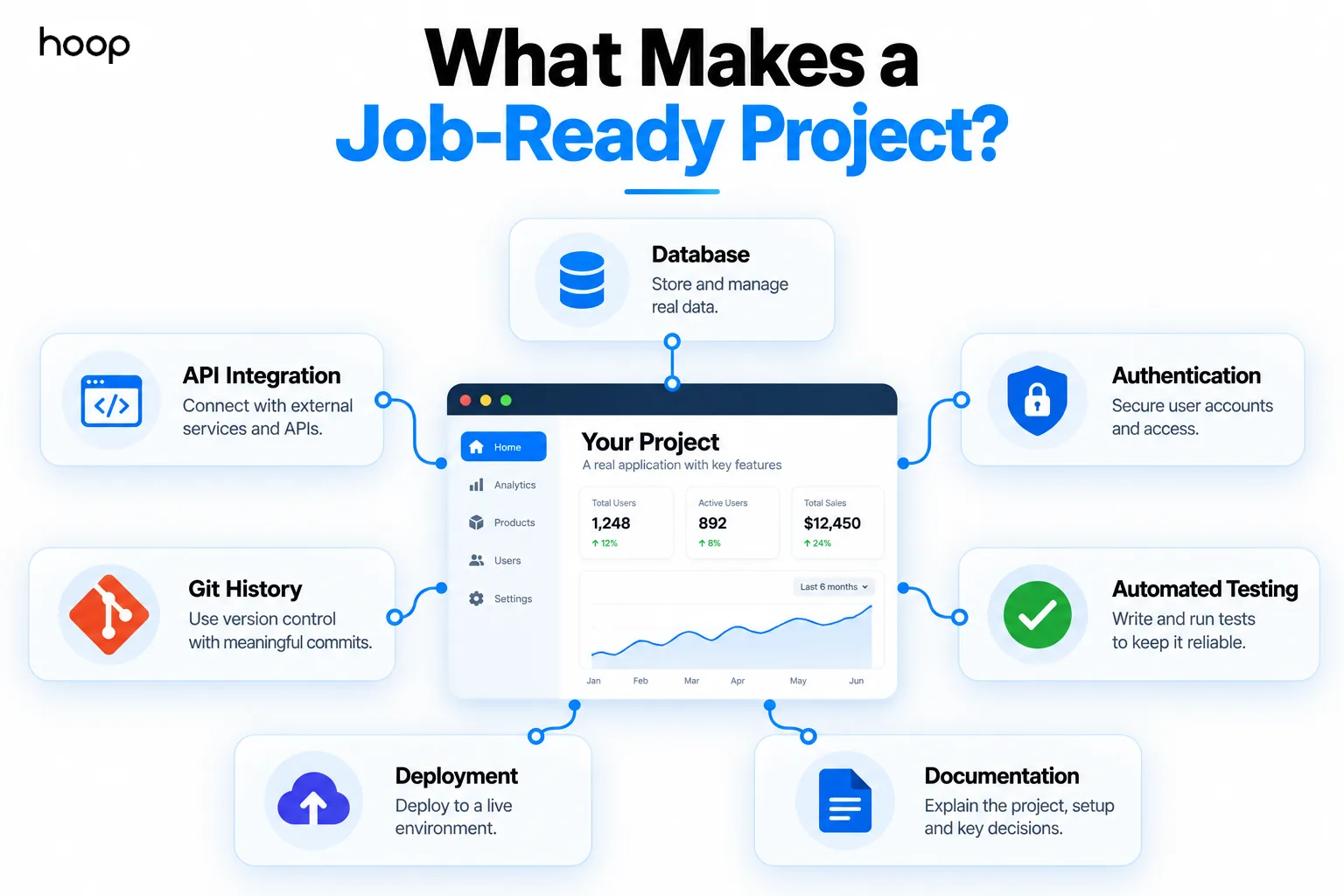
A strong project usually includes real data, meaningful application logic, version control, error handling, tests, deployment, and documentation. Useful additions include authentication, third-party APIs, background jobs, search, file uploads, permissions, or payments when those features fit the product.
Write a README that explains the problem, architecture, setup process, major technical decisions, and known limitations. Include screenshots or a live demo when possible.
Your portfolio should make it easy for another developer to understand what you built and which parts you personally owned.
Step 8: Get Collaborative or Real-World Experience
Add experience where other people can review, use, or depend on your work. Professional development involves coordination, not only solo coding.
Good options include internships, student projects, open-source contributions, freelance work, volunteer projects, hackathons, apprenticeships, and collaborative products with other developers.
Team experience teaches skills that personal projects cannot fully reproduce. You learn code reviews, task discussions, conflicting requirements, shared repositories, deadlines, debugging with other people, and responsibility for changes that affect users.
Even a small real project can reveal how different professional software feels from a tutorial.
Step 9: Prepare for Technical Interviews and Applications
Start job preparation before you feel completely finished learning because no developer reaches a final state of readiness. Target roles that match the stack and project evidence you already have.
Create a concise resume that emphasizes technical skills, projects, measurable outcomes, and practical experience. Link to a clean GitHub profile and live projects where appropriate.
Prepare to explain your projects without memorized scripts. Interviewers can ask why you chose a database, how authentication works, what failed during deployment, or how you would improve the architecture.
Practice coding problems that match the level of the roles you target. Also prepare for debugging, SQL, API, system-design, behavioral, and project-discussion questions where relevant.
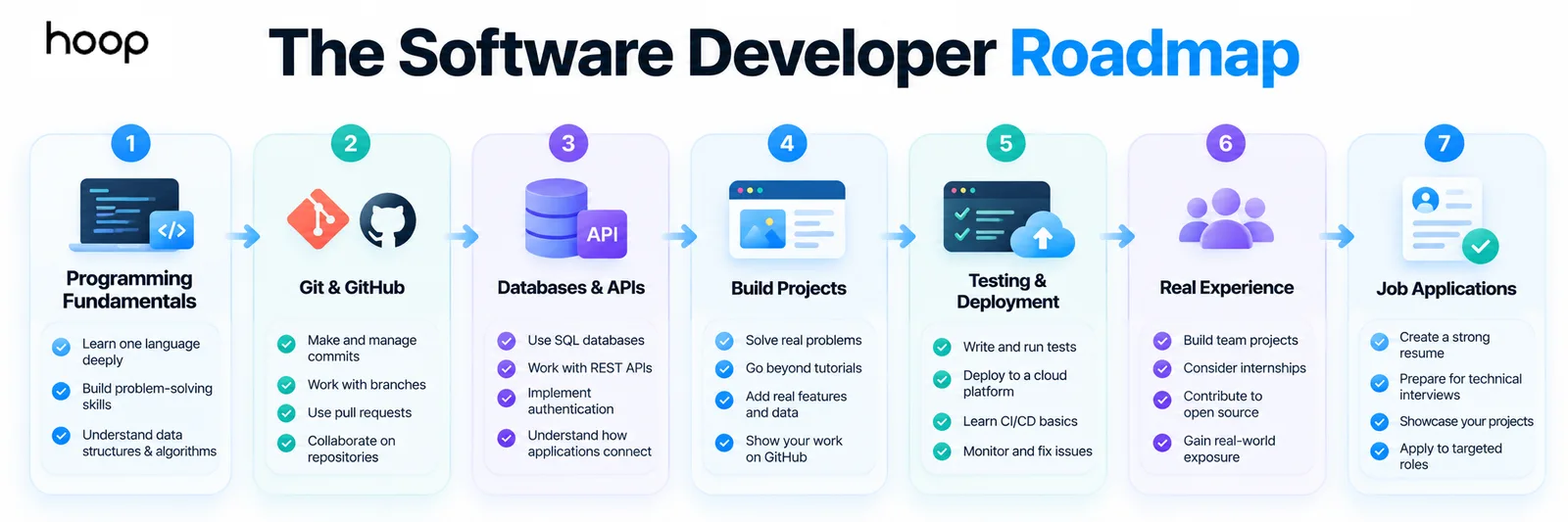
Quick-reference software developer roadmap
| Stage | Example Study Block | Practical Method | Difficulty |
|---|---|---|---|
| Programming foundations | 4–8 weeks | Learn 1 language and solve small problems daily | Moderate |
| Git and developer tools | 2–4 weeks | Use Git on every project and practice branches | Beginner |
| Databases and APIs | 4–8 weeks | Build an app with SQL, APIs, and authentication | Moderate |
| Portfolio projects | 8–16 weeks | Build 2 complete deployed applications | Challenging |
| Experience and job preparation | Ongoing | Collaborate, apply, interview, and improve gaps | Challenging |
These time blocks are planning examples, not promises. Your prior knowledge, weekly study time, and chosen specialty will change the pace.
Do You Need a Degree to Become a Software Developer?
No universal rule requires every software developer to hold a degree, but a degree remains a common hiring route. Requirements vary by employer, country, and role.
In the United States, the Bureau of Labor Statistics says software developers typically need a bachelor’s degree in computer and information technology or a related field. Degree programs also create access to structured fundamentals, internships, team projects, and recruiting pipelines.
A self-taught route can still build strong technical ability. However, you need another way to prove your skills through substantial projects, professional experience, open-source work, certifications where relevant, or strong referrals.
Treat education as one part of your evidence, not the only evidence.
Is a Coding Bootcamp Worth It?
A coding bootcamp can provide structure and accountability, but a bootcamp does not guarantee a software job. Evaluate the program as a learning environment rather than a shortcut around skill development.
Check the curriculum depth, instructor quality, project standards, graduate outcomes, career support, total cost, and amount of independent coding required.
Avoid programs that focus only on copying framework tutorials. A useful program should force you to debug, build projects, use Git, work with data, test software, and explain your decisions.
Compare the cost against self-study, community college, university, apprenticeship, and part-time learning options before committing.
Can You Become a Software Developer Without Experience?
Yes, but you still need evidence that you can perform developer work. “No professional experience” should not mean “no applied experience.”
Projects, internships, freelance tasks, open-source contributions, and collaborative builds can all demonstrate practical ability. The strongest evidence shows that someone else used, reviewed, or depended on your work.
Your goal is to reduce uncertainty for an employer. Show that you can enter an unfamiliar codebase, learn what you need, communicate clearly, and deliver a working change.
How Should Beginners Use AI While Learning?
Use AI to accelerate feedback and research, not to replace understanding. AI coding tools can explain errors, suggest tests, draft boilerplate, compare approaches, and help you navigate unfamiliar documentation.
You still need to inspect generated code, verify assumptions, test behavior, and understand security implications. If you cannot explain why a generated solution works, the tool has completed the learning step for you.
A good rule is simple: ask AI for help, then make yourself responsible for the final code. Debug the output and rewrite parts when needed.
Employers increasingly care about whether developers can use modern tools productively while still reasoning about the software independently. Our guide on whether AI will replace developers looks at where that line sits today.
How Long Does It Take to Become a Software Developer?
There is no reliable universal timeline because “learn programming” and “be competitive for a developer job” are different milestones. Study time, previous experience, role choice, and local hiring conditions all change the result.
You can learn basic syntax relatively quickly. Building complete applications takes longer because databases, APIs, testing, deployment, debugging, and architecture add complexity.
Professional readiness also requires communication, collaboration, interview preparation, and enough project depth to prove your ability.
Measure progress by capabilities instead of calendar months. Ask whether you can build without a step-by-step tutorial, debug unfamiliar problems, use Git confidently, deploy software, and explain your decisions.
Common Mistakes That Slow Beginners Down
Most slowdowns come from learning behavior rather than a difficult programming language.
Avoid switching languages every few weeks. Avoid watching courses without building. Avoid creating only clone projects that follow an instructor exactly. Avoid skipping Git, testing, databases, or deployment because those topics feel less exciting than coding features.
Do not wait until you know “everything” before applying. Software development changes continuously, so professional developers also learn on the job.
Focus on one path, build progressively harder software, review your gaps, and keep improving the weakest part of your skill set.
How Do You Know When You Are Ready to Apply?
Start applying when you can independently build and explain small complete applications that resemble the roles you want. You do not need mastery of every technology listed in a job description.
A useful readiness check includes 7 questions:
- Can you build a feature without copying a complete tutorial?
- Can you debug common errors using logs and documentation?
- Can you use Git branches, commits, and pull requests?
- Can you work with a database and an API?
- Can you write and run useful tests?
- Can you deploy a project and diagnose deployment problems?
- Can you explain your technical choices clearly?
A “yes” to most of those questions gives you enough evidence to begin testing the job market. Use interviews and rejected applications as feedback on the next skills to strengthen.
Build the Skills, Then Prove Them
Build complete software, explain your decisions, and keep improving. See Hoop Interactive’s software development services for the professional workflow from architecture to support.
“If you cannot explain why a generated solution works, the tool has completed the learning step for you.”
Key takeaways
- 01Pick one path and one language; switching stacks every few weeks is what stalls beginners.
- 02Start projects before you feel ready — they expose the gaps tutorials hide.
- 03Use Git from your first serious project; a clean history proves more than a ZIP file.
- 04Two complete deployed applications beat ten unfinished tutorial clones.
Written by
Sahar
Content Writer
Frequently Asked
Questions
Everything you need to know before booking a strategy call. Can't find your answer? Contact us directly.
Yes. Some employers hire self-taught developers, bootcamp graduates, and career changers. Strong projects and practical experience become especially important without a degree.
Choose 1 language that matches your target path. JavaScript or TypeScript suits web development, while Python, Java, and C# suit many backend paths.
Quality matters more than a fixed count. Two complete, deployed projects with real functionality can demonstrate more than 10 unfinished tutorial clones.
Yes, at a practical level. Learn core data structures, algorithmic thinking, and complexity. Go deeper when your target interviews or specialty require it.
AI can support your learning, but AI cannot replace independent understanding. Use AI for explanations and feedback while you remain responsible for debugging, testing, and decisions.
Keep reading
All articles →
What Does a Software Developer Do? Roles, Tasks and Skills
Sep 21, 2026 · 10 min read
Agile Methodology in Software Development: How It Actually Works
Sep 17, 2026 · 10 min read