What Is CI/CD? Continuous Integration and Delivery Explained
CI/CD automates the path from a code change to a release. CI integrates and validates small changes constantly; CD either keeps software release-ready (delivery) or ships it automatically (deployment).
Sahar
Content Writer
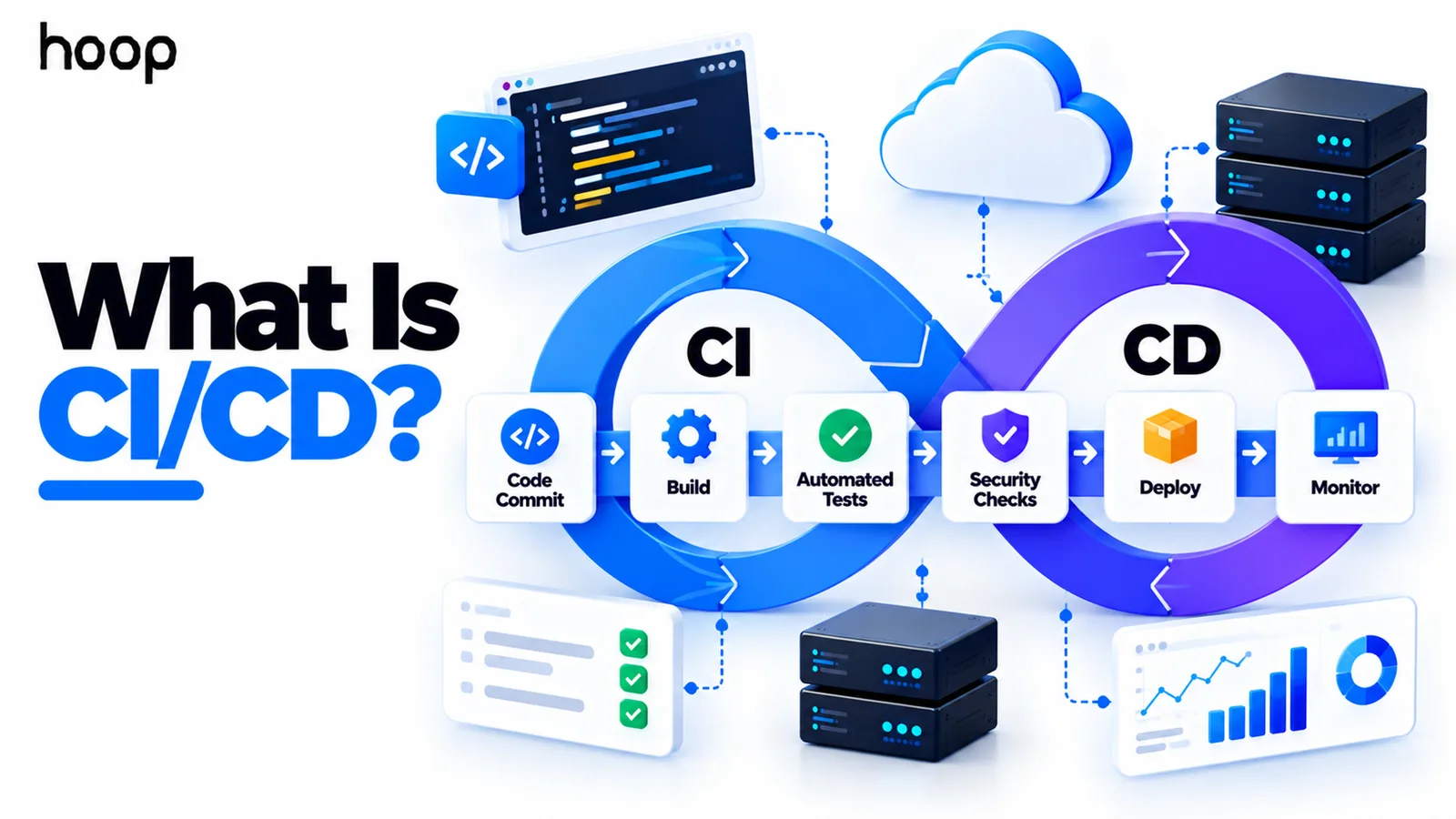
CI/CD is a software-delivery approach that automatically validates and moves code changes through build, testing, and release stages. CI means Continuous Integration, while CD can mean Continuous Delivery or Continuous Deployment.
The goal is simple: catch problems earlier, make releases repeatable, and move safe changes toward users with less manual work. CI/CD does not require one specific tool, cloud provider, container platform, or programming language.
Need this done right?
Hoop builds the strategy, design and development behind sites like this one — talk to us about yours.
What Does CI/CD Mean?
CI/CD describes a set of practices for integrating code frequently and moving validated software toward release. It connects development work with automated checks and repeatable delivery steps.
Continuous Integration focuses on combining small code changes safely. Continuous Delivery keeps validated software ready for release. Continuous Deployment takes the final step automatically when every required check passes.
The slash in CI/CD hides an important detail. CD has 2 common meanings, so teams should state whether they mean delivery or deployment.
Why Do Teams Use CI/CD?
Software releases become risky when teams depend on memory and long manual checklists. A developer may forget a test, package the wrong files, or deploy a different version.
Delivery automation replaces repeated manual release work with a defined workflow. The same checks can run whenever code changes, which makes the process more consistent.
The approach also encourages smaller changes. Smaller releases are easier to review, test, diagnose, and reverse when something behaves badly.
How Does a CI/CD Pipeline Work?
A delivery pipeline is an automated workflow that moves a code change through ordered jobs and stages. A version-control event usually starts that workflow.
For example, a developer may open a pull request. The pipeline can install dependencies, check code quality, run tests, and build the application.
After approval, another workflow may package the release, deploy it to staging, run smoke tests, and prepare production deployment. Production may remain manual or become automatic.
A simple pipeline can be summarized as commit, validate, build, test, stage, release, verify. Real pipelines may add or remove stages based on risk.
What Is Continuous Integration?
Continuous Integration means developers merge small changes into a shared codebase frequently. Automated validation then checks whether those changes still work with the product.
CI often includes compilation, linting, unit tests, type checks, dependency checks, and other fast feedback. Testing supports integration, but CI is broader than testing alone.
Frequent integration reduces the pain of combining weeks of isolated work. It also makes failures easier to trace because each change set is smaller.
What Is Continuous Delivery?
Continuous Delivery keeps software in a releasable state after automated checks pass. The team can still choose when production deployment happens.
A business may require a human approval before release because of compliance, customer timing, or operational risk. The pipeline still prepares the release consistently.
Continuous Delivery is useful when teams want frequent readiness without making every successful change reach customers immediately.
What Is Continuous Deployment?
Continuous Deployment automatically releases a validated change to production after every required gate passes. No separate human approval is needed for the final release.
That does not mean every raw commit goes straight to users. The change still moves through the pipeline and must satisfy the checks defined by the team.
Continuous Deployment fits products where automated testing, observability, rollback, and deployment controls are mature enough to support frequent releases.
Continuous Delivery vs Continuous Deployment
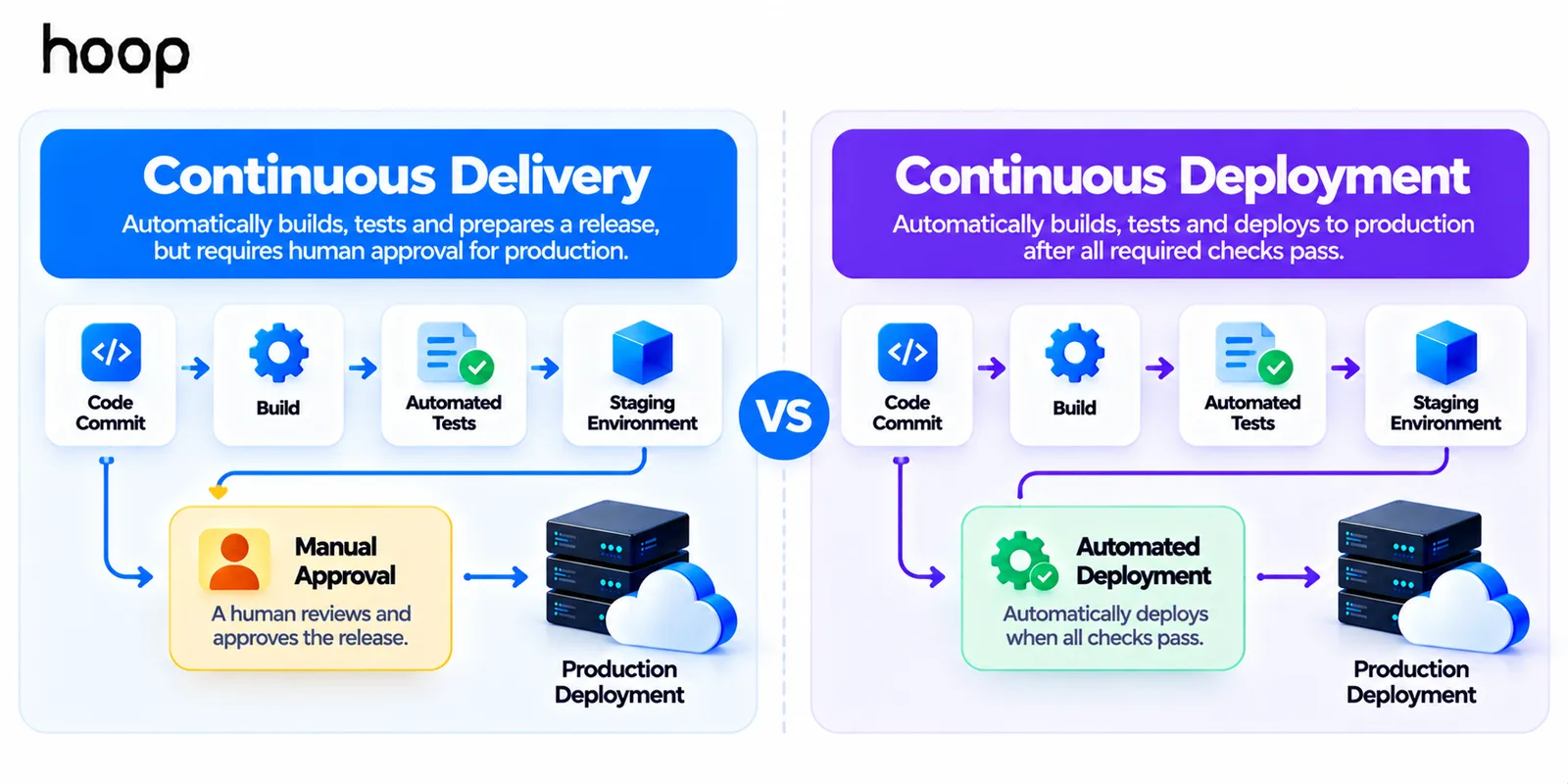
The difference is the final production decision. Continuous Delivery makes a release ready, while Continuous Deployment releases it automatically after validation.
Both approaches can use the same builds, tests, security checks, staging environment, and deployment scripts. The difference is whether a person approves production.
Neither model is automatically better. The right choice depends on product risk, regulation, testing depth, and the cost of a bad release.
What Happens Inside a CI/CD Pipeline?
Delivery stages should answer clear questions. Can the code compile? Do tests pass? Is the artifact secure enough? Can it start correctly in a realistic environment?
A strong pipeline may build the deployable artifact once and reuse that same artifact later. This reduces differences between what was tested and what reaches production.
Staging gives teams another chance to validate behavior before production. Smoke tests can confirm that critical paths still work after deployment.
The pipeline should stop when a required gate fails. A red pipeline is useful information because it prevents an unsafe change from moving farther.
A Real-World CI/CD Example
Imagine a team changes the checkout flow in an ecommerce application. The developer pushes code and opens a pull request.
The CI workflow checks formatting, runs unit tests, and tests the checkout service. It then builds the application artifact.
After review, the change merges to the main branch. The delivery workflow deploys that artifact to staging and runs integration tests.
If every required check passes, the team approves production. A deployment job releases the same artifact and runs a short production smoke test.
If checkout errors increase after release, monitoring can trigger investigation. The team may roll back or disable the change with a feature flag.
Why Build Artifacts Matter
A build artifact is the packaged output created from source code. It may be a binary, archive, container image, static bundle, or another deployable package.
Teams should know exactly which artifact passed important validation. Rebuilding separately for production can introduce differences that were never tested.
A safer pattern is to build once, record the artifact version, and promote that same version through later environments. This improves traceability during releases and incidents.
How Code Moves Through Environments
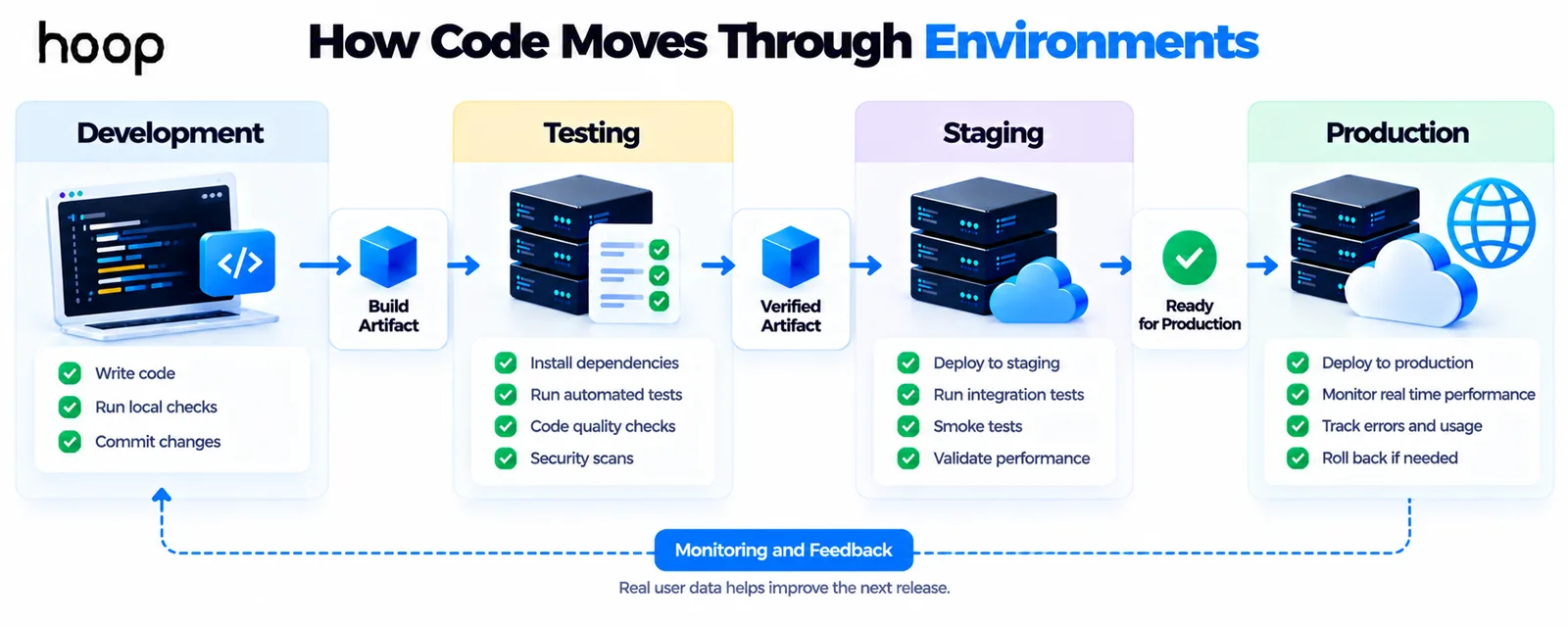
Most teams separate development, testing, staging, and production because each environment serves a different purpose. The pipeline controls how a release moves between them.
Development favors fast feedback. Staging should resemble production closely enough to expose integration problems. Production serves real users and needs the strongest controls.
Promotion may happen automatically between early environments while production still requires approval. The workflow can become more automated after the team gains confidence.
How Configuration and Secrets Fit Into the Pipeline
Applications often need environment-specific settings. These may include database addresses, API keys, feature settings, and service credentials. Those values should not be hardcoded into source files.
The pipeline can inject approved configuration during deployment while secrets remain inside protected secret stores. Access should follow least-privilege rules.
Keeping code separate from environment configuration makes the same artifact easier to promote safely. It also reduces accidental credential exposure inside repositories or logs.
How Database Changes Affect Releases
Application releases sometimes depend on database schema changes. Those changes need the same planning as application code because a failed migration can block or damage a release.
Teams may test migrations before production, make changes backward-compatible, and separate risky data operations from normal deployment steps. Recovery planning matters here as well.
A pipeline can run migration checks automatically. Engineers still need to design safe transitions between old and new application versions.
Where Manual Approval Still Makes Sense
Automation should remove repetition, not judgment. Some releases deserve a person checking timing, risk, customer impact, compliance requirements, or business readiness.
A manual production gate can coexist with highly automated integration, testing, packaging, and staging. That model is still continuous delivery when software stays ready to release.
Teams can later remove approvals for lower-risk changes while keeping stronger controls for sensitive systems. The release policy should reflect real business risk.
What Happens Without CI/CD?
Software can still be released without an automated pipeline. Developers can build, test, package, and deploy everything manually.
That approach can work for a tiny project with rare releases. Problems appear as the product, team, environments, and release frequency grow.
Manual processes make mistakes easier. Teams may skip tests, deploy the wrong build, forget configuration, or change production steps.
Automation does not remove engineering judgment. It makes repeatable work easier to perform consistently and gives teams faster feedback when something breaks.
How CI/CD Fits Into DevOps
DevOps is broader than release automation. DevOps includes collaboration, infrastructure, operations, monitoring, shared ownership, automation, and feedback across the software lifecycle.
An automated delivery pipeline is one practical part of that system. Hoop Interactive uses Cloud and DevOps services to connect automated delivery with infrastructure, observability, and production operations.
A company can install a pipeline tool without changing how teams collaborate. That may create automation, but it does not automatically create a mature DevOps model.
Does CI/CD Require Cloud Computing?
No. Automated pipelines can deploy software to cloud platforms, private data centers, virtual machines, physical servers, mobile systems, or other environments.
Cloud services make programmable infrastructure and disposable environments easier, which often improves automation. They are helpful, but they do not define CI/CD.
For cloud-native products, cloud application development can combine application architecture with deployment pipelines from the start.
Does CI/CD Require Docker or Kubernetes?
No. A pipeline can install dependencies, run tests, build files, and deploy directly to a server without containers.
Docker can make application packaging more consistent across environments. Kubernetes can manage containerized workloads at scale. Neither technology is required for basic CI/CD.
The tool should match the architecture. Adding orchestration complexity to a small product can slow delivery instead of improving it.
Where Does Security Fit Into CI/CD?
Security checks can become pipeline gates instead of waiting until release day. Teams can scan code, dependencies, secrets, containers, and deployed applications. That practice is the core of DevSecOps.
Automated scanning does not replace security review. It gives teams repeatable checks that can catch common problems earlier in development.
Hoop Interactive also integrates security testing into delivery workflows through its cybersecurity services. That work can include code, dependency, secrets, and container scanning where appropriate.
The useful principle is simple: security should move with the software instead of appearing as one late handoff before production.
What Happens When a Pipeline Fails?
A failed pipeline should stop the affected release path and provide useful feedback. The failure may come from tests, build errors, security checks, or deployment validation.
The developer fixes the problem and triggers the workflow again. That feedback loop is one of the main reasons teams automate delivery checks.
The goal is not to make every pipeline green. The goal is to prevent broken changes from progressing unnoticed.
How Do Rollbacks Work in CI/CD?
Release automation should include recovery thinking. A fast deployment process is incomplete if teams cannot respond safely when production behavior gets worse.
Rollback may mean restoring a previous artifact, reversing a deployment, switching traffic, or disabling a feature. The exact method depends on the architecture.
Feature flags, blue-green deployments, and canary releases can reduce release risk. They let teams limit exposure while observing real production behavior.
What Are the Benefits of Automated Delivery?
- Faster feedback because code problems appear soon after a change enters the shared workflow.
- More consistent releases because the same build, test, and deployment steps run repeatedly.
- Smaller changes that are easier to review, diagnose, and reverse when necessary.
- Less repetitive manual work for developers and operations teams.
- Higher release confidence when automated checks cover the product’s most important risks.
- Better traceability because commits, builds, artifacts, approvals, and deployments can be recorded.
What Are Common Pipeline Mistakes?
- Automating a weak manual process without simplifying it first.
- Running tests against one build but deploying a different artifact.
- Making pipelines so slow that developers avoid running them frequently.
- Treating a green pipeline as proof that the application is completely safe.
- Putting secrets directly inside pipeline configuration or source code.
- Adding Kubernetes, microservices, or complex release tooling before the product needs them.
- Automating deployment without planning monitoring, rollback, or incident response.
What Tools Do Delivery Teams Use?
Teams usually need version control, a pipeline runner, build tooling, test frameworks, artifact storage, deployment automation, and monitoring. Security tools may also join the workflow.
Common platforms include GitHub Actions, GitLab CI/CD, Jenkins, CircleCI, Azure DevOps, and cloud-native pipeline services. The exact choice matters less than workflow quality.
A good pipeline should be understandable, observable, and maintainable. Tool sprawl can become another source of delivery friction.
How Do You Measure Whether the Pipeline Is Working?
Pipeline success is not measured only by how many jobs run. Teams should look at delivery speed, release quality, recovery, and developer experience.
Useful signals include lead time for changes, deployment frequency, failure rate, recovery time, pipeline duration, flaky tests, and rollback frequency.
A pipeline that saves 10 minutes but causes unstable production releases is not a meaningful improvement. Speed and reliability must improve together.
How Can Small Teams Start With Delivery Automation?
Start with the smallest useful pipeline. A small web product might begin with linting, unit tests, a build, and staging deployment.
Keep production approval manual while the team learns the workflow. Add automated production deployment only when the risk controls are strong enough.
Later, add integration tests, security scans, artifact storage, smoke tests, or advanced deployment strategies. Pipeline maturity should follow product needs.
The objective is not maximum automation on day one. The objective is removing repeated risk from the release process one step at a time.
Build a Release Process You Can Trust
A well-designed pipeline turns software release from a fragile event into a repeatable engineering workflow. It gives teams faster feedback and clearer release gates.
Start with frequent integration and automated validation. Then make delivery repeatable, add production safeguards, and improve the pipeline as product risk grows.
The strongest delivery systems are not the most complicated. They are the ones teams understand, trust, and use for every important change.
“Automation does not remove engineering judgment. It makes repeatable work easier to perform consistently and gives teams faster feedback when something breaks.”
Key takeaways
- 01The slash hides a real distinction — say whether you mean continuous delivery or continuous deployment.
- 02Build the artifact once and promote that same artifact, so what you tested is what you ship.
- 03A failing pipeline is doing its job; the goal is stopping unsafe changes, not keeping the dashboard green.
- 04Automating deployment without rollback, monitoring, and incident response just makes failures arrive faster.
Written by
Sahar
Content Writer
Frequently Asked
Questions
Everything you need to know before booking a strategy call. Can't find your answer? Contact us directly.
No. DevOps is the broader approach to building and operating software. CI/CD automates and standardizes important integration and delivery workflows inside DevOps.
No. Continuous Delivery can keep software ready while production remains manual. Continuous Deployment can release validated changes automatically after required checks pass.
Yes. Even a simple pipeline can run tests and create a repeatable build. Small teams can add deployment automation gradually as the product grows.
No. Docker can make packaging consistent, but release automation can build and deploy applications without containers. The pipeline should match the application architecture.
CI focuses on integrating and validating code changes frequently. CD focuses on moving validated software toward release or automatically releasing it to production.
Keep reading
All articles →
What Is DevOps? How Development and Operations Work Together
Oct 12, 2026 · 10 min read
What Is Azure DevOps? Microsoft’s DevOps Platform Explained
Oct 12, 2026 · 10 min read