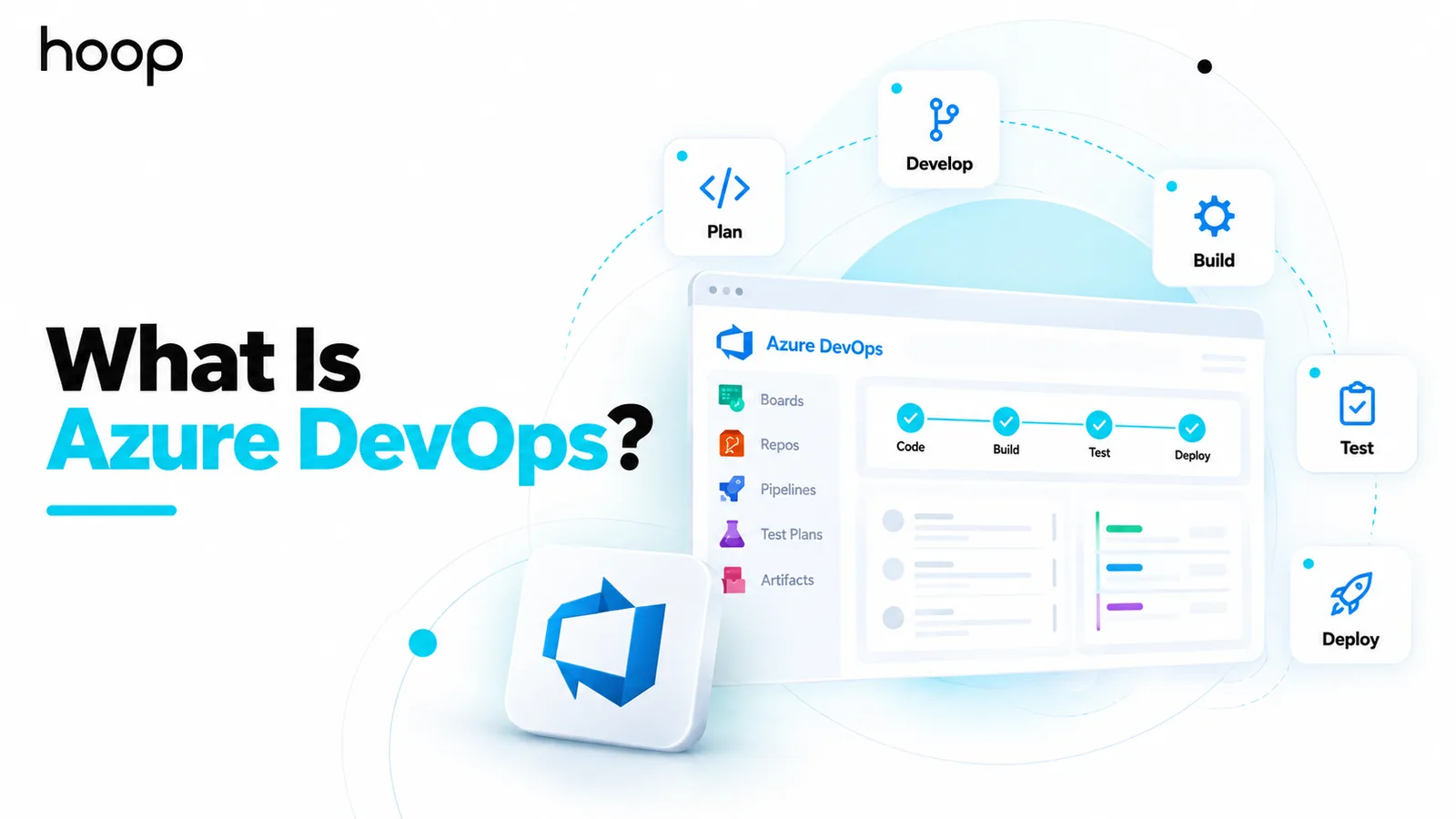
What Is Azure DevOps? Microsoft’s DevOps Platform Explained
Azure DevOps is Microsoft’s integrated delivery suite: Boards for planning, Repos for Git, Pipelines for CI/CD, Test Plans for testing, and Artifacts for packages. The name is misleading — it deploys anywhere, not only to Azure.
Sahar
Content Writer
What is Azure DevOps? It is Microsoft’s integrated platform for planning work, managing source code, running CI/CD, and testing software. It also manages development packages. Despite the name, teams can use the platform even when applications run outside Microsoft Azure.
The platform brings several parts of software delivery into one connected environment. Teams can plan work, review code, automate releases, test changes, and track delivery history without stitching together many unrelated systems.
Need this done right?
Hoop builds the strategy, design and development behind sites like this one — talk to us about yours.
What Does Azure DevOps Do?
Azure DevOps supports the software lifecycle from an initial work item to a production release. It gives product, development, testing, and operations teams shared tools for planning and delivery.
A feature can begin as a backlog item in Azure Boards. Developers can implement it in Azure Repos, validate it through Azure Pipelines, and link tests through Azure Test Plans. Reusable packages can be stored in Azure Artifacts.
That connection creates traceability. A team can follow a request from planning through code changes, builds, tests, and deployment history.
Is Azure DevOps the Same as DevOps?
No. DevOps is an engineering approach, while Azure DevOps is a software platform that supports many DevOps practices.
DevOps focuses on collaboration, automation, fast feedback, reliable releases, and shared responsibility between development and operations. Azure DevOps supplies tools for work tracking, version control, pipelines, testing, and package management.
Using Azure DevOps does not automatically create good DevOps practices. Teams still need sensible branching, testing, deployment, monitoring, ownership, and incident processes.
What Are the 5 Main Azure DevOps Services?
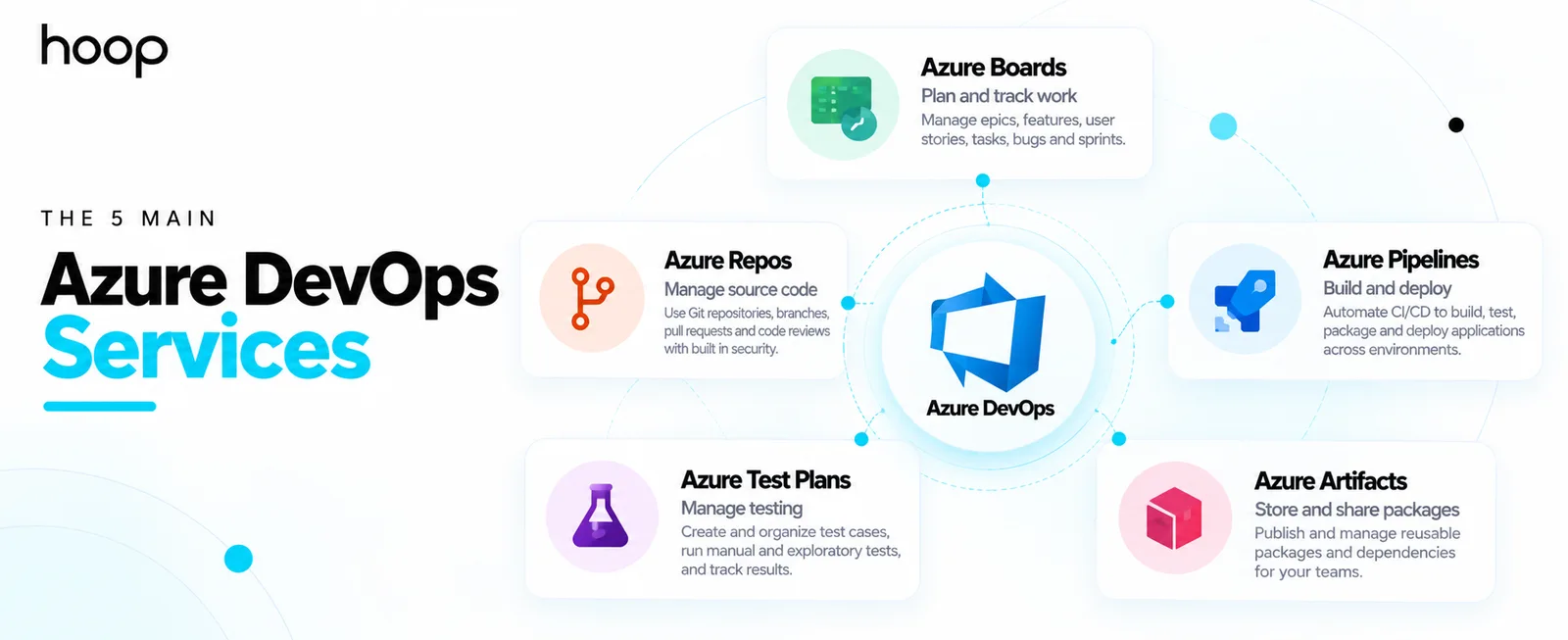
Azure DevOps is a suite rather than one single application. Its 5 core services cover different parts of the software lifecycle.
Azure Boards
Azure Boards handles work planning and tracking. Teams can manage epics, features, user stories, tasks, bugs, backlogs, Kanban boards, and sprints.
A product manager can create a feature, break it into work items, assign tasks, and track progress through the sprint. Development and testing activity can stay connected to that work.
Azure Repos
Azure Repos provides source control. Most modern projects use its standard Git repositories for branches, commits, pull requests, code reviews, and branch policies.
Teams can require reviews before code reaches a protected branch. They can also connect builds and work items to individual commits or pull requests.
Azure Pipelines
Azure Pipelines is the CI/CD service. It can build, test, package, and deploy applications through automated workflows.
A pipeline might run after a pull request, merge, or scheduled event. It can install dependencies, compile code, run tests, create an artifact, deploy staging, request approval, and release production.
Azure Test Plans
Azure Test Plans supports structured manual and exploratory testing. Teams can organize test cases, test suites, user acceptance testing, and traceability between tests and work items.
This is different from automated unit tests inside a pipeline. Test Plans helps QA teams manage the broader testing process and record evidence around expected behavior.
Azure Artifacts
Azure Artifacts is a package-management service. Teams can publish and consume controlled versions of reusable software packages and internal dependencies.
For example, several applications may depend on one internal authentication library. Azure Artifacts can store approved versions so teams reuse the same managed package.
How Does Azure DevOps Work?
A simple workflow shows why the suite is useful. Imagine a team adding a new reporting feature to a business application.
The product owner creates the feature in Boards. A developer creates a branch in Repos and links the work item. A pull request triggers Pipelines, which builds the code and runs tests.
After approval, the pipeline creates a release artifact and deploys it to staging. Testers validate the change and record results. The production release can then run automatically or through an approval gate.
The feature, code, build, test results, and release history remain connected. That traceability helps teams understand what changed and why.
What Is Azure Boards Used For?
Azure Boards is useful when teams need structured work management inside the same environment as engineering activity. It supports Scrum, Kanban, and custom work-item processes.
Its main advantage is linkage. A task does not need to remain an isolated project-management ticket. It can connect directly to code, pull requests, builds, tests, and releases.
What Is Azure Repos Used For?
Azure Repos stores source code and controls how changes enter the shared codebase. Git support is standard, so developers can use normal Git commands and familiar branching workflows.
Teams can create pull requests, assign reviewers, enforce branch policies, and require successful builds before merging changes. This makes source control part of the release process rather than a separate file store.
What Is Azure Pipelines Used For?
Azure Pipelines automates software delivery. Teams define the steps required to turn source code into a tested and deployable application.
For organizations building modern applications, Cloud and DevOps services often combine pipelines with infrastructure automation, monitoring, and release controls. Azure Pipelines can act as the CI/CD engine inside that wider system.
Pipelines can deploy to Microsoft Azure, but they are not restricted to Azure. The same service can deliver software to other clouds or on-premises environments.
What Is Azure Test Plans Used For?
Azure Test Plans helps teams manage test scenarios that need structured human validation. This can include exploratory testing, acceptance testing, regression suites, and evidence for release decisions.
Testers can link failures to bugs and work items. That keeps the feedback loop connected to the feature or requirement that created the test.
What Is Azure Artifacts Used For?
Azure Artifacts gives teams a controlled repository for reusable packages. It supports common ecosystems such as npm, NuGet, Maven, Python, Cargo, and Universal Packages.
This is useful when organizations want internal libraries to be versioned, access-controlled, and distributed through the same development platform.
Does Azure DevOps Only Work With Microsoft Azure?
No. Azure DevOps is a Microsoft product, but its development tools are not limited to applications hosted on Microsoft Azure.
Azure Pipelines can deploy applications to different cloud and infrastructure environments. Teams building cloud applications can use the suite across Azure, AWS, Google Cloud, or private infrastructure.
The name describes the product family, not a hosting requirement.
Does Azure DevOps Only Support Microsoft Languages?
No. Azure DevOps supports common languages and platforms beyond .NET. Teams can build Java, JavaScript, Node.js, Python, PHP, mobile, containerized, and other workloads.
Developers can also use familiar editors, Git clients, command-line tools, APIs, and integrations. The platform does not require an all-Microsoft development stack.
How Are Organizations and Projects Structured?
The cloud service is organized around organizations and projects. An organization is the top-level account boundary, while projects group related code, work items, pipelines, tests, and permissions.
A company might use one organization for the business and separate projects for different products. Another company might separate business units when permissions or administration need stronger boundaries.
This structure matters because access rules and service connections can become difficult without clear ownership. Repository, board, and pipeline settings also need consistent administration.
YAML Pipelines vs Classic Pipelines
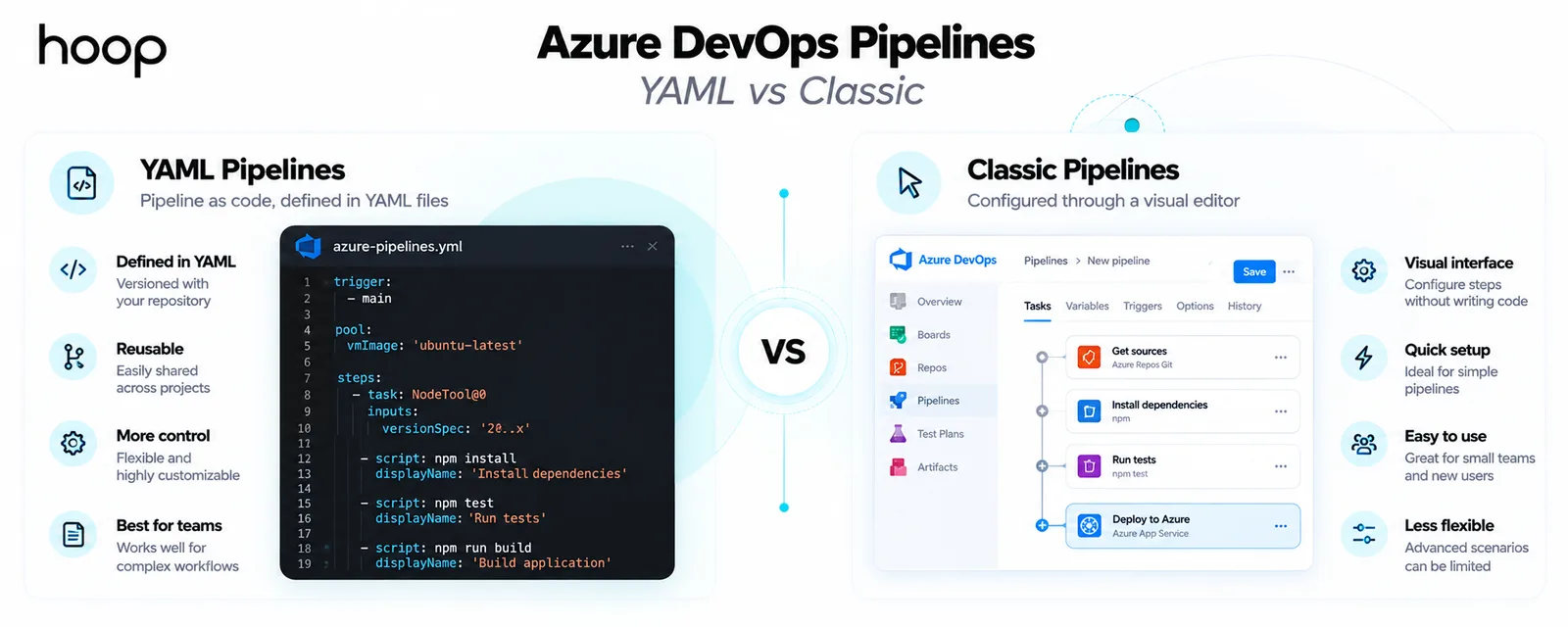
Azure Pipelines supports code-defined YAML pipelines and older visual pipeline editors. YAML stores the delivery workflow beside the application code, which makes changes reviewable and versioned.
A YAML file can describe triggers, build steps, testing, artifacts, environments, approvals, and deployment stages. Teams can review pipeline changes through the same pull-request process used for application code.
Classic interfaces can still be useful for existing projects or teams that prefer visual configuration. Newer workflows often favor YAML because it improves portability, review, and repeatability.
How Do Permissions and Governance Work?
Enterprise teams need controls around who can change code, approve releases, access secrets, or modify production pipelines. The platform provides permissions, groups, branch policies, environment approvals, and service connections.
Governance becomes especially important when one project can deploy into production. A developer may submit code without permission to change protected pipeline settings. Sensitive releases can still require separate approval.
Clear separation of duties can reduce accidental changes while keeping the delivery process usable for engineers.
How Does Azure DevOps Integrate With Other Tools?
The suite does not need to operate alone. Teams can connect external repositories, issue trackers, cloud services, test tools, chat systems, security platforms, and deployment targets.
Extensions and APIs can add specialized capabilities when the built-in services do not cover a workflow. This matters for organizations that already have mature tools and cannot replace everything at once.
A gradual integration strategy can reduce migration risk. Teams can keep selected existing tools while adopting Boards, Pipelines, or other services where they add clear value.
Azure DevOps Services vs Azure DevOps Server
Azure DevOps Services is the Microsoft-hosted cloud version. Microsoft operates the service-side infrastructure, while customers manage organizations, projects, permissions, repositories, pipelines, and related configuration.
Azure DevOps Server is the self-hosted version for organizations that need more control over where the platform runs. It can suit environments with on-premises requirements, internal network restrictions, or specific governance needs.
Organizations choosing self-hosted delivery tooling also need to think about availability, backup, security, and operational ownership. Those concerns overlap with broader cloud infrastructure setup decisions.
What Happened to TFS and VSTS?
Microsoft renamed older products as the Azure DevOps family evolved. Team Foundation Server became Azure DevOps Server, while Visual Studio Team Services became Azure DevOps Services.
Older tutorials may still use TFS or VSTS terminology. The modern names describe the current cloud and self-hosted product lines.
Azure DevOps vs GitHub
Azure DevOps and GitHub overlap because both can host Git repositories and automate software delivery. Their emphasis is different.
Azure DevOps grew as an integrated enterprise application-lifecycle suite. It combines Boards, Repos, Pipelines, Test Plans, Artifacts, permissions, and reporting inside one project environment.
GitHub is centered more strongly on Git repositories, pull requests, developer collaboration, GitHub Actions, and a large developer ecosystem. Microsoft increasingly connects the two platforms rather than treating them as completely separate worlds.
The right choice depends on existing workflows, governance needs, migration cost, testing requirements, and developer preferences. Some organizations use both.
Can Azure DevOps Work With GitHub?
Yes. Teams can keep code in GitHub while using selected Azure DevOps services around it. Azure Boards and Azure Pipelines can participate in workflows that use GitHub repositories.
This allows organizations to adopt GitHub for source collaboration without replacing every planning or delivery process at once.
Is Azure DevOps Just a CI/CD Tool?
No. Azure Pipelines is the CI/CD component inside the wider Azure DevOps suite.
Boards manages work. Repos manages source code. Test Plans supports testing. Artifacts manages packages. Pipelines automates builds and releases.
Reducing the suite to CI/CD misses much of its value. Larger teams may need traceability across planning, code, testing, and releases.
What Are the Benefits of Azure DevOps?
- Connected planning, code, testing, and release history improve traceability across the software lifecycle.
- Integrated tools can reduce context switching between unrelated project, repository, pipeline, and testing systems.
- Azure Pipelines supports automated builds and deployments across different languages, platforms, clouds, and on-premises environments.
- Enterprise permissions, branch policies, work tracking, and testing controls support larger engineering organizations.
- Teams can adopt individual services instead of replacing their entire toolchain at once.
What Are the Limitations of Azure DevOps?
- The platform can feel complex because it combines several products, permission models, and administrative layers.
- Teams may pay for capabilities they do not need if a simpler Git and CI/CD workflow would be enough.
- GitHub now overlaps with Azure DevOps in repositories, automation, security, and developer collaboration.
- Older TFS or Azure DevOps Server environments can require significant migration and maintenance planning.
- Installing the platform does not fix weak engineering practices, poor test coverage, or fragile deployment processes.
Is Azure DevOps Still Used?
Yes. Microsoft continues to maintain Azure DevOps Services and Azure DevOps Server, with active product updates and roadmap work.
The ecosystem is changing, though. Microsoft is also investing heavily in GitHub and tighter connections between GitHub and Azure DevOps.
That means organizations should evaluate both current needs and future tool strategy. Existing Azure DevOps investments can remain valuable, especially where Boards, Test Plans, and enterprise traceability are deeply embedded.
How Is AI Being Added to Azure DevOps?
Microsoft is adding AI-assisted workflows around Azure DevOps and its GitHub ecosystem. Current directions include Copilot-assisted code review, work-item interaction, and model-context integrations for developer tools.
AI can reduce repetitive work around review, search, and workflow navigation. Teams still need strong permissions, testing, release controls, and engineering judgment around generated changes.
The practical value depends on workflow quality. AI can accelerate review and navigation, but weak branch policies or unreliable pipelines remain engineering problems.
How Can a Team Start With Azure DevOps?
Start with one workflow that has a clear problem. A team might begin with work tracking, source control, or a deployment pipeline instead of enabling every service immediately.
Define repository rules, naming, permissions, environments, and ownership before the project expands. Then automate the repetitive steps that create the most release risk or manual effort.
Measure whether the new workflow shortens feedback, reduces failed releases, or improves traceability. Add more services only when they solve a real delivery problem.
Who Should Use Azure DevOps?
Azure DevOps fits teams that want several software-delivery functions connected inside one environment. It is especially relevant when work tracking, source control, testing, and release traceability need to stay closely linked.
It can also suit Microsoft-heavy organizations, regulated environments, and enterprise engineering teams. Existing Boards or Pipelines investments can make adoption easier.
A smaller team that only needs Git hosting and a simple pipeline may prefer a lighter toolchain. The decision should follow the workflow rather than the brand name.
Azure DevOps Connects the Software Delivery Lifecycle
Azure DevOps is easiest to understand as a connected development platform rather than an Azure-only deployment tool. Boards plans the work, Repos manages code, Pipelines automates delivery, Test Plans organizes testing, and Artifacts manages reusable packages.
That connection can give engineering teams clearer traceability from an idea to a production release. The platform works best when the underlying engineering process is already designed for frequent feedback, reliable testing, and controlled delivery.
“Using Azure DevOps does not automatically create good DevOps practices. Teams still need sensible branching, testing, deployment, monitoring, ownership, and incident processes.”
Key takeaways
- 01DevOps is a practice; Azure DevOps is a product. Adopting the tool does not create the practice.
- 02Pipelines deploy to AWS, Google Cloud, and on-premises environments just as readily as to Azure.
- 03YAML pipelines live beside the code and go through pull-request review; classic visual pipelines do not.
- 04It overlaps heavily with GitHub, so the choice turns on governance, traceability, and migration cost.
Written by
Sahar
Content Writer
Frequently Asked
Questions
Everything you need to know before booking a strategy call. Can't find your answer? Contact us directly.
The service offers limited free access for small teams and selected features. Larger usage and certain capabilities require paid licensing. Pricing depends on the services and user model.
The product family is separate from the Azure infrastructure services used to host applications. Teams can use it without running workloads in Azure.
Yes. Azure Repos supports standard Git and uses Git as the normal choice for modern repositories. Teams can use familiar Git branches, commits, pull requests, and clients.
It can replace parts of those workflows because Boards handles work tracking and Repos handles Git hosting. Whether replacement makes sense depends on integrations, team habits, reporting, and migration cost.
No. DevOps is an engineering approach rather than a Microsoft product. Teams can practice DevOps using many different combinations of source control, CI/CD, infrastructure, testing, and monitoring tools.
Keep reading
All articles →
What Is DevOps? How Development and Operations Work Together
Oct 12, 2026 · 10 min read
What Is CI/CD? Continuous Integration and Delivery Explained
Oct 12, 2026 · 10 min read