What Is the Software Development Life Cycle?
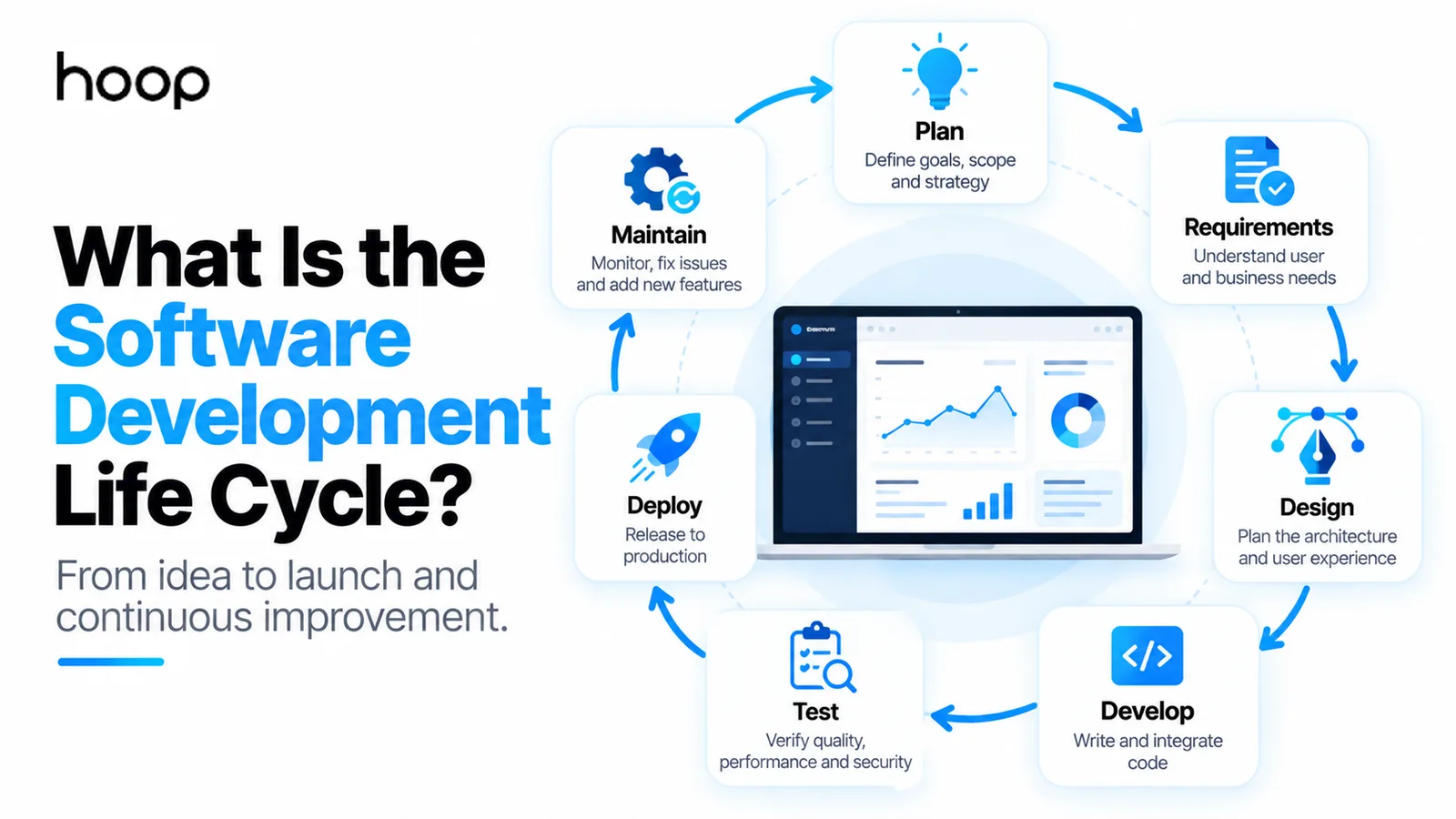
SDLC is the set of activities every software project goes through — plan, requirements, design, development, testing, deployment, maintenance. Agile and Waterfall are ways of organising those activities, not alternatives to them.
Sahar
Content Writer
The Software Development Life Cycle (SDLC) is the structured process teams use to plan, design, build, test, release, and maintain software. It gives everyone a shared way to turn a business need into working software, then keep improving that software after launch.
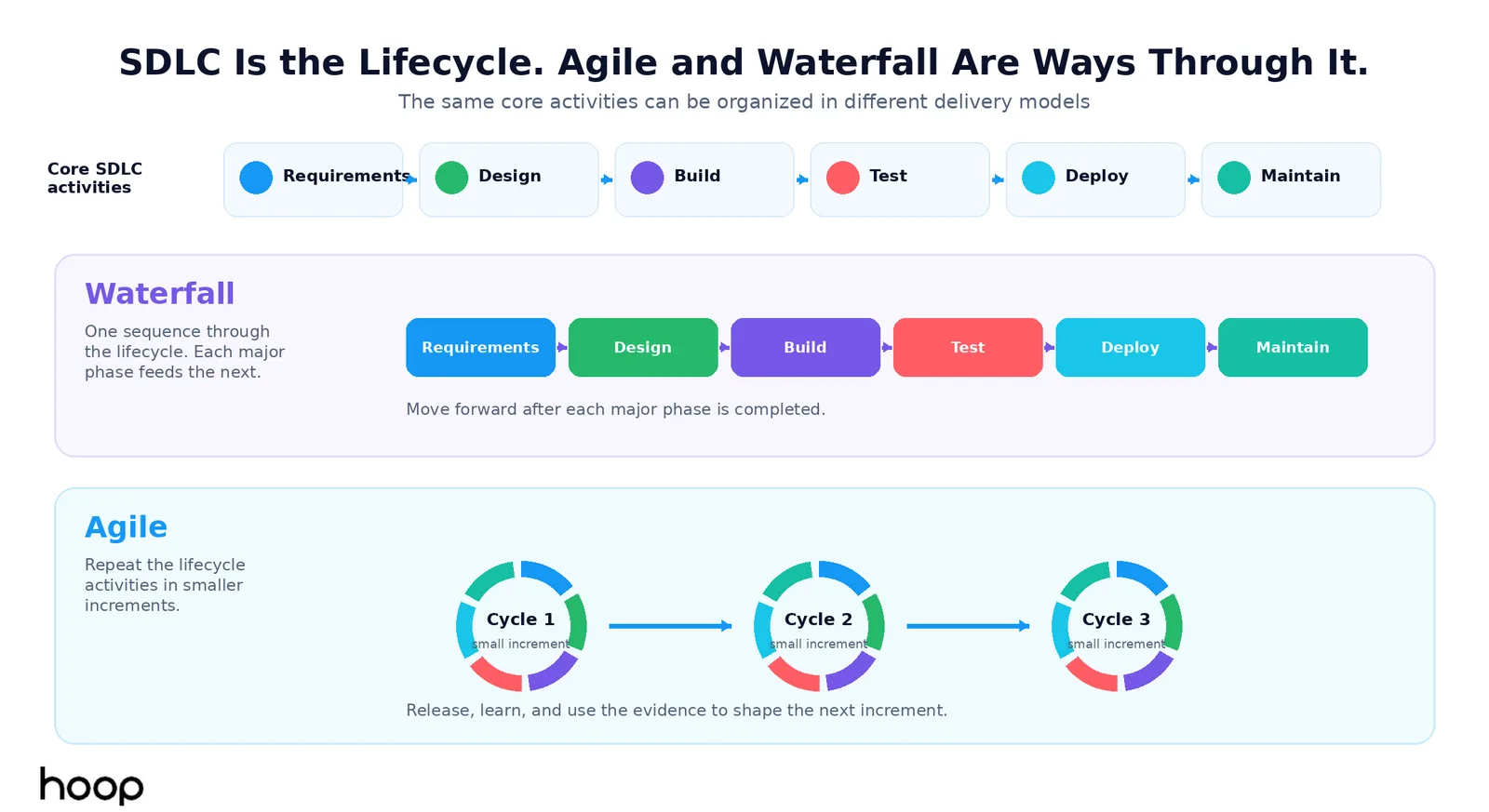
SDLC does not describe one rigid way to build products. A Waterfall team can move through the stages sequentially. An Agile team can repeat the same activities in smaller cycles. The lifecycle describes the work that needs to happen. The delivery model determines how the team organizes that work.
That distinction matters because many SDLC explanations stop at a diagram. Real software projects are messier. Requirements change. Testing overlaps development. Security belongs throughout the process. Deployment creates new information. Maintenance often lasts far longer than the original build.
Why Is the Software Development Life Cycle Important?
SDLC makes software development easier to plan, control, explain, and improve. It gives product owners, developers, designers, testers, and stakeholders a common view of what happens next and why.
Without a defined lifecycle, teams can start coding before they understand the problem. Developers can build features that do not match user needs. Testing can arrive too late. Release ownership can remain unclear. Maintenance can become an afterthought.
A structured lifecycle helps teams clarify scope, estimate effort, identify risk, define quality expectations, and make responsibilities visible. Hoop’s software development services follow the same principle: discovery, architecture, development, testing, deployment, and support belong to one connected product journey.
SDLC also helps you ask better questions. Instead of asking only, “How long will coding take?” you can ask how requirements will be validated, how the architecture will support growth, how testing will work, and who will maintain the product after release.
How Many Phases Does the SDLC Have?
There is no single universal phase count. Some teams combine planning and requirements. Others separate analysis, feasibility, design, development, testing, deployment, and maintenance.
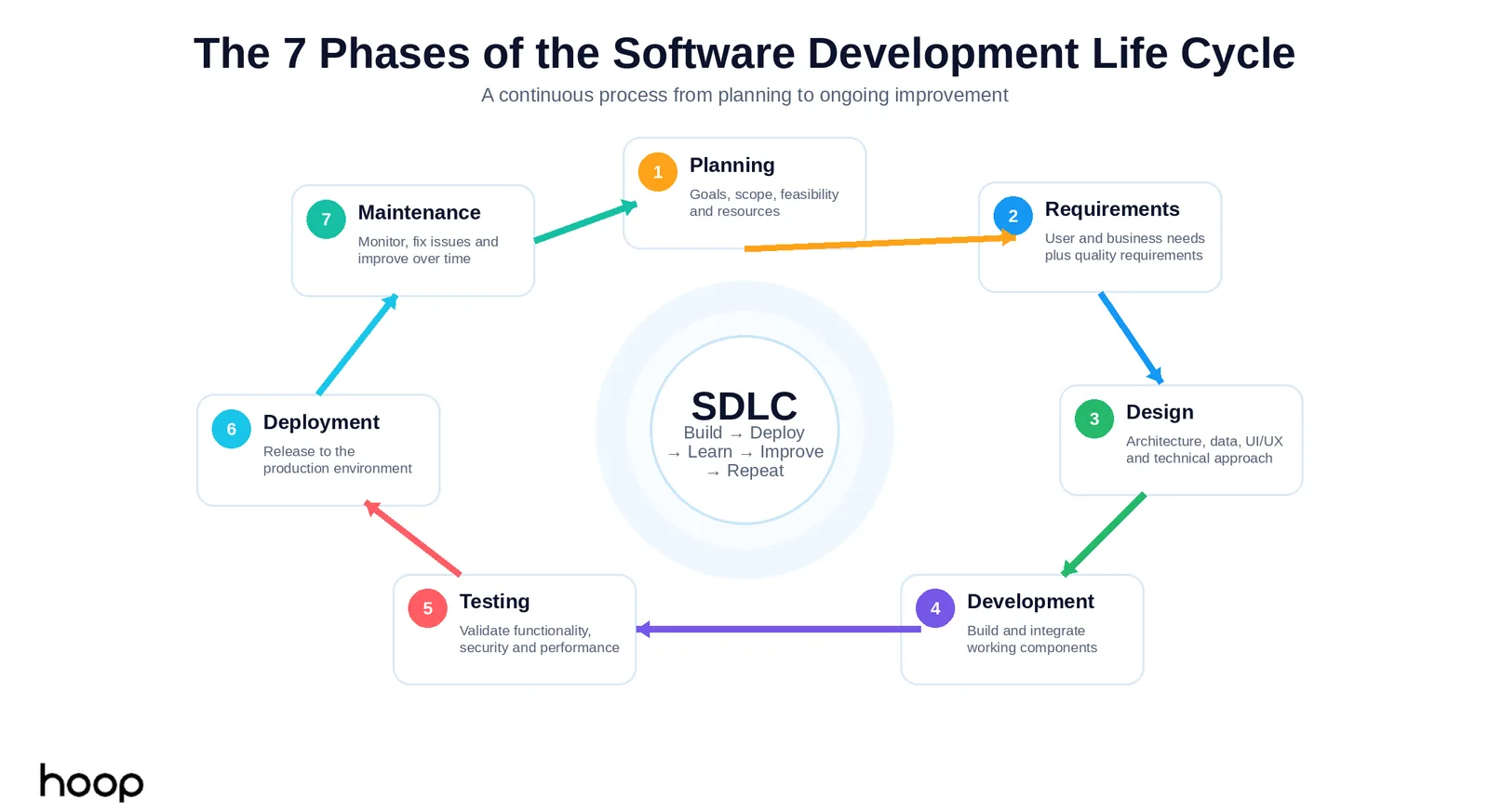
A practical 7-phase model uses:
- Planning
- Requirements analysis
- Software design
- Development
- Testing
- Deployment
- Maintenance
The labels can change, but the underlying work stays similar. IBM, AWS, Atlassian, and other established technology organizations describe the lifecycle with slightly different phase groupings. That variation does not mean one source is wrong. It reflects different ways of organizing the same work.
What Are the 7 Phases of the Software Development Life Cycle?
1. Planning
Planning defines why the product should exist, what problem it should solve, and what the project should include. The team identifies goals, users, expected outcomes, budget constraints, timelines, risks, and available resources.
Planning also defines what the first release should not include. That decision protects the project from uncontrolled scope growth.
For a new customer portal, planning might define the main users, business goals, expected traffic, target launch window, and whether the first release needs billing, messaging, reporting, or only account management.
2. Requirements Analysis
Requirements analysis turns the product idea into specific functional and nonfunctional needs. Functional requirements describe what users must be able to do. Nonfunctional requirements describe qualities the system must meet.
For an ecommerce application, functional requirements can include product search, customer accounts, checkout, payment processing, and order tracking. Nonfunctional requirements can include page performance, availability, accessibility, security, data protection, and scalability.
Requirements should explain the problem and the expected outcome clearly enough for designers and engineers to make sound decisions. Vague requirements create expensive rework later.
3. Software Design
Software design decides how the system will satisfy the requirements before the team commits to full implementation. Design covers more than visual interfaces.
The team can define system architecture, database structure, APIs, integrations, user flows, infrastructure, security controls, and technology choices. UI/UX designers can map screens and interactions while software architects define how components exchange data.
Good design reduces avoidable technical debt. It also exposes risky decisions while changes remain cheaper.
If you need a platform built around a unique workflow, custom software development usually requires deeper discovery and architecture than a simple brochure website because the system must support business logic, data, integrations, permissions, and future changes.
4. Development
Development turns approved requirements and designs into working software. Developers build the frontend, backend, APIs, database operations, integrations, background processes, and configuration required by the product.
Teams also divide large features into smaller units. That makes work easier to review, test, and release safely.
Modern teams often test code during development instead of treating testing as a completely separate later activity. The lifecycle phases still exist, but the work can overlap.
5. Testing
Testing checks whether the software works correctly, meets requirements, and behaves safely under expected conditions. Testing protects users and the business from defects that coding alone cannot reveal.
Teams can use unit tests for individual components, integration tests for connected systems, system tests for complete workflows, security tests for vulnerabilities, performance tests for load, and acceptance tests for business requirements.
Testing should answer more than “Does the page open?” A checkout feature also needs correct totals, failed-payment handling, permission checks, mobile behavior, error recovery, and integration reliability.
Testing increasingly runs throughout development through automated pipelines. A dedicated testing stage still matters for release readiness, but quality work starts earlier.
6. Deployment
Deployment moves a tested software version into the production environment where real users can access it. A successful deployment requires more than uploading files to a server.
Deployment also creates a new source of evidence. Real users interact with the system differently from test scripts. Monitoring and analytics can reveal performance bottlenecks, confusing flows, unexpected errors, and new product opportunities.
7. Maintenance
Maintenance keeps software reliable, secure, compatible, and useful after launch. This phase often lasts much longer than the initial development period.
Maintenance includes fixing defects, updating libraries, responding to operating-system or browser changes, improving performance, strengthening security, adding features, monitoring infrastructure, and supporting users.
A product can also outgrow its original architecture. Teams may need to redesign components, migrate databases, replace integrations, or improve scalability as usage increases.
Maintenance is why the last SDLC phase loops back toward planning. New evidence creates new requirements, and the lifecycle begins again.
Quick Reference: What Happens in Each SDLC Phase?
| Phase | Main question | Typical output | Difficulty |
|---|---|---|---|
| Planning | Why are we building this? | Scope, goals, roadmap | Medium |
| Requirements | What must the software do? | Functional and quality requirements | High |
| Design | How should the system work? | Architecture, flows, technical design | High |
| Development | How do we build it? | Working software components | High |
| Testing | Does it work correctly? | Verified build and defect fixes | High |
| Deployment | How do users get it safely? | Production release | Medium |
| Maintenance | How do we keep improving it? | Updates, monitoring, support | Ongoing |
Why Is SDLC Called a Life Cycle?
SDLC is a cycle because software keeps changing after release. Users request features. Bugs appear. Business rules change. Dependencies need updates. New regulations or security threats can create new requirements.
A useful lifecycle therefore looks like:
Plan → Analyze → Design → Build → Test → Deploy → Maintain → Learn → Plan again.
The word “cycle” also prevents a common mistake: treating launch as the finish line. Launch starts the period when the product finally meets real users, real traffic, real data, and real operating conditions.
Teams that plan for maintenance from the beginning usually make better decisions about architecture, documentation, observability, testing, and ownership.
SDLC vs Agile: What Is the Difference?
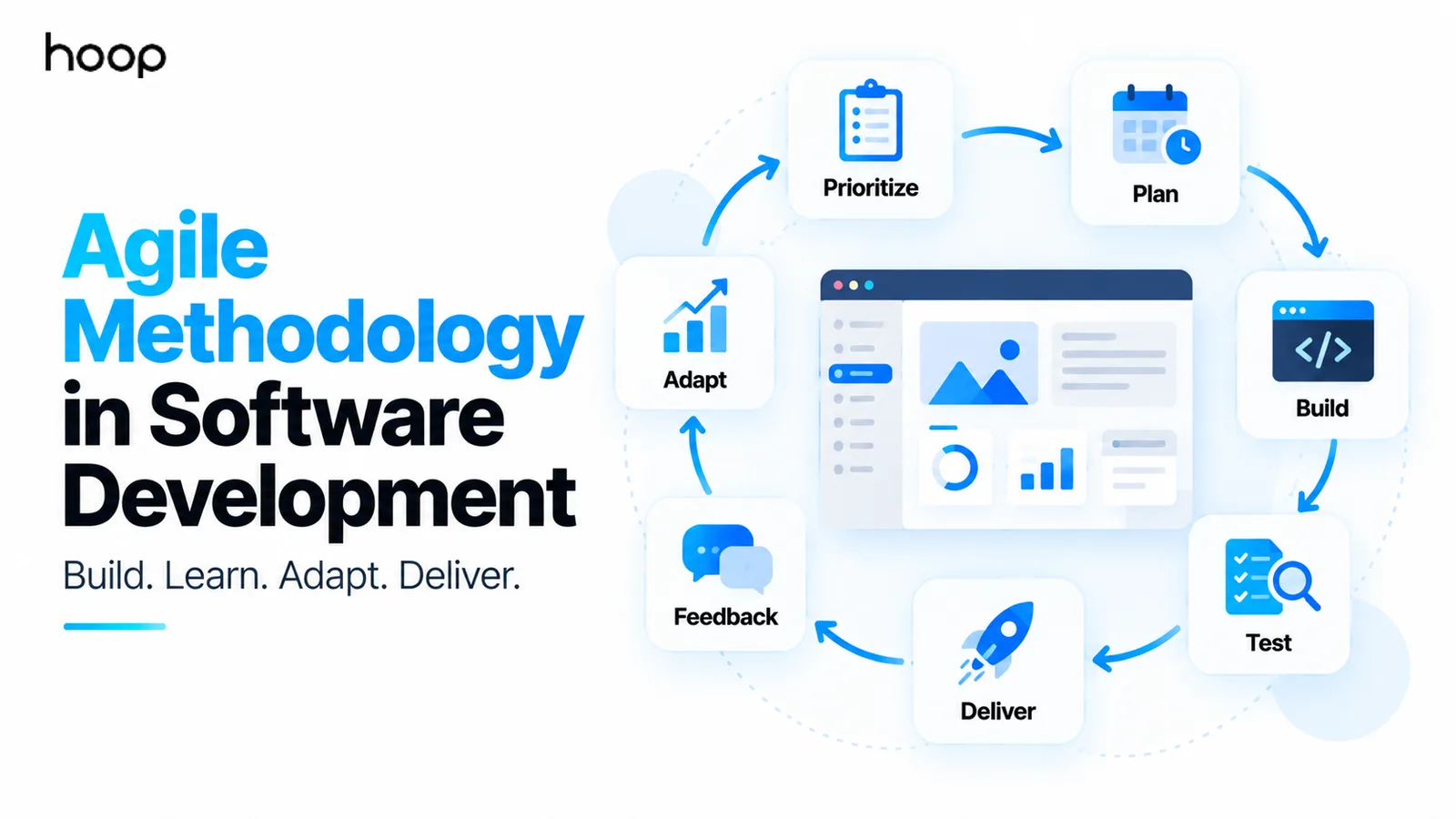
SDLC describes the lifecycle activities. Agile describes a way to organize and repeat those activities. Agile does not replace requirements, design, development, testing, deployment, or maintenance.
An Agile team usually works through smaller increments. The team can define a short-term goal, clarify requirements, design the solution, build, test, release, gather feedback, and repeat. The feedback arrives sooner because the team does not wait for the entire product to finish before learning from users.
A Waterfall-style project can perform the same SDLC activities in larger sequential phases. That difference is about process structure, not whether the lifecycle exists.
This distinction also explains why Scrum is not the SDLC. Scrum is one framework for organizing complex work. SDLC is the broader product lifecycle that still contains analysis, design, engineering, testing, release, and maintenance.
SDLC vs Waterfall: What Is the Difference?
Waterfall is one SDLC model, not another name for SDLC. Waterfall organizes work in a more linear sequence, with each major phase feeding the next.
That structure can help projects with stable requirements, formal approvals, or strong documentation needs. It becomes harder to adapt when important assumptions change late.
Iterative models shorten that feedback loop. They repeat lifecycle activities more often and use each release to inform the next one.
The choice should depend on project risk, change frequency, regulatory constraints, stakeholder access, and the cost of revisiting earlier decisions.
What Are the Main SDLC Models?
Teams can move through the lifecycle in several ways. The most useful models to understand are Waterfall, Agile, iterative, Spiral, and DevOps-oriented delivery.
Waterfall emphasizes a staged sequence. Agile emphasizes smaller increments, collaboration, and adaptation. Iterative development starts with a limited version and improves it through repeated cycles. The Spiral model adds explicit risk analysis to repeated development loops. DevOps connects development and operations so building, testing, deploying, monitoring, and improving software happen more continuously.
You can compare those models in more detail through an authoritative SDLC overview from IBM.
Where Does Security Fit Into the SDLC?
Security belongs throughout the lifecycle, not only before launch. A secure SDLC brings security decisions into requirements, architecture, implementation, testing, deployment, and maintenance.
During requirements, the team can define privacy, authentication, compliance, and data-retention needs. During design, architects can plan access controls and data boundaries. During development, engineers can follow secure coding practices. Automated pipelines can scan dependencies and code. Security testing can validate the release. Monitoring can detect problems after deployment.
Finding security issues earlier usually gives the team more options and reduces expensive late rework.
How Do DevOps and CI/CD Change the SDLC?
DevOps and Continuous Integration/Continuous Delivery (CI/CD) make the lifecycle more continuous and automated. They do not remove SDLC phases.
A modern pipeline can automatically build code, run tests, scan dependencies, package releases, deploy to environments, and report failures. Monitoring then feeds operating data back into engineering decisions.
This creates tighter loops between development and operations. Instead of “build first, operate later,” the same team can consider deployment, reliability, and observability while creating the product.
The result is still SDLC. The boundaries between phases simply become less rigid.
How Is AI Changing the Software Development Life Cycle?
AI can speed up individual SDLC tasks, but it does not remove the need for the lifecycle. Teams still need to understand the problem, define requirements, make architecture decisions, verify code, control releases, protect data, and maintain the product.
AI tools can help summarize research, draft requirements, generate prototypes, suggest code, create tests, review changes, and analyze operational data. Faster code generation can actually make verification more important because teams can produce more code in less time.
The valuable question is not whether AI replaces SDLC. The valuable question is where automation can reduce repetitive work while human teams keep responsibility for product decisions, quality, security, and outcomes.
What Happens When Teams Skip SDLC Stages?
Skipping lifecycle work usually moves the cost somewhere else instead of removing it. Weak requirements can create features nobody needs. Weak design can produce architecture that becomes difficult to change. Weak testing can push defects into production. Weak deployment planning can create outages. Weak maintenance can turn a successful launch into an unreliable product.
That does not mean every project needs months of documents. A small internal tool can use lightweight planning and design. A regulated financial platform needs far more evidence, review, testing, and release control.
The right process should match the risk and complexity of the software.
How Do You Choose the Right SDLC Model?
Choose the model based on uncertainty, risk, feedback needs, and delivery constraints. Stable requirements can support a more sequential process. Evolving products often benefit from shorter iterative cycles.
Ask how frequently requirements will change, how often users can provide feedback, how expensive defects are, whether regulators require approvals, how often the product must release, and how tightly development and operations need to work together.
Do not select a model because the terminology sounds modern. Select a working process that helps the team make good decisions, expose risk early, and deliver reliable software.
What Does SDLC Look Like on a Real Software Project?
Imagine a company needs a browser-based customer service portal.
Planning defines the business goal: reduce manual support work and give customers self-service access. Requirements identify account login, ticket submission, attachments, status tracking, notifications, staff permissions, response-time targets, and security needs.
Design defines the user flows, frontend architecture, API structure, database model, access controls, and hosting approach. Development turns those plans into working interfaces and services. Testing checks permissions, ticket workflows, uploads, notifications, performance, and failure handling.
Deployment moves the application into production with monitoring, backups, and release controls. Maintenance then handles bugs, user feedback, new features, security updates, and performance improvements.
If the product is built incrementally, the team can release account access and ticket submission first. Reporting, automation, and integrations can follow later. The lifecycle remains the same even when the delivery model changes.
Build Software With the Full Lifecycle in Mind
The software development life cycle gives you a practical way to think beyond coding. Strong products start with clear goals, convert those goals into sound requirements and architecture, test quality before release, and keep improving after real users arrive.
If you are planning a browser-based product, Hoop can take the project from discovery and architecture through development, testing, deployment, and support. Explore our web application development approach to see how the full lifecycle fits into a real build.
“Launch is not the finish line. Launch starts the period when the product finally meets real users, real traffic, real data, and real operating conditions.”
Key takeaways
- 01There is no universal phase count; the seven-phase model is a practical grouping, not a standard.
- 02Agile and Waterfall both perform the same lifecycle work — they differ in increment size and feedback speed.
- 03Security belongs in requirements, design, code, testing, release, and monitoring, not in a pre-launch check.
- 04Maintenance usually outlasts the original build, which is why the last phase loops back into planning.
Written by
Sahar
Content Writer
Frequently Asked
Questions
Everything you need to know before booking a strategy call. Can't find your answer? Contact us directly.
SDLC is the process used to plan, design, build, test, release, and maintain software. It gives teams a repeatable structure from idea through long-term improvement.
The common 7 stages are planning, requirements analysis, design, development, testing, deployment, and maintenance. Some organizations combine or rename stages.
Yes. Agile is one way teams can organize and repeat SDLC activities in smaller increments with frequent feedback.
SDLC describes the software lifecycle. Waterfall is one model for moving through that lifecycle sequentially. Agile and iterative models organize the same core work differently.
No. Maintenance, monitoring, security updates, user feedback, and new features continue after release and feed new work back into the lifecycle.
Keep reading
All articles →
Why Is Software Bixiros.5a8 Development Process? What the Term Really Means
Sep 28, 2026 · 10 min read
Custom Software Development in 2025: A Complete Guide for Modern Businesses
Aug 4, 2026 · 8 min read