What Is Cloud Infrastructure? How the Cloud Actually Works
Cloud infrastructure is real hardware in real data centres, pooled and abstracted by software into compute, storage, networking, virtualization, security, and management services you can provision remotely.
Sahar
Content Writer
Cloud infrastructure is the physical and virtual foundation that cloud applications and services run on. It combines servers, storage, networking, virtualization, security, and management software.
Think of the systems beneath every cloud application. The hardware is real, but software makes those resources flexible and available on demand.
Need this done right?
Hoop builds the strategy, design and development behind sites like this one — talk to us about yours.
What Is Cloud Infrastructure?
Cloud infrastructure is a collection of computing resources that supports cloud computing. It includes physical equipment, virtual resources, connectivity, security controls, and management tools.
The physical layer lives inside provider-operated data centers. The virtual layer turns that hardware into compute, storage, and networking resources that customers can provision remotely.
This is the key idea. Businesses consume capacity without buying, installing, or maintaining every physical machine themselves.
What Does the Cloud Actually Mean?
The cloud is not a separate place in the internet. It is a way of delivering computing resources from remote infrastructure through networks and software interfaces.
A server is simply a computer that provides data, processing, applications, or another service to other computers. Cloud providers operate very large numbers of those machines.
The phrase “someone else’s computer” is useful for beginners, but it misses an important detail. Modern cloud systems pool hardware and abstract it behind software.
That abstraction lets customers request resources without choosing a specific physical server. The underlying hardware can change while the service stays available.
What Is Cloud Infrastructure Made Of?
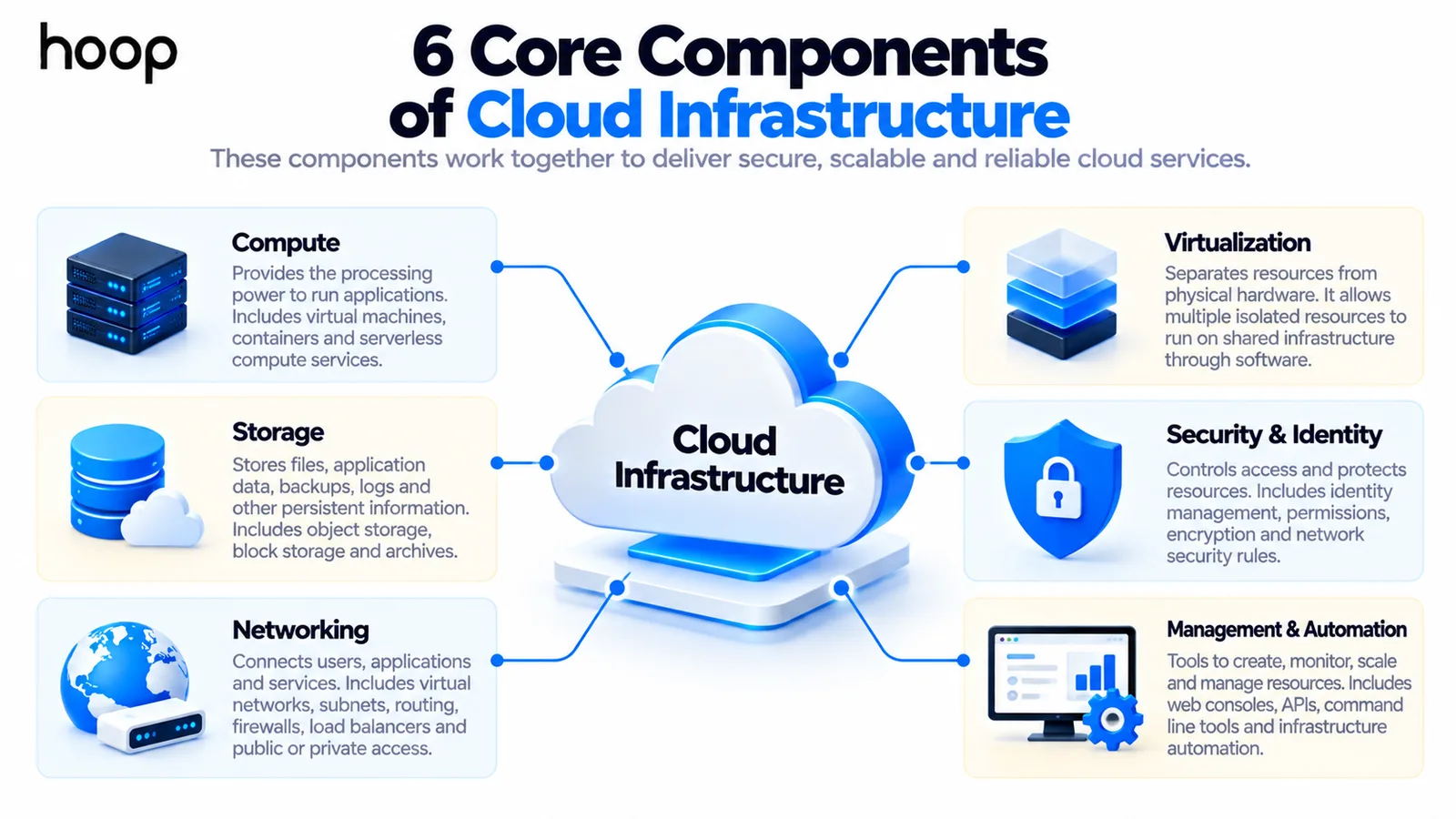
It helps to break the environment into core components. Each component supports a different part of the workload.
Compute
Compute provides the processing power that runs applications. Common forms include virtual machines, containers, managed compute services, and serverless execution environments.
The customer chooses how much processing capacity a workload needs. The provider supplies that capacity from its physical server fleet.
Storage
Storage holds files, backups, application data, images, logs, and other persistent information. Cloud platforms usually offer several storage types for different workloads.
Object storage works well for files and media. Block storage often supports virtual machines. Other services handle archives, backups, or high-performance data.
Networking
Networking connects users, applications, databases, and external services. It also controls how traffic enters, leaves, and moves through the cloud environment.
Cloud networking can include virtual networks, subnets, routing rules, firewalls, gateways, load balancers, private links, and public IP addresses.
Virtualization
Virtualization separates computing resources from the exact physical hardware underneath them. It lets providers divide large hardware pools into isolated resources for different workloads.
A virtual machine can behave like a dedicated server even though it shares physical hardware. This abstraction is central to modern cloud infrastructure.
Security and Identity
Security controls decide which users, applications, and services can access cloud resources. Identity systems, permissions, encryption, and network rules all contribute to protection.
Cloud security is not automatic. The provider protects parts of the platform, while customers still configure many access and application controls.
Management and Automation
Management tools create, monitor, scale, replace, and remove cloud resources. Automation reduces the amount of manual work needed to operate an environment.
Teams can manage infrastructure through web consoles, command-line tools, APIs, or code-based workflows. Larger environments usually depend heavily on repeatable automation.
How Does Cloud Infrastructure Work?
Cloud infrastructure works by combining physical hardware with virtualization and automation. The provider operates data centers filled with servers, storage systems, and networking equipment.
Software then groups those resources into pools. Customers request virtual resources from those pools through a cloud platform instead of handling the hardware directly.
For example, a team may request a virtual machine with specific memory and processing power. The platform places that workload on suitable physical hardware.
The team can later change the machine size, attach storage, add networking rules, or replace the instance. Those actions happen without opening a server rack.
Physical capacity remains underneath, while software turns that capacity into flexible services.
Where Does Cloud Data Actually Live?
Cloud data still lives on physical storage systems inside data centers.
The exact device may be hidden from the customer because the platform manages placement and replication.
Providers organize infrastructure into geographic regions and smaller availability zones. Customers can choose locations based on latency, resilience, regulation, and business requirements.
A well-designed application may store copies across separate systems or zones. That approach reduces dependence on one device or one facility.
Can Cloud Infrastructure Run Out of Space?
Yes. Cloud providers operate finite physical hardware, so capacity is never truly infinite. The difference is that customers usually interact with very large shared resource pools.
Providers forecast demand, add servers, expand storage, and build new facilities as usage grows. They also set service quotas and capacity limits for individual customers.
From a customer perspective, capacity can feel almost unlimited. That experience comes from pooling, automation, and ongoing provider investment, not infinite hardware.
How Does Cloud Infrastructure Handle Hardware Failure?
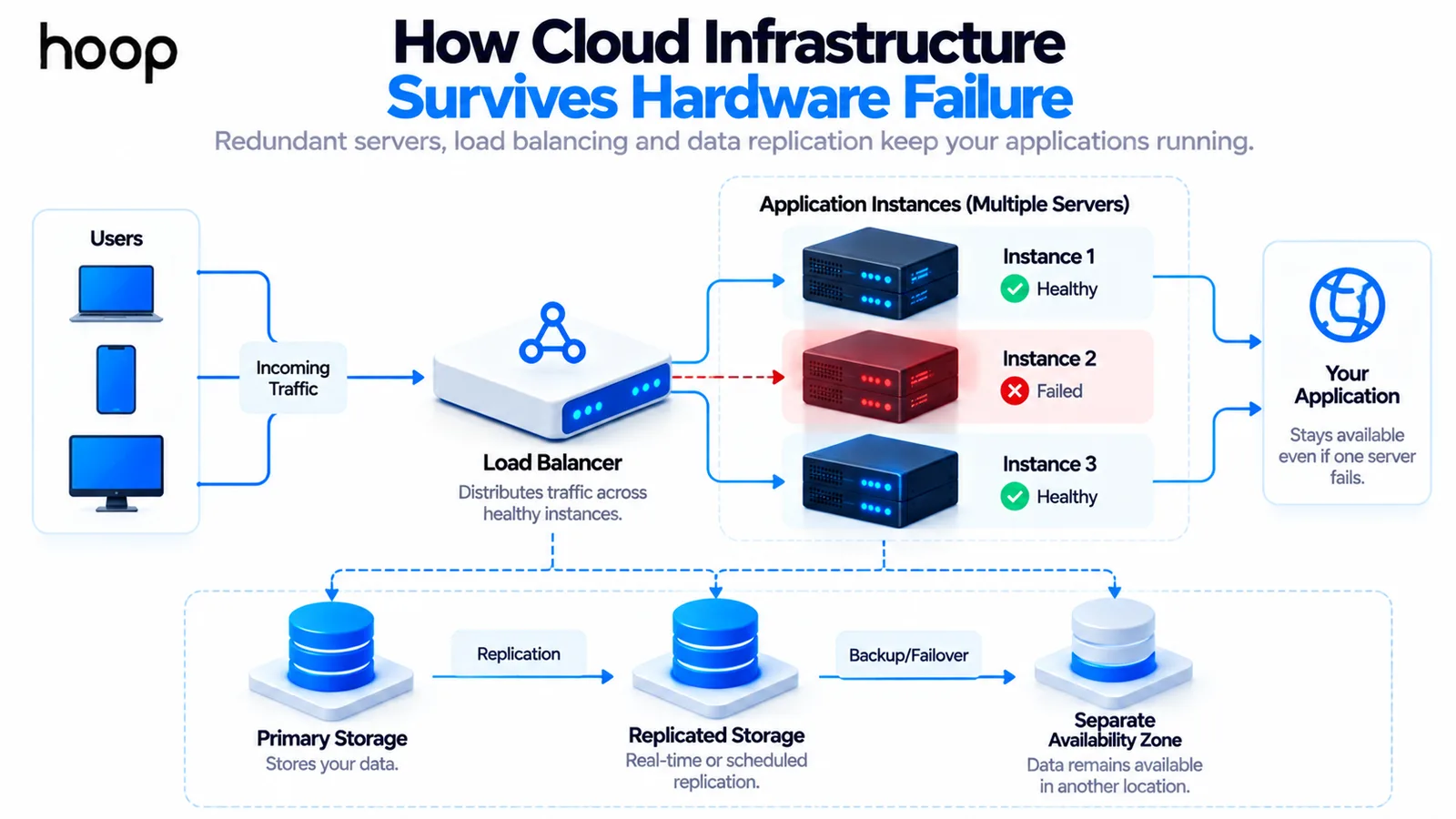
Hardware fails in every computing environment, so cloud systems use redundancy and replacement.
An application can run on multiple instances behind a load balancer. Storage can keep replicated copies. Databases can use standby systems in another zone.
If one server fails, traffic can move to healthy capacity. Good architecture assumes individual components may fail and plans recovery before failure happens.
Hoop builds this resilience into its cloud infrastructure setup through redundancy, recovery planning, backups, and production-ready network design.
Cloud Infrastructure vs Cloud Computing
Cloud infrastructure is the foundation. Cloud computing is the delivery and use of computing services built on that foundation.
Servers, storage systems, networks, virtualization, and access controls belong to infrastructure. Applications, databases, analytics, and hosted services consume that underlying capacity.
Infrastructure describes the resource layer, while cloud computing describes how those resources are delivered and used.
Cloud Infrastructure vs Cloud Architecture
Cloud infrastructure is the collection of resources that exist. Cloud architecture is the design that explains how those resources should work together.
For example, a load balancer, virtual network, database, and server cluster are infrastructure components. Their placement and relationships form the architecture.
Two companies can use similar cloud resources but design very different systems. Architecture determines availability, security boundaries, performance, recovery, and operating complexity.
Cloud Infrastructure vs IaaS
Cloud infrastructure and Infrastructure as a Service are closely related, but they are not identical. Cloud infrastructure describes the actual computing resource layer.
IaaS is a service model for consuming compute, storage, and networking resources on demand. The provider manages physical infrastructure while the customer manages more software above it.
In simple terms, cloud infrastructure is what exists underneath. IaaS is one way businesses access and consume parts of that infrastructure.
Cloud Infrastructure vs On-Premises Systems
On-premises infrastructure usually means the organization owns or directly operates its physical servers, storage, networking equipment, and facilities. Expansion may require new hardware purchases.
Cloud infrastructure shifts the physical layer to a provider. Teams provision resources remotely and can change capacity without purchasing each new machine.
That difference can shorten provisioning time dramatically. It also changes costs from large hardware purchases toward ongoing consumption and operational spending.
Cloud does not remove technical responsibility. Teams still need architecture, security, monitoring, backups, and cost controls for the resources they create.
Public vs Private vs Hybrid vs Multi-Cloud Infrastructure
Public Cloud
Public cloud uses provider-operated infrastructure that serves many customers through isolated environments. AWS, Microsoft Azure, and Google Cloud are common public-cloud platforms.
Private Cloud
Private cloud applies cloud-style provisioning and management to infrastructure dedicated to one organization. The environment may run in a private facility or hosted location.
Hybrid Cloud
Hybrid cloud connects public cloud resources with private or on-premises systems. Businesses often use this model when some workloads must remain outside public cloud.
Multi-Cloud
Multi-cloud uses services from more than one cloud provider. It can support resilience, regulatory goals, specialized services, or vendor diversification.
Choosing among these models depends on workload, regulation, existing systems, cost, and operating skills. Hoop helps teams assess those tradeoffs through its cloud solutions services.
How Does Cloud Infrastructure Scale?
Scaling adds or removes capacity as workload demand changes. A system can scale vertically by changing resource size or horizontally by adding more instances.
Elasticity goes one step further. Elastic systems increase or reduce resources in response to demand, often through automated scaling policies.
For example, an ecommerce application may need extra compute during a sale. Autoscaling can add capacity during the peak and reduce it afterward.
This flexibility is one reason businesses choose cloud infrastructure. Capacity can follow demand more closely than a fixed set of purchased servers.
Is Cloud Infrastructure Secure?
Protection depends on both provider controls and customer configuration. This division is often called the shared responsibility model.
Providers protect physical facilities, hardware, and parts of the service platform. Customers still control identities, permissions, network exposure, data protection, and application security.
Strong environments use least-privilege access, encryption, logging, backups, patching, network segmentation, and continuous monitoring. Misconfiguration can weaken otherwise capable cloud platforms.
Is Cloud Infrastructure Cheaper Than On-Premises?
Cloud infrastructure can reduce hardware purchases and long procurement cycles. It also creates ongoing usage charges that must be managed carefully.
A fair comparison includes more than server prices. It should include staff time, networking, backups, resilience, software, support, power, facilities, and replacement cycles.
Poorly managed cloud environments can become expensive through idle resources, oversized instances, unnecessary data transfer, and weak storage policies.
The stronger goal is cost efficiency. Teams should match resources to workload needs instead of assuming cloud is automatically cheaper.
What Is Infrastructure as Code?
Infrastructure as Code, or IaC, defines cloud resources through machine-readable configuration instead of relying only on manual setup. Terraform is a common example.
A configuration can describe networks, servers, databases, load balancers, permissions, and other infrastructure. Teams can review those changes before applying them.
This makes environments easier to reproduce and audit. It also reduces drift between development, staging, and production systems.
Hoop combines Infrastructure as Code with deployment automation, monitoring, and operations through its Cloud and DevOps services.
How Is Cloud Infrastructure Managed?
Small environments may begin with a cloud provider console. As complexity grows, teams usually add command-line tools, APIs, Infrastructure as Code, monitoring, and automated policies.
Management also includes observing performance, responding to incidents, reviewing costs, rotating credentials, testing backups, and planning capacity. Provisioning is only the first step.
Good cloud operations make changes repeatable and visible. Teams should know what exists, why it exists, who can change it, and how failure will be handled.
What Are the Benefits of Cloud Infrastructure?
The strongest benefits come from flexibility and operating speed rather than from one feature. Businesses can create environments quickly and change capacity as requirements evolve.
- Faster provisioning without waiting for new physical hardware.
- Flexible compute, storage, and networking capacity for changing demand.
- Redundancy options across multiple servers, zones, and regions.
- Global infrastructure that can place services closer to users.
- Automation that makes infrastructure repeatable and easier to operate.
- Consumption-based spending that can reduce large upfront hardware purchases.
These benefits are strongest when the environment is designed around actual workloads. Poor architecture can turn flexibility into unnecessary complexity and cost.
What Are the Challenges of Cloud Infrastructure?
Cloud infrastructure removes hardware ownership, but it does not remove operational decisions. Teams still need disciplined architecture, security, monitoring, and financial controls.
- Usage-based costs can grow quickly when resources are oversized or forgotten.
- Security mistakes can expose data or services even when the provider platform is secure.
- Complex environments may require strong DevOps and networking skills.
- Provider-specific services can create migration and vendor-dependence concerns.
- Poor architecture can create latency, reliability, or recovery problems.
- Compliance requirements may limit where data and workloads can run.
The goal is not to avoid cloud complexity entirely. The goal is to choose the right amount of infrastructure for the business problem.
When Should a Business Use Cloud Infrastructure?
Cloud infrastructure works well when a business needs fast provisioning, variable capacity, distributed systems, or remote access. It also fits businesses that need stronger resilience without owning data-center hardware.
It is also useful for development environments, SaaS products, ecommerce systems, APIs, analytics workloads, backups, disaster recovery, and global applications.
A small stable workload may not need an elaborate cloud architecture. The right design should match risk, traffic, growth plans, compliance, and internal operating skills.
How to Plan Cloud Infrastructure Without Overbuilding
Start with the workload rather than the cloud provider catalog. Define traffic patterns, data sensitivity, recovery needs, compliance requirements, and expected growth before selecting services.
Choose the simplest architecture that meets those needs. Add redundancy, automation, and advanced services where they solve a measurable risk or operating problem.
This approach keeps infrastructure tied to business requirements. It also prevents the environment from becoming a collection of fashionable cloud tools.
The Cloud Still Runs on Real Hardware
Understanding cloud infrastructure starts with one idea: the cloud still runs on real hardware. Software makes that hardware flexible, programmable, and available remotely.
Servers provide compute, storage holds data, networks connect services, and virtualization abstracts physical machines. Security and automation keep the environment controlled and manageable.
The best cloud environment is not the one with the most services. It is the one that meets business requirements with clear ownership, resilience, security, and cost control.
“The best cloud environment is not the one with the most services. It is the one that meets business requirements with clear ownership, resilience, security, and cost control.”
Key takeaways
- 01Six components do the work: compute, storage, networking, virtualization, security and identity, and management.
- 02Capacity is not infinite — it feels that way because of pooling, quotas, and continuous provider investment.
- 03Security is shared: the provider secures the platform, you secure identities, permissions, exposure, and data.
- 04Cloud is not automatically cheaper. Idle resources, oversized instances, and data transfer costs add up fast.
Written by
Sahar
Content Writer
Frequently Asked
Questions
Everything you need to know before booking a strategy call. Can't find your answer? Contact us directly.
Cloud infrastructure is the servers, storage, networking, virtualization, security, and management technology that cloud services run on. Businesses access those resources remotely.
No. Cloud infrastructure is the underlying resource layer. IaaS is a service model that lets customers consume infrastructure resources on demand.
It is located in real data centers operated by cloud providers or private organizations. Those facilities contain servers, storage systems, networking equipment, and supporting hardware.
Some cloud services can use dedicated physical systems, but virtualization remains central to most cloud environments. It enables resource pooling, isolation, and flexible provisioning.
The main components are compute, storage, networking, virtualization, security, and management. Together, they provide the foundation for cloud applications and services.
Keep reading
All articles →
What Is DevSecOps? How Security Fits Into DevOps
Oct 12, 2026 · 10 min read
What Is IaaS? Infrastructure as a Service Explained Simply
Oct 12, 2026 · 10 min read