What Is IaaS? Infrastructure as a Service Explained Simply
IaaS is a responsibility model. The provider runs the data centre, hardware, and virtualization; you run the operating system, runtime, application, and data — with all the control and all the work that implies.
Sahar
Content Writer
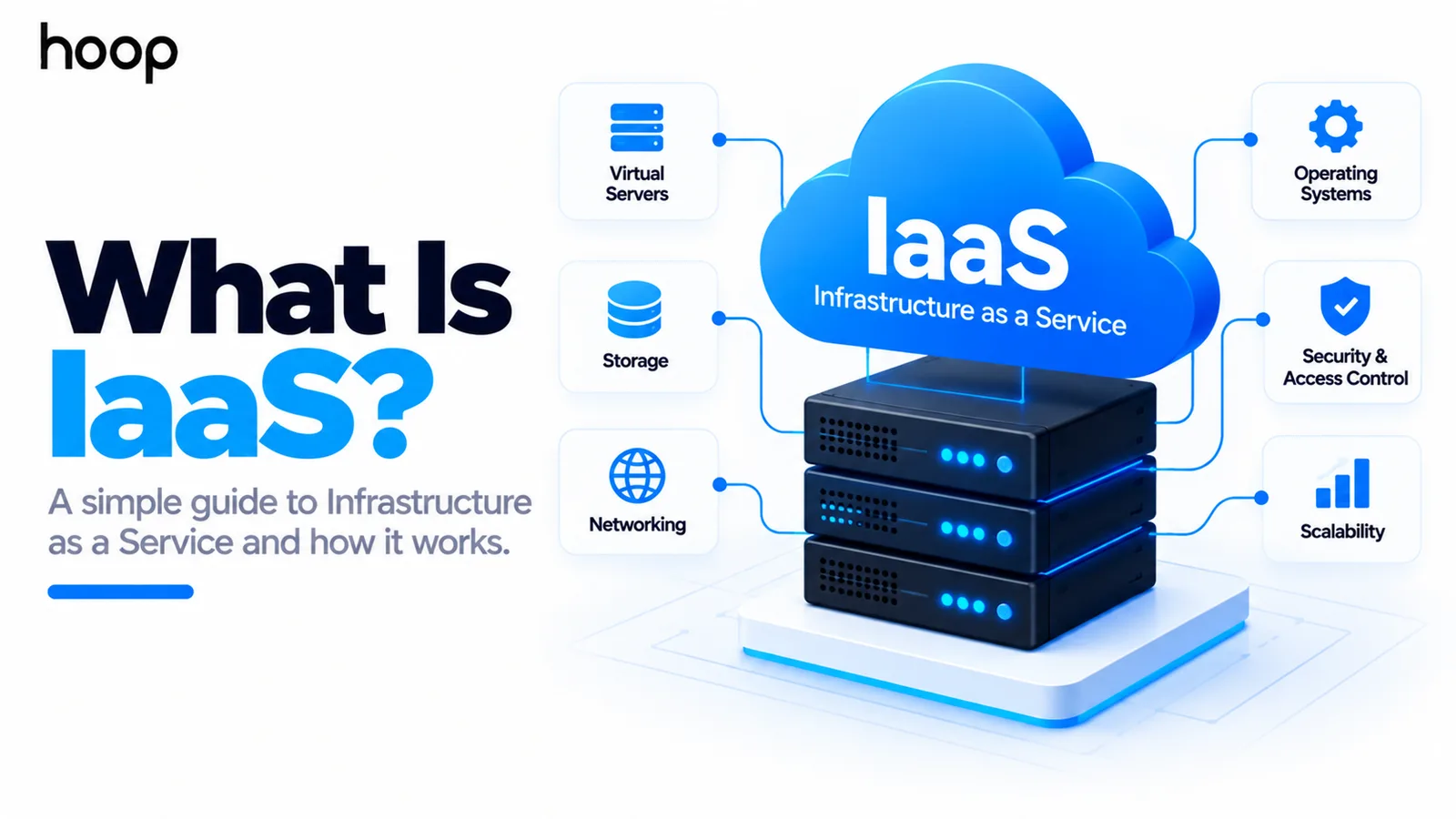
IaaS, or Infrastructure as a Service, is a cloud model for renting computing infrastructure instead of owning physical hardware. The provider runs the data centers and hardware. Your team manages much of the software stack above them.
The simplest way to understand IaaS is this: you rent the computer, storage, and network foundation. You still decide what operating system, applications, configurations, and data run on that foundation.
Need this done right?
Hoop builds the strategy, design and development behind sites like this one — talk to us about yours.
What Does IaaS Stand For?
IaaS stands for Infrastructure as a Service. It is one of the main cloud service models alongside PaaS and SaaS.
Infrastructure means the computing resources beneath an application. These resources include processing power, storage, networking, and the virtual machines that use them.
The provider owns and maintains the physical equipment. Customers access virtualized resources through a console, command line, API, or automation tool.
What Does “Infrastructure” Mean in IaaS?
Start with the physical systems behind every application. Software ultimately needs processors, memory, storage, networking, power, cooling, and physical servers.
A traditional business may buy and operate that hardware itself. IaaS moves those physical layers into a cloud provider’s data centers.
The customer then rents virtual resources instead of buying servers for every workload. Those resources can be created, resized, copied, or removed much faster than physical hardware.
How Does IaaS Work?
An IaaS provider runs large data centers filled with servers, storage systems, and networking equipment. Virtualization divides those physical resources into isolated computing environments.
A customer can create a virtual machine with selected CPU, memory, disk, network, and location settings. The provider assigns resources from its infrastructure.
The customer then installs or selects an operating system and configures the software required by the application. The virtual machine behaves much like a remote server.
Cloud APIs make those resources programmable. Teams can create infrastructure manually or automate provisioning through scripts and infrastructure definitions.
A Simple IaaS Example
Imagine an ecommerce company launching a custom order-processing application. The team needs two application servers, a private network, storage, backups, and a load balancer.
Without IaaS, the company could buy servers, install them, configure networking, and plan spare capacity. Hardware procurement could slow the project.
With IaaS, the team can create virtual servers and storage within minutes. It can then install the operating system and application stack.
The cloud provider maintains the physical machines. The ecommerce team still patches the operating system, deploys code, configures security, and protects customer data.
What Does the IaaS Provider Manage?
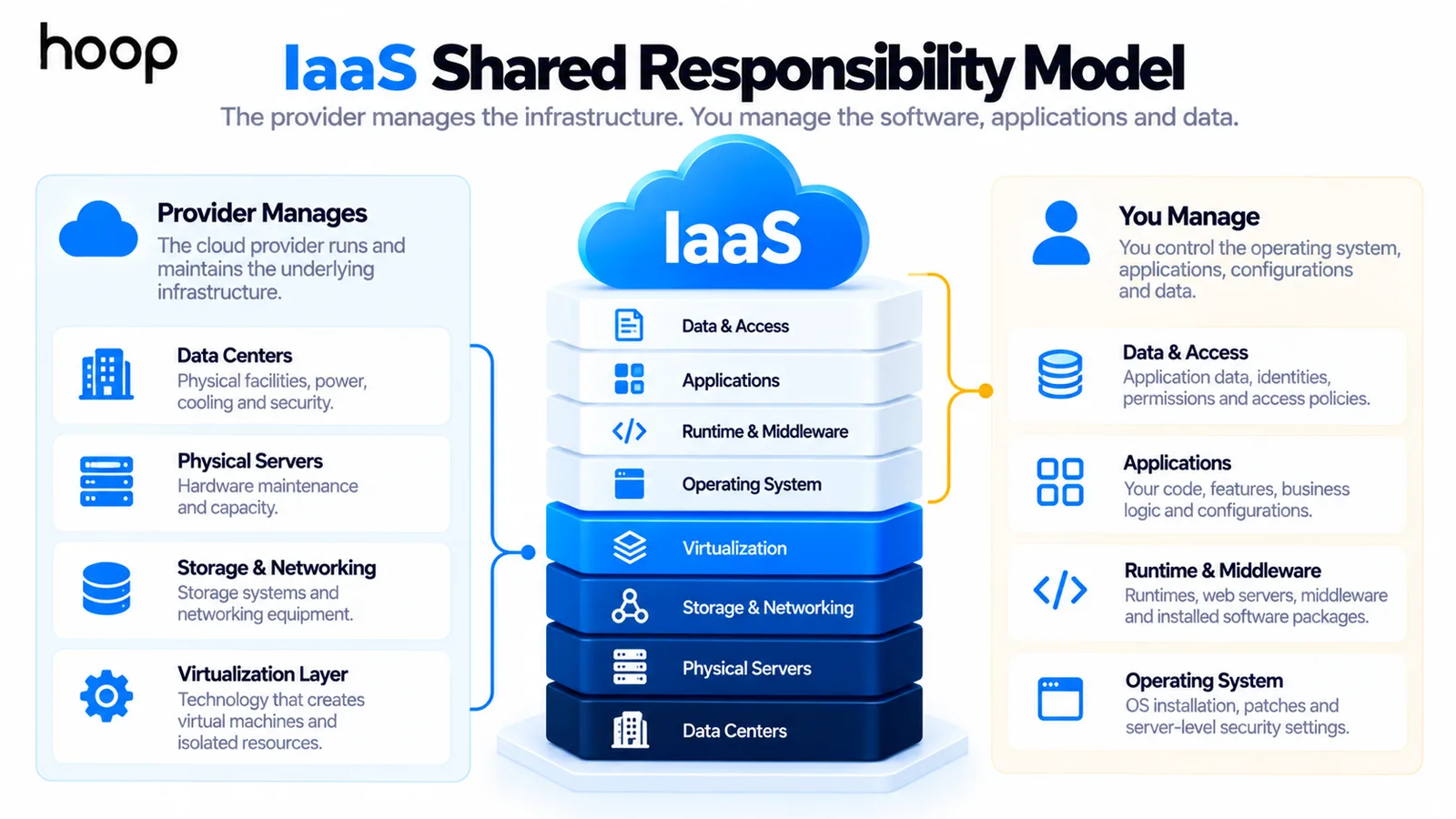
The provider manages the physical and virtualization layers that would otherwise require data-center operations. Exact boundaries vary between services.
- Physical data centers, power, cooling, and hardware maintenance.
- Physical servers, storage systems, and core networking equipment.
- Virtualization technology that creates virtual machines and isolated resources.
- Hardware replacement, physical capacity, and lower-level platform availability.
- Provider-side facilities, physical security, and infrastructure maintenance.
What Does the Customer Manage?
IaaS gives the customer more control than PaaS, but that control also creates more responsibility.
- Operating systems, patches, and many server-level security settings.
- Middleware, runtimes, web servers, and installed software packages.
- Applications, business logic, configurations, and deployment processes.
- Application data, identities, permissions, secrets, and access policies.
- Monitoring, backups, recovery plans, and workload-specific performance decisions.
Managed add-on services can shift some responsibilities back to the provider. The exact responsibility model depends on every service you combine.
IaaS vs PaaS: What Is the Difference?
IaaS gives you infrastructure resources. PaaS gives you a more managed application platform.
With IaaS, your team commonly manages the operating system, runtime, middleware, application, and data. You get more freedom to configure the environment.
With PaaS, the provider usually manages the operating system and runtime too. Your team can focus more directly on application code and data.
The tradeoff is simple. IaaS offers more infrastructure control. PaaS removes more infrastructure work.
Teams that need lower-level configuration often combine IaaS with professional cloud infrastructure setup to design networking, compute, security, backups, and availability around the application.
IaaS vs SaaS: What Is the Difference?
SaaS gives users finished software. IaaS gives technical teams the infrastructure needed to run software they manage themselves.
A SaaS customer might open a browser and use a CRM immediately. An IaaS customer might rent servers that help run a custom CRM product.
That means SaaS sits much higher in the technology stack. The provider manages far more of the system for the customer.
A finished subscription product can still run on lower-level cloud resources. Hoop’s SaaS development services cover the product architecture that sits above those infrastructure decisions.
IaaS vs PaaS vs SaaS at a Glance
The easiest way to compare the three models is to ask who manages each layer. More provider management usually means less customer control.
| Layer | IaaS | PaaS | SaaS |
|---|---|---|---|
| Physical infrastructure | Provider | Provider | Provider |
| Virtualization | Provider | Provider | Provider |
| Operating system | Customer | Provider | Provider |
| Runtime and middleware | Customer | Provider | Provider |
| Application | Customer | Customer | Provider |
| Application data | Customer | Customer | Mostly provider-managed service environment |
| Typical customer goal | Control infrastructure | Deploy applications faster | Use finished software |
No model is automatically better. The right choice depends on how much control your team needs and how much operational work it can support.
What Are Common Examples of IaaS?
IaaS examples are usually specific cloud services rather than entire cloud companies. Large providers sell many service types at different abstraction levels.
Classic IaaS-style compute examples include Amazon EC2, Azure Virtual Machines, and Google Compute Engine. Each provides configurable virtual computing resources.
Storage, virtual networks, load balancers, firewalls, public IP addresses, and snapshots can also form part of an IaaS environment.
A real application rarely uses only one resource. Teams combine infrastructure components into a complete environment for development, testing, or production.
Is AWS IaaS?
AWS offers IaaS services, but AWS is not only an IaaS provider. It also offers databases, serverless products, application platforms, AI services, and SaaS-style tools.
The same applies to Microsoft Azure and Google Cloud. It is more accurate to classify individual services than the entire cloud provider.
For example, a virtual machine service fits the IaaS model. A managed application platform may fit PaaS more closely.
Is IaaS the Same as a VPS?
A virtual private server and an IaaS virtual machine can feel similar. Both can give you remote access to a virtual server.
IaaS is broader. It can include programmable compute, storage, networking, load balancing, security groups, snapshots, and other infrastructure services.
A VPS product may offer a simpler server-focused experience. A mature IaaS environment is designed to assemble many infrastructure resources together.
So a virtual machine can be one IaaS resource. IaaS is the broader service model around those resources.
IaaS vs On-Premises Infrastructure
On-premises infrastructure means your organization owns or directly operates the physical equipment. Your team may manage servers from purchase through retirement.
That includes procurement, installation, power, cooling, hardware replacement, capacity planning, and physical networking. These responsibilities require time and capital.
IaaS moves physical ownership to the provider. Your team can create resources when needed without installing new hardware in its own facility.
You still manage the software layers assigned to you. The cloud does not remove every infrastructure responsibility.
IaaS vs Infrastructure as Code
Infrastructure as a Service and Infrastructure as Code sound similar, but they describe different ideas.
IaaS is the service model that supplies infrastructure resources. Infrastructure as Code, often called IaC, is a method for defining infrastructure through code or configuration files.
For example, a team can rent virtual machines from an IaaS provider. Terraform can then describe how many machines, networks, and security rules should exist.
IaaS does not require IaC. Teams can create resources manually. Automation becomes more valuable as environments grow and need repeatable changes.
Why Do Businesses Use IaaS?
The main reason is control without physical hardware ownership. Teams can design their own operating environment while avoiding data-center procurement and maintenance.
IaaS also makes experimentation faster. Developers can create temporary environments, test changes, and remove resources when the work ends.
Businesses can provision capacity closer to actual demand. That can reduce the need to buy hardware for traffic levels that may happen only occasionally.
IaaS also supports disaster recovery, regional expansion, development environments, legacy application hosting, and custom security architectures.
Advantages of IaaS
IaaS can shorten infrastructure provisioning from procurement cycles to software-driven requests. Teams can create resources without waiting for physical equipment.
It also offers broad configuration freedom. Engineers can select operating systems, machine sizes, storage types, network layouts, and security controls.
Capacity can change with the workload. A team can add compute during higher demand and remove unnecessary resources later.
The model also turns more infrastructure spending into operating expense. Businesses pay for rented resources instead of purchasing every server upfront.
Disadvantages of IaaS
More control means more operational work. Your team may still need strong skills in server administration, networking, security, monitoring, backups, and cost management.
Cloud resources can also be misconfigured. An exposed storage bucket, weak firewall rule, or unpatched server can create serious risk.
Usage-based pricing can become difficult to predict when workloads grow. Data transfer, idle resources, oversized machines, and duplicate environments can raise bills.
Provider-specific services can create migration work later. Portability should be considered when architecture depends heavily on one vendor.
Does IaaS Require DevOps?
IaaS does not require a team with “DevOps” in every job title. It does require someone to handle the responsibilities the provider leaves to you.
Those responsibilities often include deployments, system configuration, monitoring, patching, recovery, access controls, and infrastructure changes.
DevOps methods can make that work safer and more repeatable. Automation, CI/CD, observability, and Infrastructure as Code reduce manual infrastructure changes.
Organizations running production cloud environments often use Cloud and DevOps services to connect infrastructure, deployment automation, monitoring, and recovery into one operating model.
How Does IaaS Scaling Work?
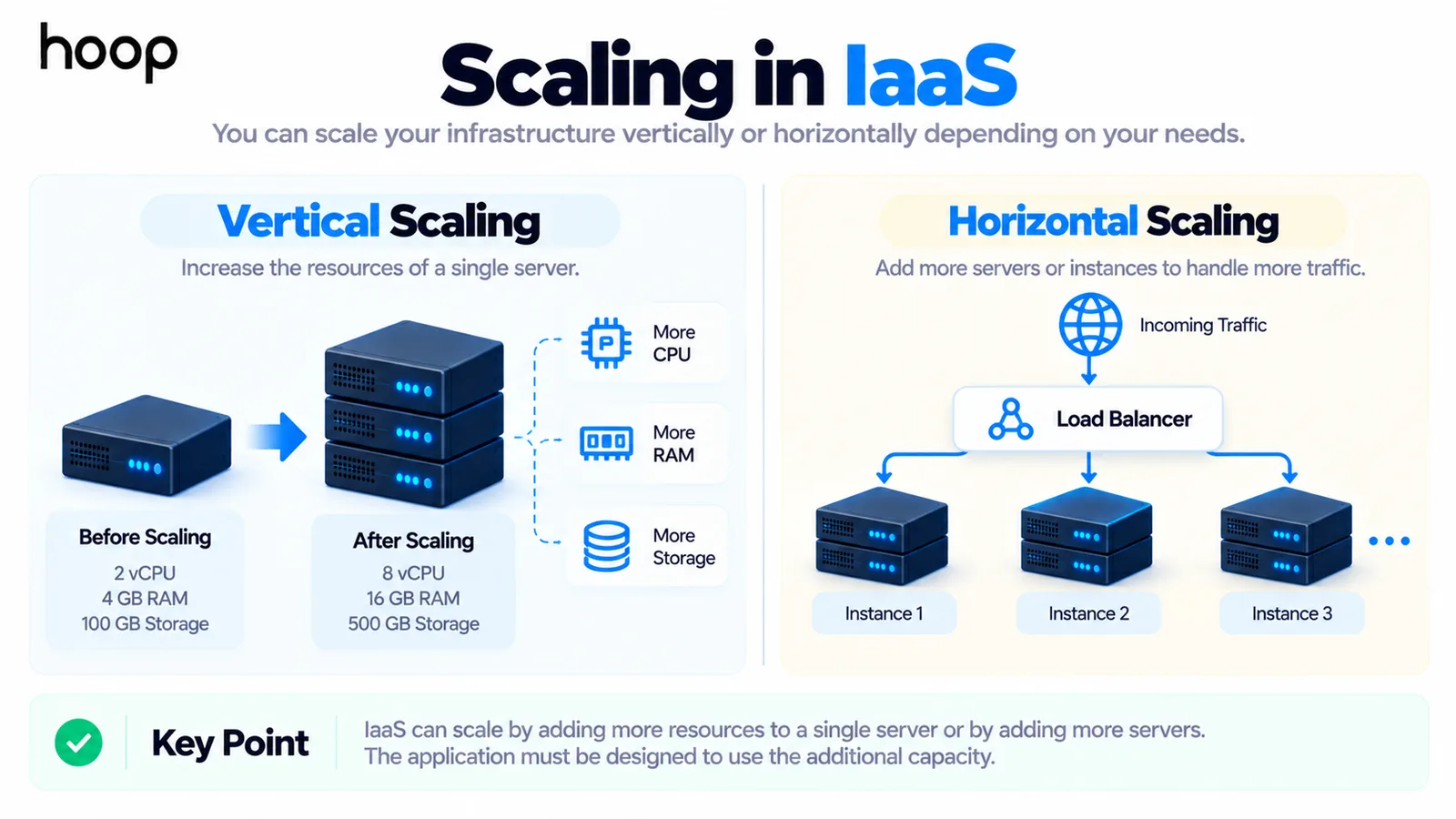
Scaling means changing infrastructure capacity as demand changes. That can involve larger machines, more machines, additional storage, or greater network capacity.
Vertical scaling increases the resources assigned to one machine. Horizontal scaling adds more machines or service instances to share the workload.
Cloud platforms can automate some scaling decisions when metrics cross defined thresholds. The application still needs an architecture that can use the extra capacity.
Adding servers does not automatically fix inefficient code or a database bottleneck. Infrastructure scaling and application design must work together.
Is IaaS Secure?
IaaS can support strong security, but security is shared between the provider and customer. The provider protects the physical infrastructure and lower layers.
The customer must secure what it deploys. That includes operating systems, identities, firewall rules, data, secrets, applications, and access permissions.
A secure data center cannot protect an application from weak passwords or an exposed management port. Responsibility changes by service, so teams should document the boundary clearly.
How Does IaaS Pricing Work?
IaaS commonly uses consumption-based pricing. Charges can depend on machine type, running time, storage, network traffic, reserved capacity, and location.
A low server price does not represent the complete operating cost. Monitoring, backups, engineers, security tools, support, and data transfer may also matter.
Unused resources are another common source of waste. Development machines, old snapshots, oversized servers, and forgotten test environments can continue creating charges.
Compare total operating cost rather than only the price of one virtual machine.
When Should You Use IaaS?
IaaS fits teams that need meaningful control over the operating environment. It is useful when standard managed platforms cannot support the required configuration.
It can also fit legacy applications that expect server-level access, custom network layouts, specialized software, or strict environment requirements.
Growing companies may choose IaaS when they want cloud flexibility but still need infrastructure-level choices. Technical capacity matters because those choices need ongoing management.
When Should You Avoid IaaS?
Avoid choosing IaaS only because it sounds more flexible. Extra flexibility has value only when the application needs it.
A small team may waste engineering time managing servers when a PaaS or SaaS product solves the same problem. Managed services can reduce operational overhead.
IaaS may also be a poor fit when your team lacks the skills to manage the environment reliably. Security and recovery still need expertise.
Choose the lowest infrastructure layer that gives your application the control it genuinely needs.
How to Choose an IaaS Provider
Start with application requirements instead of brand familiarity. Identify where users are located, what operating systems are needed, and which compliance controls apply.
Then compare compute options, storage, networking, service availability, support, pricing, observability, backup features, and regional coverage.
Portability also matters. Understand which parts of the design depend on provider-specific technology and how difficult they would be to replace.
Finally, evaluate the operating model. The best provider is not useful if your team cannot manage the environment safely and consistently.
IaaS Is a Responsibility Model
The clearest answer is that IaaS is a responsibility model. The provider owns and operates the physical infrastructure. You rent virtual resources and manage much of what runs above them.
That model gives technical teams significant control without buying data-center hardware. It also leaves meaningful responsibility for security, operations, software, and cost management.
Choose IaaS when that control solves a real technical requirement. Choose a more managed service when infrastructure work would only distract from the product.
“A secure data center cannot protect an application from weak passwords or an exposed management port.”
Key takeaways
- 01The dividing line sits at the operating system: below it is the provider, above it is you.
- 02AWS, Azure, and Google Cloud are not "IaaS providers" — individual services are IaaS, PaaS, or SaaS.
- 03IaaS (a service model) is not Infrastructure as Code (a way of defining resources); you can use either without the other.
- 04Choose the lowest layer your application genuinely needs — extra flexibility you do not use is just extra operational work.
Written by
Sahar
Content Writer
Frequently Asked
Questions
Everything you need to know before booking a strategy call. Can't find your answer? Contact us directly.
IaaS means renting virtual computing infrastructure instead of buying physical servers. The provider manages hardware, while you manage more of the software stack.
Amazon EC2 is a common example. Azure Virtual Machines and Google Compute Engine also provide configurable virtual compute resources.
IaaS gives you more infrastructure control and responsibility. PaaS manages more of the operating environment so developers can focus on applications.
Not exactly. Cloud hosting can describe many hosted models. IaaS specifically describes rented infrastructure resources with a defined customer responsibility layer.
No. IaaS is better when you need lower-level control. PaaS is often better when reducing infrastructure management matters more.
Keep reading
All articles →
What Is PaaS? Platform as a Service Explained Simply
Oct 12, 2026 · 9 min read
What Is Cloud Infrastructure? How the Cloud Actually Works
Oct 12, 2026 · 10 min read