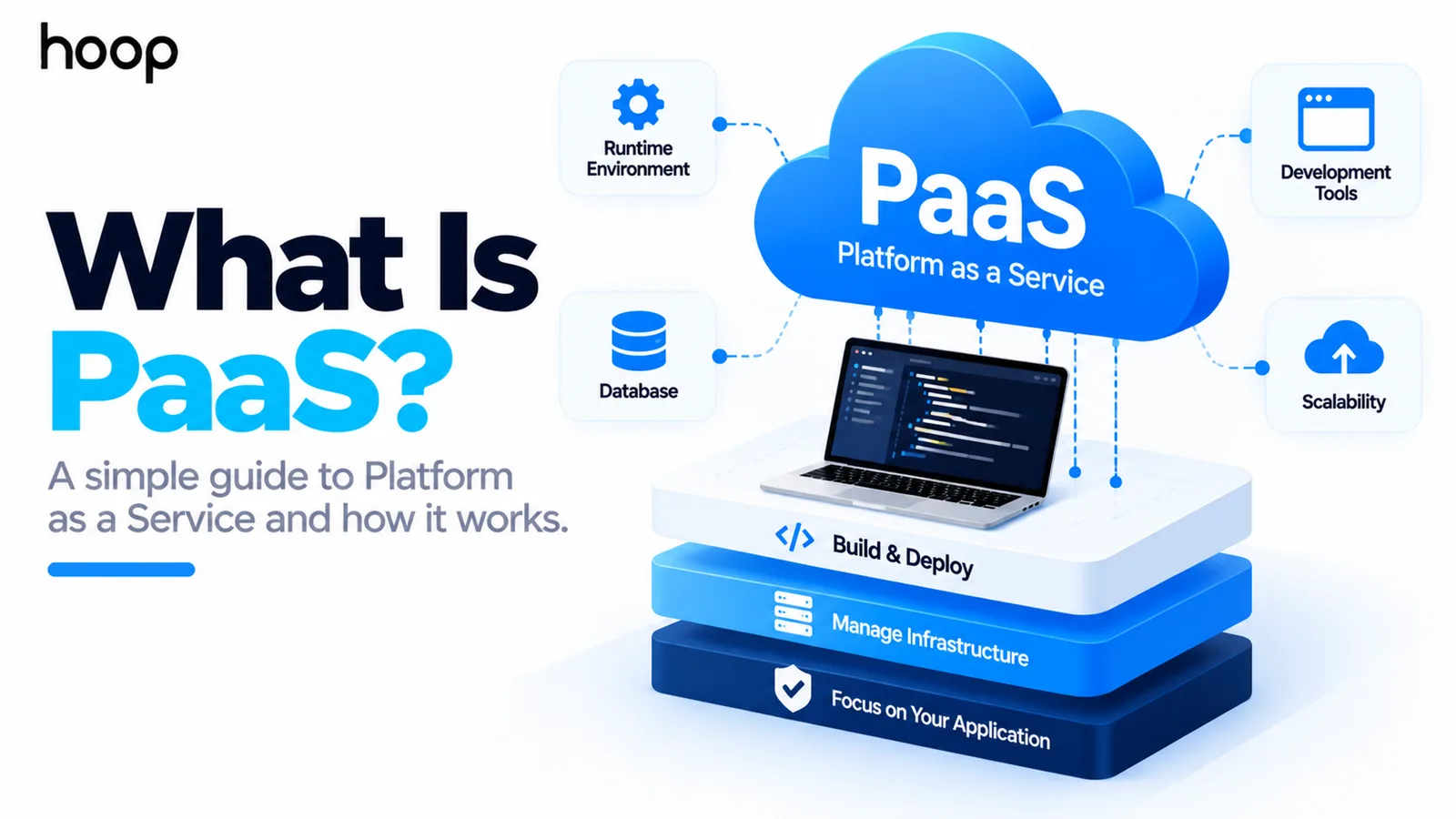
What Is PaaS? Platform as a Service Explained Simply
PaaS is a managed place to run your application. The provider handles servers, operating system, runtime, routing, and scaling; you keep the code, the data, and the business logic.
Sahar
Content Writer
PaaS, or Platform as a Service, is a cloud model for deploying applications without managing most underlying infrastructure. The provider manages the platform. Your team focuses on the application and its data.
The easiest way to understand PaaS is simple. You bring the application. The provider runs much of the environment it needs. That tradeoff can reduce DevOps work, speed up deployment, and make scaling easier.
Need this done right?
Hoop builds the strategy, design and development behind sites like this one — talk to us about yours.
What Does PaaS Stand For?
PaaS stands for Platform as a Service. It sits between raw cloud infrastructure and finished software services.
A PaaS usually gives developers a managed application environment. That environment can include servers, operating systems, runtimes, deployment tools, routing, scaling, logging, and service integrations.
Your team still writes the application. You also control its business logic, features, user experience, and most application-level decisions.
How Does PaaS Work?
Picture a software stack made of layers. Physical servers and networking sit at the bottom. Operating systems, runtimes, middleware, application code, and data sit above them.
With traditional infrastructure, your team manages many of those layers. With PaaS, the provider takes responsibility for much of the lower and middle stack.
You normally deploy code through a dashboard, command-line tool, repository connection, or deployment pipeline. The platform then prepares the environment needed to run that code.
That environment may handle routing, certificates, runtime configuration, scaling, health checks, logs, and service connections. Exact features vary between providers.
A Simple PaaS Example
Imagine a team building a customer portal in Python. Without PaaS, the team might provision and maintain a server. It may also configure the runtime, reverse proxy, certificates, deployment process, and monitoring.
With PaaS, the developers can push the application code to a supported platform. The provider prepares the runtime, starts the application, connects networking, and exposes logs and health information.
The team still writes the portal, protects customer data, manages authentication, and fixes application bugs. The platform removes much of the repetitive environment work around those tasks.
What Does a PaaS Provider Manage?
The provider usually manages the platform layers that developers would otherwise configure and maintain themselves. The exact boundary depends on the product.
- Physical servers, storage, networking, and virtualization.
- Operating system maintenance and many platform security updates.
- Application runtimes and supported framework environments.
- Deployment plumbing, routing, certificates, and service configuration.
- Scaling mechanisms, health checks, and platform-level monitoring.
- Managed integrations such as databases, queues, caches, or identity services.
What Does the Developer Still Manage?
PaaS does not remove engineering responsibility. Your team still owns the application itself.
That usually includes application code, business logic, data models, application permissions, secrets, third-party integrations, dependency choices, and application-level security. Your team also decides how features should behave and how users interact with the product.
PaaS will not automatically repair inefficient queries, broken authorization, poor business logic, or weak architecture.
PaaS vs SaaS: What Is the Difference?
SaaS gives the customer finished software to use. PaaS gives developers a managed platform where they can build or run their own software.
For example, a customer may use a finished SaaS product without seeing the code or infrastructure behind it. A development team can use a PaaS to deploy the application that later becomes that SaaS product. For a deeper look at product architecture, see Hoop Interactive’s SaaS development services.
The practical difference is ownership. SaaS users mainly configure and consume software. PaaS customers still create and control their application.
PaaS vs IaaS: What Is the Difference?
IaaS, or Infrastructure as a Service, gives you more control over the computing environment. That control also creates more operational work.
With IaaS, your team may manage the operating system, runtime, web server, middleware, patches, deployment configuration, and application. With PaaS, the provider manages more of that platform layer.
If you need direct control over networks, compute, storage, permissions, and infrastructure architecture, consider a more hands-on cloud infrastructure setup. That model may fit better than a highly managed PaaS.
The tradeoff is simple. IaaS gives more control. PaaS removes more platform management.
SaaS vs PaaS vs IaaS at a Glance
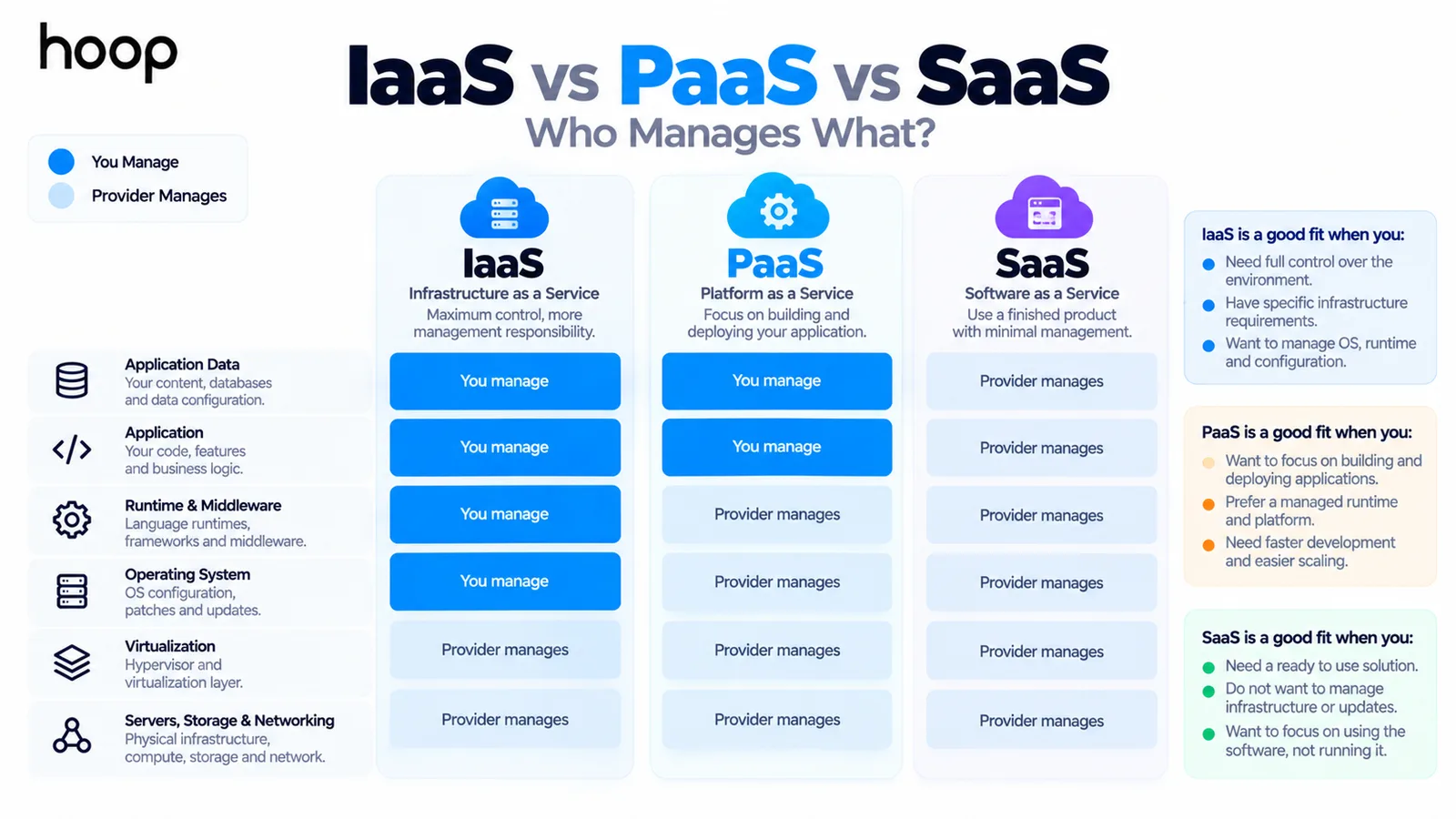
The easiest way to compare these cloud models is to ask who manages each layer.
| Layer | IaaS | PaaS | SaaS |
|---|---|---|---|
| Infrastructure | Provider | Provider | Provider |
| Operating system | Customer | Provider | Provider |
| Runtime and middleware | Customer | Provider | Provider |
| Application | Customer | Customer | Provider |
| Application data | Customer | Customer | Mostly provider-managed service |
What Are Common Examples of PaaS?
Well-known PaaS-style services include Google App Engine, Azure App Service, AWS Elastic Beanstalk, and Heroku. Each product provides a different level of abstraction and control.
Large cloud providers should not be labeled only as PaaS companies. AWS, Microsoft Azure, and Google Cloud offer many service models, including infrastructure, managed platforms, databases, containers, and serverless products.
The important question is not the provider name. The important question is how much of the application environment that specific service manages for you.
Why Do Developers Use PaaS?
Developers use PaaS to spend less time managing repetitive infrastructure work. That can shorten the path from code to a working deployment.
A team may avoid configuring servers, installing runtimes, setting up routing, and maintaining operating systems. It may also avoid building every scaling mechanism itself.
This can be especially useful for small product teams. Engineering time can stay focused on features, testing, customers, and product quality.
Teams with complex delivery pipelines may still combine PaaS with broader Cloud and DevOps services. Those services can support automation, observability, reliability, and release management.
What Are the Main Advantages of PaaS?
The first advantage is faster deployment. Developers can often move from repository to running application with fewer infrastructure steps.
The second advantage is reduced operational overhead. Platform maintenance becomes the provider’s responsibility instead of consuming internal engineering time.
PaaS can also make scaling easier. Many platforms can add capacity or instances based on demand without requiring teams to build every scaling component themselves.
Standardized environments can improve consistency between deployments. They can also reduce differences between development, staging, and production environments.
What Are the Disadvantages of PaaS?
The same abstraction that makes PaaS convenient can limit control. Teams may have fewer options for operating-system changes, networking behavior, runtime versions, or specialized infrastructure tuning.
Vendor lock-in is another concern. An application may depend on provider-specific services, deployment formats, environment rules, or managed integrations.
Cost can also rise as usage grows. A managed platform may cost more per compute unit than a self-managed server. Compare that price with engineering time and operational effort.
PaaS can be a poor fit for unusual system access, custom kernels, strict infrastructure rules, or specialized networking.
Is PaaS the Same as Hosting?
No. Hosting describes where an application or website runs. PaaS describes a managed application platform and its responsibility model.
Basic hosting may give you space on a server. A PaaS usually adds application deployment, runtime management, service configuration, scaling features, logs, health checks, and platform maintenance.
Some hosting providers include managed features that resemble PaaS. The boundary can blur, so compare responsibilities rather than marketing labels.
PaaS vs VPS: What Changes?
A virtual private server gives you a virtual machine and much more control over the software installed on it. That also means more setup and maintenance.
On a VPS, your team may install the web server, runtime, database client, and firewall rules. It may also manage deployments, monitoring, and operating-system updates.
On a PaaS, many of those decisions are standardized or automated. You trade some low-level access for a more managed deployment experience.
How Are Applications Deployed on PaaS?
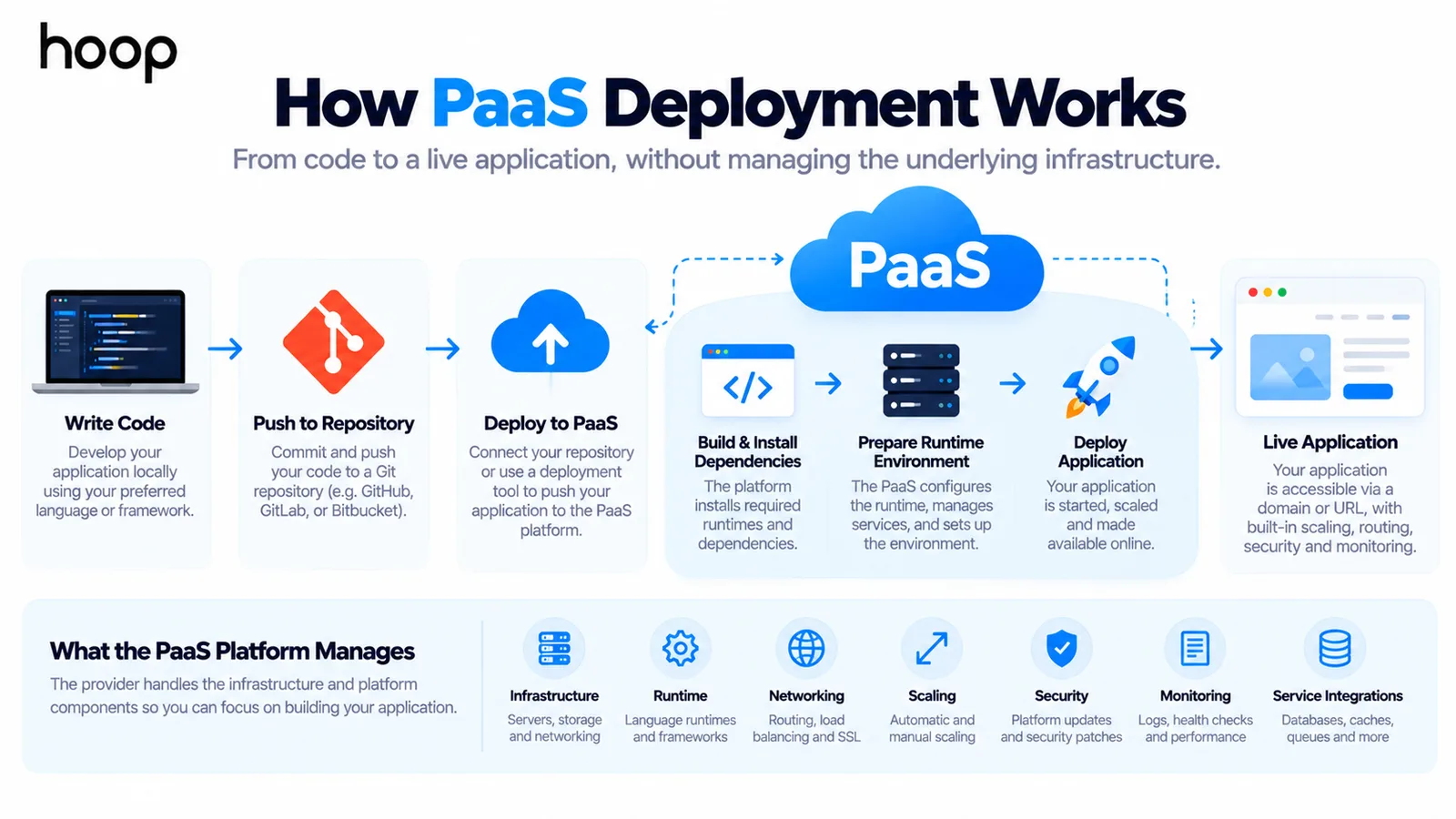
Deployment usually starts with application code stored in a repository or uploaded through a platform tool. The PaaS detects or receives the application configuration.
It then prepares the runtime, installs dependencies, assigns networking, starts the application, and exposes it through a route or domain. Some platforms build containers behind the scenes.
Modern PaaS products may connect directly to Git repositories. A code change can trigger a build and deployment after tests pass.
How Does PaaS Handle Scaling?
Many PaaS products can scale application capacity by adding instances, containers, or compute resources. Some can react automatically to traffic or resource thresholds.
Scaling is not magic. The application still needs an architecture that can handle multiple instances, shared data, sessions, background jobs, and external services correctly.
A poorly designed application can still fail under load even when the platform adds more compute.
How Is PaaS Different From Containers and Serverless?
PaaS, containers, and serverless can overlap, but they describe different levels of abstraction. Containers package an application and its dependencies. A PaaS may run those containers for you without exposing every infrastructure detail.
Serverless services usually move the responsibility boundary even further toward the provider. Teams may deploy individual functions or services while the provider handles capacity and execution more automatically.
These models are not strict competitors. A modern PaaS can use containers internally, connect to serverless services, and still present one managed application platform to developers.
Is PaaS Secure?
PaaS can reduce some infrastructure-security work because the provider manages the underlying platform. It does not remove application-security responsibility.
The provider may patch operating systems, maintain platform components, protect physical infrastructure, and secure managed services. Your team still needs secure code, access controls, secrets handling, data protection, and safe dependencies.
Security responsibilities should be checked in the provider’s documentation before choosing a platform, especially for regulated or sensitive workloads.
What PaaS Does Not Solve
PaaS removes platform work, not product risk. It does not validate your market, design your architecture, secure weak business logic, or guarantee a good user experience.
It also does not replace observability, testing, release discipline, or capacity planning. Managed infrastructure can make those practices easier, but engineering teams still need to use them well.
How Does PaaS Pricing Work?
PaaS pricing varies by provider and product. Charges may depend on compute time, memory, requests, application instances, storage, data transfer, managed databases, or supporting services.
Do not compare only the monthly server price. A PaaS fee may also replace engineering work for platform setup, patching, deployment tooling, scaling, monitoring integration, and maintenance.
The better comparison is total operating cost. Include cloud charges, engineering time, reliability work, and the cost of slower releases.
When Is PaaS a Good Choice?
PaaS is a strong option when a team wants to ship applications quickly without building a large infrastructure layer first. It works well when the application fits supported runtimes and standard platform patterns.
It can also fit prototypes, internal tools, APIs, customer-facing web applications, and SaaS products that need a dependable deployment environment.
The model becomes especially attractive when developer time is more valuable than low-level infrastructure control.
When Should You Avoid PaaS?
PaaS may be wrong for applications needing deep system access, specialized hardware, unusual networking, or custom runtime behavior. Strict portability requirements can also make it unsuitable.
It may also be unsuitable when provider-specific limitations create more work than they remove. Large predictable workloads can sometimes justify a more customized infrastructure model.
Teams should also be cautious when a provider makes migration difficult or hides important cost drivers.
How to Choose a PaaS Provider
Choose the platform around the application’s requirements rather than the provider’s feature count. Compare the parts that affect development, operations, cost, and long-term flexibility.
- Check supported languages, frameworks, runtimes, and version policies.
- Review scaling limits, regional availability, reliability, and service-level commitments.
- Confirm database, queue, cache, identity, and third-party integration options.
- Understand logging, monitoring, debugging, backups, and incident-response tooling.
- Compare pricing at realistic traffic levels, including data transfer and managed services.
- Review portability, export options, account ownership, and the effort required to migrate.
What Is PaaS in Simple Terms?
It is a managed place to run your application without managing most of the platform underneath it.
You still build the product. The provider handles more of the infrastructure, runtime, deployment, and scaling work that would otherwise fall on your engineering team.
That can make PaaS a strong middle ground between full infrastructure control and consuming finished SaaS software.
A Middle Ground Between Control and Convenience
PaaS is a cloud service model that moves much of the platform responsibility from your development team to a provider.
You keep control of the application and its data. The provider manages more of the infrastructure, operating environment, deployment plumbing, and scaling underneath it.
PaaS is valuable when that abstraction saves more engineering time than the low-level control you give up. The right decision depends on your application, team, compliance needs, budget, and long-term architecture.
“PaaS removes platform work, not product risk. It does not validate your market, design your architecture, secure weak business logic, or guarantee a good user experience.”
Key takeaways
- 01The responsibility line sits above the runtime: the provider owns the platform, you own the application.
- 02It does not fix bad queries, broken authorization, or weak architecture — those stay yours.
- 03Vendor lock-in and per-unit cost are the real trade-offs against the saved engineering time.
- 04Autoscaling only helps if the application was designed to run as multiple instances.
Written by
Sahar
Content Writer
Frequently Asked
Questions
Everything you need to know before booking a strategy call. Can't find your answer? Contact us directly.
No. PaaS is one cloud service model. Cloud computing also includes IaaS, SaaS, serverless services, managed databases, storage, and other products.
Yes. Developers still build and maintain the application. PaaS mainly reduces the infrastructure and platform work around that application.
Yes. Heroku is a well-known PaaS-style platform. Developers deploy applications while the platform manages much of the underlying runtime environment.
AWS is a cloud provider with many service types. AWS Elastic Beanstalk is a PaaS-style service, while other AWS products provide infrastructure or different managed services.
Yes, it can be. PaaS can reduce early infrastructure work and help a small team ship faster. That works best when the application fits the platform model.
Keep reading
All articles →
What Is IaaS? Infrastructure as a Service Explained Simply
Oct 12, 2026 · 10 min read
What Is Cloud Infrastructure? How the Cloud Actually Works
Oct 12, 2026 · 10 min read