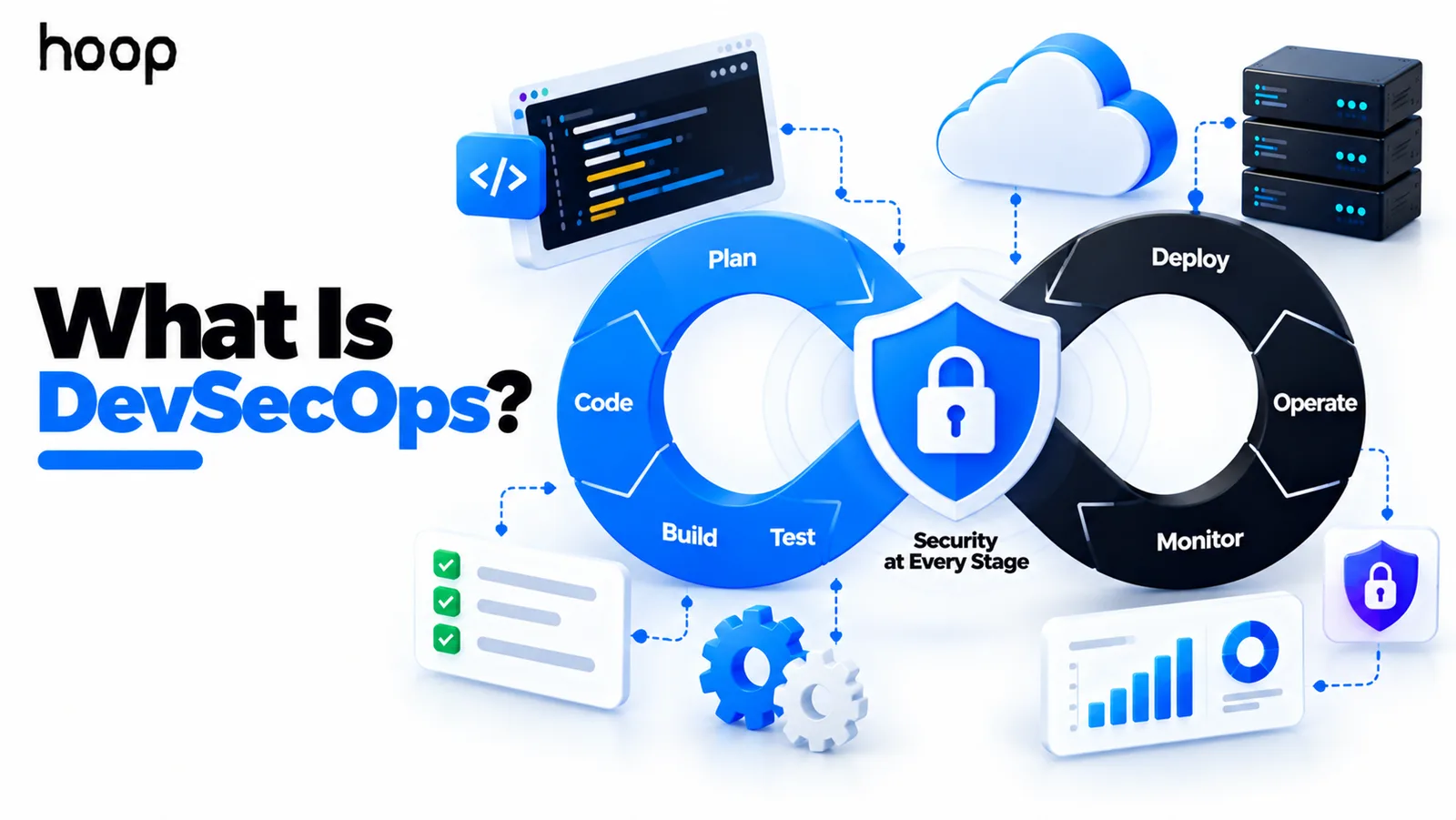
What Is DevSecOps? How Security Fits Into DevOps
DevSecOps puts security inside the delivery pipeline instead of in front of the release. Checks run during planning, coding, build, deployment, and production, so risk surfaces while it is still cheap to fix.
Sahar
Content Writer
What is DevSecOps? It is an approach that integrates security throughout software development, delivery, and operations. Instead of waiting for a final review, teams add security requirements and automated checks throughout the lifecycle. Policy controls and production monitoring continue that protection after release.
DevSecOps does not mean one engineer must handle development, operations, and cybersecurity alone. It means security becomes a shared and continuous part of how software moves from an idea to production.
Need this done right?
Hoop builds the strategy, design and development behind sites like this one — talk to us about yours.
What Does DevSecOps Mean?
DevSecOps combines development, security, and operations into one coordinated software delivery model. Developers still build features, operations teams still run systems, and security specialists still provide deep expertise.
The difference is that security is not treated as a separate queue at the end. Security feedback appears during planning, coding, testing, infrastructure changes, deployment, and production operations.
That makes the DevSecOps meaning broader than a list of scanners. The goal is to help teams identify meaningful risk earlier while keeping delivery repeatable and reliable.
Why Was DevSecOps Created?
Traditional software projects often handled security late. A team might finish development, prepare a release, and then send the product for security review.
A serious finding at that stage can force expensive rework. Developers may need to change architecture, replace a dependency, or redesign an authentication flow just before launch.
Modern teams release more frequently, so late security reviews create even more friction. DevSecOps moves security feedback closer to the work that created the risk.
Finding a vulnerable package during development is easier than finding it after production deployment. Detecting an exposed credential before merge is safer than rotating it after leakage.
DevSecOps vs DevOps: What Is the Difference?
DevOps improves collaboration between development and operations across the software lifecycle. It focuses on repeatable delivery, automation, monitoring, infrastructure, and shared ownership.
DevSecOps extends that model by making security an explicit part of those same workflows. The security work is not placed beside DevOps. It is built into the delivery system.
This is why mature Cloud and DevOps services often include security scanning, secrets controls, policy checks, and secure infrastructure practices.
The relationship is simple: DevOps asks how teams can deliver software safely and efficiently. DevSecOps makes security risk part of that answer from the beginning.
How Does DevSecOps Work?
DevSecOps works by adding security decisions and feedback to each stage of the software lifecycle. Teams do not rely on one final test to prove that an application is secure.
Planning
Teams identify sensitive data, trust boundaries, regulatory needs, and authentication requirements early. They also consider likely threats before architecture becomes expensive to change.
Coding
Developers follow secure coding standards and receive fast feedback while changes are still small. Code analysis, dependency checks, and secrets scanning support that feedback.
Building and Testing
The pipeline checks source code, packages, container images, and infrastructure definitions before release. It can also test application behavior in running environments.
Deployment
Deployment policies can verify required approvals, artifact integrity, environment configuration, and security gates before software reaches production.
Operations and Monitoring
Production monitoring looks for suspicious behavior, configuration drift, vulnerable workloads, and identity misuse. It also catches risks that only appear after deployment.
What Does Shift Left Mean in DevSecOps?
Shift left means moving security checks earlier in development. The phrase comes from software lifecycle diagrams, where planning and coding appear on the left.
The purpose is not to make developers become security specialists. The purpose is to give them useful feedback while they still understand the code and change.
A secrets scanner can stop an API key before it enters the shared repository. Dependency analysis can flag a vulnerable package before an application reaches staging.
Earlier detection usually means smaller fixes, less release disruption, and clearer ownership of the issue.
Does DevSecOps Also Shift Security Right?
Yes. Security cannot stop when deployment finishes. Some risks only appear when real users, traffic, identities, infrastructure, and integrations interact in production.
Shift-right practices include runtime monitoring, cloud posture checks, incident detection, identity monitoring, and configuration-drift detection. Production signals then feed back into development priorities.
A strong program therefore combines early prevention with continuous production awareness. Shift left reduces avoidable defects. Shift right helps teams catch changing and runtime risks.
How Does DevSecOps Work With CI/CD?
CI/CD provides the automated path that moves code from a repository toward production. DevSecOps adds security checks and policies to that same path.
A pipeline might run secrets scanning before build and static analysis after code checkout. Dependency and container scans can run before deployment.
Infrastructure policies can review Terraform or other configuration files. Dynamic testing can inspect a running staging environment before production approval.
The key idea is that security becomes part of normal delivery. Teams receive security feedback through the same system that already reports build and test results.
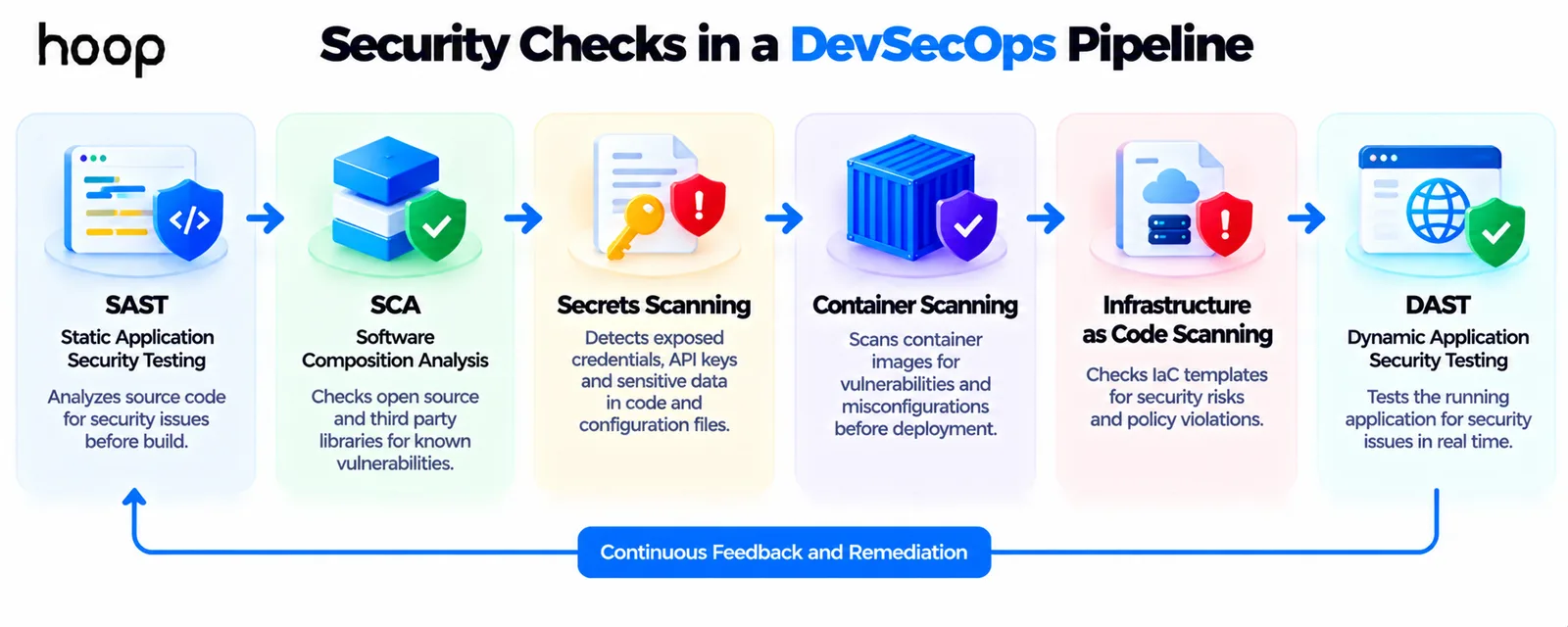
What Security Checks Run in a DevSecOps Pipeline?
Static Application Security Testing
Static Application Security Testing, or SAST, examines source code or compiled artifacts without running the application. It looks for risky patterns and implementation weaknesses.
Software Composition Analysis
Software Composition Analysis, or SCA, reviews third-party libraries and packages. It can identify known vulnerabilities, outdated components, and licensing concerns.
Secrets Scanning
Secrets scanning looks for credentials stored in places they should not be. Common examples include API keys, tokens, passwords, and private keys committed to source control.
Container Scanning
Container scanning inspects container images and their operating-system packages. It can identify vulnerable base images, outdated packages, and risky configuration choices.
Infrastructure as Code Scanning
Infrastructure as Code scanning reviews infrastructure definitions before deployment. It can catch public storage, broad permissions, open network rules, or missing encryption.
Dynamic Application Security Testing
Dynamic Application Security Testing, or DAST, tests a running application from the outside. It looks for exploitable behavior that code-only analysis may miss.
What Happens When a Security Check Fails?
A failed security check should produce a clear decision, not simply another alert. Teams first need to understand the severity, confidence, exploitability, and affected component.
High-risk findings can block a build or deployment. Lower-risk findings may create tracked remediation work without stopping the entire release.
This risk-based approach matters because noisy pipelines can create alert fatigue. If every minor warning blocks developers, teams may start ignoring the security system.
A security gate that stops a genuinely unsafe release is doing useful work. A gate that blocks everything without context can become another bottleneck.
What Is Software Supply Chain Security in DevSecOps?
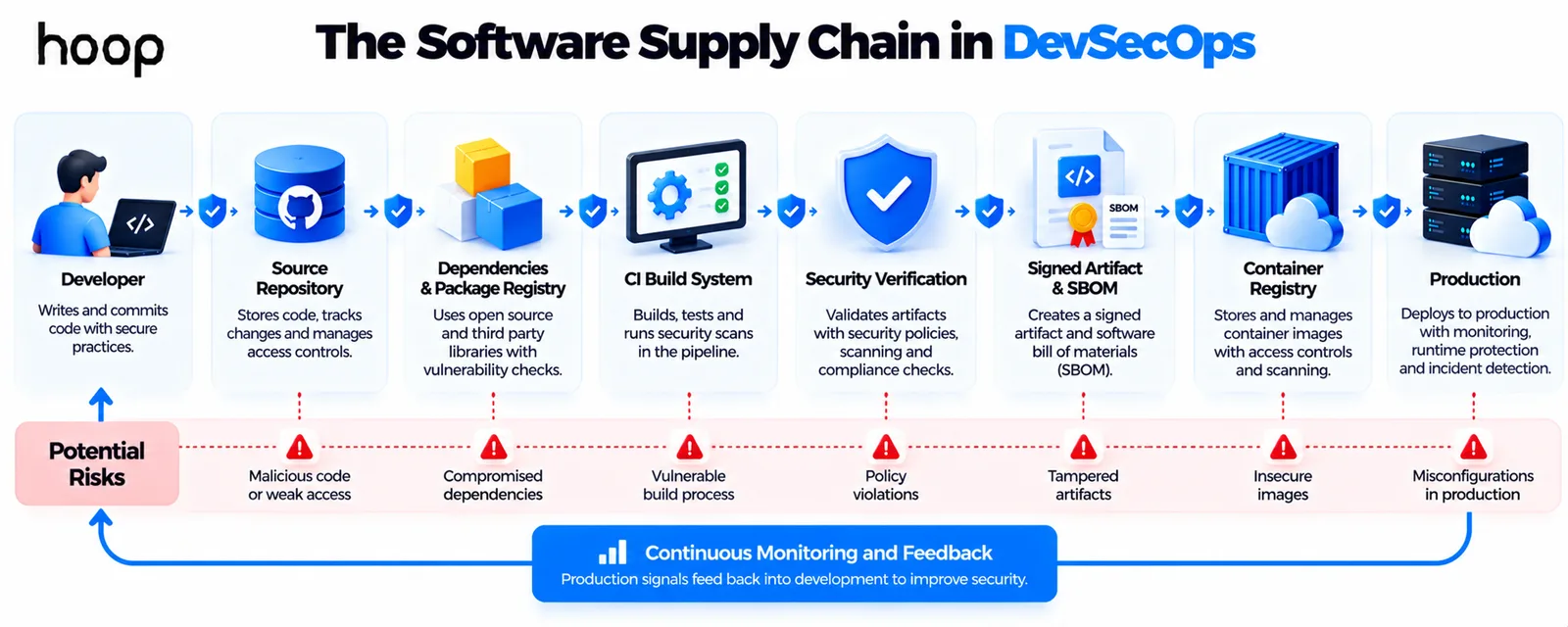
Modern software depends on more than first-party source code. Applications also rely on package registries, build systems, repositories, container registries, third-party actions, and open-source libraries.
Software supply chain security protects these dependencies and the path used to build software. Teams may verify trusted sources, track components, sign artifacts, and restrict build identities.
A Software Bill of Materials, or SBOM, can record the components included in a release. That record helps teams understand exposure when a dependency vulnerability appears.
The CI/CD system itself also needs protection. Repository permissions, runners, tokens, signing keys, and deployment credentials can all become valuable attack targets.
How Does DevSecOps Protect Cloud Infrastructure?
Cloud risk often comes from configuration rather than application code. A secure application can still be exposed by excessive permissions, public storage, or weak network rules.
A well-designed cloud infrastructure setup applies least-privilege access, encryption, network controls, logging, and reviewable infrastructure definitions.
DevSecOps brings those controls into normal engineering workflows. Infrastructure changes can be reviewed, tested, scanned, and approved before they modify a live environment.
This also makes cloud configuration easier to audit because important changes have a version history and a repeatable deployment path.
DevSecOps vs Application Security
Application security focuses on protecting software from design, coding, and runtime weaknesses. It includes practices such as threat modeling, secure coding, code review, and penetration testing.
DevSecOps focuses on how security work becomes part of continuous software delivery and operations. It connects application security, cloud controls, automation, and production feedback.
The two areas overlap heavily. Application security asks whether the software is secure. DevSecOps asks how security is built into the system that creates and runs it.
DevSecOps vs Cybersecurity
Cybersecurity covers a much wider set of risks than software delivery. It can include networks, endpoints, identities, employees, incident response, governance, compliance, and organizational risk.
DevSecOps is one part of that broader security program. It focuses specifically on integrating security into software development, infrastructure, delivery, and production operations.
Organizations may still need broader cybersecurity services for penetration testing, cloud security, VAPT, compliance readiness, and deeper risk assessment.
Does DevSecOps Replace Security Teams?
No. Shared responsibility does not remove the need for security specialists. It changes how specialists work with engineering teams.
Security experts can define standards, review architecture, model threats, guide incident response, and investigate difficult vulnerabilities. Developers can fix issues closer to the code.
Platform and operations engineers can secure infrastructure, deployment identities, secrets, and pipelines. The objective is collaboration with clear ownership, not one overloaded role.
What Does a DevSecOps Engineer Do?
A DevSecOps engineer helps make security controls practical inside engineering workflows. The role varies considerably between companies.
Typical work can include securing CI/CD pipelines, automating scans, and hardening cloud infrastructure. The role may also cover secrets, identity controls, and infrastructure code.
The engineer may help teams prioritize findings, tune noisy tools, and secure containers. They may also track dependencies and connect security events to monitoring systems.
The role usually requires software delivery knowledge and security knowledge. It is not simply a security analyst renamed with a DevOps title.
What Are the Benefits of DevSecOps?
The biggest benefits come from faster feedback and repeatable security controls. Security becomes part of normal engineering instead of a separate release-time event.
- Find vulnerabilities earlier, when fixes are usually smaller and easier to understand.
- Apply repeatable security checks across repositories, pipelines, containers, and infrastructure.
- Reduce late release surprises by making high-risk findings visible before production.
- Give developers faster security feedback without waiting for a separate review cycle.
- Create clearer evidence for security governance and compliance activities.
These benefits depend on good implementation. Adding many scanners without ownership or prioritization can create more noise instead of better security.
What Are the Challenges of DevSecOps?
DevSecOps can fail when tools produce more findings than teams can understand or fix. It can also create friction when security policies are added without engineering input.
- False positives can teach developers to ignore security results.
- Too many disconnected tools can create duplicate findings and ownership confusion.
- Security specialists and developers may use different language and risk priorities.
- Legacy applications may not fit modern automated controls easily.
- Poorly designed gates can slow delivery without reducing meaningful risk.
The answer is not weaker security. Teams need risk-based policies, useful feedback, clear ownership, and tools that fit the delivery workflow.
How Does DevSecOps Support Compliance?
DevSecOps can help teams apply required controls more consistently. Automated checks can verify encryption settings, access policies, dependency status, and infrastructure rules during delivery.
Version-controlled policies and infrastructure can also improve traceability. Teams can show when a control changed, who approved it, and which release used it.
However, DevSecOps does not automatically make an organization compliant. Compliance also depends on governance, documentation, policies, people, evidence, and operational behavior.
Does DevSecOps Replace Penetration Testing?
No. Automated pipeline checks provide frequent coverage, but they do not find every business-logic flaw or complex attack path.
Penetration testing can evaluate how several weaknesses combine in a real attack scenario. Human testers can also explore unusual workflows that automated tools do not understand.
A stronger security program combines continuous automated checks with deeper testing where risk justifies it.
How Is AI Changing DevSecOps?
AI can help teams generate code, tests, infrastructure definitions, and remediation suggestions faster. That increased output can also increase the volume of software requiring security review.
Automated security checks become more valuable when engineering teams produce more changes. They provide consistent baseline review across both human-written and AI-assisted code.
AI can also help summarize findings or suggest fixes, but teams still need to verify the result. Risk ownership cannot be delegated to a generated recommendation.
How Do You Start With DevSecOps?
Start with a small set of controls that address the highest-risk failure modes. Secrets scanning, dependency checks, branch protection, and basic IaC validation are practical starting points.
Then connect ownership to each finding. Developers should know who fixes application issues, while platform teams should own infrastructure and pipeline problems.
Add stronger controls as the delivery system matures. Threat modeling, container policies, DAST, artifact signing, and runtime monitoring can follow when the risk justifies them.
This gradual approach keeps the secure SDLC understandable. Teams improve coverage without turning the pipeline into a collection of disconnected scanners.
When Does a Business Need DevSecOps?
A business benefits from DevSecOps when software delivery is frequent enough that security cannot depend on occasional manual reviews.
The need becomes stronger when applications process sensitive data or use cloud infrastructure. Third-party dependencies and regulatory requirements increase the pressure further.
Small teams can still start simply. A useful first step might be secrets scanning, dependency checks, branch protection, and basic cloud-policy validation.
The security workflow can mature as the product, customer base, and risk profile grow.
Build Security Into the Delivery System
DevSecOps works when security becomes part of normal engineering. It should not become a separate obstacle before release. The goal is earlier feedback, clearer ownership, and safer production systems.
Start with the risks that matter most, automate repeatable checks, and keep specialists involved where judgment is needed. That creates a security process that can grow with the software instead of fighting against it.
“A security gate that stops a genuinely unsafe release is doing useful work. A gate that blocks everything without context can become another bottleneck.”
Key takeaways
- 01Shift left catches avoidable defects early; shift right catches runtime and configuration risk after release.
- 02Six pipeline checks carry most of the load: SAST, SCA, secrets, container, IaC, and DAST.
- 03Gate on risk, not on every finding — noisy pipelines train developers to ignore security results.
- 04It does not replace security specialists or penetration testing; it changes when and how they engage.
Written by
Sahar
Content Writer
Frequently Asked
Questions
Everything you need to know before booking a strategy call. Can't find your answer? Contact us directly.
Yes, but that phrase can sound too simple. DevSecOps makes security a continuous part of DevOps workflows rather than a separate final review.
No. Teams can apply DevSecOps to cloud, on-premises, hybrid, desktop, mobile, or embedded software delivery.
No. Kubernetes can introduce useful security controls, but DevSecOps applies to many architectures that do not use container orchestration.
SAST inspects code or artifacts without running the application. DAST tests a running application from the outside for exploitable behavior.
Yes, if controls are noisy or poorly designed. Well-tuned automation can reduce late security rework and make release decisions faster.
Keep reading
All articles →
What Is Cloud Infrastructure? How the Cloud Actually Works
Oct 12, 2026 · 10 min read
What Is CI/CD? Continuous Integration and Delivery Explained
Oct 12, 2026 · 10 min read