Which Ecommerce Platform Is Best for SEO?
The best ecommerce platform for SEO depends on how much technical control your store needs and how much maintenance your team can handle. This guide compares Shopify, WooCommerce, BigCommerce, Wix, Squarespace, and Adobe Commerce across crawl control, content, speed, structured data, and scale.
Sahar
Content Writer
For most ecommerce stores, Shopify offers the strongest balance of SEO capability, reliability, and low technical overhead. WooCommerce gives you more control, while BigCommerce suits larger catalogs and Adobe Commerce suits complex enterprise requirements.
The best choice still depends on your team, catalog size, content strategy, and technical resources. A platform does not rank a store by itself. The platform determines how easily you can control crawlability, URLs, structured data, speed, content, and indexation.
Does Your Ecommerce Platform Actually Affect SEO?
Yes, your ecommerce platform affects SEO because the platform controls important technical and publishing functions. The platform can make optimization easy, limited, or expensive to maintain.
Google needs to discover, crawl, understand, and index your store pages. Your ecommerce system influences each stage through navigation, internal links, canonical tags, XML sitemaps, redirects, product markup, and page delivery.
Your platform does not decide whether your product deserves to rank. Search demand, page quality, links, internal linking, product information, and user experience still determine performance.
A store can publish hundreds of articles and gain little traffic when those pages target weak topics or provide thin answers. A strong platform cannot repair weak keyword targeting or unhelpful content.
Use the platform as the technical foundation. Then build the SEO strategy on top of that foundation. Hoop’s ecommerce SEO guide explains how product, category, technical, and content work fit together.
What Makes an Ecommerce Platform Good for SEO?
A strong SEO platform gives you control over the elements search engines need without creating unnecessary maintenance. You should judge each platform against 8 areas.
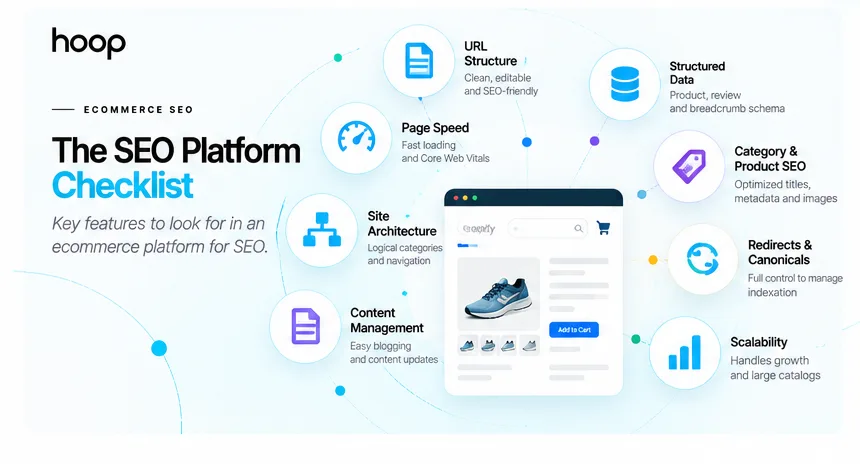
Clean URL control
You need editable product, category, blog, and landing-page URLs. Clean URLs help users understand page topics and make migrations easier to manage.
Fixed path segments do not automatically prevent rankings. However, flexible URL controls help complex stores organize large catalogs and redirect retired pages cleanly.
Crawl and indexation controls
Your platform should support XML sitemaps, canonical tags, robots directives, 301 redirects, and indexation settings. Large stores also need practical control over filter and parameter URLs.
Google warns that faceted navigation can create huge numbers of low-value URLs. Good ecommerce architecture keeps important categories and products easy to crawl.
Structured data
Product structured data can help Google understand price, availability, reviews, shipping, and other product details. Your platform should provide reliable markup or allow custom implementation.
Page speed and Core Web Vitals
Your theme, apps, plugins, hosting, scripts, and media all affect performance. Hosted platforms manage infrastructure for you. Self-hosted systems give you more control but more responsibility.
Product and category optimization
You need editable titles, descriptions, headings, image alt text, category copy, product copy, internal links, and merchandising blocks. Strong category pages often target higher-volume commercial queries than individual products.
Content publishing
Ecommerce SEO extends beyond product pages. Buying guides, comparisons, tutorials, gift guides, and product-care content can attract informational searches and support internal linking.
Redirect and migration control
Product ranges change constantly. Your platform should make 301 redirects easy when products disappear, categories merge, or URLs change.
Scalability
A 30-product store and a 30,000-product store create different SEO problems. Large catalogs need better handling for filters, variants, crawl paths, templates, feeds, and international storefronts.
Google’s ecommerce SEO guidance explains why site structure, product data, structured data, and crawlable links matter across ecommerce systems.
Which Platform Is Best for SEO?
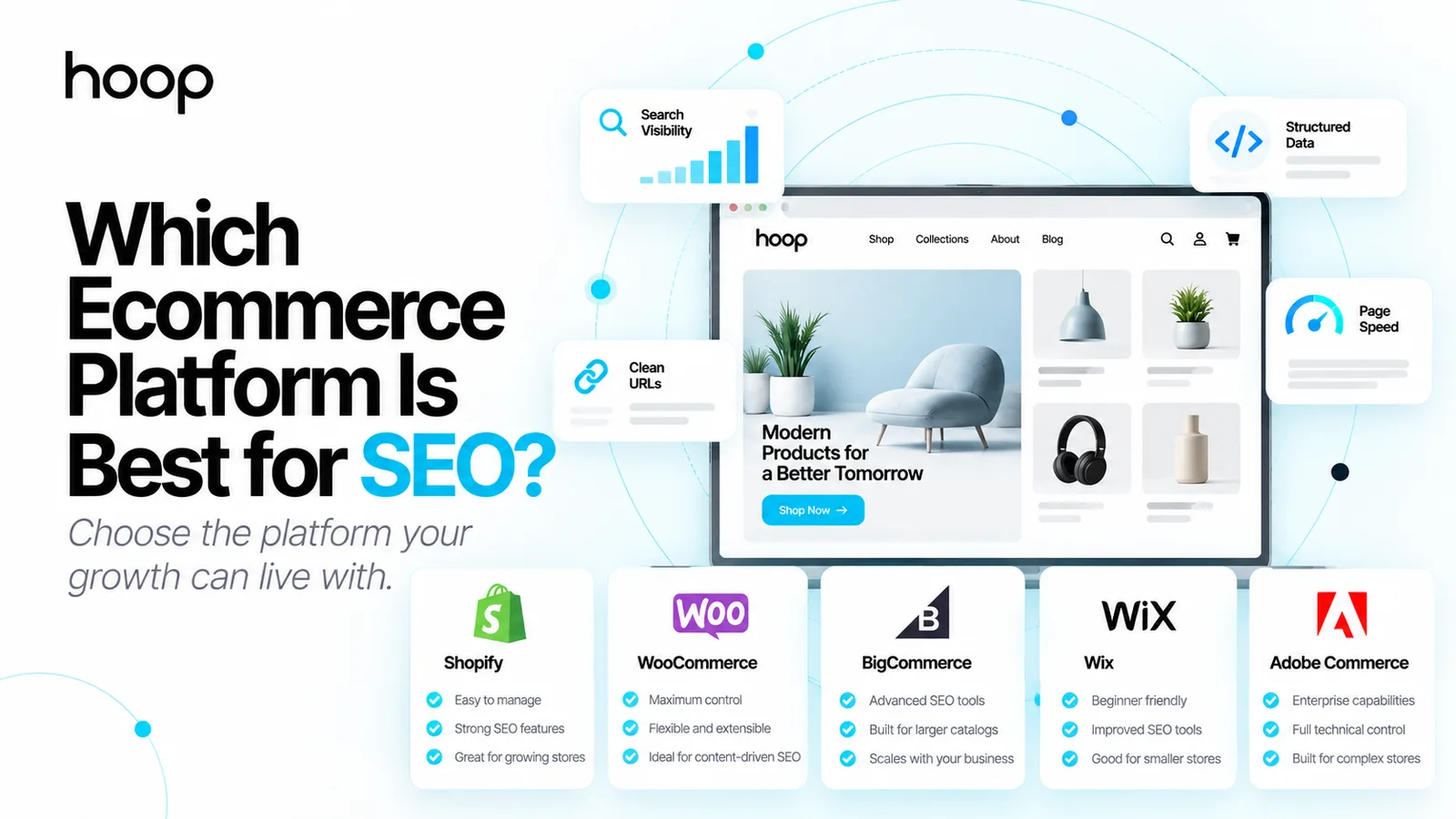
Shopify is the best all-around SEO choice for most stores, while WooCommerce provides the deepest control for technically capable teams. BigCommerce offers a strong hosted option for larger catalogs, and Adobe Commerce serves complex enterprise stores.
Shopify: best balance for most ecommerce teams
Shopify handles many technical SEO basics automatically. Shopify generates canonical tags, XML sitemaps, robots.txt, and SSL certificates. Store owners can edit page titles, meta descriptions, image alt text, and URL handles.
Shopify also manages hosting, security, and infrastructure. That setup reduces the number of technical tasks a small team must maintain.
The tradeoff involves platform structure. Shopify uses fixed content paths for products and collections. Advanced customizations can require theme development, apps, or headless architecture.
Shopify works well when you want reliable ecommerce operations without managing servers, plugin conflicts, or WordPress updates.
WooCommerce: best for maximum SEO control
WooCommerce runs on WordPress and gives you extensive control over code, hosting, plugins, templates, and content. You can customize URL structures, schema, redirects, metadata, internal linking systems, and content architecture.
WordPress also provides a strong publishing environment for content-heavy strategies. That advantage matters when guides, comparisons, resources, and editorial pages drive a large share of organic traffic.
The flexibility creates responsibility. Your hosting, caching, theme quality, plugin stack, security, and maintenance affect performance. A poorly managed WooCommerce store can become slow or unstable.
Choose WooCommerce when you have technical support and want control over the full SEO stack.
BigCommerce: best hosted option for large catalogs
BigCommerce provides editable URLs, automatic 301 redirects, built-in product microdata, robots.txt controls, and hosted infrastructure. The platform gives larger stores more native technical control without requiring WordPress maintenance.
BigCommerce suits catalog-heavy and business-to-business stores that need strong product architecture and fewer third-party dependencies.
The platform has a smaller developer and theme ecosystem than Shopify or WordPress. Your team should confirm integration needs before committing.
Wix: strong for smaller stores that value simplicity
Wix now provides far more SEO control than older platform comparisons suggest. Wix supports editable URL structures, canonical tags, structured data, robots.txt, bulk redirects, XML sitemaps, server-side rendering, and image optimization.
Those controls make Wix a realistic option for small ecommerce businesses. Wix also reduces technical setup for owners who manage their own site.
A growing store should still test catalog management, advanced filtering, international requirements, and custom technical workflows before choosing Wix for long-term scale.
Squarespace: suitable for design-led smaller catalogs
Squarespace automatically creates and updates XML sitemaps and includes core SEO settings. The platform suits visually led brands with smaller product ranges and simpler content structures.
Larger stores should evaluate catalog depth, filtering, variant complexity, technical customization, and integration needs carefully. A design-first system can become restrictive when SEO requirements become highly technical.
Adobe Commerce: best for enterprise complexity
Adobe Commerce provides deep control over metadata, sitemaps, URL rewrites, canonical settings, robots directives, store views, and large catalogs. The platform can support complex business rules, international setups, and enterprise integrations.
That power comes with greater development and infrastructure demands. Adobe Commerce fits organizations with engineering resources rather than small teams seeking fast setup.
Shopify vs WooCommerce: Which Gives You More Control?
WooCommerce gives you more raw SEO control, while Shopify gives you easier technical maintenance. The better choice depends on who will manage the store.
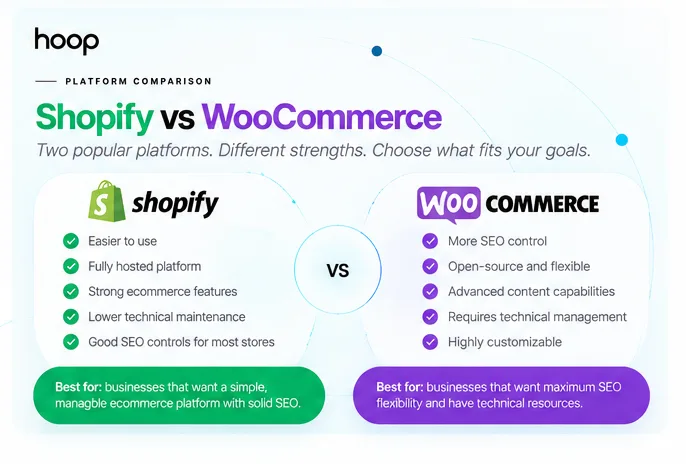
Shopify manages hosting, platform security, updates, and many technical defaults. Your team can spend more time on products, content, internal links, and conversion work.
WooCommerce lets developers change nearly every layer of the website. The team can control server configuration, templates, plugins, schema, URLs, caching, and content architecture.
Choose Shopify when simplicity and reliability matter more than unlimited customization. Choose WooCommerce when your strategy needs deep control and your team can maintain that control. Our Shopify vs WooCommerce vs custom comparison covers the wider platform decision.
Neither platform guarantees better rankings. A fast Shopify store with strong categories and useful content can outrank a poorly maintained WooCommerce store. A well-engineered WooCommerce store can support SEO workflows Shopify makes harder.
Is Shopify Good for SEO?
Yes, Shopify supports the SEO requirements most ecommerce stores need. Shopify provides automatic canonical tags, XML sitemaps, robots.txt generation, editable metadata, image alt text, SSL, and editable URL handles.
Shopify also supports international SEO through Shopify Markets features, including automatic hreflang options for market-specific pages.
The main limitations appear when a store needs unusual URL architecture, highly customized crawl controls, or a complex content model. Those cases can require development work or a headless setup.
For most small and mid-sized stores, the platform itself rarely causes the biggest SEO problem. Weak category structure, duplicate product copy, thin descriptions, app bloat, and poor internal linking usually create larger problems.
Is WooCommerce Better for SEO?
WooCommerce offers greater SEO flexibility, but greater flexibility does not guarantee stronger rankings. WooCommerce works best when developers manage hosting, performance, plugin quality, and technical settings carefully.
A content-led brand can benefit from WordPress publishing tools. A technical team can also build custom templates, schema, redirects, taxonomies, and programmatic internal links.
A small team without technical support can struggle with updates, plugin conflicts, security, caching, and server performance. Shopify can produce a better practical outcome for that team because the hosted platform removes those responsibilities.
The right decision depends on operational reality, not the longest feature list.
Which Platform Is Best for Large Stores?
BigCommerce and Adobe Commerce deserve serious consideration for large or complex catalogs. Shopify also scales well, especially when a business prefers managed infrastructure.
Large stores need more than editable title tags. A large catalog creates challenges around faceted navigation, product variants, pagination, discontinued products, duplicate URLs, inventory changes, and crawl efficiency.
BigCommerce provides strong native URL and crawl controls within a hosted system. Adobe Commerce offers deeper customization for enterprises with dedicated developers and complex integrations.
Shopify can support large stores, but teams should test required catalog logic, B2B features, international structure, and URL requirements before migration.
For custom storefronts, composable systems, or unusual product experiences, Hoop’s ecommerce development services cover Shopify, WooCommerce, Magento, headless commerce, and custom builds.
Which Platform Is Best for Small Businesses?
Shopify and Wix usually fit small businesses that want fewer technical responsibilities. WooCommerce fits small businesses that already use WordPress or have reliable technical support.
Small stores should avoid choosing a platform only because experts describe the platform as powerful. Unused flexibility creates no ranking benefit.
A small team needs dependable product pages, category pages, redirects, metadata, blogging, analytics, and performance. The team also needs enough time to publish useful content and improve merchandising.
Choose a system your team can maintain every week. Consistent execution usually beats theoretical flexibility.
Which Platform Is Best for Blogging?
WooCommerce gives content-heavy stores the strongest publishing flexibility because WordPress sits underneath the store. Shopify, Wix, Squarespace, BigCommerce, and Adobe Commerce can also publish content, but their editorial flexibility differs.
Blogging matters when customers research products before buying. Useful topics include comparisons, sizing guides, compatibility guides, tutorials, troubleshooting pages, buying guides, and care instructions.
A blog only helps when the content supports real search demand and connects to commercial pages. Publish fewer useful pages instead of hundreds of weak posts.
Your platform should let editors update content quickly, add internal links, create clean headings, manage images, and connect informational pages to categories and products.
Can You Rank an Ecommerce Store on Any Platform?
Yes, mainstream ecommerce platforms can rank when search engines can crawl useful pages and your SEO execution is strong. Platform limitations become important when they block a requirement your strategy genuinely needs.
Google does not rank a page because the page runs on Shopify, WooCommerce, Wix, BigCommerce, Squarespace, or Adobe Commerce. Google evaluates the accessible content and signals generated by the site.
Focus on category architecture, product quality, internal links, structured product information, page performance, useful content, and authority. Then use platform controls to support those goals.
Should You Move Platforms Just for SEO?
Do not migrate only because another platform has a longer SEO feature list. Migrate when your current system blocks important requirements that your business cannot solve reasonably.
A replatform changes URLs, templates, navigation, schema, internal links, scripts, analytics, and sometimes product data. Poor migration planning can remove pages from search or break accumulated authority.
Before moving, identify the exact SEO limitation. Then calculate whether the new platform solves the limitation without creating larger operational costs.
Preserve valuable URLs where possible. Map changed URLs with 301 redirects. Keep important copy, metadata, canonicals, structured data, and internal links intact. Submit the new sitemap and monitor indexing after launch.
What Should You Check Before Choosing a Platform?
Check the platform against your actual SEO workflow before signing a long-term contract. Use the following decision points.
| Check | Why it matters | What to confirm | Priority |
|---|---|---|---|
| URL control | Supports clean architecture and migrations | Editable handles, redirects, canonical behavior | High |
| Crawl control | Prevents indexation waste | Sitemaps, robots settings, filter handling | High |
| Product markup | Helps search engines understand products | Product and offer structured data | High |
| Performance | Supports users and search visibility | Hosting, theme weight, app or plugin load | High |
| Content tools | Supports informational demand | Blog, guides, internal links, editing workflow | Medium |
| Catalog scale | Prevents technical debt during growth | Variants, filters, pagination, large categories | High |
| International SEO | Supports market expansion | Hreflang, language URLs, regional stores | Medium |
| Maintenance | Determines long-term execution | Updates, security, hosting, developer needs | High |
A platform should fit both your current store and your next stage of growth. The most flexible system can still become the wrong choice when nobody maintains that flexibility.
Choose a Platform Your SEO Strategy Can Sustain
The answer to which ecommerce platform is best for SEO depends on the people operating the store. Shopify fits most teams that want strong SEO controls with lower maintenance. WooCommerce fits teams that want maximum flexibility. BigCommerce suits larger hosted catalogs, while Adobe Commerce fits enterprise complexity.
Choose the platform that lets your team execute consistently without fighting the technology. If your store needs better organic visibility, technical fixes, category strategy, and product optimization, explore Hoop’s ecommerce SEO services and build the search foundation around your real growth goals.
“Unused flexibility creates no ranking benefit.”
Key takeaways
- 01Shopify balances SEO capability with the least technical overhead for most teams.
- 02WooCommerce gives the deepest control — and hands you the maintenance that comes with it.
- 03Google does not favour any platform; it evaluates the pages each one produces.
- 04Migrate only when the current system blocks a requirement you genuinely need.
Written by
Sahar
Content Writer
Frequently Asked
Questions
Everything you need to know before booking a strategy call. Can't find your answer? Contact us directly.
WooCommerce gives you more technical control, while Shopify gives you easier maintenance and strong built-in SEO features. Choose based on your team’s technical capacity and content needs.
No. Shopify supports core ecommerce SEO requirements, including canonical tags, sitemaps, metadata, alt text, redirects, SSL, and editable URL handles.
No. Google does not give WordPress or WooCommerce an automatic ranking advantage. Google evaluates crawlable pages, content quality, relevance, structure, performance, and other search signals.
Yes. Wix supports editable URLs, structured data, canonical tags, robots.txt, sitemaps, redirects, and server-side rendering. Your market and execution determine results.
No, unless your current platform blocks requirements your business genuinely needs. Fix content, architecture, performance, internal linking, and technical errors before assuming migration will solve rankings.