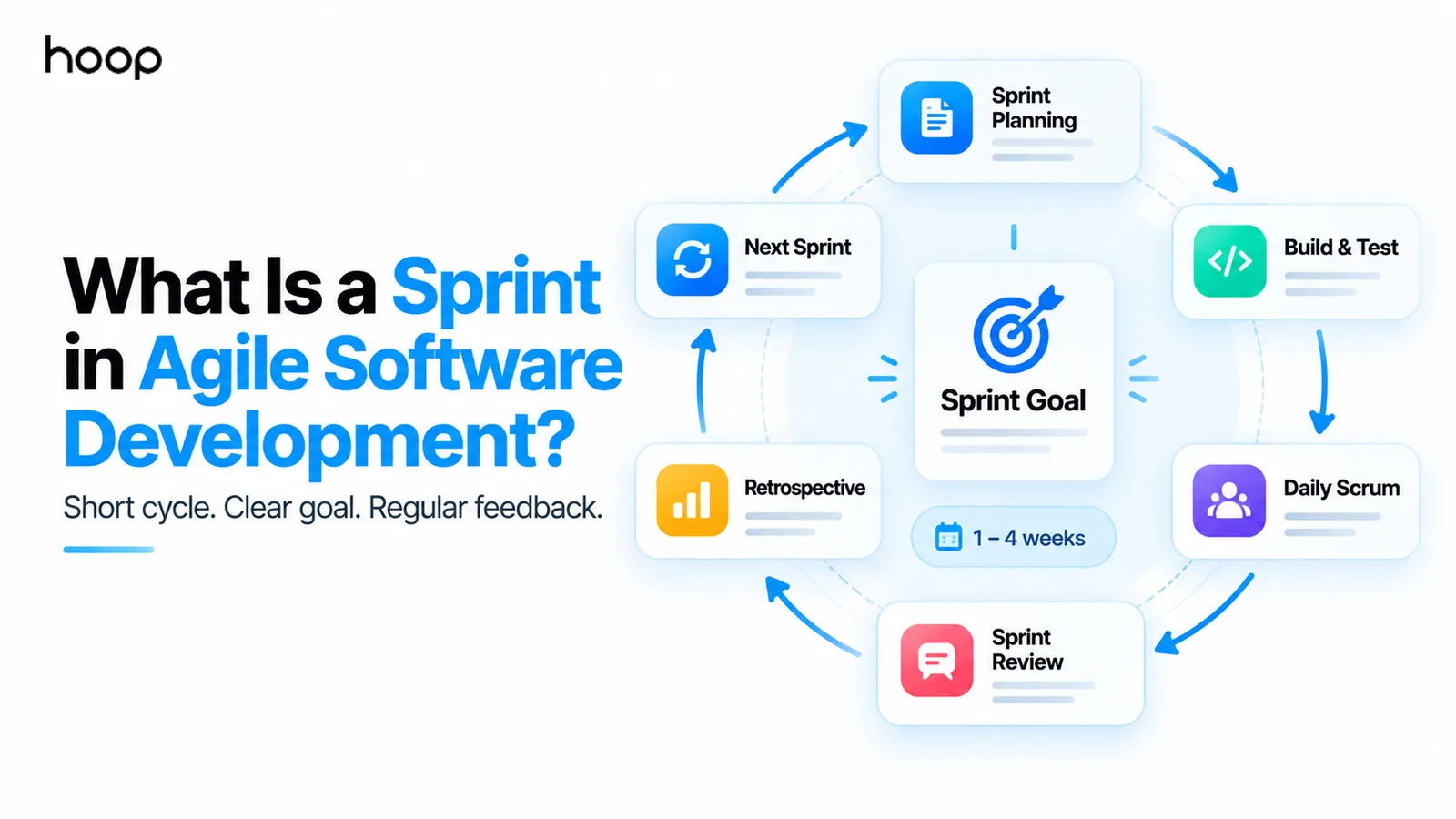
What Is a Sprint in Agile Software Development? A Clear Guide
A sprint is a fixed work cycle used in Scrum to help teams focus on a short-term goal, deliver a usable increment, gather feedback, and adapt the next cycle. Learn what happens inside a sprint and what teams often misunderstand about it.
Sahar
Content Writer
What is a sprint in Agile software development? A sprint is a fixed-length Scrum work cycle that turns selected backlog items into a usable increment. The team pursues one Sprint Goal, inspects results, gathers feedback, and adjusts future work.
The word “sprint” can sound like a demand to work faster. That is not the purpose. A sprint creates a short planning horizon and a regular feedback rhythm. The team works at a sustainable pace inside a fixed timebox.
The official Scrum Guide defines a sprint as a fixed-length event of one month or less. Many software teams use 1-week, 2-week, or 4-week sprints. A new sprint begins after the previous sprint ends.
This structure helps product teams avoid one large delivery at the end of a long project. Teams can plan a smaller outcome, build it, inspect it, and learn before committing to the next cycle.
What Is the Purpose of a Sprint?
A sprint gives a Scrum team a short period for focused delivery, inspection, and adaptation. The team does not need to predict an entire project before development starts.
A useful sprint creates 4 practical benefits. It gives the team a shared objective, limits the planning horizon, creates a predictable feedback point, and produces evidence for the next decision.
A sprint also protects focus. New ideas can enter the Product Backlog without constantly disrupting work already in progress. The team can discuss urgent changes, but the Sprint Goal remains the central reference point.
This rhythm works well in custom software development because requirements often become clearer after users see working software. A short cycle exposes assumptions early and makes changes cheaper than a late project-wide correction.
How Long Is a Sprint?
The Scrum Guide allows a sprint to last one month or less. Teams commonly choose 1, 2, or 4 weeks. The chosen duration usually stays consistent across successive sprints.
Shorter sprints create faster feedback and reduce the amount of work exposed to uncertainty. Longer sprints give teams more room for complex work, but feedback arrives less frequently.
The team should not change sprint length whenever work becomes difficult. A consistent cadence helps the team understand capacity and compare outcomes across cycles.
What Is a Sprint Goal?
A Sprint Goal states the single outcome the Scrum team wants to achieve during the sprint. The selected work should support that outcome.
For example, a finance platform might use this Sprint Goal:
Let account owners export and share their monthly financial reports.
The Sprint Backlog could include an export endpoint, permission checks, a CSV download button, automated tests, and error handling. Those items belong together because they support one useful outcome.
A weak sprint often becomes a container for unrelated tickets. A clear Sprint Goal gives the team a reason to prioritize one task over another when new information appears.
What Is a Sprint Backlog?
The Sprint Backlog combines the Sprint Goal, selected Product Backlog items, and the plan for delivering them. The developers update that plan as they learn during the sprint.
The Product Backlog and Sprint Backlog serve different purposes.
The Product Backlog contains ordered work that may improve the product. The Sprint Backlog contains the work currently selected to support the Sprint Goal.
A backlog item does not become a permanent promise simply because someone added it to the Product Backlog. Sprint Planning creates a near-term forecast based on priority, capacity, and what the team understands at that point.
How Do User Stories Fit Into a Sprint?
User stories can describe product needs that a team selects for a sprint, but Scrum does not require user stories. Many teams use them because they keep work connected to user outcomes.
A common format looks like this:
As an account owner, I want to download my monthly report so I can share it with my finance team.
The development team can break that story into technical work such as API changes, interface updates, permissions, tests, and analytics. Other teams use requirements, tasks, bugs, or other backlog-item formats instead.
The format matters less than clarity. The team needs enough information to understand the desired outcome and determine when the work meets its Definition of Done.
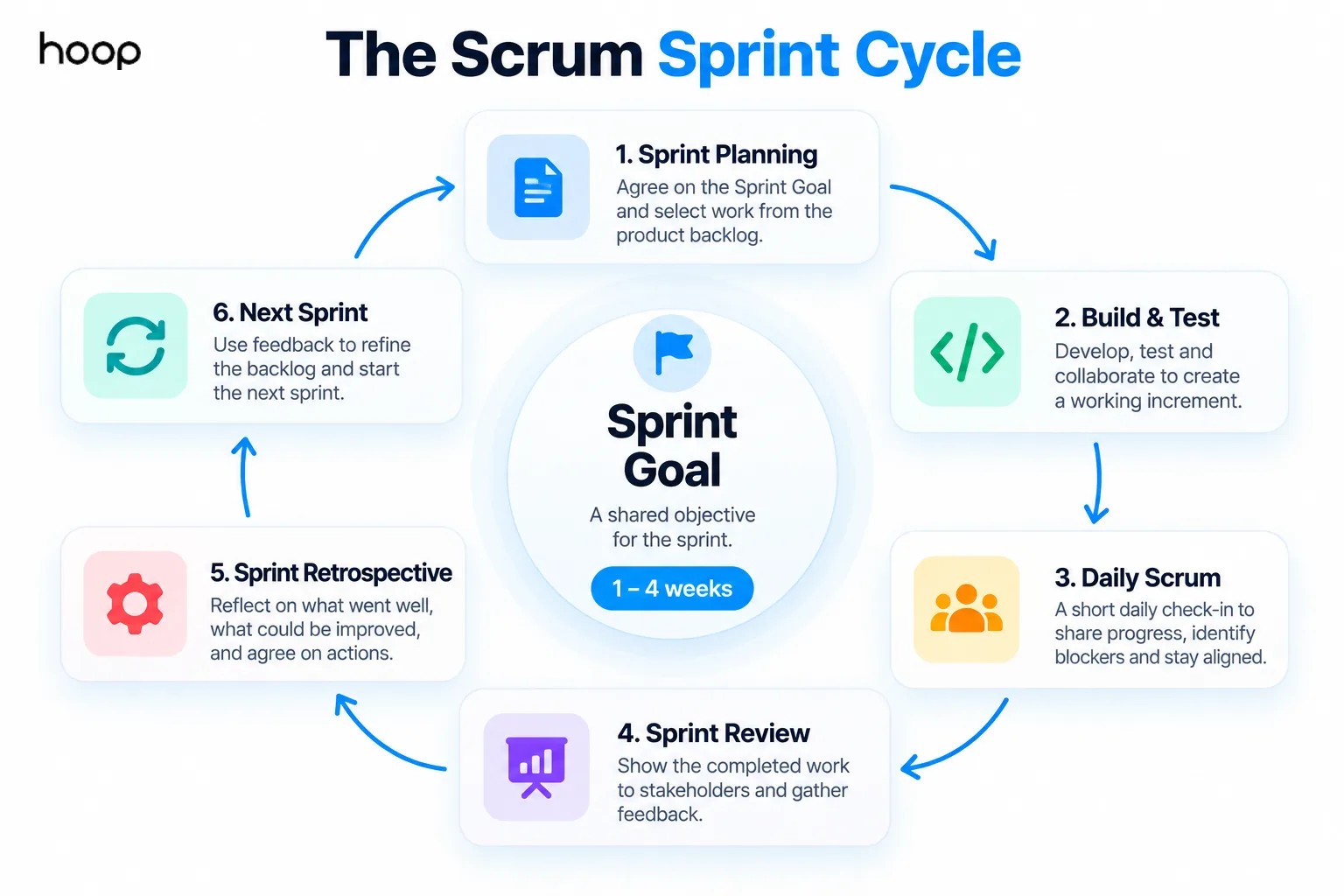
What Happens During a Sprint?
A sprint contains Sprint Planning, Daily Scrums, the development work, the Sprint Review, and the Sprint Retrospective. Each activity supports inspection and adaptation.
Sprint Planning sets the goal and initial plan
Sprint Planning starts the sprint by defining why the sprint matters, what work supports the goal, and how delivery can begin. The team considers product priorities, capacity, dependencies, and the Definition of Done.
Planning should create a realistic forecast. The team should not fill every available hour with tickets. Unexpected technical work, collaboration, debugging, and review still consume capacity.
Development and testing create the increment
The team designs, builds, integrates, tests, and reviews the selected work throughout the sprint. Testing should not wait until the final day.
A usable increment needs working software that meets the team’s Definition of Done. Half-finished code does not become complete because the sprint ends.
Hoop uses sprint-based delivery across projects such as MVP development services, where frequent working demos help founders validate decisions before expanding the product.
The Daily Scrum helps developers adapt the plan
The Daily Scrum is a 15-minute event for developers to inspect progress toward the Sprint Goal and adapt their plan. The meeting is not a management status report.
Developers can discuss progress, blockers, dependencies, and immediate coordination. Teams can communicate outside the Daily Scrum whenever a problem needs attention.
The Sprint Review inspects the product
The Sprint Review examines the sprint outcome with stakeholders and uses feedback to inform what happens next. The event should be a working discussion, not only a presentation.
The team can demonstrate completed functionality, discuss changes in the market or product, and update the Product Backlog based on new information.
The Sprint Retrospective improves how the team works
The Sprint Retrospective focuses on team effectiveness, quality, tools, interactions, and process. The team identifies changes that can improve the next sprint.
The Sprint Review asks, “What did we build, and what should the product do next?” The retrospective asks, “How can we work better?”
Does a Sprint Mean Working Faster?
No. A sprint defines a fixed duration, not an unsustainable pace. Teams should not treat the word “sprint” as permission for routine overtime.
The purpose is short-cycle learning. A team plans a manageable amount, works toward the goal, inspects the result, and adjusts the next cycle.
Poor sprint management can still create pressure. Overloaded backlogs, unrealistic commitments, changing priorities, and individual performance targets can turn a useful framework into deadline management.
A healthy sprint protects quality. The Scrum Guide explicitly states that quality does not decrease during a sprint.
What If Work Is Not Finished by the End of a Sprint?
Unfinished work returns for reassessment instead of becoming “Done” by default. The team then decides whether the item still matters and how to handle it next.
The team should first inspect why the work remained unfinished. Common causes include excessive scope, unclear requirements, underestimated complexity, hidden dependencies, production incidents, or oversized backlog items.
The key question is not “Who failed?” The useful questions are:
- Did the team achieve the Sprint Goal?
- Was the selected scope realistic?
- Did new information change the work?
- Should larger items be split differently?
- Does the unfinished work still deserve priority?
Repeated carryover signals a planning or workflow problem. Automatically moving every unfinished item into the next sprint can hide that problem.
Can Scope Change During a Sprint?
Yes. A Scrum team can clarify and renegotiate scope as it learns, provided changes do not endanger the Sprint Goal. Scrum does not require the team to ignore new information for the entire timebox.
The Sprint Goal provides stability while the exact path remains flexible. The Product Owner and developers can discuss scope when technical discoveries or new information affect delivery.
A major business change can make the Sprint Goal obsolete. The Product Owner can cancel the sprint in that situation.
Sprint vs Deadline: What Is the Difference?
A sprint is a repeating delivery and learning cycle. A deadline is a date by which an outcome is expected. Treating every sprint item as an individual hard deadline changes how the system behaves.
A sprint creates a synchronization point for the whole team. The team can inspect the product, the plan, and the working process on a predictable cadence.
Deadlines can still exist around launches, regulations, contracts, or market events. Scrum does not remove real dates. The sprint helps the team manage work and uncertainty before those dates arrive.
Sprint vs Iteration: Are They the Same?
A sprint is Scrum’s specific term for its fixed-length iteration. “Iteration” is a broader Agile term. Other Agile approaches can use iterations without following Scrum.
Sprint vs Kanban: Which Approach Fits Which Work?
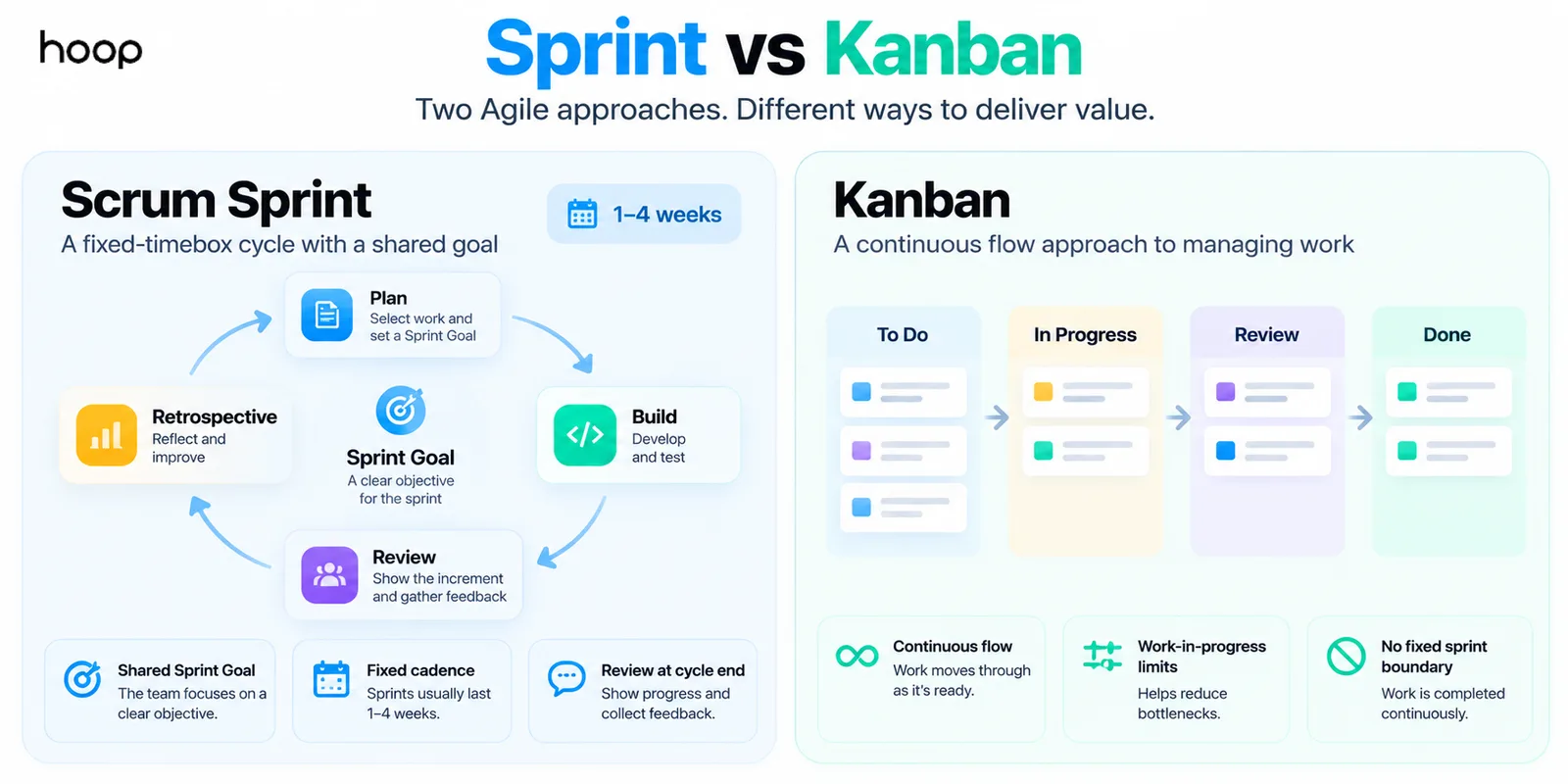
Scrum sprints organize work into fixed timeboxes, while Kanban usually manages work as a continuous flow. Neither approach fits every team.
Scrum works well when a team benefits from a shared short-term objective and regular review cadence. Product teams building related features often benefit from that rhythm.
Kanban can fit teams that receive unpredictable work throughout the week. Support, operations, maintenance, and service teams often need continuous intake rather than a protected sprint boundary.
Kanban also emphasizes Work in Progress limits. Those limits help teams reduce bottlenecks and finish existing work before starting too much new work.
What Are Story Points and Velocity?
Story points and velocity are optional planning practices, not requirements of Scrum. Teams can use other forecasting methods.
Story points usually express relative size or complexity rather than direct hours. A 5-point item is not automatically a promise of 5 hours or 5 days.
Velocity describes the amount of estimated work a team completes across sprints. Teams sometimes use historical velocity to inform future forecasts.
Velocity should not become an individual productivity score. Comparing developers or teams by points encourages gaming and damages the purpose of estimation.
What Makes a Sprint Effective?
An effective sprint combines a clear goal, manageable work, quality standards, regular inspection, and a sustainable pace. The ceremonies alone do not create value.
A strong sprint usually has these characteristics:
- Defines one meaningful Sprint Goal.
- Selects work that supports that goal.
- Keeps backlog items small enough to finish.
- Protects quality through testing and review.
- Uses the Daily Scrum for coordination.
- Invites useful stakeholder feedback.
- Turns retrospective findings into action.
Teams should also maintain a healthy Product Backlog. Sprint Planning becomes difficult when work arrives with unclear requirements, unknown dependencies, or no priority.
What Are Common Sprint Mistakes?
Most sprint problems come from using the timebox as a pressure mechanism instead of a feedback system. The following mistakes weaken the model.
Treating the sprint as a deadline
A team starts rushing when every ticket becomes a promise. The Sprint Goal should guide decisions when individual work changes.
Starting without a shared Sprint Goal
A random set of unrelated tasks gives the team little reason to synchronize. A shared outcome creates focus.
Loading too much work
An overloaded Sprint Backlog increases carryover and encourages shortcuts. Capacity should reflect meetings, testing, reviews, support, and uncertainty.
Changing priorities every day
Constantly inserting new work destroys the short planning horizon. Urgent issues require explicit trade-offs, not silent backlog growth.
Measuring individuals by story points
Story points estimate work. They do not provide a reliable measure of developer productivity.
Skipping the review or retrospective
Skipping feedback removes the learning loop. Teams need both product inspection and process improvement.
Using sprints for the wrong type of work
A team handling constant unplanned requests may gain more from continuous flow. Process should fit the work instead of forcing every team into Scrum.
Sprint Quick Reference
| Sprint Element | Main Purpose | Typical Timing | Main Question |
|---|---|---|---|
| Sprint | Create a usable increment and learn | 1–4 weeks commonly; one month or less in Scrum | What value can we create next? |
| Sprint Planning | Set the goal and initial plan | Start of sprint | Why, what, and how will we work? |
| Daily Scrum | Inspect progress and adapt the plan | Daily, 15 minutes | Are we moving toward the Sprint Goal? |
| Sprint Review | Inspect the product with stakeholders | Near sprint end | What did we create, and what did we learn? |
| Sprint Retrospective | Improve quality and effectiveness | End of sprint | How can the team work better next time? |
Does Every Agile Team Use Sprints?
No. Sprints belong to Scrum, while Agile describes a broader family of principles and approaches. Teams can work iteratively without using Scrum.
Kanban often uses continuous flow. Extreme Programming can use iterations with different practices. Some product teams combine techniques while keeping a clear operating model.
The important question is not whether a team uses Agile vocabulary. The process should help the team deliver useful software, learn from evidence, maintain quality, and respond to change.
How Hoop Uses Sprints in Software Projects
Sprints give clients regular visibility into working software instead of long periods of silent development. Each cycle creates a natural point for demos, feedback, and priority decisions.
Hoop’s software development services use sprint-based delivery where the project benefits from iterative development. The exact cadence depends on the product, scope, team, and delivery model.
A sprint does not remove planning. A good sprint turns planning into a shorter, evidence-based cycle. Teams decide what matters now, build it well, inspect the result, and use what they learned next.
“Half-finished code does not become complete because the sprint ends.”
Key takeaways
- 01“Sprint” names a fixed duration, not an unsustainable pace — quality does not drop inside it.
- 02One clear Sprint Goal is what separates a sprint from a container of unrelated tickets.
- 03Unfinished work is reassessed, not silently rolled forward — repeated carryover is a signal.
- 04Story points and velocity are optional, and neither measures individual productivity.
Written by
Sahar
Content Writer
Frequently Asked
Questions
Everything you need to know before booking a strategy call. Can't find your answer? Contact us directly.
A sprint is a fixed work cycle used in Scrum to pursue a short-term goal and create a usable product increment. Teams commonly use 1-week, 2-week, or 4-week cycles.
A Scrum sprint lasts one month or less. Many software teams choose 1, 2, or 4 weeks and keep that duration consistent.
Unfinished work is not automatically counted as complete. The team reassesses the remaining work, learns why it slipped, and decides whether to plan it again.
No. Scrum uses sprints, while other Agile approaches can use iterations or continuous flow without fixed sprint boundaries.
Scrum is the full framework, while a sprint is the fixed-length container for Scrum’s events and product work. Sprint Planning, Daily Scrums, Sprint Review, and Sprint Retrospective happen within the sprint.
Keep reading
All articles →
What Is Scrum in Agile Software Development?
Sep 22, 2026 · 10 min read
What Is Adaptive Software Development? A Practical ASD Guide
Sep 21, 2026 · 10 min read