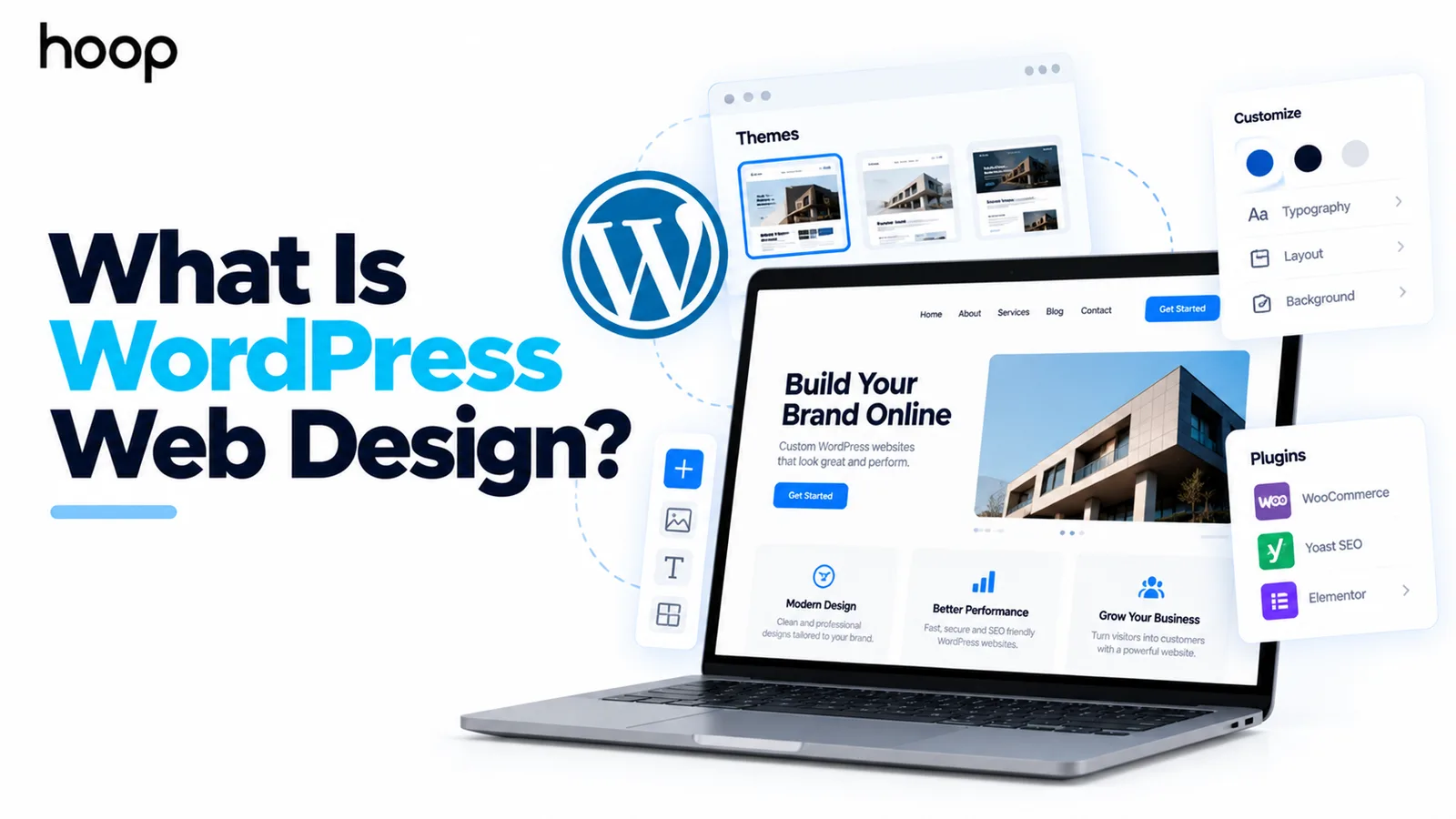
What Is WordPress Web Design? How WordPress Websites Actually Work
WordPress web design means building a website experience on top of the WordPress CMS. Five layers do the work — core, theme, plugins, content and database, and hosting — and a fully custom design can still run on WordPress.
Sahar
Content Writer
WordPress web design means planning, designing, and building a website that uses WordPress as its content management system. WordPress manages content and site administration, while themes, plugins, frontend code, and hosting shape the finished website.
The phrase can describe anything from a simple theme-based business site to a fully custom WordPress build. The important distinction is that WordPress is the platform underneath the website, not the design itself.
What Is WordPress Web Design?
What is WordPress web design? It is the process of creating a website experience on top of the WordPress content management system. The process covers structure, layout, branding, responsive behavior, content editing, functionality, performance, and ongoing maintenance.
A professional project starts with users and business goals. The designer then decides how pages should work, what content users need, and what actions matter. WordPress provides the content management layer that supports those decisions.
You can build WordPress sites with pre-built themes, visual builders, block-based editing, custom themes, or combinations of those methods. The implementation changes, but the core job stays the same: create a usable website that the business can manage.
What Does WordPress Actually Do?
WordPress stores, organizes, and publishes website content through a browser-based administration system. The platform lets authorized users manage pages, posts, media, menus, users, and settings without editing raw files for routine updates.
WordPress also connects website content with a database. A visitor requests a page, and WordPress retrieves the relevant content. The active theme then determines how the browser presents that content.
That separation matters. Your website can change its visual presentation without rewriting every article or service page. Your team can also update content while developers maintain the underlying system.
Readers who want a deeper explanation of content management architecture can review Hoop Interactive’s CMS web design guide. The WordPress-specific question is how that CMS becomes a finished website.
How Does a WordPress Website Work?
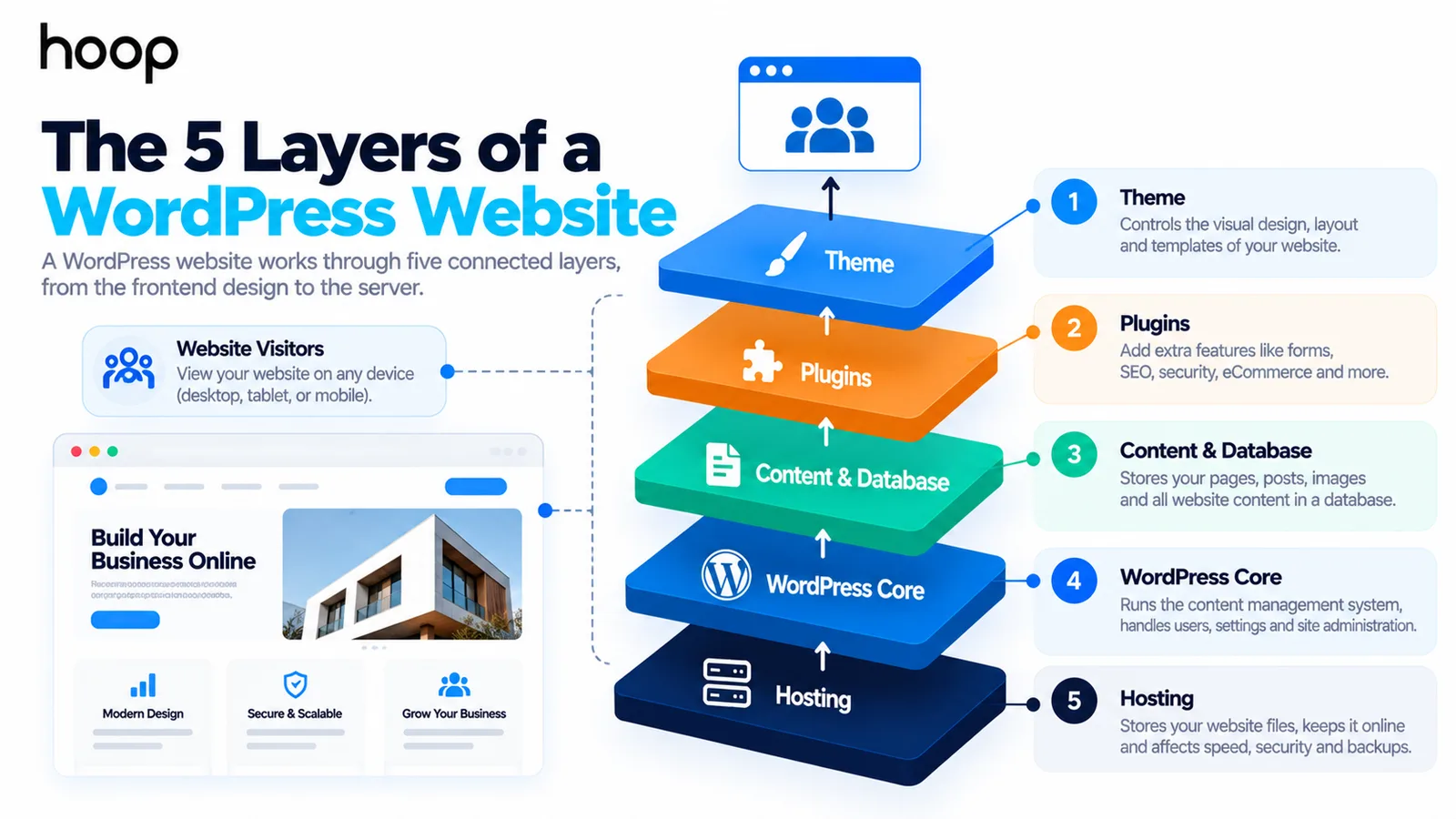
A WordPress website combines 5 main layers: WordPress core, a theme, plugins, stored content, and hosting. Each layer has a different responsibility, so changing one layer can affect the others.
| Component | What it does | Common example | Why it matters |
|---|---|---|---|
| WordPress core | Runs the CMS and administration system | Dashboard, users, editor | Provides the base platform |
| Theme | Controls presentation and templates | Custom theme, block theme | Shapes layout and visual output |
| Plugins | Add defined functionality | Forms, ecommerce, SEO controls | Extend features without rewriting core |
| Content and database | Store editable information | Pages, posts, products | Keep content separate from presentation |
| Hosting | Runs the site on a server | Managed WordPress hosting | Affects speed, uptime, backups, and security |
WordPress Core Provides the CMS
WordPress core contains the main publishing, user, media, and administration functions. Developers normally avoid editing core files directly because updates can replace those changes.
The Theme Controls Presentation
A theme defines templates, visual styles, and frontend presentation. A custom theme can follow a unique design system while still using WordPress for content management.
Plugins Add Specific Functions
Plugins extend WordPress with functions such as forms, ecommerce, memberships, caching, or search optimization. Professional builds choose plugins against defined requirements instead of adding features without a clear purpose.
Is WordPress a Website Builder?
WordPress is primarily a content management system, although website-building tools can operate inside WordPress. That distinction explains why WordPress can feel very different across 2 websites.
One site can use the native Gutenberg block editor. Another can use Elementor or Divi. A third can use a custom theme with carefully controlled editing fields. All 3 sites still run WordPress.
A hosted website builder usually combines hosting, editing, templates, and platform rules into one managed product. Self-hosted WordPress gives developers much greater control over hosting, themes, plugins, custom code, and data.
What Is the Difference Between WordPress Web Design and WordPress Development?
WordPress web design focuses on the user-facing experience, while WordPress development builds or extends the technical system behind that experience. Real projects often combine both disciplines.
Design work covers information architecture, page hierarchy, typography, branding, navigation, mobile layouts, accessibility, and conversion paths. Development translates those decisions into working templates, components, integrations, and editing controls.
Deeper development can involve PHP, HTML, Cascading Style Sheets (CSS), JavaScript, and application programming interfaces (APIs). It can also include custom post types, database logic, and custom plugins.
Businesses with deeper technical requirements can use professional WordPress development services. That approach avoids forcing complex needs into an unsuitable off-the-shelf setup.
Do WordPress Designers Need to Know Code?
Not every WordPress designer needs to write code, but coding knowledge expands control and reduces dependence on pre-built tools. The required skill level depends on the project.
A designer can create simple sites with blocks or visual builders. More demanding work often requires CSS for precise styling, JavaScript for interactive behavior, and PHP for theme or backend customization.
Coding skill also helps professionals diagnose problems that visual interfaces hide. A designer who understands the generated markup can make better decisions about accessibility, responsive behavior, and performance.
What Are WordPress Themes?
A WordPress theme controls how stored content appears on the frontend. Themes define templates for pages, posts, archives, headers, footers, and other presentation patterns.
A pre-built theme offers ready-made layouts and settings. A customized theme starts from an existing foundation and changes selected presentation elements. A custom WordPress theme builds templates around the project’s actual content, brand, and editing requirements.
That means “WordPress” and “template website” are not synonyms. A completely custom visual system can still use WordPress as the CMS.
What Do WordPress Plugins Do?
WordPress plugins add functions that WordPress core or the active theme does not provide. Examples include contact forms, WooCommerce stores, membership controls, caching, redirects, and structured SEO settings.
Plugins solve real problems, but plugin count alone does not measure site quality. One poorly engineered plugin can create more trouble than 10 focused plugins with clear responsibilities.
A professional build evaluates plugin quality, update history, compatibility, support, database impact, frontend scripts, and security exposure. The goal is a maintainable stack, not the largest possible feature list.
Do You Need a Page Builder for WordPress Web Design?
No, a WordPress website does not require a page builder. You can use Gutenberg, a visual builder, a custom theme, or a controlled combination of approaches.
Visual builders such as Elementor and Divi can speed up layout creation and give non-technical editors more freedom. That freedom can also introduce inconsistent layouts, unnecessary code, or editing choices that damage design consistency.
Custom themes can provide tighter performance and stronger design control, but custom development requires more technical skill. The right choice depends on budget, editing needs, performance targets, design complexity, and long-term support.
Can a WordPress Website Be Fully Custom?
Yes. A WordPress website can use a completely custom design, custom templates, custom fields, custom plugins, and external integrations. WordPress does not force a business to use a marketplace theme.
Developers can build a frontend around a specific design system and expose only the content controls editors need. That approach gives the marketing team editing freedom without allowing accidental changes to core layout rules.
A custom build can connect WordPress with customer relationship management systems, payment services, search tools, and analytics platforms. APIs can connect other applications too.
WordPress Web Design vs Custom-Coded Websites: What Is the Difference?
The comparison depends on what “custom-coded” means because WordPress itself can support custom code. A fully custom WordPress theme can contain project-specific HTML, CSS, JavaScript, and PHP.
The real decision is usually whether the project benefits from WordPress as a content-management layer. A marketing website with frequent publishing often benefits from editable content and established CMS workflows.
A specialized software application can need a different architecture. Complex real-time collaboration or highly bespoke product logic can fit a custom application framework better. WordPress does not suit every application workflow.
The platform should follow the requirements. The design team should not select WordPress first and force every business process into the platform afterward.
Can You Edit a WordPress Website Yourself?
Yes, a well-designed WordPress website can let non-technical users handle routine content changes safely. The editing experience should match what each user actually needs to change.
A marketing team can update service copy, staff profiles, case studies, articles, images, products, or contact details. Developers can protect structural elements that should stay consistent.
Good editing design reduces dependency without turning every page into an unrestricted canvas. That balance matters because unlimited design control can create inconsistent spacing, typography, and mobile behavior.
Is WordPress Good for SEO?
WordPress can support strong search engine optimization, but the platform does not create rankings automatically. SEO performance still depends on content quality, site architecture, technical implementation, internal linking, backlinks, and user experience.
WordPress gives teams useful publishing controls and supports SEO plugins for titles, metadata, indexing rules, and structured data. Developers still need to manage crawlability, performance, canonical signals, redirects, and template quality correctly.
Is WordPress Secure?
WordPress can be secure when the site uses sound hosting, controlled access, trusted extensions, updates, backups, and active monitoring. Security problems often come from weak maintenance rather than the CMS name alone.
A responsible setup limits administrator access, uses strong authentication, updates dependencies, protects logins, maintains backups, and removes abandoned plugins. Hosting configuration and server security also affect risk.
No public website platform offers zero risk. The practical goal is reducing attack surface, detecting problems quickly, and maintaining a reliable recovery process.
Is WordPress Slow?
WordPress is not inherently slow, but poor implementation can make a WordPress website slow. Themes, plugins, images, hosting, scripts, caching, database queries, and third-party tools all influence performance.
A lightweight theme on suitable hosting can load quickly. A feature-heavy site can struggle when unused scripts, oversized media, excessive trackers, and inefficient plugins compete for resources.
Performance work should focus on real bottlenecks. Removing useful functionality just to reduce plugin count can create unnecessary development work without fixing the actual issue.
WordPress.org vs WordPress.com: What Is the Difference?
WordPress.org provides the open-source WordPress software, while WordPress.com provides a hosted service built around WordPress. Most custom agency development discussions refer to self-hosted WordPress software from WordPress.org.
Self-hosted WordPress gives you broad control over hosting, code, themes, and plugins. WordPress.com packages hosting and management into service plans with different capabilities and restrictions.
The right option depends on how much technical control, customization, maintenance responsibility, and hosting flexibility the project requires.
When Is WordPress Web Design a Good Choice?
WordPress web design works especially well when a business needs strong content management alongside a flexible public-facing website. The platform suits many marketing and publishing workflows.
- Choose WordPress for content-heavy service websites that need frequent page updates.
- Choose WordPress for blogs, publications, resource libraries, and editorial teams.
- Choose WordPress for WooCommerce stores that fit the platform’s ecommerce model.
- Choose WordPress for membership, directory, or lead-generation sites with proven extensions.
- Choose WordPress when non-technical teams need structured control over website content.
The strongest fit appears when content ownership matters. A business gains more value from a CMS when internal teams need to publish, update, organize, or reuse content regularly.
When Should You Not Use WordPress?
You should not choose WordPress when the project’s core requirements fit a different application architecture better. Platform familiarity should never override technical fit.
- Avoid WordPress for complex software products built around highly specialized application logic.
- Avoid WordPress when real-time collaboration drives the core product experience.
- Avoid WordPress when the website needs almost no content management and a simpler stack fits better.
- Avoid WordPress when critical integrations require an architecture that WordPress would complicate.
- Avoid WordPress when the team cannot support required updates, security, backups, and maintenance.
A good agency should be willing to recommend another platform when WordPress adds unnecessary constraints. Technology selection should follow the business and user requirements.
How Does a Professional WordPress Web Design Project Work?
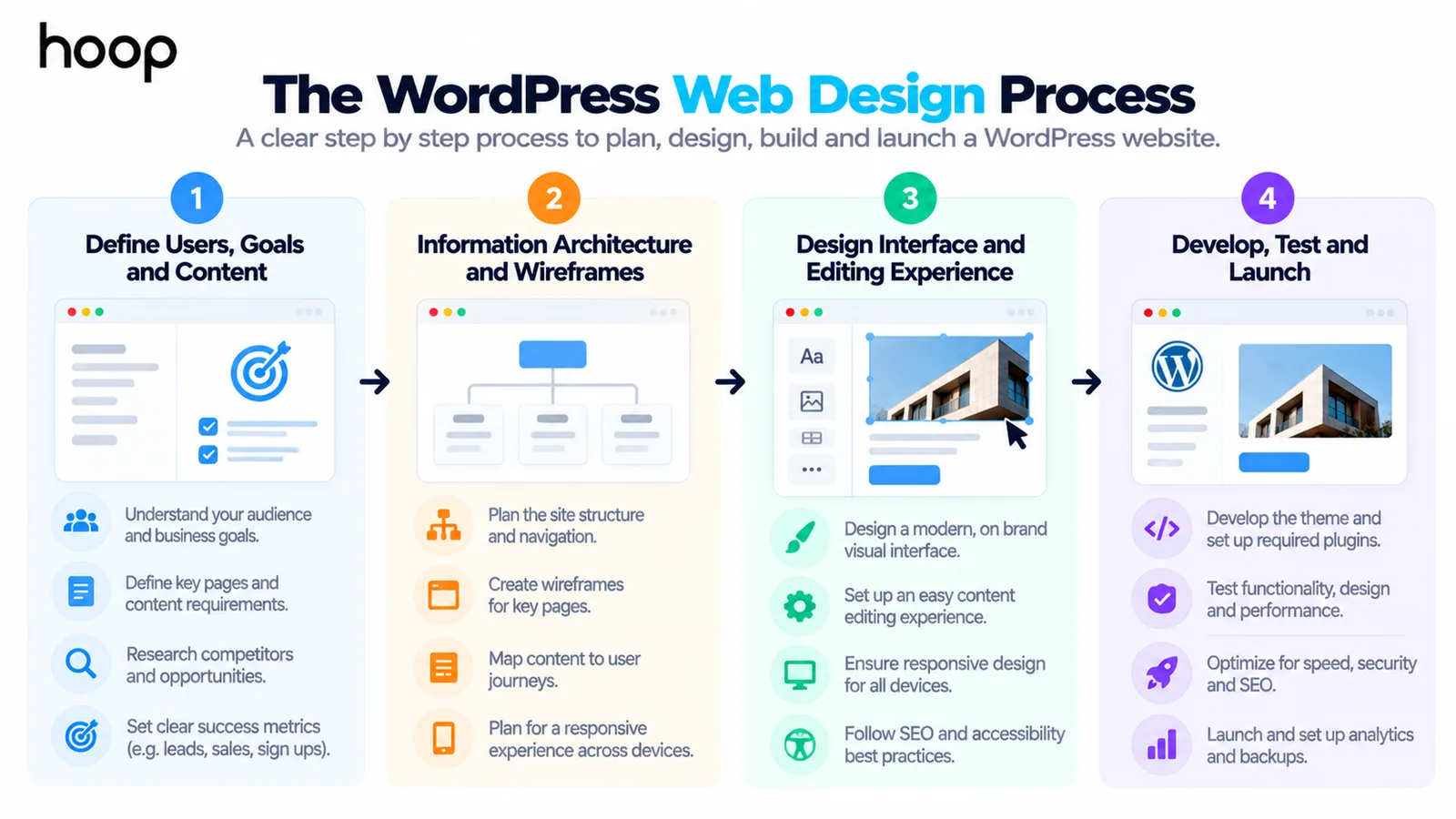
To build a professional WordPress website, start with research and content structure before selecting themes or plugins. The technology should support the planned experience instead of dictating it.
1. Define Users, Goals, and Content
To define the project, identify the audiences, business goals, required content, conversion actions, editing needs, and technical integrations. This stage prevents design decisions based only on visual preference.
2. Build the Information Architecture and Wireframes
To structure the site, map navigation, page relationships, content hierarchy, and important user journeys. Wireframes test layout logic before visual styling adds complexity.
3. Design the Interface and Editing Experience
To design the interface, create responsive components, typography rules, interaction states, and reusable patterns. Define which content editors can safely change inside WordPress.
4. Develop, Test, and Launch
To develop the site, build the chosen theme approach, configure required plugins, connect integrations, and migrate content. Test accessibility, forms, responsive behavior, browser compatibility, performance, redirects, analytics, and backups before launch.
Hoop Interactive’s web design services follow the same principle. Research, structure, design, development, quality assurance, and optimization should work as one process.
What Should You Look for in a WordPress Web Design Partner?
Choose a WordPress partner that can explain why each technical decision supports your users, editors, performance targets, and business goals. A portfolio alone does not show how maintainable the finished website will be.
Ask how the team handles custom themes, plugins, hosting, backups, security, responsive testing, accessibility, and analytics. Also ask about search optimization and post-launch maintenance. Ask who owns the code, accounts, licenses, and data after launch.
A strong partner should also explain the editing experience before development finishes. Your team should know which content can change, which layouts stay controlled, and what requires developer support.
Choose WordPress for the Right Reason
What is WordPress web design really about? It is about combining a flexible CMS with deliberate design, development, editing, and maintenance decisions. WordPress works best when the platform supports the content and operational needs of the business.
Do not choose WordPress because a theme looks convenient. Choose WordPress because the project benefits from its publishing model, extensibility, editor experience, and mature ecosystem.
If your business needs a WordPress site built around real users, content, and performance, explore Hoop Interactive’s WordPress services.
“The platform should follow the requirements. The design team should not select WordPress first and force every business process into the platform afterward.”
Key takeaways
- 01WordPress is a content management system first; page builders such as Elementor and Divi run inside it but are not required.
- 02A custom WordPress theme can be as bespoke as any hand-coded site — "WordPress" and "template website" are not synonyms.
- 03Plugin count does not measure quality. One badly engineered plugin causes more trouble than ten focused ones.
- 04WordPress is not inherently slow or insecure; both outcomes follow from implementation, hosting, and maintenance.
Written by
Sahar
Content Writer
Frequently Asked
Questions
Everything you need to know before booking a strategy call. Can't find your answer? Contact us directly.
Businesses use it to build editable marketing sites, blogs, stores, publications, and content-driven websites.
Yes. WordPress can support custom business websites with branded design, structured editing, integrations, analytics, ecommerce, and advanced functionality.
No. You can design WordPress with Gutenberg, another builder, a custom theme, or a controlled combination of methods.
Yes. WooCommerce adds ecommerce functions such as products, carts, checkout, orders, coupons, and payment integrations to WordPress.
No universal answer exists. WordPress fits projects that benefit from its CMS, while specialized applications can require a different architecture.
Keep reading
All articles →
What Is CMS in Web Design? Dynamic Content Explained
Sep 7, 2026 · 10 min read
Website Development in 2025: Complete Guide to Modern Web Solutions
Aug 5, 2026 · 7 min read