What Is CMS in Web Design? Dynamic Content Explained
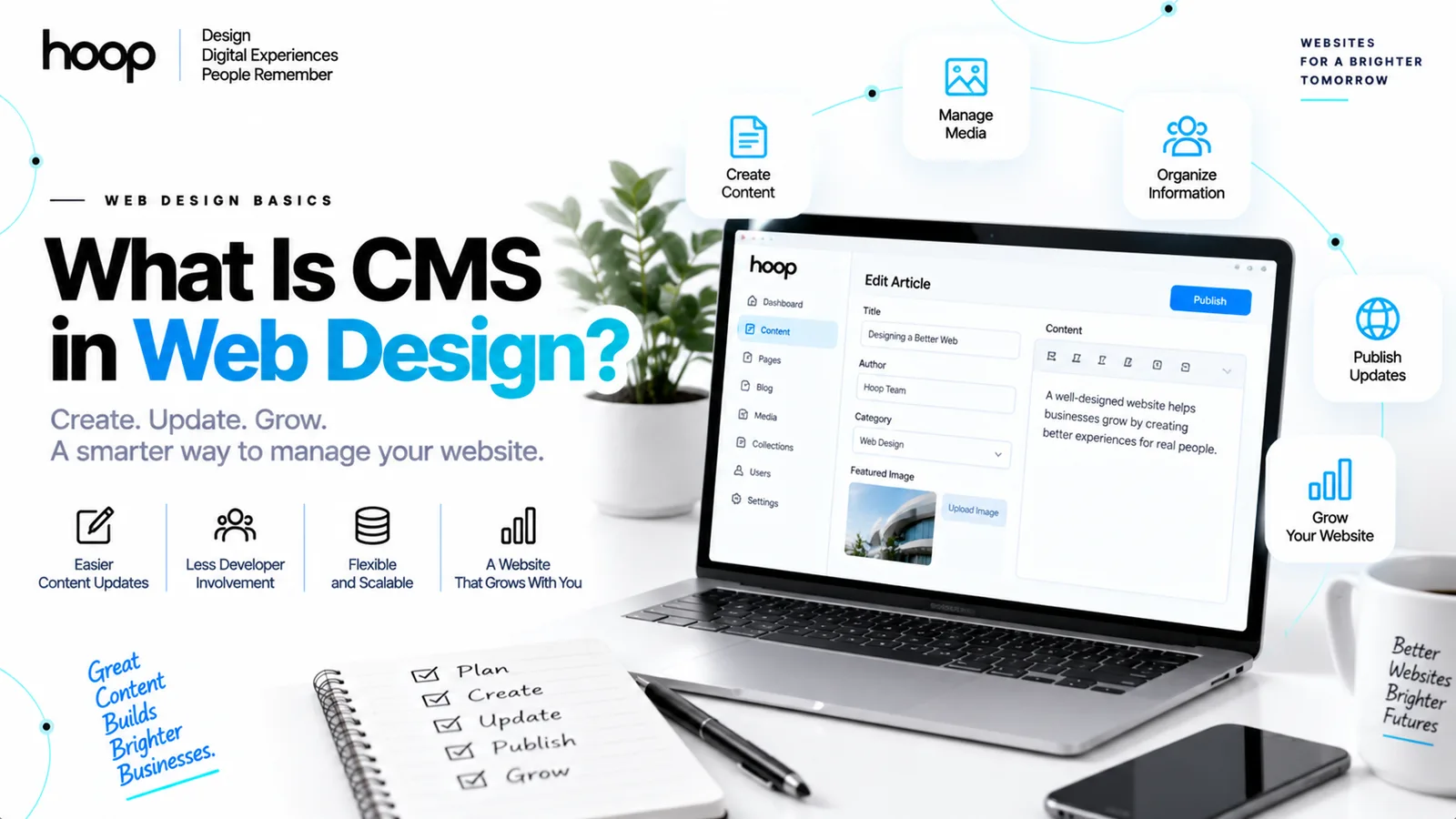
A Content Management System lets you create, edit, organize, and publish website content without changing page code. In web design, a CMS separates reusable page design from the content that fills those pages, so teams can update a site with less developer involvement.
Sahar
Content Writer
A Content Management System (CMS) is software for managing website content through an administrative interface. You do not need to edit HTML, templates, or database records for routine updates. The CMS controls how content is created, stored, organized, and delivered. Website design controls how that content looks and behaves for visitors.
Need this done right?
Hoop builds the strategy, design and development behind sites like this one — talk to us about yours.
How Does a CMS Work in Web Design?
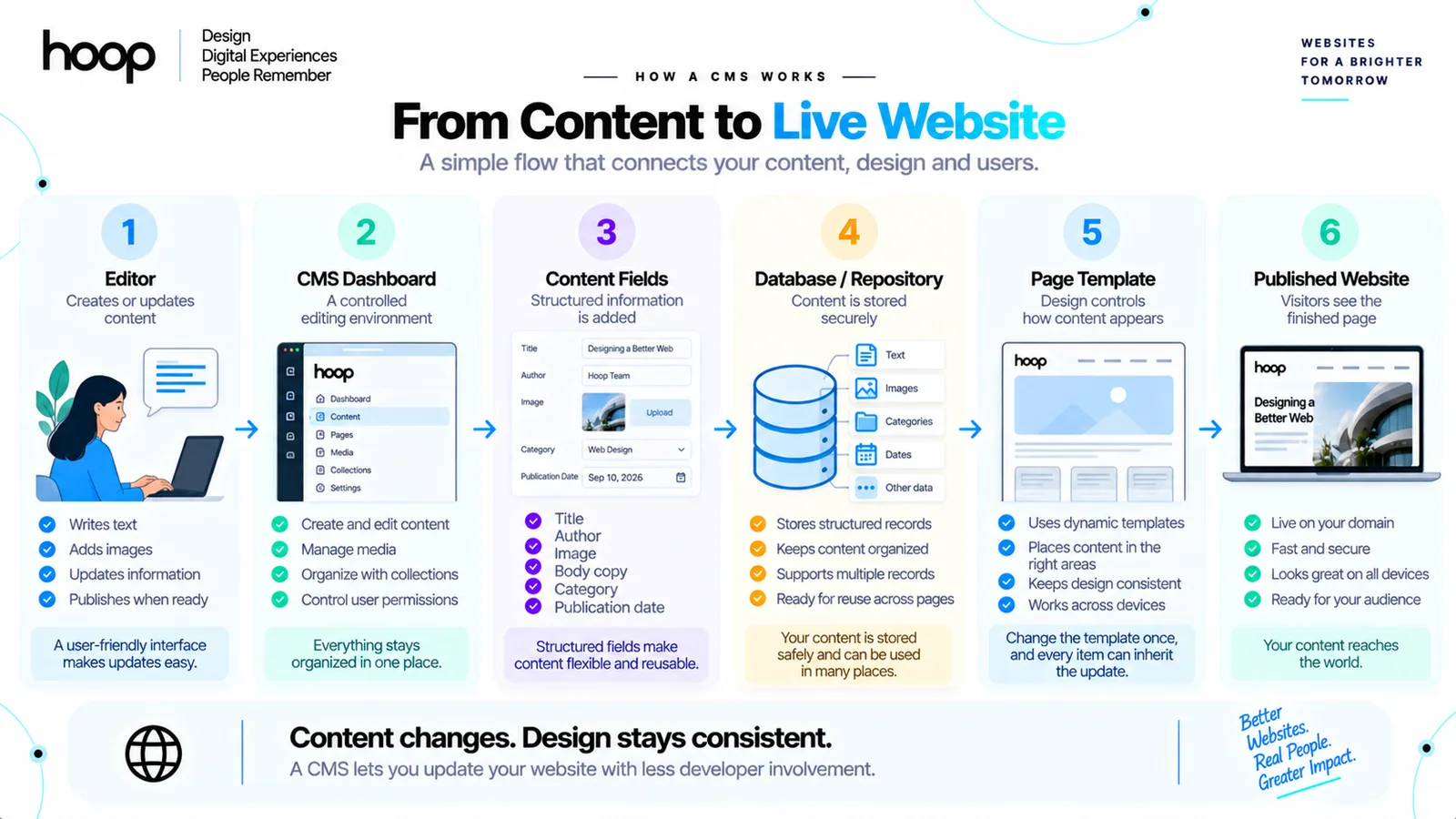
A CMS connects the editing experience with the website visitors see. Most systems combine an admin interface, structured content fields, storage, templates, publishing controls, and delivery logic.
The basic flow follows 6 steps:
Editor → CMS dashboard → content fields → database or repository → page template → published website
An editor can add 6 fields: title, author, image, body copy, category, and publication date. The CMS stores those values, then a template places each value in the correct location on the page.
The admin dashboard manages content
The dashboard gives authorized users a controlled place to create and edit content. Many platforms include a What You See Is What You Get (WYSIWYG) editor or block editor.
The content layer stores structured information
A CMS usually stores content in a database or another structured repository. The system can store individual fields instead of treating every page as one large block of HTML.
A staff profile might contain fields for name, role, biography, portrait, email address, department, and location. A product record might contain title, price, stock status, gallery, description, SKU, and category.
Structured fields let designers reuse the same visual component across many records.
Templates control presentation
Templates define how stored content appears on the website. A designer can create one article template, one case-study template, and one team-profile template.
The CMS then fills each template with the correct record. Editors update the content while the design system preserves typography, spacing, component behavior, and responsive layouts.
CMA and CDA describe 2 CMS functions
Some CMS explanations divide the system into a Content Management Application (CMA) and a Content Delivery Application (CDA). The CMA handles authoring and editing. The CDA retrieves stored content and delivers the published output through templates or frontend code.
What Is the Difference Between Static Content and CMS Content?
Static content belongs directly to a specific page, while CMS content lives separately and feeds reusable templates. Both approaches can exist on the same website.
A static About page can work well when the content rarely changes. A CMS collection works better for 100 project pages that share one structure. Each record can contain different text, images, dates, and categories.
Static pages suit fixed information
Static content works well for stable pages such as privacy policies, contact pages, and simple service pages. A designer can place the text directly inside the page layout.
Static content becomes inefficient when teams repeatedly duplicate layouts just to change the underlying information.
CMS collections suit repeating content
A collection defines a repeatable content type. Webflow uses the term “Collection,” while other systems use terms such as content type, post type, model, schema, or entry.
A Blog collection can define 6 fields: title, author, feature image, body, category, and publication date. Every new article becomes a separate item using the same field structure.
Dynamic templates connect records to layouts
A dynamic template maps those fields into a reusable page. The title field fills the H1. The image field fills the hero image. The author field fills the byline.
The designer changes the template once, and every item using that template can inherit the design change.
What Is the Difference Between a CMS and a Database?
A database stores information; a CMS gives people tools to manage, organize, and publish that information. A CMS often uses a database behind the scenes.
A database can store rows, documents, relationships, dates, and identifiers. A CMS adds an editorial layer with forms, media libraries, roles, previews, revisions, workflow controls, and publishing actions.
The distinction matters because a database alone does not give most clients a comfortable publishing experience.
| Layer | Main purpose | Typical examples |
|---|---|---|
| CMS interface | Create and manage content | WordPress admin, Webflow Editor, Contentful web app |
| Content model | Define fields and relationships | Article, product, author, location |
| Database or repository | Store persistent records | MySQL, PostgreSQL, document store, Git-backed files |
| Template or frontend | Display content to users | WordPress theme, Webflow template, Next.js frontend |
| API or delivery layer | Send content to another system | REST, GraphQL, GraphQL Content API |
The MDN CMS glossary defines a CMS as software for publishing, organizing, changing, or removing content. That definition captures the management role without confusing the CMS with the underlying database.
What Are Traditional and Headless CMS Platforms?
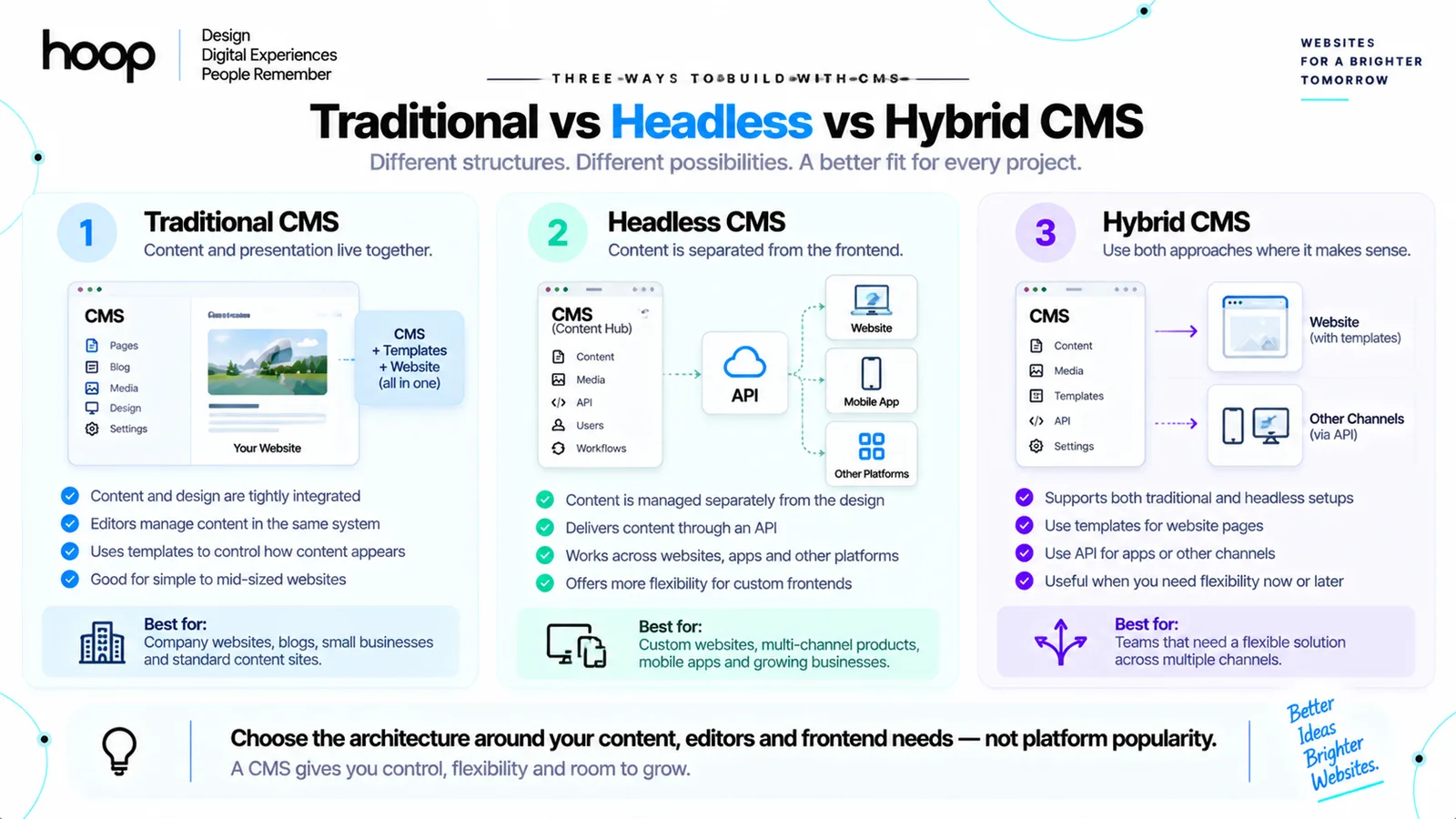
Modern CMS architecture usually falls into 2 broad patterns: traditional CMS and headless CMS. The best choice depends on who manages content and how many channels need it. Frontend freedom also affects the decision.
Traditional CMS combines content and presentation
A traditional CMS usually manages content and renders the website within the same platform. WordPress is the best-known example.
Editors create content in the WordPress dashboard. Themes and templates decide how posts, pages, and custom content types appear on the frontend.
This model works well for company websites, publications, small business sites, and content-heavy websites. Authoring and presentation remain closely connected.
Headless CMS separates content from the frontend
A headless CMS manages content without rendering the final website itself. Developers request content through an Application Programming Interface (API), then display that content with a separate frontend.
The flow looks like this:
Headless CMS → API → website / mobile app / digital product
Platforms such as Contentful, Sanity, and Strapi support this decoupled model. A Next.js website can consume the same content that a mobile application or digital display uses.
Hybrid CMS combines both approaches
Some platforms now support both coupled and headless delivery. Teams can use familiar CMS templates for one channel while exposing content through APIs for another.
What Does a Web Designer Do With a CMS?
A web designer decides how structured content should appear and behave. The CMS does not replace design work; the CMS gives the design a repeatable content source.
A professional web designer can define responsive rules, templates, components, image ratios, content limits, and editor-safe layouts. Hoop’s professional web design work combines these interface decisions with the underlying content structure.
Designers create reusable page systems
A CMS website works best when designers think in systems rather than isolated screens. Reusable components can include article cards, author blocks, product tiles, testimonial sections, location summaries, and related-content modules.
Designers plan content constraints
Good CMS design anticipates real editorial behavior. A headline can become 2 lines instead of 1. A portrait can arrive in a different aspect ratio. A product description can become much longer than the original mockup.
Designers support responsive CMS content
Dynamic content still needs responsive rules. Cards can move from 4 columns to 2, then 1. Image crops can change by breakpoint. Navigation and filter controls can reorganize on smaller screens.
The CMS supplies the content. CSS and frontend components determine how that content responds to available space.
When Does a Website Need a CMS?
A website needs a CMS when non-developers must update content regularly or when many pages share repeatable structures. The more frequently content changes, the more valuable structured management becomes.
Blogs and resource libraries benefit from a CMS
Blogs need repeatable fields such as title, author, date, category, image, excerpt, and body. A CMS lets editors publish new articles without recreating layouts.
Ecommerce sites depend on structured content
Stores manage large collections of products, categories, prices, images, inventory states, and variants. Platforms such as Shopify and WooCommerce use content-management concepts because merchants need to update products without editing templates manually.
Hoop’s ecommerce development services connect storefront design with structured product data, checkout logic, and content management.
Teams and multi-location sites need repeatable records
A company with 80 staff profiles should not maintain 80 unrelated page layouts. One team-member content type can generate consistent pages from structured records.
The same logic works for franchises, clinic locations, property listings, job openings, events, and service-area pages.
When Does a Website Not Need a CMS?
A CMS adds little value when a website has very few pages, rarely changes, and has no editorial workflow. A lightweight static site can be simpler to build and maintain.
A 4-page portfolio with stable information can work without a database-backed CMS. A small campaign microsite can also remain static when the campaign lasts only a few weeks.
A custom web application can also use a purpose-built administration system instead of a general CMS. Hoop builds custom web applications when business logic requires more than standard page publishing.
Ask who needs to update content, how often updates happen, and which workflow controls publishing. Those answers determine whether a CMS adds value.
What Are the Main Benefits of Using a CMS?
A CMS can reduce repetitive development work and give content teams more independence. The benefits become strongest when the content structure is designed carefully before launch.
Editors can update content without code
A marketer can publish an article. A recruiter can add a job opening. A store manager can update a product description. A school administrator can post a notice.
The CMS turns those tasks into forms and publishing actions rather than code changes.
Templates keep presentation consistent
This separation makes large websites easier to maintain because design changes happen at the template level.
Workflows support larger teams
CMS platforms can support draft status, review, approval, scheduling, revisions, permissions, and content ownership. These features matter when 5, 20, or 100 people contribute to one website.
Structured content can serve more than one channel
Headless CMS platforms can deliver one content record to several frontends. A product description can appear on a website, a mobile application, and another digital interface without 3 separate copies.
That pattern also supports mobile app development when websites and apps share content, user-facing resources, or product information.
What Are the Drawbacks of a CMS?
A CMS introduces tradeoffs. Teams still need to manage architecture, updates, permissions, integrations, security, and performance.
Plugins and extensions can create maintenance work
Platforms such as WordPress support large extension ecosystems. Extensions can add forms, ecommerce, caching, memberships, or integrations.
Templates can limit unusual experiences
A theme or builder can speed up production. The same system can restrict custom interactions or complex page behavior. Teams should confirm platform limits before committing to a template-led build.
Headless CMS adds engineering complexity
Headless architecture gives frontend developers more control. Teams must manage APIs, hosting, previews, caching, deployment, and integration logic.
Poor content models become expensive later
A weak content model can mix unrelated fields, duplicate information, and make migrations difficult. Teams should define content relationships before importing hundreds of records.
Good content architecture treats content modeling as a design and engineering decision, not a form-building exercise.
WordPress vs Webflow vs Headless CMS: Which Approach Fits?
Choose the CMS that fits the content model, editorial team, frontend requirements, integrations, and maintenance capacity. No platform wins every project. Our WordPress vs Webflow vs custom comparison goes deeper on cost and ownership.
WordPress fits flexible publishing websites
WordPress works well for blogs, company websites, publications, membership sites, and many business websites. Themes, custom post types, plugins, and a familiar dashboard give teams broad flexibility.
Webflow fits visual design with structured collections
Webflow combines visual site building with CMS Collections. Designers can define collection fields, build templates visually, and let editors update structured records.
Webflow works especially well when design teams want direct control over presentation without maintaining a traditional theme codebase.
Headless CMS fits multi-channel and custom frontends
Contentful, Sanity, and Strapi fit projects that need custom frontends. The same content can also serve several channels.
Headless architecture is often appropriate for larger web products, composable systems, and applications that already use modern frontend frameworks.
How Should You Choose a CMS for a Web Design Project?
To choose a CMS, start with the people, content, workflows, and technical constraints rather than a platform shortlist.
Define the content types first
List the repeating records the website must manage. Examples include articles, authors, products, locations, case studies, events, courses, and jobs.
Define required fields, relationships, filters, and publishing states for each type.
Map the editorial workflow
Identify who creates content, who reviews content, who publishes content, and who manages media. A solo business owner needs a different workflow from a 30-person publishing team.
The CMS should support the real approval process without adding unnecessary steps.
Check frontend and integration needs
List systems the website must connect with. Examples include customer relationship management systems, ecommerce platforms, mobile apps, analytics tools, payment gateways, and internal databases.
API requirements can quickly determine whether a traditional, hybrid, or headless architecture fits better.
Evaluate ownership and maintenance
Confirm who owns the content, hosting, code, database, and account access. Also confirm who handles backups, platform updates, plugin updates, monitoring, and recovery.
A CMS should make future changes easier, not trap the business inside one inaccessible setup.
Build the CMS Around the Content, Not the Other Way Around
A CMS works best when teams design content types, editor roles, templates, integrations, and maintenance as one system. If your website needs structured publishing or custom functionality, Hoop’s software development services can help. The team can design the right CMS foundation.
“A database alone does not give most clients a comfortable publishing experience.”
Key takeaways
- 01Structured fields — not pages of HTML — are what make content reusable across templates.
- 02A database stores records; a CMS adds the editorial layer people actually use.
- 03Traditional CMS couples content to presentation; headless delivers it through an API.
- 04Design the content model before the platform shortlist — a weak model gets expensive later.
Written by
Sahar
Content Writer
Frequently Asked
Questions
Everything you need to know before booking a strategy call. Can't find your answer? Contact us directly.
CMS stands for Content Management System. The software helps users create, organize, edit, and publish website content through an administrative interface.
Yes. WordPress is a Content Management System that manages pages, posts, media, users, templates, and extensible website functionality.
Yes. Webflow includes CMS Collections for structured content alongside visual web design and site-building tools.
No. Small static sites with rarely changing content can work without a CMS. Content-heavy and frequently updated websites benefit more from one.
No. A headless CMS offers frontend freedom and multi-channel delivery, while a traditional CMS can reduce complexity for standard websites.
Keep reading
All articles →
What Is WordPress Web Design? How WordPress Websites Actually Work
Sep 26, 2026 · 10 min read
Website Development in 2025: Complete Guide to Modern Web Solutions
Aug 5, 2026 · 7 min read