What Is Regression Testing? How It Prevents Old Features From Breaking
Regression testing rechecks behavior users already depend on after the software changes. It is not retesting — retesting proves the fix works, regression testing proves the fix broke nothing else.
Sahar
Content Writer
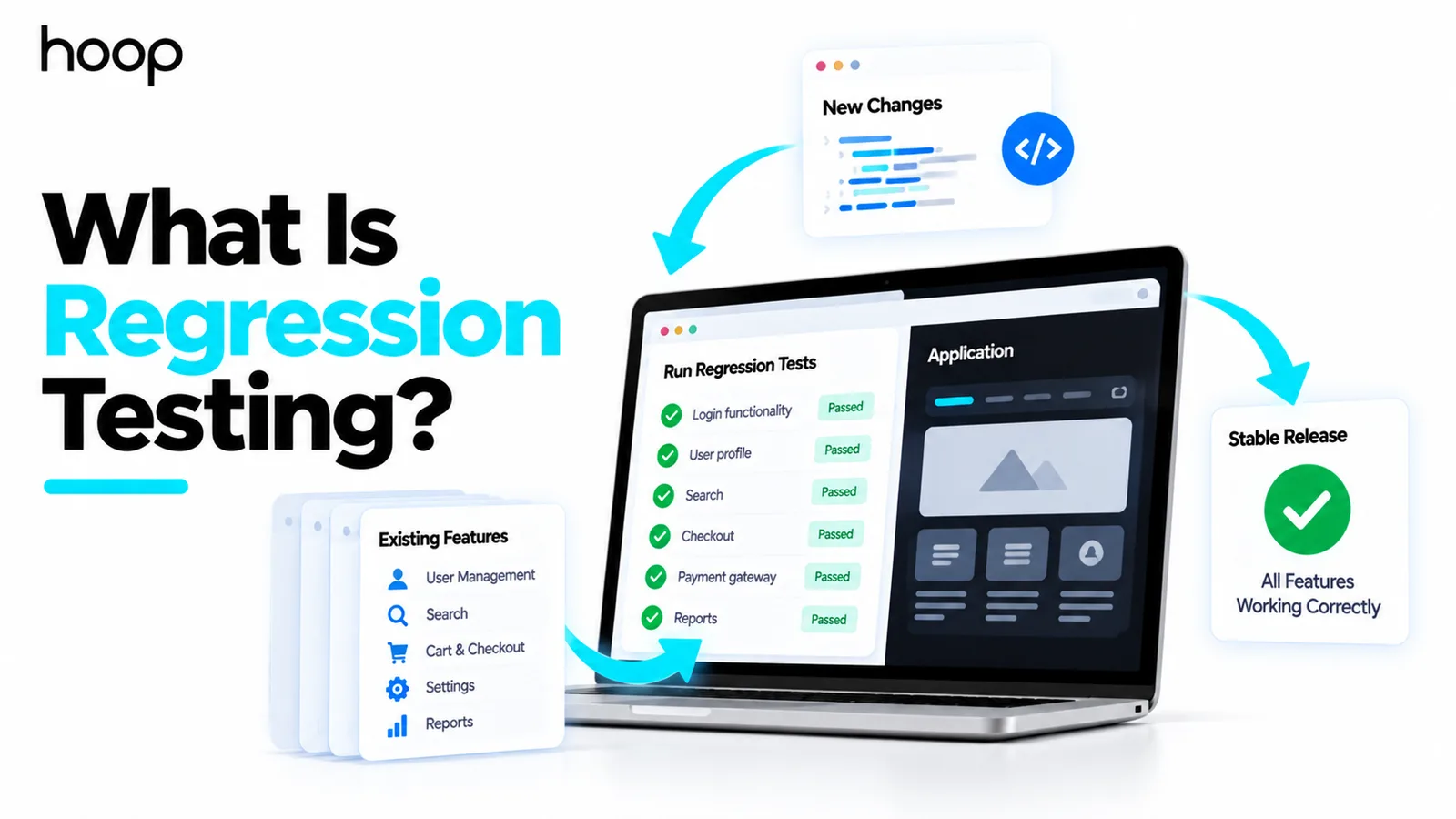
Regression testing checks that existing software still works correctly after something changes. Teams rerun selected checks after fixes, features, refactoring, dependency updates, or configuration changes.
The goal is to catch unintended side effects before users encounter them. Regression testing is different from retesting, which confirms that a specific fix now works.
Need this done right?
Hoop builds the strategy, design and development behind sites like this one — talk to us about yours.
What Does Regression Testing Mean?
It asks whether trusted behavior still works after the software changes. The focus is protecting established functionality.
A change in one area can affect code, data, integrations, permissions, or shared services elsewhere. Regression testing looks for those unexpected effects.
The same idea applies to small patches and major releases. The amount of testing should match the risk and reach of the change.
What regression testing really protects is confidence in behavior users already depend on. That confidence must survive continuous product change.
What Is a Regression Bug?
A regression bug appears when something that previously worked stops working after a change. The broken behavior may be near the change or far away.
Imagine an ecommerce team updates shopping-cart pricing. The cart now calculates discounts correctly, but checkout fails because both features use shared pricing logic.
The checkout failure is a regression. The new work solved one problem while accidentally damaging existing behavior.
Why Is Regression Testing Important?
Modern products change constantly. Teams add features, fix defects, upgrade libraries, alter infrastructure, and connect new services.
Every change creates some chance of unintended impact. Regression testing reduces that risk by checking important established behavior after modifications.
This becomes especially valuable for SaaS products, ecommerce platforms, financial systems, mobile apps, and frequently updated enterprise software.
Teams often expect one universal checklist. In reality, the highest-value checks depend on the product, architecture, users, and failure cost.
How Does Regression Testing Work?
To run regression testing effectively, start with the change itself. Understand what changed, which components depend on it, and which workflows could be affected.
Next, select tests that cover the highest-risk behavior. Run those tests, investigate failures, and update the regression suite when the product changes.
A mature process does not blindly rerun every test after every commit. It uses impact analysis to decide where regression risk is highest.
What Should You Regression Test?
Prioritize workflows that would hurt users or the business if they failed. Examples include authentication, checkout, payments, billing, permissions, search, and core product actions.
Also focus on shared services, integrations, historically fragile areas, and modules touched by recent work. The right scope depends on product risk.
A small isolated text change may justify focused coverage. A shared authentication refactor may justify much broader regression testing.
What Is a Regression Test Suite?
A regression test suite is a maintained collection of tests used to protect established behavior after changes. It should reflect the product’s current risks.
The suite normally contains business-critical flows, important integrations, high-use features, and behavior that has broken before.
It should not automatically contain every test ever written. An oversized suite can become slow, noisy, and expensive to maintain.
Does Every Test Become a Regression Test?
Not automatically. Regression describes the purpose of running a test, not a unique test format.
A login test may start as feature verification when login is first built. Later, the same check can become regression coverage after other code changes.
That is why unit, integration, API, system, and UI tests can all contribute to regression protection.
Regression Testing vs Retesting
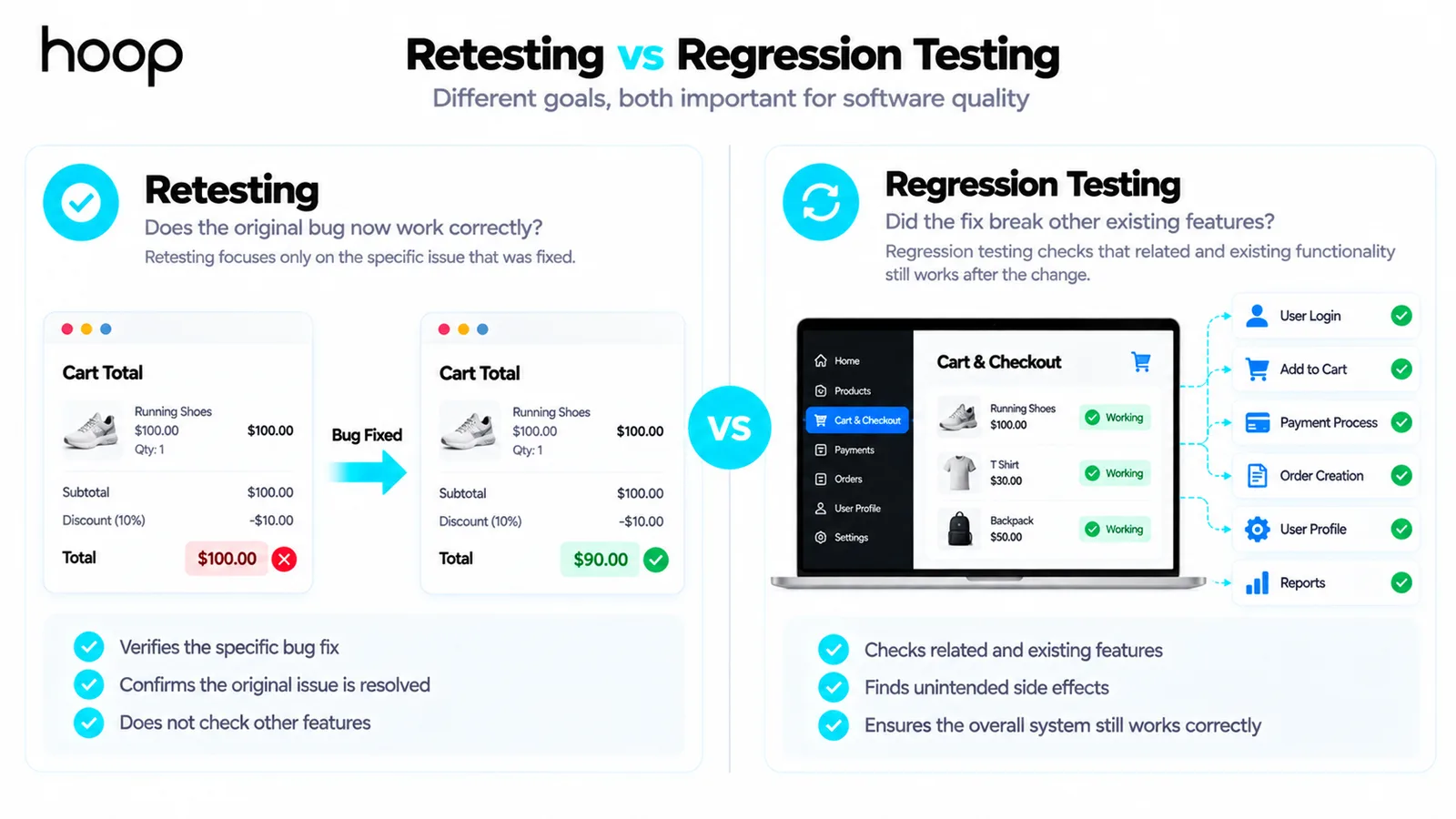
Retesting checks whether a specific defect or change now works correctly. Regression testing checks whether that fix or change damaged something else.
Suppose a developer fixes an incorrect checkout total. Retesting repeats the failed checkout scenario to confirm the defect is gone.
Regression testing then checks related pricing, discounts, taxes, payment flows, and order creation for unintended breakage.
Regression Testing vs Unit Testing
Unit testing and regression testing describe different dimensions of testing. Unit testing describes scope, while regression testing describes purpose.
A unit test checks a small piece of code in isolation. Running that same unit test after later changes can provide regression coverage.
Regression protection can also exist at integration, API, system, interface, performance, and security levels.
Regression Testing vs Smoke Testing
Smoke testing asks whether a new build is stable enough for deeper testing. It covers a small set of critical basics.
Regression testing asks whether established behavior still works after a change. Teams may run smoke checks first, then broader regression coverage.
Regression Testing vs Sanity Testing
Sanity testing is usually a focused check of a changed area. It asks whether that part of the application behaves sensibly after a modification.
Regression testing looks more broadly at existing behavior that the change could affect. The difference is mainly scope and purpose.
Manual vs Automated Regression Testing
Regression testing can be manual or automated. The right method depends on test stability, frequency, cost, risk, and need for human judgment.
Manual regression is useful for new workflows, exploratory checks, visual issues, and scenarios where interpretation matters. Automation is strongest for repeatable checks.
Hoop combines human testing with repeatable automation through its QA testing services. Teams can protect core behavior without turning every test into a script.
Which Regression Tests Should You Automate?
Automate stable tests that repeat frequently and protect important behavior. Good candidates include login, checkout, subscription billing, API contracts, and permissions.
Avoid automating unstable behavior simply to increase test counts. A brittle automated suite can waste time and reduce trust in the results.
The best automated regression suite is not the largest one. It is the suite that gives fast, dependable feedback about meaningful risk.
Partial Regression vs Full Regression
Partial regression focuses on selected areas most likely to be affected by a change. It is useful when the modification is small or well isolated.
Full regression runs broader coverage across the product. Teams may use it before major releases, shared-platform changes, or high-risk migrations.
The change should determine the scope. Running the entire suite after every tiny edit can slow feedback without adding enough value.
What Is Risk-Based Regression Testing?
Risk-based regression testing prioritizes tests based on likely impact. Teams spend more time on failures that could cause greater business or user harm.
Useful factors include transaction value, user frequency, recent code changes, integration complexity, defect history, compliance impact, and shared dependencies.
This approach helps large teams keep feedback useful when running every regression test on every change becomes too slow.
How Often Should Regression Tests Run?
Fast regression checks can run on every commit or pull request. Slower end-to-end suites may run after merges, nightly, or before releases.
A high-risk payment flow may deserve very frequent coverage. A slow administrative report may be checked less often.
Frequency should reflect test speed, product risk, release cadence, and how quickly the team needs feedback.
How Does Regression Testing Work in CI/CD?
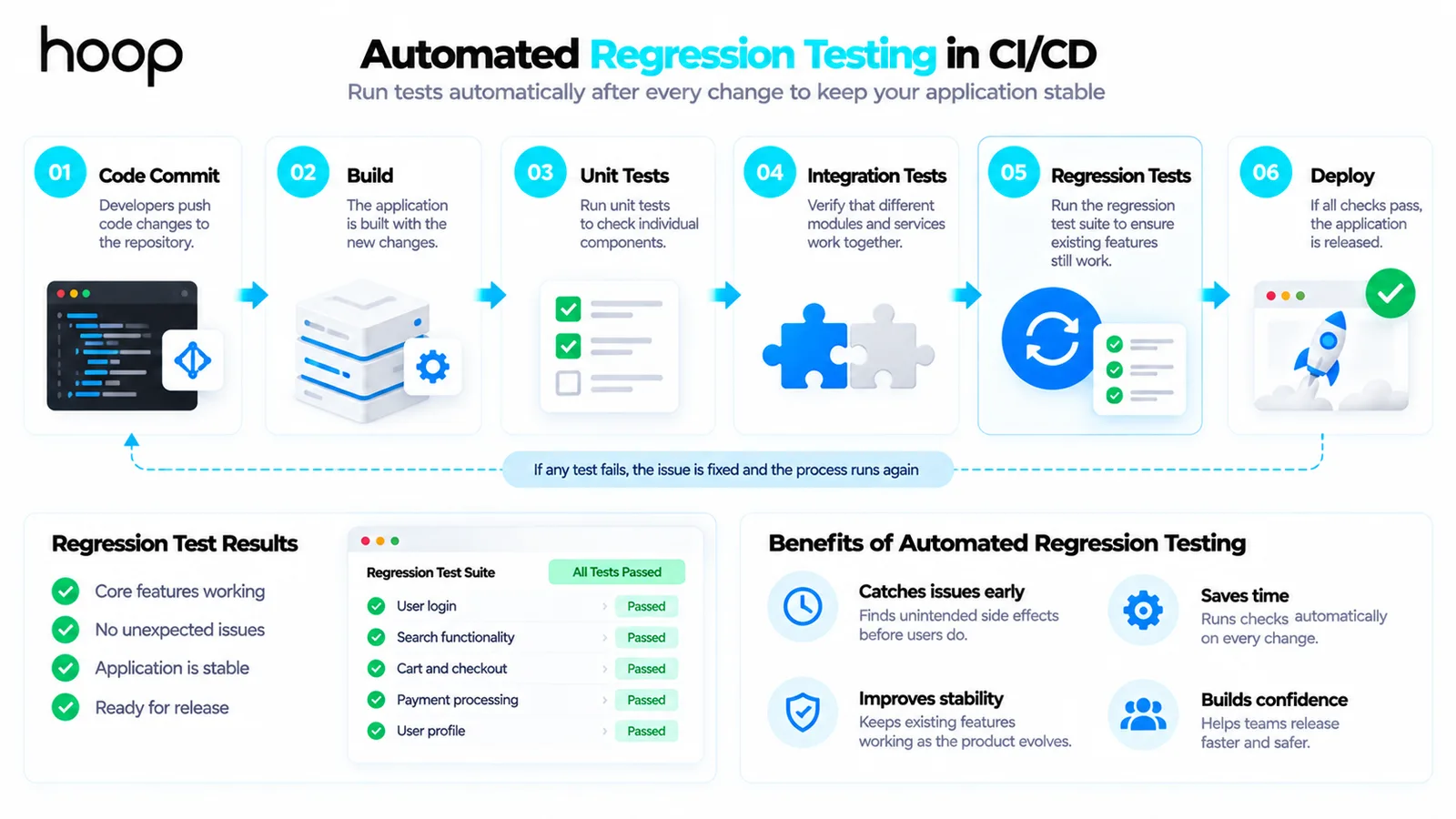
Continuous integration and delivery make regression testing easier to repeat. Automated checks can run whenever code moves through the delivery pipeline.
A pipeline might run unit regression tests on a pull request, integration checks after merge, and broader suites before production.
Hoop’s Cloud and DevOps services connect automated testing with delivery workflows, so teams receive feedback before changes reach users.
What Is Visual Regression Testing?
Visual regression testing checks whether the interface still looks as expected after a change. It compares current screens against approved visual baselines.
It can detect missing elements, spacing changes, layout shifts, responsive issues, and styling regressions that functional checks may miss.
Visual regression is especially useful for design systems, ecommerce pages, dashboards, and products with many reusable interface components.
Can Performance and Security Regress?
Yes. Regression testing is not limited to functional behavior. A product can remain functionally correct while becoming slower or less secure.
A code refactor might double API latency. A new permission rule might expose data that was previously restricted.
Teams can therefore maintain performance, security, and API regression checks alongside normal functional coverage.
What Happens When a Regression Test Fails?
A failed regression test does not always prove the product regressed. The test data, environment, requirement, or test itself may have changed.
Investigate the failure before disabling the test. Determine whether the product broke, the test became obsolete, or the failure is flaky.
Teams lose confidence quickly when red tests are routinely ignored. Trusted regression feedback depends on keeping failures meaningful.
How Do You Maintain a Regression Test Suite?
A regression suite needs maintenance as the product evolves. Remove obsolete tests, update changed workflows, and add coverage for new critical behavior.
Review duplicate checks and slow tests regularly. Move some tests to lower-cost levels when the same risk can be covered faster.
Treat the suite as a living product. Its job is to represent current risk, not preserve historical tests forever.
Regression Testing During Ongoing Development
Regression protection works best when it grows alongside the product. Waiting until release week creates large, stressful testing cycles.
Teams can add coverage whenever a feature becomes business-critical or a defect reveals a new risk. That keeps the suite aligned with real behavior.
Hoop’s broader software development services include QA throughout delivery. Regression protection can evolve with the application instead of appearing only before launch.
Which Changes Usually Trigger Regression Testing?
Any change that can alter existing behavior may justify regression coverage.
Bug fixes are obvious triggers because a fix can affect nearby logic. Refactoring also matters because internal code changes can alter behavior unexpectedly.
Dependency upgrades can change APIs, browser behavior, security rules, or performance. Database migrations may affect queries, reporting, or stored data assumptions.
Configuration changes can be equally important. A new feature flag, permission rule, environment variable, or deployment setting can change production behavior without changing application code.
Infrastructure changes may also create regressions. Load balancer rules, caching, network policies, or container updates can affect user-facing reliability and integrations.
The answer remains consistent after any of these changes. Recheck the established behavior most likely to be affected.
Regression Testing Examples by Product Type
The most valuable regression coverage changes with the product. An ecommerce store should protect product search, cart totals, checkout, payments, and order confirmation.
A SaaS product may prioritize login, tenant isolation, permissions, subscription billing, core workflows, exports, and customer integrations.
A banking application may focus on balances, transfers, transaction history, authentication, fraud controls, and audit trails. Failures in these areas carry higher financial risk.
A mobile application may prioritize startup, authentication, offline behavior, push notifications, device permissions, purchases, and supported operating-system versions.
These examples show why a generic suite is rarely enough. Regression coverage should mirror the workflows customers rely on and the failures the business cannot tolerate.
Regression Coverage vs Test Coverage
Test coverage describes how much behavior, code, requirement space, or risk a test set exercises. Regression coverage asks whether established behavior remains protected after change.
High code coverage does not automatically mean strong regression protection. Tests may execute many lines while missing an important customer workflow or integration.
Likewise, a smaller suite can provide strong regression value if it targets critical behavior and known risk. Quality matters more than raw test counts.
Teams should review gaps after incidents and escaped defects. A production regression often reveals where the existing suite failed to represent real product risk.
How Long Should a Regression Suite Take?
There is no universal target. A useful regression suite should return feedback quickly enough to influence the decision that triggered it.
Tests needed before merging code may need results within minutes. Broader end-to-end coverage can run later, including nightly or before release.
Teams can reduce runtime through parallel execution, smaller test layers, better test data, and risk-based selection. Slow checks can move to less frequent stages.
If the suite takes so long that teams bypass it, the process is failing. The suite should protect releases without becoming a reason to avoid testing.
Who Performs Regression Testing?
Regression testing is not only a QA responsibility. Developers, testers, product teams, and operations staff can all contribute depending on the system.
Developers often maintain unit and integration regression checks close to the code. QA engineers usually own broader workflow, exploratory, and end-to-end coverage.
Product specialists can help identify business-critical paths that deserve protection. Operations teams may contribute reliability, configuration, and production-risk scenarios.
The healthiest model gives clear ownership without isolating quality inside one team. Everyone should understand which trusted behaviors must survive change.
Automation also changes ownership patterns. Developers may maintain fast pipeline tests while QA maintains broader suites and explores new risks manually.
Clear ownership prevents duplicated effort and missing coverage. It also helps teams decide who investigates failures when a regression check turns red.
What Are the Benefits of Regression Testing?
Regression testing gives teams a repeatable way to protect trusted behavior while software continues changing. The strongest benefits are practical:
- It catches unintended side effects before customers encounter them.
- It protects critical workflows during frequent releases and refactoring.
- It gives developers faster feedback about the wider impact of changes.
- It supports safer CI/CD by turning important behavior into release checks.
- It reduces fear around change because established functionality has repeatable coverage.
Common Regression Testing Mistakes
Regression testing becomes less useful when teams confuse more testing with better risk coverage. Common mistakes include:
- Running the entire suite after every tiny change without considering impact.
- Testing only the changed feature and ignoring shared dependencies.
- Confusing retesting with regression testing.
- Automating unstable scenarios that produce frequent false failures.
- Keeping obsolete or duplicate tests forever.
- Ignoring flaky failures until the team stops trusting the suite.
- Waiting until release day to discover that regression coverage is too slow.
Protect Existing Behavior as the Product Changes
Regression testing helps teams change software without losing confidence in what already works. The strongest programs focus on risk, not raw test volume.
The practical answer is simple. It is disciplined protection for trusted behavior whenever the product changes.
Select the behavior that matters most and automate repeatable checks. Investigate failures and keep the suite aligned with the evolving product.
“Teams lose confidence quickly when red tests are routinely ignored. Trusted regression feedback depends on keeping failures meaningful.”
Key takeaways
- 01Scope should follow the change: a small edit needs focused coverage, a shared refactor needs breadth.
- 02Any test level — unit, API, integration, UI — becomes regression coverage when rerun after a change.
- 03Performance and security regress too, not just functionality.
- 04A suite so slow that teams bypass it has already failed, however complete it looks.
Written by
Sahar
Content Writer
Frequently Asked
Questions
Everything you need to know before booking a strategy call. Can't find your answer? Contact us directly.
No. Regression testing can be manual or automated. Automation is especially useful for stable checks that need to run frequently.
Usually yes, but the scope varies. Retest the fix, then check related behavior that the change could reasonably affect.
Yes. Unit tests describe test level. When they are rerun after later changes to protect existing behavior, they provide regression coverage.
Large enough to cover meaningful product risk, but small enough to return useful feedback. Size matters less than relevance and reliability.
Use broader regression before major releases, shared-platform changes, risky migrations, or other changes with wide potential impact.
Keep reading
All articles →
What Is Software Testing? Types, Methods and How It Works
Oct 12, 2026 · 9 min read
What Is Unit Testing? How Developers Test Code in Isolation
Oct 12, 2026 · 10 min read