
What Is UX Design? A Complete User-Centered Guide
UX design shapes how people experience products and services — how information is organised, how tasks flow, where users get confused, and how the product responds. It is evidence-led work that covers the whole journey, not the visible interface alone.
Sahar
Content Writer
UX design, short for user experience design, is the process of understanding what people need from a product or service and shaping the complete experience so they can achieve their goals clearly, efficiently, and with confidence. It considers far more than appearance. UX includes how information is organized, how tasks flow, what users expect, where they become confused, how the product responds, and how the overall interaction feels.
A beautifully styled interface can still deliver poor UX if people cannot find a feature, understand a form, recover from an error, or complete a purchase. Conversely, good UX may feel almost invisible: the product behaves as expected, important decisions are understandable, and unnecessary obstacles stay out of the way.
This guide explains what UX designers do, how UX differs from UI and other design disciplines, which methods are used, and why responsible UX should serve both user needs and sustainable business goals.
Need this done right?
Hoop builds the strategy, design and development behind sites like this one — talk to us about yours.
What Does User Experience Mean?
User experience is the complete relationship a person has with a product, service, system, or organization while trying to accomplish something. It includes interactions, perceptions, expectations, emotions, and outcomes before, during, and after direct use.
Consider booking a medical appointment online. The experience begins before the appointment form appears. Can the patient find the right service? Is the language understandable? Are available times clear? Does the form preserve information after an error? Is confirmation immediate? Can the appointment be changed later? Every touchpoint contributes to the experience.
This wider view is why UX is not limited to websites and apps. It applies to business software, ecommerce, physical products, public services, transport systems, customer support, onboarding, packaging, and connected journeys that move between digital and physical environments. Nielsen Norman Group defines UX broadly as encompassing all aspects of a person’s interaction with a company, its services, and its products.
What Is UX Design in Simple Terms?
In simple terms, UX design is the work of making sure a product helps the right people do the right things without avoidable confusion or frustration. The designer does not begin by choosing colors or drawing polished screens. The process begins by learning about users, their context, the task they need to complete, and the constraints surrounding that task.
A useful analogy is a door. Visual design determines how the door looks. UX considers whether people can find it, understand where it leads, open it comfortably, recognize whether it is locked, and recover if they choose the wrong entrance. Both appearance and function matter, but they answer different questions.
UX Design vs UI Design vs Other Disciplines
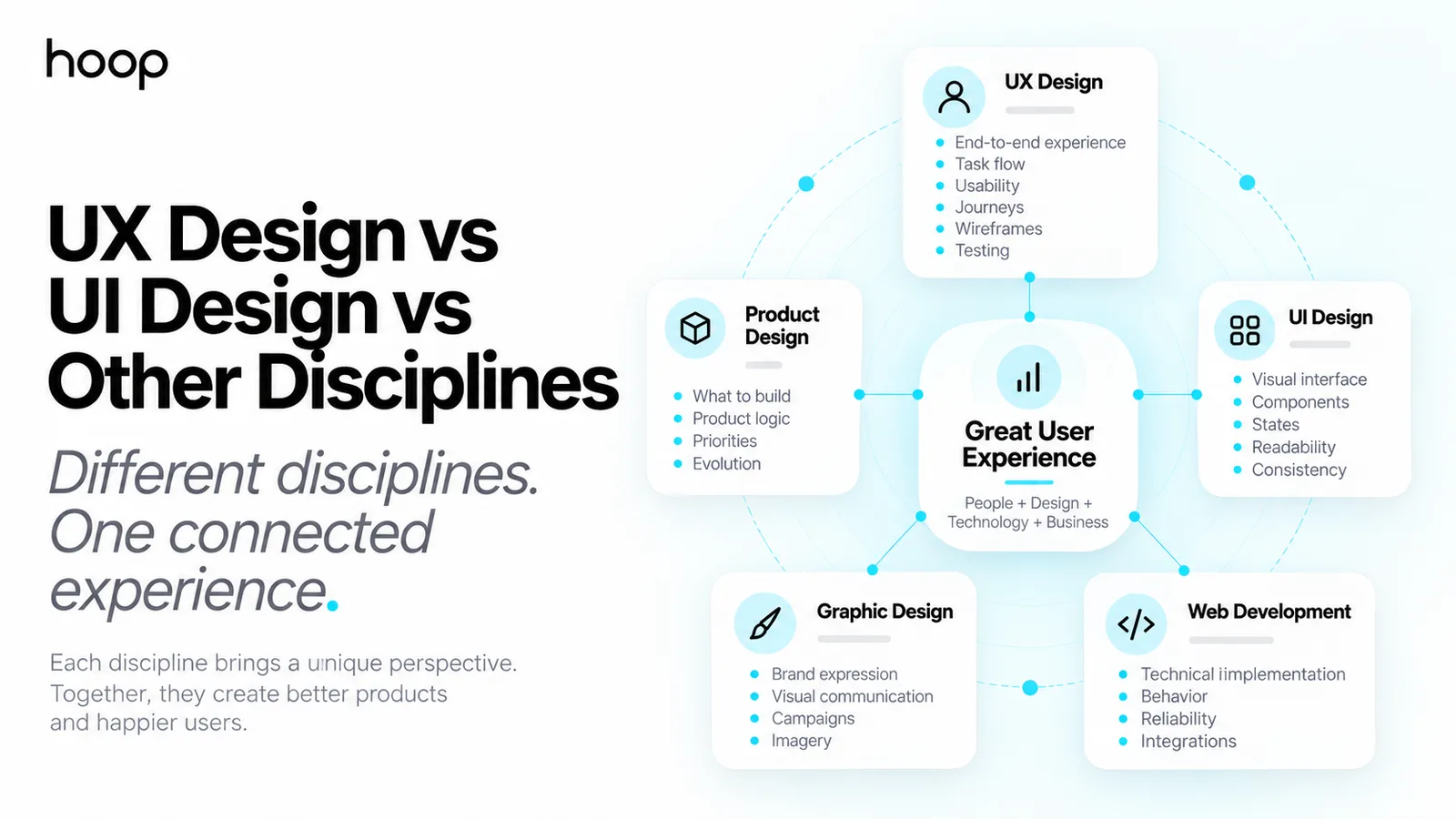
UX and UI overlap closely, especially on smaller teams, but they are not identical. The following comparison shows their usual focus rather than rigid job boundaries.
| Discipline | Primary focus | Typical questions | Common outputs |
|---|---|---|---|
| UX design | The end-to-end experience and task flow | Can users understand and complete what they came to do? | Journeys, flows, wireframes, prototypes and findings |
| UI design | The visual and interactive interface | Is the interface clear, consistent, readable and on-brand? | High-fidelity screens, components and states |
| Graphic design | Visual communication and brand expression | Does the message communicate effectively and look distinctive? | Brand assets, campaigns, layouts and imagery |
| Product design | The product as a usable and viable system | What should be built, how should it work and how will it evolve? | Product strategy, interaction design and prototypes |
| Web development | Technical implementation and behavior | How can the experience be built securely and reliably? | Production code, integrations and deployed features |
In practice, collaboration matters more than defending labels. UX decisions affect UI; technical limitations affect interaction; brand choices affect trust; and business rules shape what users can do. Hoop’s UI and UX design services bring these decisions together rather than treating experience as a decorative layer.
What Does a UX Designer Do?
A UX designer investigates problems, models how users move through an experience, proposes solutions, tests those solutions, and helps the team refine what gets built. The balance changes by company. One role may concentrate on research and service journeys, another on interaction design and prototypes, while a product designer may own several of these responsibilities.
Understand users and the problem
Designers may conduct interviews, observe users, review support tickets, analyze search terms, study analytics, and speak with customer-facing teams. The goal is not to collect opinions for their own sake. It is to understand behavior, context, motivation, constraints, workarounds, and unmet needs.
Map journeys and organize information
A user journey shows the stages, actions, questions, and pain points involved in completing a goal. Information architecture determines how content and features should be grouped, labeled, and navigated. These activities prevent teams from polishing individual screens while ignoring the path between them.
Design user flows and wireframes
A user flow maps the decisions and steps needed to complete a task. Wireframes translate that logic into page or screen structures without allowing visual polish to hide unresolved problems. Teams can compare alternative routes before development becomes expensive. A storyboard can add the surrounding context when the user’s situation changes the design problem.
Create and test prototypes
A prototype lets users and stakeholders experience a proposed interaction before the complete product is built. It may be a clickable sequence of simple screens or a highly realistic simulation. Usability testing then reveals where people hesitate, misunderstand labels, miss information, or take an unexpected route.
Collaborate through implementation
UX work does not end when a design file is handed to developers. Designers clarify states, edge cases, content behavior, responsive rules, and accessibility requirements. They review implementation, learn from released behavior, and iterate as evidence changes.
The UX Design Process
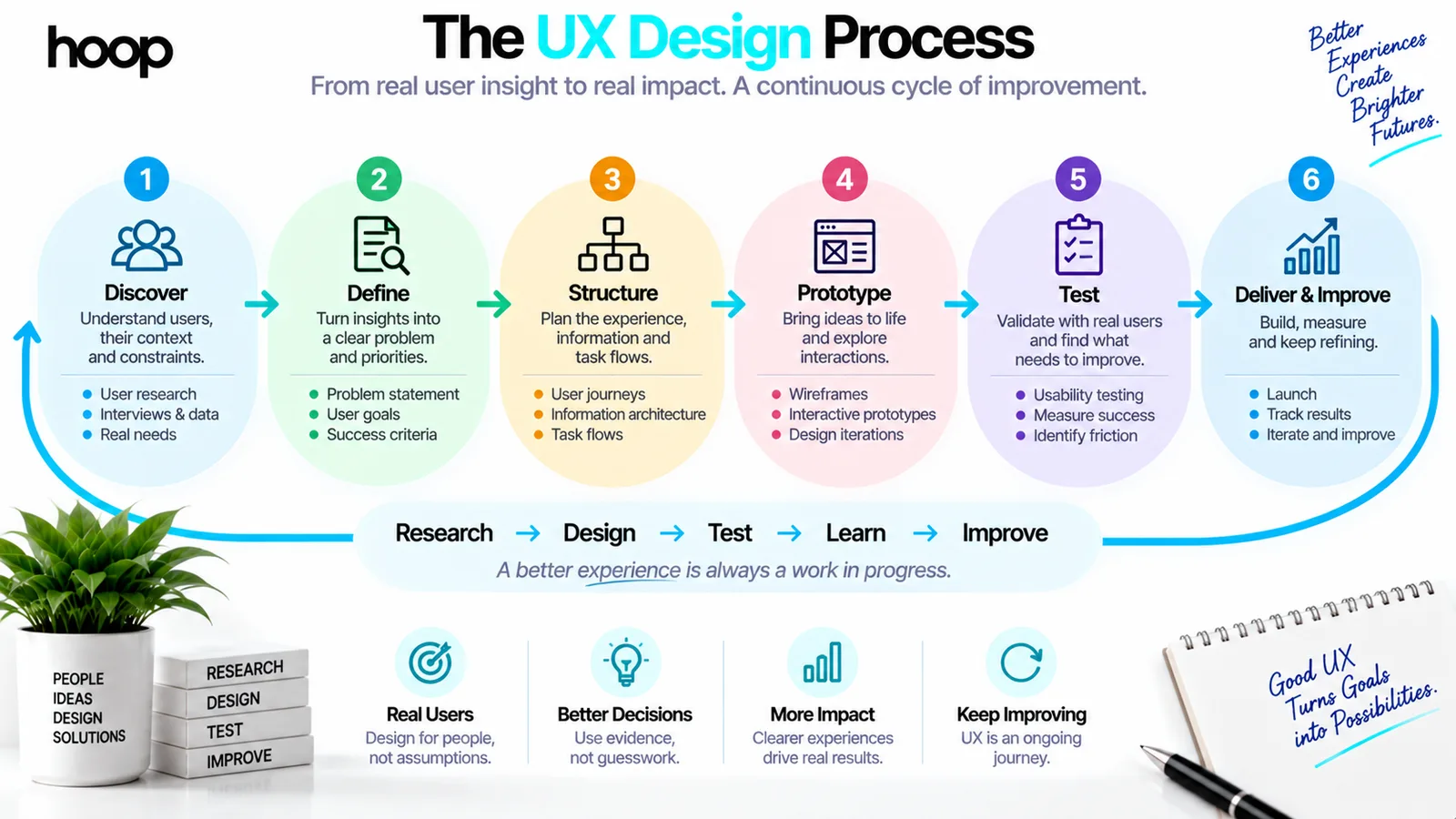
UX is often described as a sequence, but real projects move backward and forward. A discovery insight may change the problem definition. Testing may expose a missing requirement. Development may reveal a constraint that requires a different interaction. A practical process includes six connected stages.
1. Discover
Learn about users, business context, technical constraints, current behavior, and the problem behind the request.
2. Define
Turn research into a focused problem statement, success criteria, priorities, and assumptions that still need testing.
3. Structure
Create journeys, information architecture, content hierarchy, task flows, and early concepts.
4. Prototype
Represent the proposed experience at the lowest level of fidelity needed to answer the current question.
5. Test
Observe representative users completing realistic tasks and analyze patterns rather than isolated preferences.
6. Deliver and improve
Work with product and engineering, measure the released experience, and continue refining it.
For an existing website, the process may begin with a UX audit that combines heuristic review, analytics, session evidence, accessibility checks, and task-based testing.
Common UX Research Methods
There is no single “UX research method.” Teams choose methods according to what they need to learn. Interviews reveal experiences, motivations, and language. Contextual observation exposes workarounds that people may forget to mention. Surveys can identify patterns across larger groups but rarely explain behavior on their own.
Card sorting helps organize information around users’ mental models. Tree testing evaluates whether people can find content in a proposed structure. Usability testing observes people attempting tasks with a prototype or live product. Analytics and funnel data show what happens at scale, while qualitative research helps explain why.
Research quality depends on clear questions, appropriate participants, realistic tasks, and disciplined interpretation. Asking users whether they “like” a design is weaker than observing whether they can use it successfully.
What Makes a User Experience Good?
Good UX is useful, usable, understandable, accessible, trustworthy, and appropriate to its context. A product can be easy to use but still fail because it solves the wrong problem. It can offer valuable features but remain frustrating because people cannot discover or operate them.
Useful experiences provide capabilities people genuinely need. Usable experiences allow tasks to be learned and completed efficiently. Accessible experiences reduce barriers for people with disabilities. Credible experiences communicate honestly, protect users from costly mistakes, and explain consequences at the right moment.
A strong experience also handles failure well. Clear validation, helpful error messages, undo options, saved progress, and visible system status often matter more than a perfectly smooth “happy path.” Professional web design services should account for these states before launch.
Examples of Good and Bad UX
Imagine an ecommerce checkout. Good UX preserves the basket, displays the total cost early, accepts familiar payment methods, labels fields clearly, and lets customers correct mistakes without losing information. Bad UX reveals fees at the final step, rejects valid input without explanation, forces account creation, or hides how to return to the basket.
In workplace software, good UX reflects real tasks and terminology, reduces repetitive entry, and makes status visible. Bad UX may require users to memorize codes, move between disconnected systems, or repeat information the organization already holds.
On a marketing website, good UX helps visitors understand the offer, compare options, evaluate proof, and take an appropriate next step. This is why effective landing page design connects message, hierarchy, interaction, speed, and conversion rather than concentrating only on appearance.
How UX Design Supports Business Goals
User and business goals are not natural enemies. A customer wants to complete a purchase confidently; the business wants a completed sale. A team wants to learn software quickly; the provider wants adoption and retention. UX creates value when it finds solutions that work for both sides.
Reducing confusion can decrease support demand. Improving onboarding can help more customers reach value. Clear navigation can increase product discovery. Accessible design can expand reach. Better forms can increase completion without pressuring users. These outcomes can be measured through task success, error rates, completion time, abandonment, satisfaction, support volume, retention, and conversion.
The important word is “sustainable.” An interface may produce a short-term business gain by making cancellation difficult or obscuring a cost, but the resulting distrust, complaints, and reputational damage are signs of poor experience design.
Ethical UX and Dark Patterns
UX methods can guide attention and influence decisions. That power creates responsibility. Ethical design helps people understand their options, anticipate consequences, and make choices consistent with their own interests.
Dark patterns do the opposite. They may disguise advertisements, preselect unwanted extras, manufacture urgency, hide cancellation, make privacy refusal harder than acceptance, or use confusing wording to obtain consent. These patterns are not successful user-centered design simply because they improve a short-term metric.
Responsible teams identify the user benefit alongside the business objective, present meaningful choices clearly, test comprehension, and measure longer-term trust as well as immediate clicks.
Accessibility, Inclusion, and UX
Accessibility and usability overlap, but one does not replace the other. A product can technically meet selected accessibility requirements and still be confusing. It can feel easy to some users while remaining inaccessible to people who navigate by keyboard, use screen readers, need captions, or require sufficient contrast.
W3C recommends considering accessibility, usability, and inclusion together. UX research should involve people with disabilities where relevant, and design requirements should include keyboard interaction, meaningful structure, visible focus, clear labels, adaptable content, and understandable feedback. Accessibility belongs in discovery, design, testing, and implementation — not at the final compliance check.
Does a UX Designer Need to Code?
Most UX roles do not require production-level coding, although expectations vary. Designers benefit from understanding how interfaces are implemented, how responsive systems behave, and which technical constraints affect performance or accessibility. This knowledge improves communication and helps proposals remain feasible.
The core role, however, is not front-end development. It is understanding problems, designing behavior, validating decisions, and communicating a coherent experience. Developers, designers, product managers, researchers, writers, analysts, and subject-matter experts all influence the final UX.
How AI Is Changing UX Design
AI can accelerate research synthesis, generate interface variations, support prototyping, draft content, and help teams explore alternatives. It does not remove the need to define the right problem, recruit appropriate participants, interpret context, make ethical tradeoffs, or take responsibility for outcomes.
A fast mockup is not evidence that the experience works. AI-generated conventions can also reproduce generic layouts or existing biases. Strong UX practice uses AI as a tool within a human-centered process, then validates important decisions with real users and real constraints.
When Should a Business Invest in UX Design?
UX becomes especially valuable when users abandon important tasks, support teams repeatedly explain the same feature, onboarding takes too long, new functionality increases complexity, or stakeholders disagree about what customers need. It is also valuable before expensive development, because testing an early flow costs less than rebuilding a finished product.
If an existing platform has accumulated inconsistent pages and workarounds, Hoop’s website redesign services can combine research, information architecture, interface design, performance, and implementation into one coordinated improvement.
UX Is Evidence, Not Decoration
UX design is the evidence-led process of shaping products and services around the people who use them, the goals they need to accomplish, and the context in which use occurs. It covers the complete journey: structure, behavior, content, interaction, accessibility, feedback, and emotion — not only the visible interface.
Good UX removes avoidable barriers while protecting clarity, choice, and trust. It also creates practical business value by improving adoption, completion, retention, accessibility, and operational efficiency. The work is iterative because users, products, markets, and evidence continue to change.
“Asking users whether they “like” a design is weaker than observing whether they can use it successfully.”
Key takeaways
- 01UX asks whether users can complete the task; UI asks whether the interface is clear.
- 02Research quality depends on realistic tasks — “do you like it?” is a weak question.
- 03Good experiences handle failure well: validation, undo, saved progress, visible status.
- 04A short-term metric win from a dark pattern is a sign of poor experience design.
Written by
Sahar
Content Writer
Frequently Asked
Questions
Everything you need to know before booking a strategy call. Can't find your answer? Contact us directly.
UX stands for user experience: the complete experience a person has while interacting with a product, service, system, or organization.
UX design is the process of understanding users and designing an experience that helps them complete meaningful goals with less confusion and friction.
UX focuses on the complete journey, task flow, structure, and experience. UI focuses more specifically on the visual and interactive interface through which that experience is delivered.
No. UX design applies to software, physical products, services, ecommerce, healthcare, transport, customer support, and journeys spanning several touchpoints.
Tools vary by task and may include interview and survey platforms, analytics, spreadsheets, whiteboards, Figma, prototyping software, testing platforms, and documentation systems.
Visual-design knowledge is useful, but UX also requires research, systems thinking, information architecture, interaction design, testing, analysis, and communication.
Teams may measure task completion, time on task, error rates, abandonment, conversion, retention, support demand, accessibility outcomes, and user satisfaction.
Keep reading
All articles →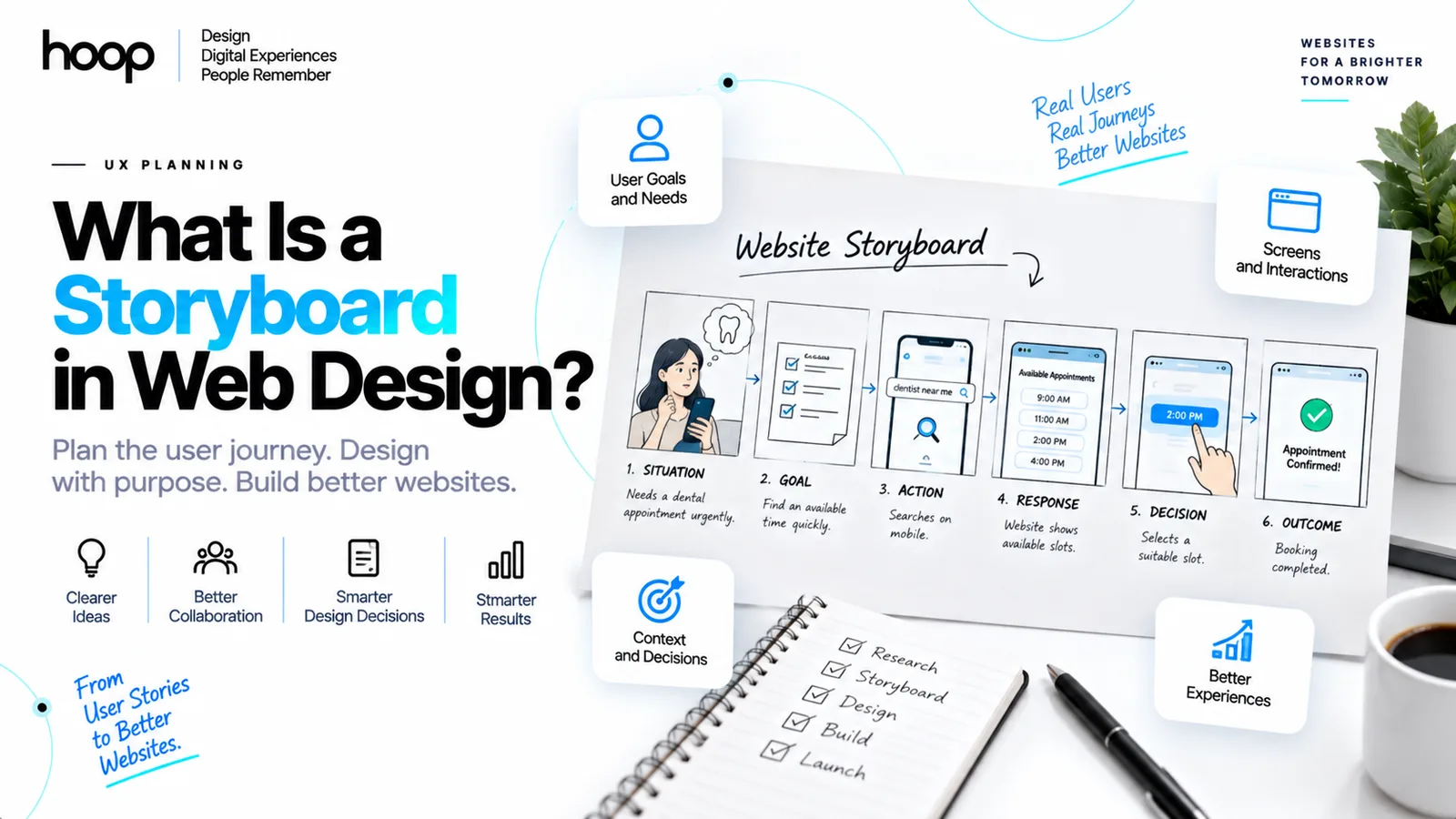
What Is a Storyboard in Web Design? A UX Planning Guide
Sep 8, 2026 · 10 min read
Why Typography Is Important in Web Design: 10 Reasons It Matters
Sep 26, 2026 · 10 min read