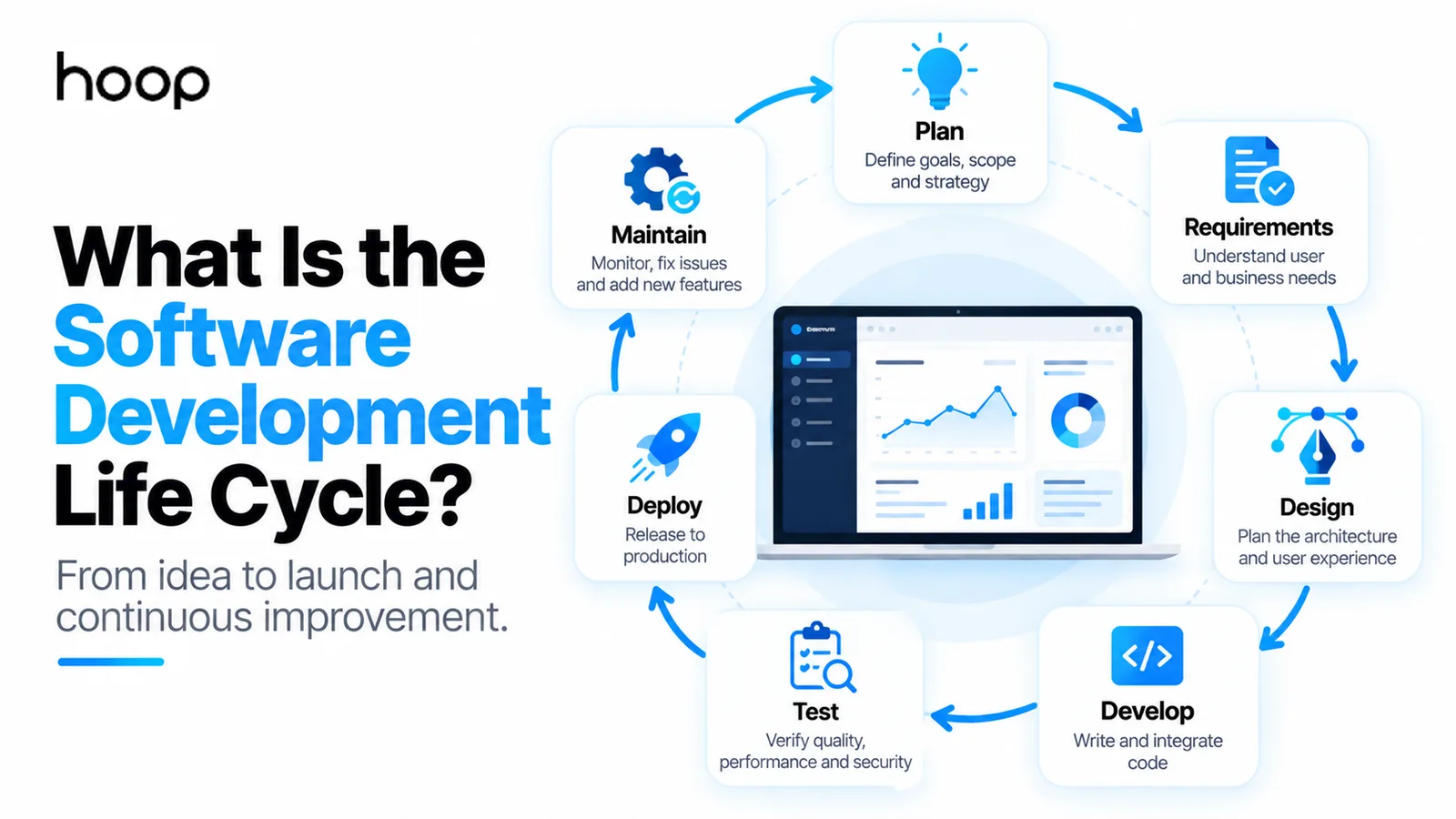
A Software Engineering Model for Mobile App Development
A software engineering model for mobile app development gives teams a structured path from discovery and architecture to coding, testing, deployment, and maintenance — reducing technical debt and letting an app grow safely.
Sahar
Content Writer
A software engineering model for mobile app development gives your team a repeatable path from product idea to maintained production app. The strongest model combines discovery, requirements, architecture, iterative development, testing, deployment, monitoring, and continuous improvement.
Mobile development needs more than a generic software checklist. Your process must account for iOS and Android platforms, device behavior, network loss, permissions, app-store rules, backend APIs, local storage, security, and frequent releases.
A practical model should therefore answer 3 questions at every stage: What decision must the team make? What artifact proves the decision? What must be true before work moves forward?
Need this done right?
Hoop builds the strategy, design and development behind sites like this one — talk to us about yours.
What Is a Software Engineering Model for Mobile App Development?
A software engineering model for mobile app development is a structured lifecycle for planning, designing, building, testing, releasing, and maintaining mobile software. The model turns development into controlled engineering work instead of a sequence of disconnected coding tasks.
A systematic literature review of mobile app process models identified 20 different approaches. The review found frequent use of Agile or state-based principles and weaker coverage of deployment and maintenance. That gap matters because mobile applications keep changing after version 1.0 reaches users. You can review the systematic literature review for the academic background.
Mobile software engineering adds platform constraints
Mobile apps run inside operating systems with strict lifecycle rules. Developers must handle background states, limited battery, unstable networks, storage limits, device permissions, screen sizes, and hardware differences.
The development process must also support App Store and Google Play requirements. A technically correct build can still fail release review because of privacy, payments, permissions, or account-management rules.
The model controls decisions, not just tasks
A weak process says, “design, code, test, launch.” A strong process defines the output and approval gate for every stage.
For example, architecture should produce a documented client structure, backend boundary, data model, and integration plan. Testing should produce evidence that critical user flows pass on supported devices.
The 8-Stage Mobile Software Engineering Model
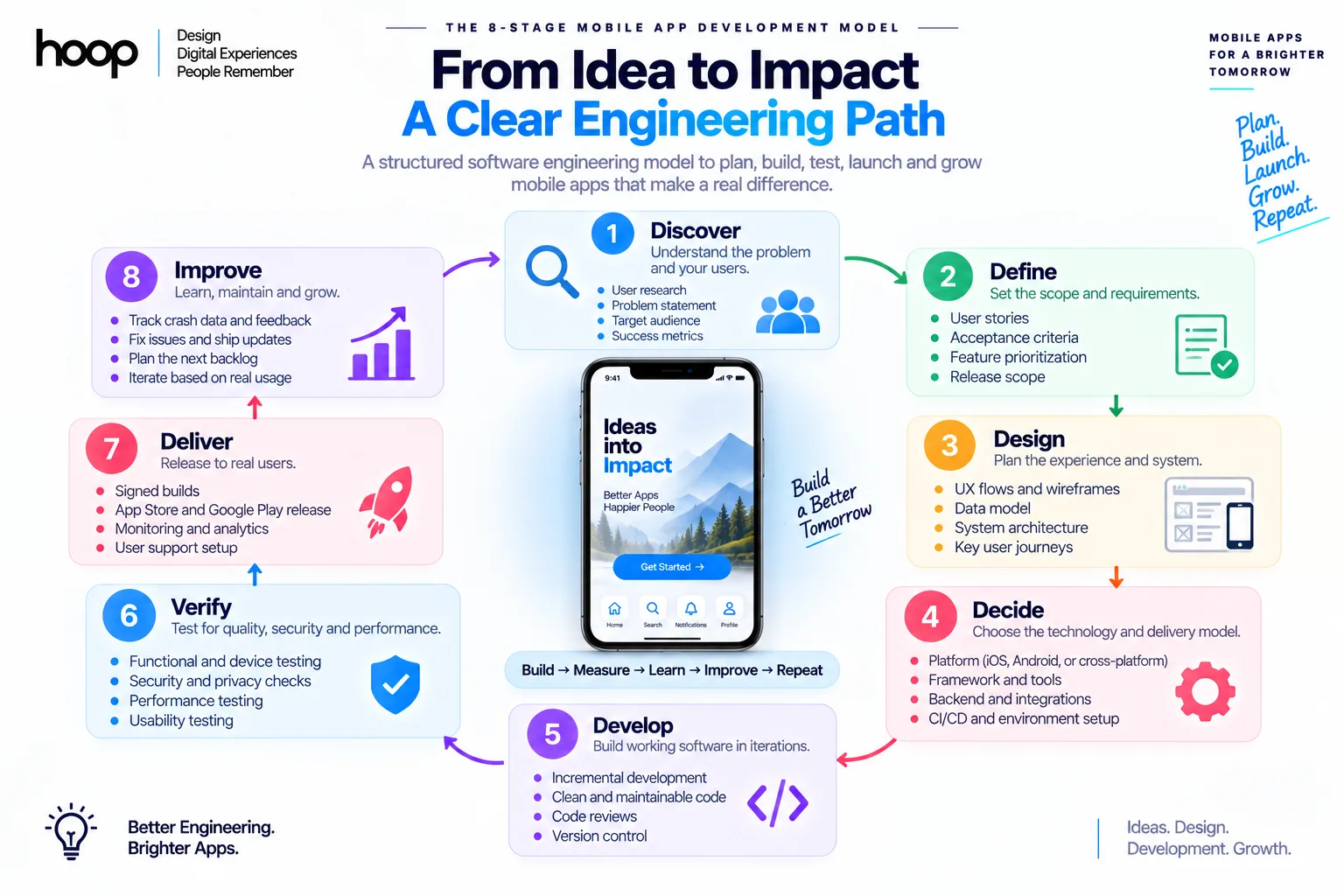
Use the following 8-stage model as a practical framework for production mobile applications. The stages form a loop because production data should influence the next planning cycle.
| Stage | Core task | Required output | Exit gate |
|---|---|---|---|
| 1. Discover | Validate problem and users | Problem statement, success metrics | Problem and target user are specific |
| 2. Define | Control scope and requirements | User stories, acceptance criteria, release scope | Version 1 scope is approved |
| 3. Design | Plan experience and system | UX flows, data model, architecture | Major flows and boundaries are clear |
| 4. Decide | Choose stack and delivery model | Platform, framework, backend, CI/CD plan | Technology matches product needs |
| 5. Develop | Build working software | Incremental production code | Feature meets acceptance criteria |
| 6. Verify | Prove quality and safety | Test results, security checks, device results | Release risks are acceptable |
| 7. Deliver | Release to real users | Signed builds, store release, monitoring | Production release succeeds |
| 8. Improve | Learn and maintain | Crash data, feedback, next backlog | Evidence informs the next cycle |
The model works for startup Minimum Viable Products (MVPs), consumer apps, internal business tools, and larger mobile products. Teams should adjust the depth of each stage to product risk.
Stage 1: Discover the Product Before You Design the App
Discovery proves that your team understands the user problem before engineering resources commit to a solution. The output should define the user, problem, expected outcome, and measurable success condition.
Define one primary user result
Start with the result a user must complete. Examples include booking an appointment, paying an invoice, tracking a delivery, recording a workout, or approving a field-service task.
Avoid beginning with a long feature inventory. A feature list describes software components, while a user result describes product value.
Validate demand and constraints
Check whether the target audience needs a native mobile experience. A responsive website can remain the better product when users do not need push notifications, offline access, sensors, background work, or frequent mobile interaction.
Teams planning a production build can use Hoop’s mobile app development services as a reference for the capabilities a complete mobile product can require.
Define measurable success
Choose product metrics before implementation. Useful examples include successful task completion, activation rate, crash-free sessions, response time, retention, or completed transactions.
Stage 2: Define Requirements and Control the First Release
Requirements convert the product idea into testable behavior. Every important feature should have an owner, acceptance criteria, and release priority.
Write user stories with acceptance criteria
A user story should describe who needs the feature and what outcome the feature supports. Acceptance criteria should define observable behavior.
Separate MVP scope from later scope
A Minimum Viable Product should test the product’s central value with the smallest responsible feature set. An MVP should not mean unfinished security, missing error handling, or unstable data storage. Our MVP development guide covers how to draw that line.
Review platform and policy requirements early
Check store rules before building sensitive features. Payments, subscriptions, health data, children’s services, location tracking, account deletion, and background permissions can affect architecture.
Early policy review prevents expensive redesign after development.
Stage 3: Design the User Experience and System Architecture Together
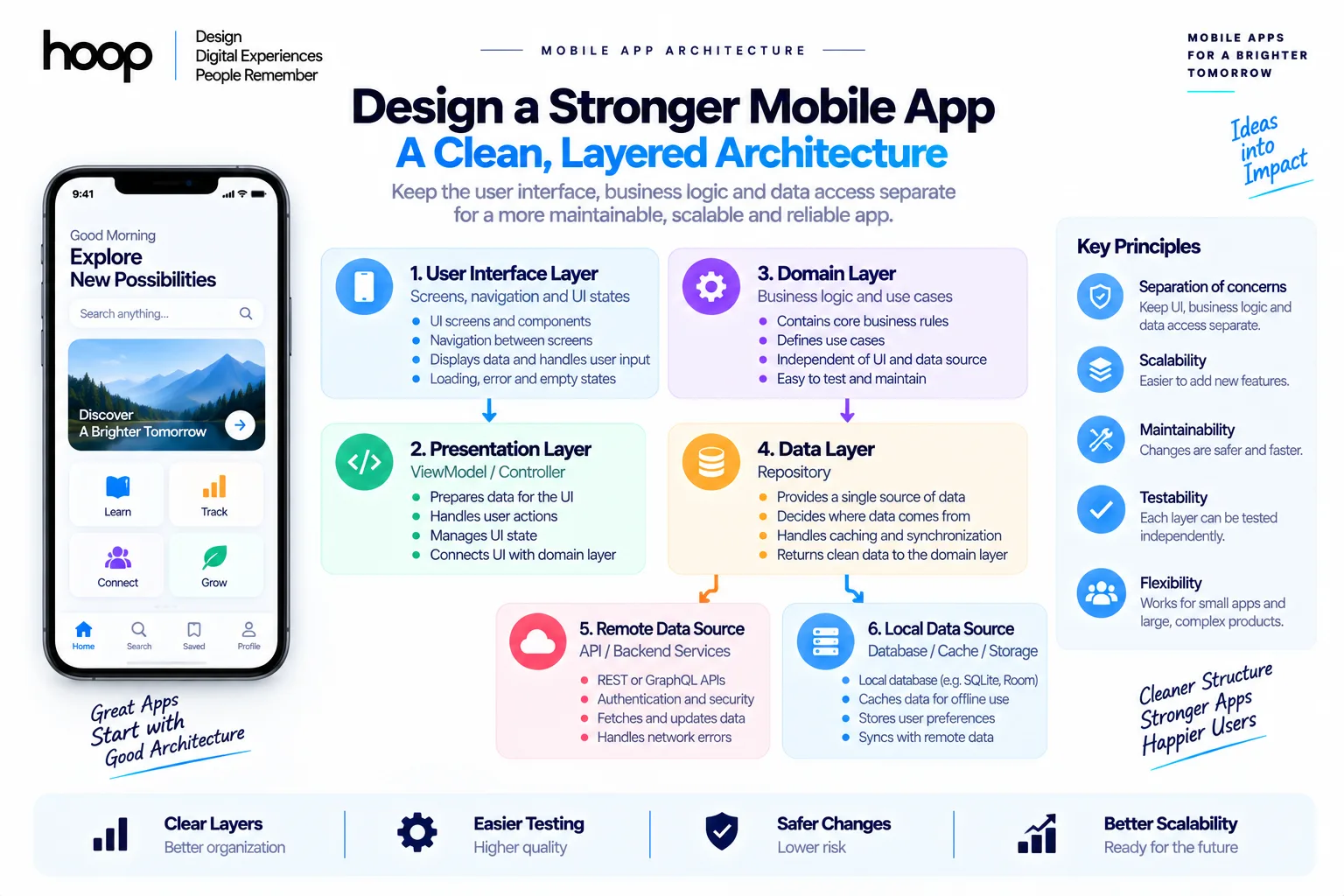
Design should cover both the visible mobile experience and the invisible system behind the screens. UX decisions and architecture decisions affect each other.
Map complete user flows
Design the happy path plus error, empty, loading, offline, denied-permission, and recovery states. Real users encounter these states frequently.
Wireframes should show navigation and task order before visual polish begins.
Use layered mobile architecture
A maintainable mobile client should separate presentation, domain logic, and data access. Common patterns include Model-View-ViewModel (MVVM), Clean Architecture, and repository-based designs.
A typical flow looks like:
Screen → ViewModel or Controller → Domain Logic → Repository → API or Local Database
Design backend boundaries and data contracts
Connected apps need defined interfaces between the mobile client and backend services. Document Application Programming Interface (API) endpoints, request formats, response formats, authentication rules, retry behavior, and error codes.
Stage 4: Decide the Technology Stack From Product Requirements
Technology selection should follow the architecture. Choose the platform and framework that best support product behavior, team capacity, and maintenance.
Choose native when platform depth matters
Native iOS development uses Swift, SwiftUI, UIKit, Xcode, and Apple frameworks. Native development fits products needing deep platform integration, advanced graphics, intensive background behavior, or immediate access to new operating-system APIs.
Hoop’s native iOS development page shows the platform-specific scope that a native iOS build can involve.
Native Android development commonly uses Kotlin, Jetpack Compose, Android Studio, Gradle, and Android platform APIs. The native Android development service illustrates the testing and platform depth expected from a dedicated Android codebase.
Choose cross-platform when shared delivery creates value
Flutter uses Dart and its own rendering system. React Native uses JavaScript or TypeScript with native platform integration.
Cross-platform development can reduce duplicated feature work across iOS and Android.
Choose backend technology separately
Choose backend technology based on data model, security, integrations, performance, operational skills, and expected scale. Products with remote APIs and managed infrastructure also benefit from deliberate cloud application development planning.
Stage 5: Develop in Small, Testable Increments
Development should produce working vertical slices instead of large batches of unfinished code. Each increment should connect interface, logic, data, and tests for one usable behavior.
Build vertical features
A booking feature should include the screen, validation, API request, backend logic, database operation, loading states, error states, and tests.
Vertical delivery exposes integration problems earlier than building every screen before backend integration begins.
Use source control and code review
Store production code in Git with a clear branching strategy. Pull requests should review logic, architecture, security, readability, and test coverage.
Control state and side effects
Mobile applications handle navigation, network requests, local caches, background refresh, notifications, and device permissions. State-management rules should make those transitions predictable.
Stage 6: Verify Quality Across Code, Devices, Networks, and Security
Testing must prove that the product works outside the developer’s ideal environment. Mobile verification requires multiple test layers and real-device conditions.
Use a layered testing strategy
Unit tests verify isolated business logic. Integration tests verify boundaries such as repositories, APIs, and databases. User-interface tests verify complete user flows.
Test mobile-specific failure states
Test slow networks, no networks, interrupted requests, background transitions, denied permissions, low storage, expired tokens, orientation changes, and repeated taps.
Android teams should test representative device classes and operating-system versions. iOS teams should test supported iPhone and iPad configurations where the product requires both.
Test security and privacy behavior
Review authentication, authorization, token storage, transport security, logging, sensitive data, API access, and secrets management.
Security review should include the backend. A secure interface cannot compensate for an API that exposes another user’s records.
Stage 7: Deliver Through a Controlled Release Pipeline
Deployment should behave like an engineering stage, not an administrative afterthought. A release needs repeatable builds, signing, store assets, monitoring, and rollback planning.
Automate build and test steps
Continuous Integration and Continuous Delivery (CI/CD) can compile builds, run automated tests, check code quality, and package releases.
Common mobile delivery tools include GitHub Actions, Bitrise, Fastlane, Xcode Cloud, TestFlight, and Google Play testing tracks.
Use staged testing before public release
Distribute internal and beta builds before production. TestFlight supports iOS beta delivery, while Google Play supports internal, closed, and open testing tracks.
Treat store submission as part of engineering
Prepare privacy disclosures, screenshots, store text, permission explanations, account-review access, payment configuration, signing assets, and release notes.
Release readiness should include technical and compliance checks before submission.
Stage 8: Improve the App With Production Evidence
A mobile app enters a new engineering phase after launch. Production telemetry should decide what the team fixes, removes, and builds next.
Monitor crashes and performance
Use crash reporting and performance monitoring to identify failures by app version, operating system, device, screen, and user flow.
Common tools include Firebase Crashlytics and Sentry. Teams should also monitor backend latency, API errors, database load, and failed jobs.
Review user behavior and feedback
Analytics should answer product questions, not merely count sessions. Track completion of important flows, abandonment points, feature adoption, and repeated failure patterns.
Maintain dependencies and platform compatibility
Apple and Google update operating systems, SDKs, privacy rules, and store policies. Third-party libraries also release security and compatibility updates.
Maintenance should include dependency updates, database migrations, certificate management, test refreshes, and planned support for new OS releases.
Agile, Waterfall, or Spiral: Which Model Fits Mobile Development?
No single delivery methodology fits every mobile product. Choose the methodology from requirement stability, technical risk, compliance, and release frequency.
Agile fits products that learn through releases
Agile works well when user feedback changes priorities. Teams plan short increments, review working software frequently, and update the backlog using evidence.
Consumer products, SaaS companion apps, and evolving marketplaces often fit iterative delivery.
Waterfall fits tightly controlled requirements
Waterfall can work when requirements remain stable and approvals must follow a strict sequence. Examples include certain internal tools, contractual builds, and regulated projects with fixed documentation gates.
Spiral fits high-risk technical work
The Spiral model organizes development around repeated risk analysis, prototyping, implementation, and evaluation.
How Should a Solo Developer Adapt the Model?
A solo developer needs fewer meetings, not fewer engineering controls. Reduce ceremony while keeping architecture, testing, release discipline, and documentation.
Keep the stack small
Choose familiar frameworks, managed backend services, and simple infrastructure when product needs allow.
Document decisions for your future self
Record API contracts, environment setup, deployment steps, data migrations, and architectural choices.
Automate repetitive work early
Use CI/CD, test scripts, formatting, linting, backups, and release tooling.
Where Does AI Fit in a Mobile Software Engineering Model?
AI can accelerate parts of each stage, but AI should not own production accountability. Use AI for assistance while engineers retain architecture, security, acceptance, and release decisions.
Use AI during planning and implementation
AI tools can help draft user stories, scaffold code, explain frameworks, generate test cases, refactor repetitive code, and summarize logs.
Use AI during testing and debugging
AI can suggest edge cases, generate unit tests, interpret stack traces, and compare logs.
Keep human approval at production boundaries
Require human approval for database migrations, security-sensitive changes, infrastructure changes, payment logic, and final production releases.
Common Mistakes That Break Mobile Engineering Models
Most failed development processes do not fail because a team forgot a lifecycle name. They fail because decisions remain vague or feedback arrives too late.
Coding before validating the product
A polished architecture cannot rescue a product that solves the wrong problem. Validate user need before building a large feature set.
Mixing UI, data, and business logic
Tightly coupled code makes testing difficult and changes risky. Separate presentation, domain behavior, and data access from the beginning.
Treating QA as the final week
Testing late turns architectural problems into launch emergencies. Run automated tests and device tests throughout development.
Ignoring deployment until the build is finished
Store policies, signing, privacy disclosures, and account requirements can block release. Plan delivery during requirements and architecture work.
Treating launch as the finish line
Production mobile software needs monitoring, support, compatibility updates, and iterative releases. Maintenance belongs inside the engineering model.
Build Mobile Apps With an Engineering Model That Survives Launch
A software engineering model for mobile app development should make every major product decision visible, testable, and reversible where possible. The 8-stage model connects product discovery with architecture, implementation, verification, deployment, and production learning.
The result is not more process for its own sake. The result is a mobile codebase your team can test, release, debug, secure, and improve without rebuilding the product after every major change.
If you are planning a new mobile product or rebuilding an unstable application, Hoop can help you scope the architecture and delivery model before production code expands. Explore Hoop’s mobile development guide or start with a technical scoping conversation.
“A weak process says “design, code, test, launch.” A strong process defines the output and approval gate for every stage.”
Key takeaways
- 01Every stage needs three answers: the decision, the artifact that proves it, and the exit gate.
- 02The 8 stages form a loop: discover, define, design, decide, develop, verify, deliver, improve.
- 03Separate presentation, domain logic, and data access from the first commit.
- 04Deployment and maintenance belong inside the model — launch is not the finish line.
Written by
Sahar
Content Writer
Frequently Asked
Questions
Everything you need to know before booking a strategy call. Can't find your answer? Contact us directly.
An iterative lifecycle with explicit architecture, testing, deployment, and maintenance stages fits most evolving mobile products. Product risk should determine the exact methodology.
No. Agile suits changing requirements and frequent feedback, while Waterfall or Spiral can fit stable or high-risk projects better.
Yes. Define major layers, data boundaries, APIs, state ownership, storage, and security before substantial production coding begins.
Yes. A solo developer can reduce meetings and documentation volume while keeping architecture, source control, testing, CI/CD, monitoring, and maintenance.
No. Production engineering continues through crash monitoring, performance work, user feedback, dependency updates, security patches, and feature iteration.
Keep reading
All articles →
Why Is Software Bixiros.5a8 Development Process? What the Term Really Means
Sep 28, 2026 · 10 min read
Why Use Cloud Computing for Mobile App Development?
Sep 5, 2026 · 10 min read