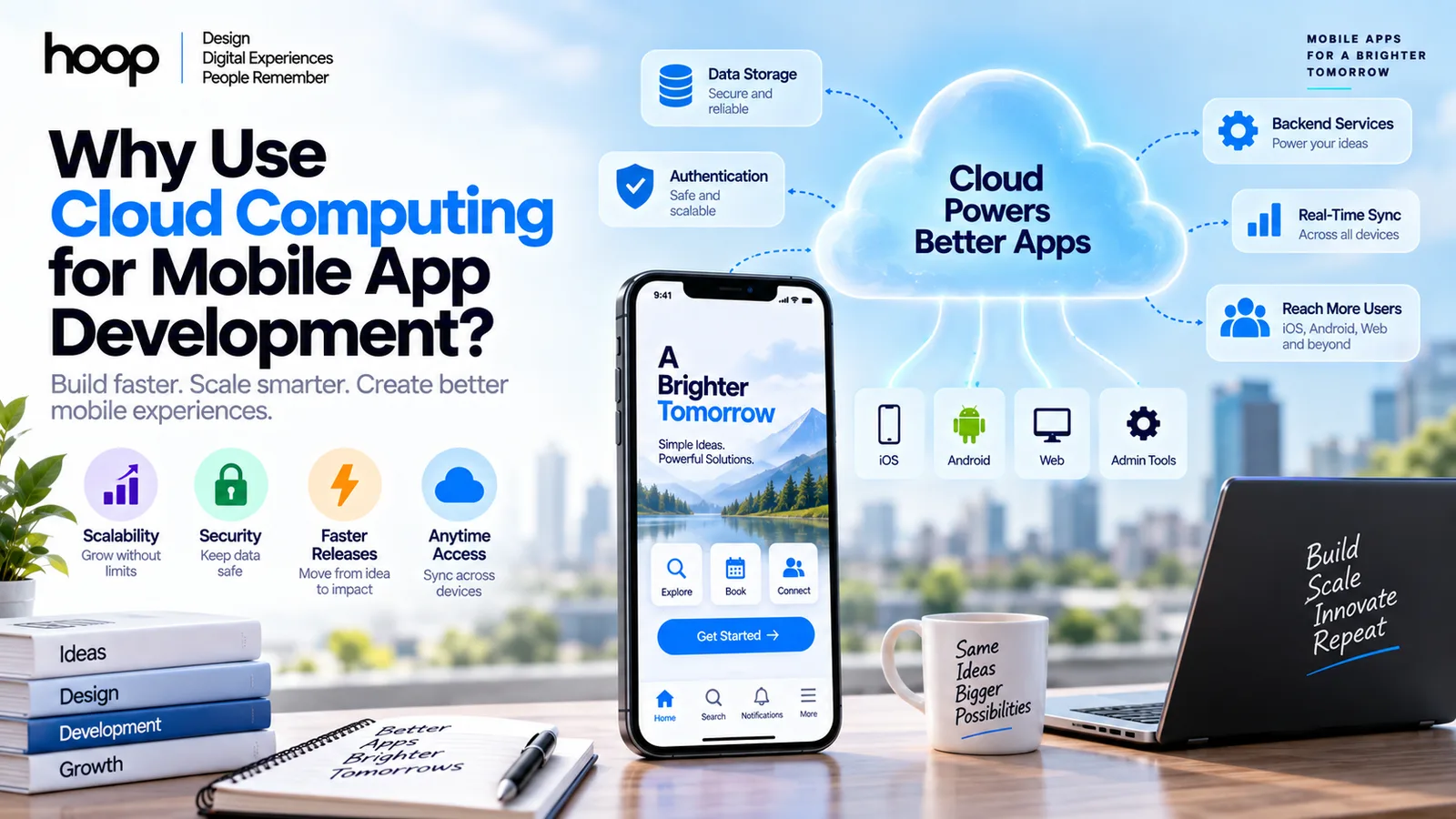
Why Use Cloud Computing for Mobile App Development?
Cloud computing moves shared mobile app services beyond one device. A well-planned cloud backend improves synchronization, release speed, scalability, security control, and operational flexibility — but not every workload belongs in the cloud.
Sahar
Content Writer
Cloud computing gives mobile apps shared backend services for data, authentication, APIs, storage, notifications, processing, and scaling.
Apps with accounts, shared records, remote content, or multi-device access usually need cloud infrastructure.
The question, why use cloud computing for mobile app development, matters because the mobile screen represents only one layer. Most connected apps depend on remote systems that store state, enforce permissions, process events, and keep users synchronized.
Need this done right?
Hoop builds the strategy, design and development behind sites like this one — talk to us about yours.
What Does Cloud Computing Do for a Mobile App?
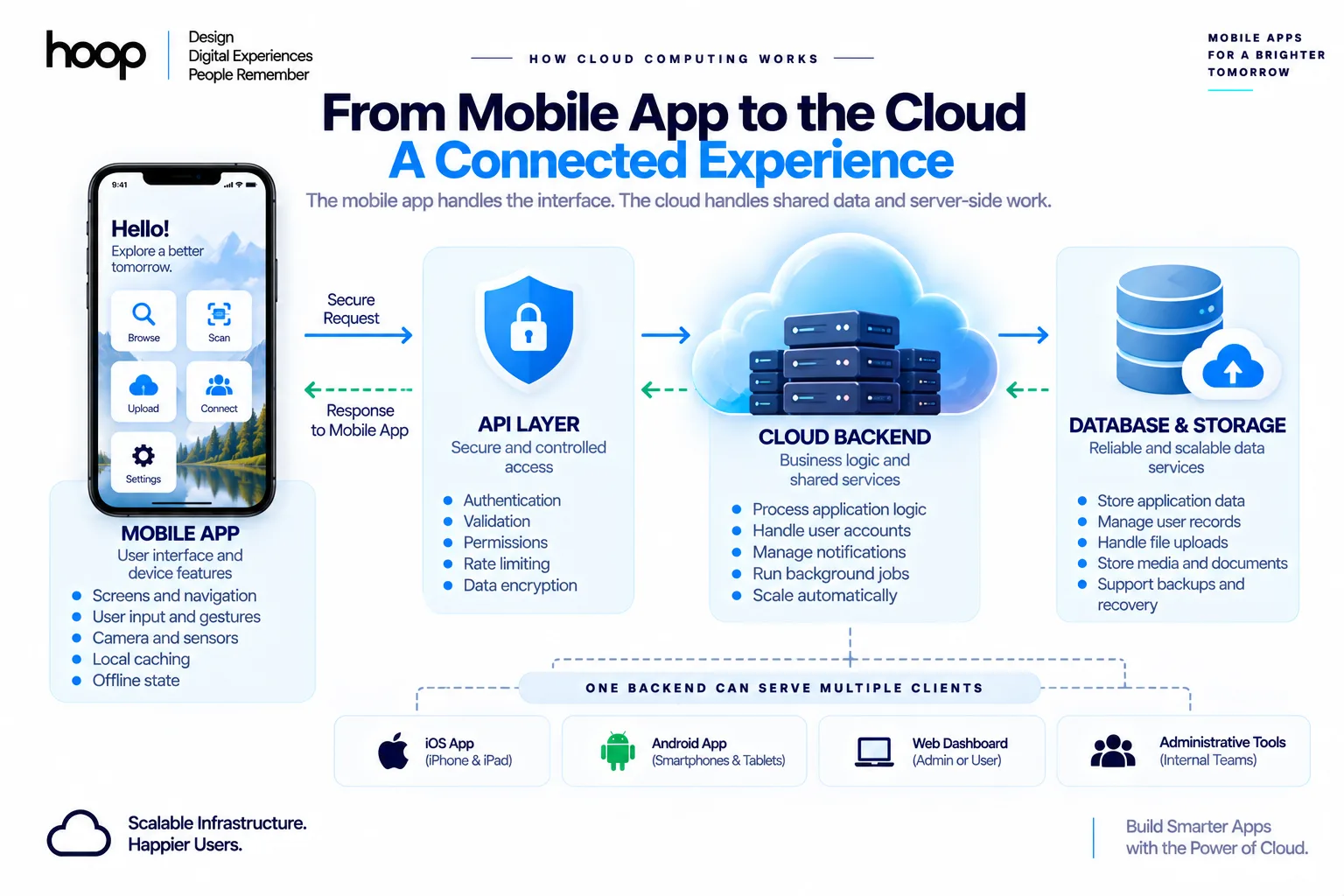
Cloud computing gives a mobile app a remote backend for every authorized user and device.
The phone handles the interface, gestures, local caching, and device features. Cloud services handle shared data and server-side work.
A common architecture follows this path:
Mobile app → secure API → cloud backend → database or storage → response to the mobile app
That flow explains why use cloud computing for mobile app development. A generic benefit list does not show the system relationship. The cloud acts as the shared system behind the iOS or Android client.
The mobile client handles device interaction
The mobile client manages screens, navigation, forms, camera access, local notifications, and offline state. Developers can build that client with Swift, Kotlin, Flutter, or React Native.
The cloud backend handles shared state
The backend manages accounts, permissions, orders, messages, appointments, subscriptions, and other shared records. The same backend can serve iOS, Android, web dashboards, and administrative tools.
Hoop’s mobile engineering team connects the client, backend, testing, and release process as one product system.
Why Use Cloud Computing Instead of Device-Only Storage?
Use cloud computing when information must survive beyond one phone or reach more than one user.
Device-only storage cannot reliably support shared accounts, synchronized records, or remote business logic.
Local storage still matters. Preferences, caches, offline queues, and device-specific files often belong on the phone.
Cloud storage supports multi-device access
A user can sign in on a new phone and retrieve server-backed information. Examples include profile details, saved items, subscriptions, bookings, and message history.
The cloud becomes the shared source of truth
Connected apps need one authoritative version of important data. A cloud database can store the accepted state after validation and permission checks.
The mobile client can cache that state for speed. The backend still decides which record remains authoritative after conflicting edits.
Which Mobile App Features Need Cloud Services?
Accounts, shared data, file uploads, notifications, payments, messaging, and remote configuration commonly need cloud services.
These features depend on infrastructure outside one installed application.
The exact cloud stack should follow product requirements. A simple utility needs less infrastructure than a marketplace or healthcare platform.
Authentication keeps identity outside the app binary
Cloud identity services can manage registration, login, password resets, sessions, and authentication tokens. Examples include Firebase Authentication, Amazon Cognito, Auth0, and Supabase Auth.
Cloud databases store shared application records
Relational databases, such as PostgreSQL and MySQL, fit structured relationships and transactions. NoSQL databases, such as Firestore and DynamoDB, fit flexible documents and high-volume access patterns.
Object storage handles large files
Object storage services hold photos, videos, audio, documents, exports, and backups. Examples include Amazon S3, Google Cloud Storage, and Azure Blob Storage.
How Does the Cloud Keep Mobile Data in Sync?
Cloud infrastructure gives multiple devices one shared place to read and update application state.
That capability explains another reason why use cloud computing for mobile app development.
Synchronization still requires design. Developers must define offline behavior, conflict handling, retries, and stale records.
Real-time updates reduce manual refreshes
Real-time listeners, WebSockets, or event streams can push updates when shared records change. Messaging, delivery tracking, collaborative tools, and live dashboards often need this pattern.
Offline queues protect unstable mobile connections
Mobile users lose connectivity in trains, elevators, hospitals, warehouses, and rural locations. A good mobile client can queue safe operations locally.
The app can submit queued changes after connectivity returns. The backend must then validate order, permissions, and conflicts.
For a deeper foundation, Hoop’s mobile development guide explains how frontend and backend systems work together.
How Does Cloud Computing Support Mobile Apps at Scale?
Cloud platforms let backend capacity change as application demand changes.
Teams can add compute, database capacity, storage, and delivery resources without buying physical servers first.
Scalability does not mean every service scales automatically. Teams still need capacity rules, database design, caching, and load testing.
Auto-scaling responds to changing traffic
Cloud compute can add instances or function capacity when demand rises. Teams can reduce capacity during quieter periods.
Content delivery networks reduce distance
A Content Delivery Network (CDN) stores cacheable assets near users. Examples include CloudFront, Cloudflare, and Google Cloud CDN.
Managed services reduce infrastructure work
Managed databases, queues, storage, monitoring, and authentication reduce routine server administration. Developers can spend more time on product behavior and less time patching infrastructure.
Hoop’s cloud application development work covers serverless systems, container-based services, mobile backends, and cloud-native APIs.
Where Does Serverless Fit in a Mobile Backend?
Serverless computing runs backend code on demand without a permanently managed application server.
Examples include AWS Lambda, Azure Functions, and Google Cloud Functions.
Serverless fits event-driven mobile workloads especially well. Variable traffic can use compute only when events occur.
Event functions handle focused backend tasks
A function can send an email, resize an image, process a webhook, or create a notification. Teams can separate these tasks from the mobile application.
Serverless can speed an MVP
A startup can combine managed authentication, a database, object storage, and functions without maintaining a full server fleet. That approach reduces early infrastructure work.
Why use cloud computing for mobile app development during an MVP? Cloud services let the team validate product behavior before building heavy operations systems.
How Does Cloud Computing Make Mobile Releases More Flexible?
Cloud backends let teams change server-side behavior without waiting for every user to update.
That flexibility matters because app-store updates remain user-controlled.
Developers still need stable Application Programming Interfaces (APIs). Older app versions can remain active long after a new release appears.
API versioning protects older app versions
A backend can support multiple API versions during a transition. That approach prevents one server change from breaking users who delayed an update.
Remote configuration changes behavior safely
Remote configuration can enable features, adjust thresholds, or change content without rebuilding the mobile binary. Teams can test changes with selected user groups first.
What Does the Cloud Change About Mobile App Security?
Cloud platforms can strengthen centralized security controls, but cloud services do not make an app secure automatically.
Teams must configure identity, permissions, encryption, logs, backups, and secrets correctly.
The AWS Well-Architected Framework groups cloud architecture around operational excellence, security, reliability, performance efficiency, cost optimization, and sustainability.
Centralized authorization protects shared records
The backend can check who requests a record and which action the user can perform. Role-based access control can separate customers, staff, administrators, and service accounts.
Secret management keeps credentials off devices
Private API keys, database passwords, signing secrets, and service credentials belong in protected backend storage. Mobile binaries can expose embedded secrets during reverse engineering.
A secure design gives the mobile client only the minimum credentials needed for its authorized session.
Logging improves incident investigation
Cloud logs can record authentication failures, API errors, unusual traffic, and service health. Monitoring tools can alert teams before small failures become prolonged outages.
What Does Cloud Computing Actually Cost a Mobile Product?
Cloud computing usually reduces upfront infrastructure spending, but it does not guarantee the lowest lifetime cost.
Usage-based services can become expensive after traffic grows.
That tradeoff answers another part of why use cloud computing for mobile app development. Teams buy flexibility and managed operations, not guaranteed cheap hosting.
Startups avoid large hardware commitments
A small team can launch without purchasing servers, networking equipment, backup hardware, or data-center capacity. The team pays for cloud resources as the product uses them.
Cost depends on data access patterns
Database reads, writes, network transfer, function executions, logs, and object storage can all create charges. A poor query pattern can multiply cost as user activity grows.
Quick Reference: What Should Run in the Cloud?
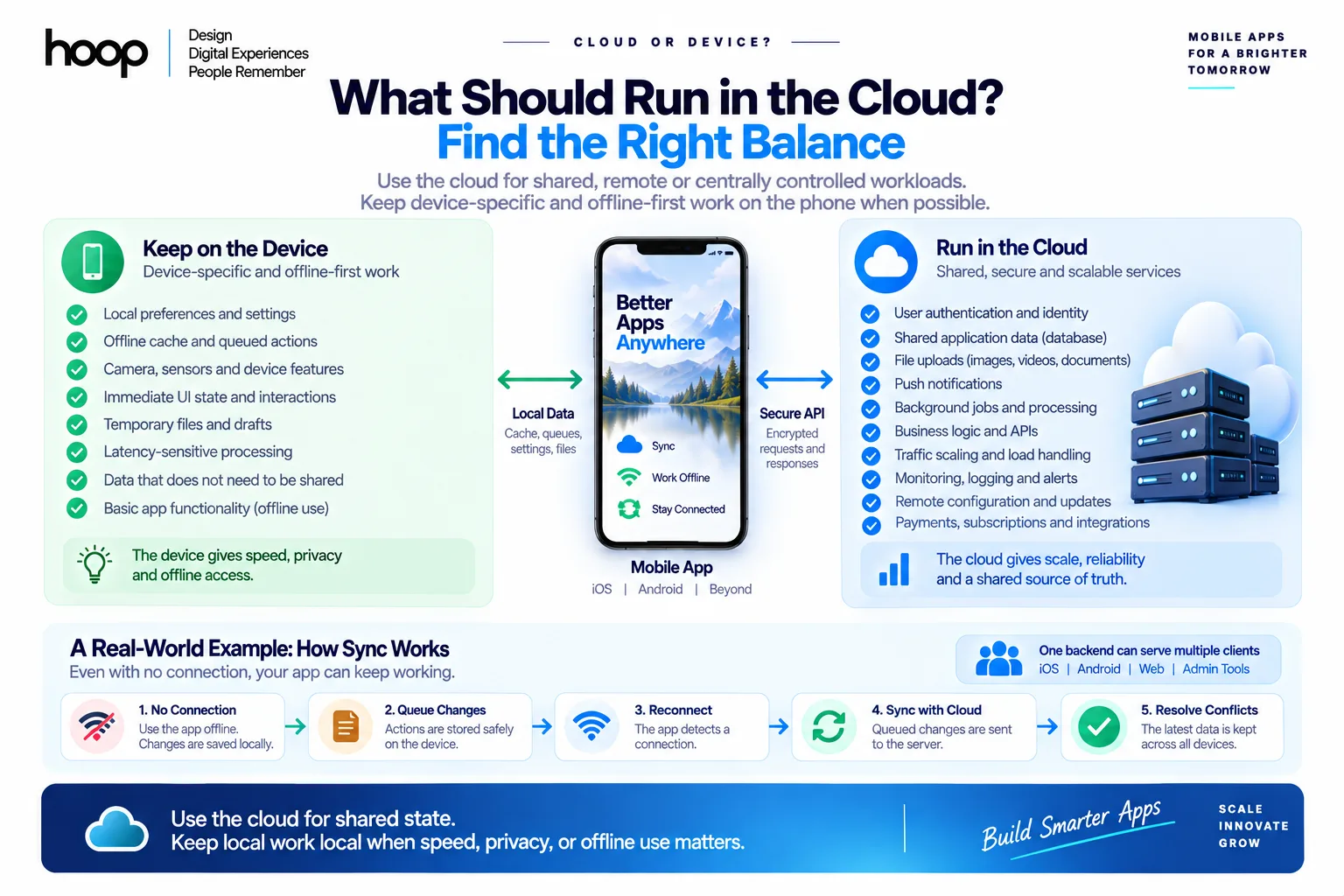
Use the cloud for shared, remote, or centrally controlled workloads. Keep device-specific and offline-first work on the phone when possible.
| Task | Typical timing | Recommended method | Difficulty |
|---|---|---|---|
| User authentication | From first account release | Managed identity or custom backend auth | Medium |
| Shared application data | From first multi-user release | Cloud database behind an API | Medium |
| Images and video | When uploads begin | Object storage with signed access | Medium |
| Push notifications | When remote events matter | Backend plus push provider | Medium |
| Background jobs | When asynchronous work appears | Serverless functions or workers | Medium |
| Traffic scaling | Before public growth campaigns | Auto-scaling plus load testing | High |
| Monitoring and alerts | Before production launch | Centralized logs and metrics | Medium |
| Offline cache | During mobile client design | Local database plus sync rules | High |
Which Cloud Platform Fits a Mobile App?
Choose a provider from product requirements, data models, team skills, compliance needs, and expected scale.
No provider wins every mobile use case.
Why use cloud computing for mobile app development does not answer which provider you should choose. Architecture comes first.
Firebase fits fast mobile backends
Firebase offers authentication, databases, storage, analytics, functions, and mobile SDKs. The platform can accelerate prototypes, messaging features, and smaller teams.
Supabase fits PostgreSQL-centered products
Supabase combines PostgreSQL with authentication, storage, APIs, and real-time features. Teams that want relational data can find that model easier to reason about.
AWS, Azure, and Google Cloud fit custom backends
Amazon Web Services (AWS), Microsoft Azure, and Google Cloud Platform (GCP) provide broad infrastructure catalogs. Teams can combine compute, databases, storage, queues, identity, and monitoring.
Hoop’s custom software development teams choose cloud components around product requirements rather than provider popularity.
What Are the Main Risks of Cloud Computing for Mobile Apps?
Vendor lock-in, cost growth, network dependence, configuration mistakes, and architecture complexity create the main cloud risks.
Good planning reduces these risks but cannot remove every tradeoff.
Vendor lock-in can raise migration costs
Provider-specific databases, SDKs, event systems, and identity services can speed delivery. The same services can make later migration harder.
Network dependence changes product behavior
Cloud-backed apps need a plan for weak or absent connectivity. A blank screen during every network loss creates poor mobile behavior.
Critical workflows can use local caches, queued writes, and clear sync states. Fully offline products can avoid a cloud backend entirely.
Misconfiguration creates security exposure
Public storage buckets, excessive permissions, weak API rules, and exposed secrets can create serious incidents. Managed services still require secure configuration.
When Should You Not Use Cloud Computing for a Mobile App?
A mobile app does not need cloud computing when the product works entirely on one device.
Simple utilities can remain local when they need no shared data or remote processing.
Examples include calculators, offline converters, local timers, and single-device reference tools.
Local-only apps can remain simpler
A local app can store preferences and records directly on the device. The app avoids remote infrastructure, network errors, backend maintenance, and cloud bills.
Ultra-low-latency workflows can require local processing
Some device interactions need immediate response. Camera pipelines, audio effects, motion processing, and certain games can perform critical work locally.
A hybrid design can keep latency-sensitive work on-device while using the cloud for accounts, storage, and synchronization.
How to Choose Cloud Architecture for a Mobile App
To choose cloud architecture, map the product’s data, users, features, risks, and expected growth before selecting services.
The architecture should support the product rather than impress other engineers.
Why use cloud computing for mobile app development becomes easier to answer after you map these requirements.
Start with data ownership
List which records live locally, which records live remotely, and which systems own each source of truth. Define retention and deletion rules before launch.
Define performance and offline behavior
Specify acceptable response times for important actions. Decide what users can do without connectivity and how the app resolves conflicts after reconnection.
Model growth before choosing infrastructure
Estimate users, peak concurrency, storage growth, API traffic, and media transfer. Do not build for imaginary scale, but avoid obvious rework.
Hoop’s broader software development services cover architecture, mobile engineering, cloud systems, testing, deployment, and long-term support.
Common Cloud Architecture Mistakes to Avoid
Avoid choosing cloud services before understanding the app’s data and workload patterns. Provider popularity cannot correct a mismatched architecture.
Do not overengineer the first release
A small Minimum Viable Product (MVP) rarely needs Kubernetes, many microservices, and complex event infrastructure. Extra moving parts increase operational work.
Start with the simplest architecture that satisfies current risks. Add complexity when real usage creates a clear reason.
Do not ignore cost monitoring
Set budgets, billing alerts, and service limits early. Watch database access, network transfer, logs, and idle resources.
Do not store secrets inside the mobile app
Mobile applications run on devices outside your control. Attackers can inspect packages, network traffic, and local files.
Keep privileged credentials on backend systems. Use short-lived tokens and narrow permissions for mobile sessions.
Cloud or Device: The Final Decision
Use cloud computing when your mobile product needs shared data, accounts, synchronization, remote processing, or centralized security controls.
Keep local processing where speed, privacy, offline use, or device-specific behavior makes local execution better.
The strongest architecture usually combines both environments. The mobile device handles immediate interaction and offline state. The cloud handles shared services and controlled backend logic.
Review Hoop’s mobile app development services before development starts. The team can map the client, backend, data, and cloud architecture.
“Teams buy flexibility and managed operations, not guaranteed cheap hosting.”
Key takeaways
- 01Use the cloud when data must survive beyond one phone or reach more than one user.
- 02Keep caches, offline queues, sensors, and latency-sensitive work on the device.
- 03A cloud backend lets you change server behavior without waiting for app-store updates.
- 04Cloud reduces upfront spend; it does not guarantee the lowest lifetime cost.
Written by
Sahar
Content Writer
Frequently Asked
Questions
Everything you need to know before booking a strategy call. Can't find your answer? Contact us directly.
No. Offline utilities and single-device tools can work without a cloud backend. Accounts, shared data, notifications, and synchronization usually require remote services.
Cloud platforms reduce upfront infrastructure work through managed services, elastic capacity, and centralized operations. Private servers can fit specialized control or compliance requirements.
Yes, for products that fit Firebase’s data model and operating limits. Complex relational workflows or predictable-cost requirements can justify another backend architecture.
Yes. The mobile client can cache data locally, queue safe writes, and synchronize changes after connectivity returns.
Authentication, an API, a database, object storage, monitoring, and push notifications cover many connected apps. The exact stack depends on product requirements.
Keep reading
All articles →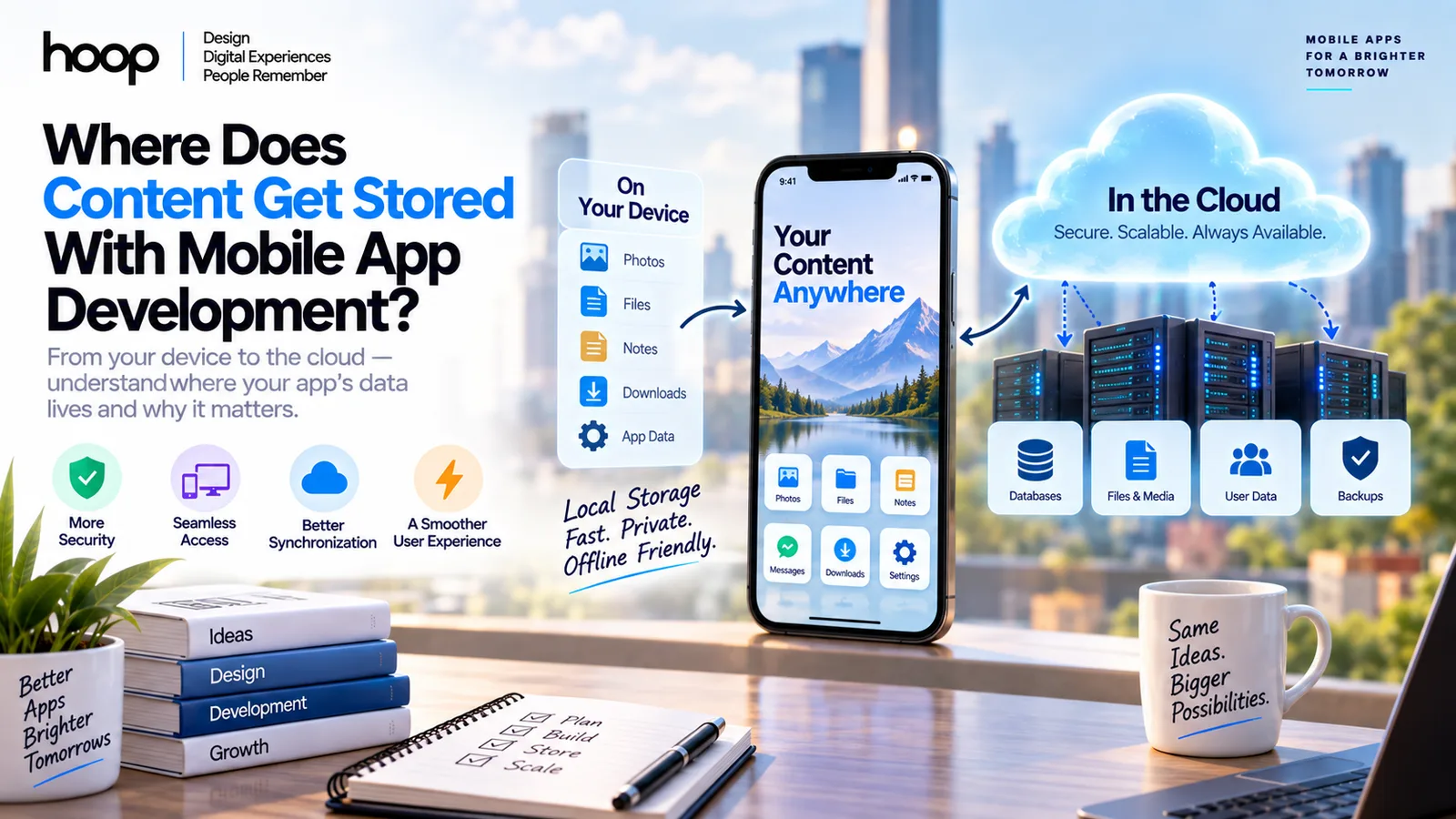
Where Does Content Get Stored With Mobile App Development?
Sep 5, 2026 · 10 min read
Custom Software Development in 2025: A Complete Guide for Modern Businesses
Aug 4, 2026 · 8 min read