
Where Does Content Get Stored With Mobile App Development?
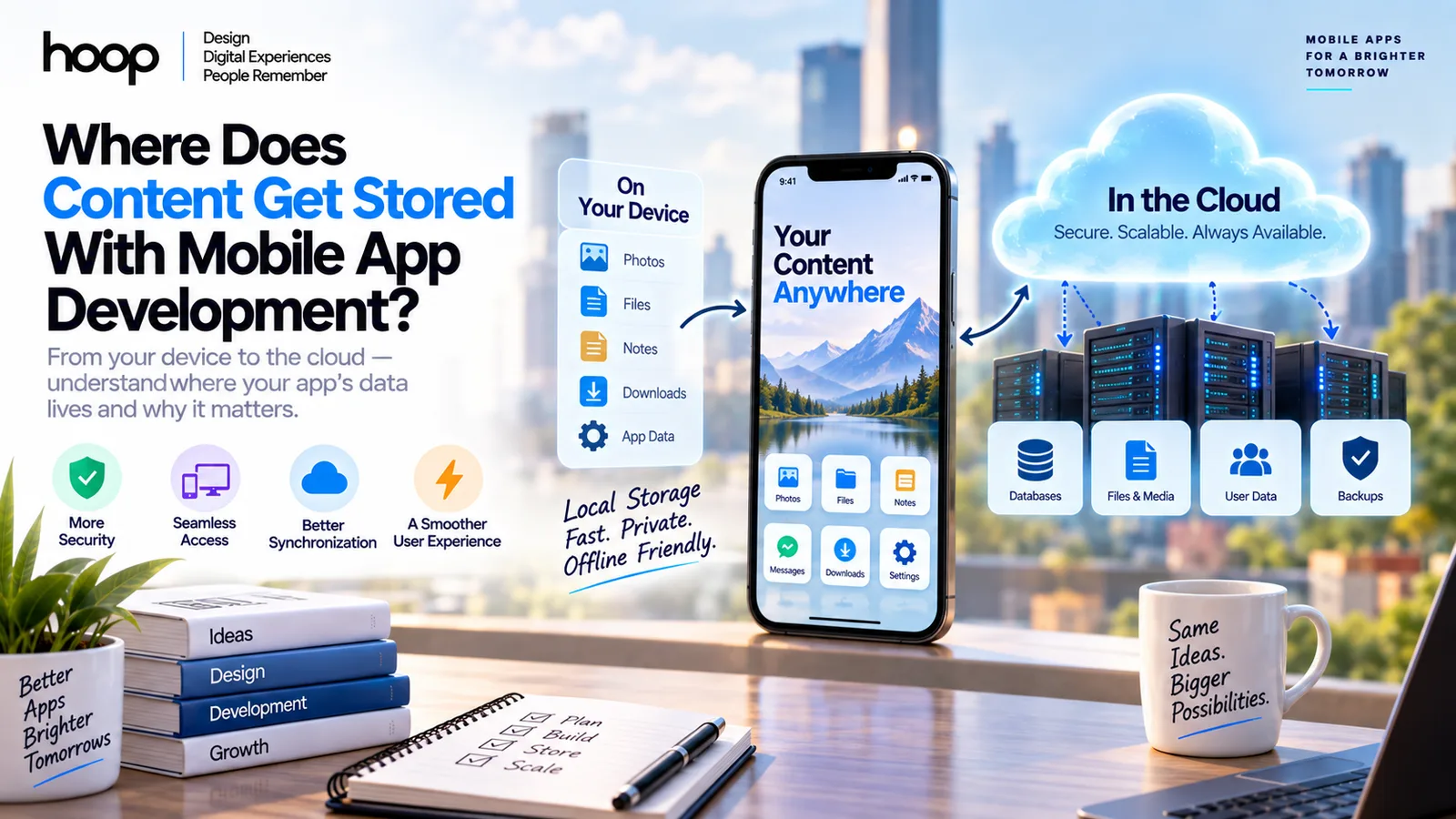
Mobile app content can live on the device, in a local database, on a backend server, or in cloud object storage. The right location depends on privacy, offline access, synchronization, file size, and who owns the data.
Sahar
Content Writer
Mobile app content gets stored in 3 main places: on the device, on a remote backend, or across both locations. Production apps often combine local files, databases, caches, secure credential storage, cloud databases, and object storage.
The storage choice depends on the content. A downloaded video needs different storage from a login token, chat message, profile photo, or product catalog.
Understanding storage helps you plan privacy, offline behavior, backups, synchronization, and maintenance. A mobile app development guide should define those decisions before engineers write production code.
Need this done right?
Hoop builds the strategy, design and development behind sites like this one — talk to us about yours.
Where Can Mobile App Content Live?
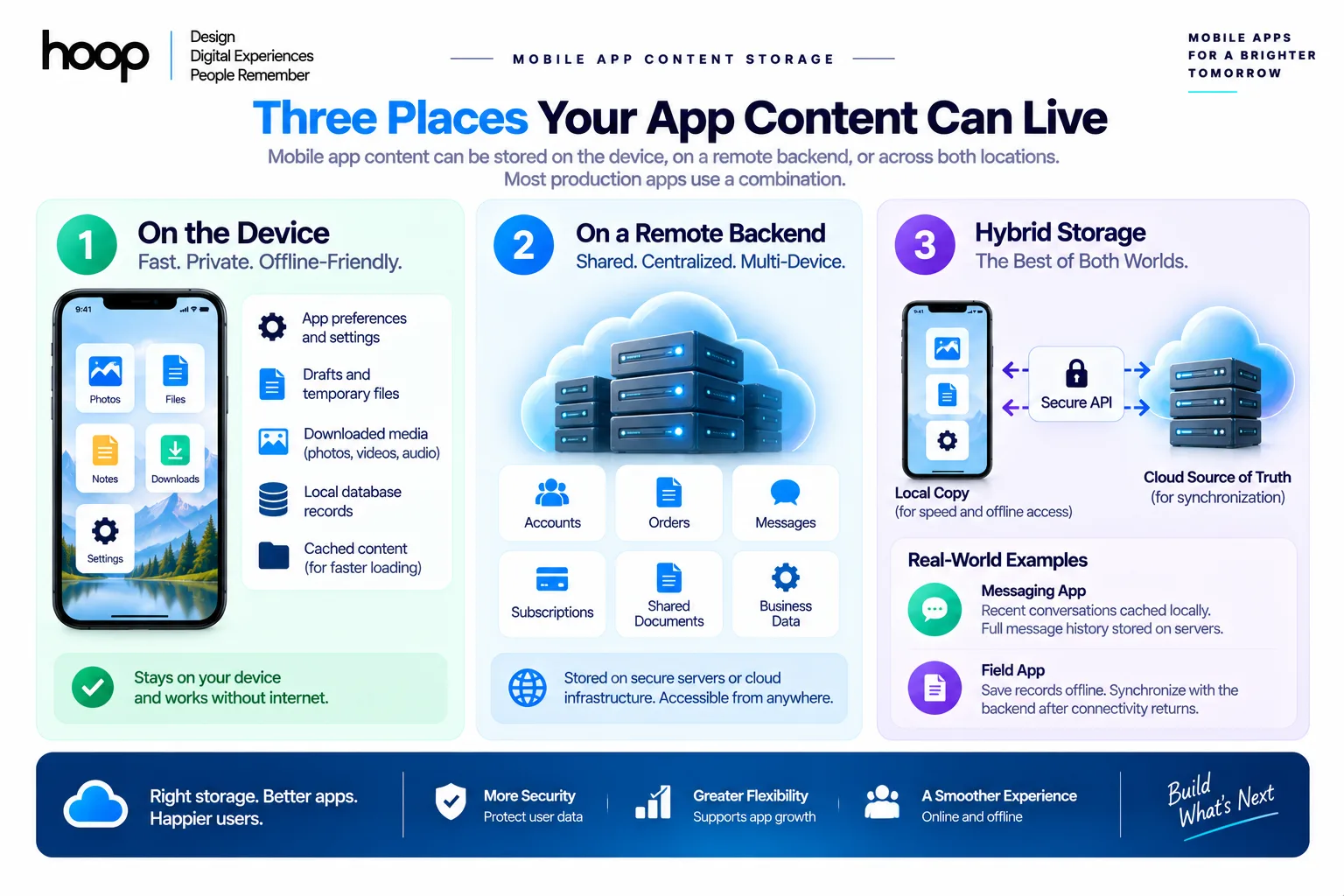
Content can stay on the phone, live on a server, or synchronize between both locations. Most connected apps use all 3 patterns.
Local device storage keeps content near the user
Local storage saves information directly on an iPhone, iPad, Android phone, or tablet. Local content can load without a network request.
Apps commonly store preferences, offline files, cached images, drafts, downloaded media, and local database records on the device.
Local storage improves speed and offline access. Device capacity still limits how much content an app should keep locally.
Backend storage keeps shared content remotely
Backend systems store information that multiple users, devices, or services need. Examples include accounts, orders, messages, subscriptions, and shared documents.
A backend usually combines an Application Programming Interface (API), business logic, authentication, a database, and cloud infrastructure.
The mobile app requests needed data instead of carrying the complete data set inside the installed application.
Hybrid storage combines speed with synchronization
Many apps keep a local copy while treating the backend as the main source of truth.
A messaging app can cache recent conversations locally while storing complete message history on servers. A field app can save records offline.
The field app can synchronize those records after connectivity returns.
What Gets Stored Directly on an iPhone or Android Device?
A mobile device stores app-specific files, preferences, structured records, caches, downloads, and temporary content. iOS and Android organize those files differently.
iOS apps use sandboxed container storage
Apple gives each app a private container for app-specific content. The container blocks ordinary access from unrelated apps.
Common iOS locations include Documents, Application Support, Caches, and temporary storage.
Use Documents for user-created files. Use Application Support for persistent app data. Use Caches for replaceable content.
Temporary storage suits files that do not need long-term persistence, including extracted archives and short-lived download fragments.
Android apps use app-specific and shared storage
Android provides app-specific storage for private files. Android also provides shared storage for content users expect other apps to access.
Internal app storage works well for private files. Android also provides cache directories, preferences, and structured database storage.
Shared storage suits user-owned media and documents, including photos, videos, audio, PDFs, and exported files.
Google’s official Android data storage guide separates app-specific files, shared content, preferences, and databases by purpose.
The app package differs from app data
The installed package contains executable code, bundled assets, libraries, and resources. User-generated content usually grows outside the original package.
A 150 MB app can later occupy several gigabytes after downloads, caches, messages, and saved media accumulate.
Local Storage vs Cloud Storage: What Is the Difference?
Local storage keeps data on the device. Cloud storage keeps data on remote infrastructure. Each option solves a different product problem.
| Storage type | Typical location | Common content | Cross-device access | Best use |
|---|---|---|---|---|
| App-specific files | Phone or tablet | Offline files, support data | No | Private local content |
| Local database | Phone or tablet | Notes, drafts, records | Only with sync | Offline structured data |
| Cache | Phone or tablet | Images, API responses | No | Faster loading |
| Secure credential store | Device security system | Tokens, keys | Device-dependent | Authentication secrets |
| Cloud database | Remote server | Accounts, messages, orders | Yes | Shared structured data |
| Object storage | Remote cloud service | Photos, videos, documents | Yes | Large binary files |
A reliable app often uses 3 or 4 storage types together. One storage method rarely fits every data category.
Where Do Mobile Apps Store Databases?
Mobile apps can use local databases on the device and remote databases behind the backend. Synchronization needs determine which model fits.
Local databases support offline structured data
Local databases store records that the app needs to query without contacting a server.
Common technologies include SQLite, Core Data, SwiftData, Room, and Realm. Each technology stores structured information near the application.
iOS teams often use Core Data or SwiftData. Android teams commonly use Room for structured persistence over SQLite.
Remote databases support shared application state
Remote databases store information that must remain available across devices, users, or services.
Common systems include PostgreSQL, MySQL, MongoDB, Firebase Firestore, and Supabase PostgreSQL.
A marketplace can store products, orders, users, and inventory remotely. The mobile client retrieves only the records each screen needs.
Mobile clients should use secure APIs
A mobile client should normally communicate through an API instead of exposing direct production database credentials.
The API validates requests, checks permissions, applies business rules, and controls which records each user can access.
Hoop’s API development services cover mobile backends, REST, GraphQL, authentication, validation, versioning, testing, and monitoring.
How Do APIs Move Content Between the App and Server?
An API carries requests and responses between the mobile interface and backend systems. Databases and object storage provide long-term persistence.
The mobile app sends a request
A user action can trigger a request. Examples include opening a profile, sending a message, placing an order, or uploading an image.
The request can include authentication, identifiers, form values, pagination parameters, or file metadata.
The backend processes the request
The backend verifies identity, checks permissions, runs business logic, and reads or writes the correct data source.
Structured records can go to PostgreSQL. Images can go to object storage. Session data can use a fast cache such as Redis.
The app receives the required response
The backend returns needed data through JSON, binary content, signed file URLs, or another agreed format.
A common architecture follows this path:
Mobile app → API → backend service → database or object storage → API response → mobile screen
The separation lets teams update server logic without replacing every installed mobile application.
Where Are Photos, Videos, and Documents Stored?
Media can live in the device library, app-specific storage, or remote object storage. Ownership and sharing requirements determine the location.
User-owned media belongs in accessible storage
A photo editor can work with pictures from the user’s photo library. A document app can export files to user-accessible storage.
User-owned content should remain accessible when the product design promises independent ownership.
App-only downloads can stay inside the sandbox
Streaming apps often store downloaded episodes or temporary media inside app-specific storage.
The application controls access and can remove expired downloads without changing the user’s general photo or document library.
Shared media usually belongs in object storage
Object storage handles large files more efficiently than ordinary database rows.
Common services include Amazon S3, Google Cloud Storage, Azure Blob Storage, Firebase Storage, and Cloudflare R2.
The database stores metadata such as owner and permissions. Object storage holds the actual image, video, audio file, or document.
What Does a Mobile App Developer Actually See?
A developer does not automatically see everything on a user’s phone. Developers access data the app collects, receives, logs, or stores.
Device permissions control protected resources
Mobile operating systems protect photos, contacts, location, camera, microphone, Bluetooth, and health information.
An app must request relevant permission before accessing protected data. Users can approve, limit, or deny many permission requests.
Permission gives the application technical access. Permission does not automatically upload every accessible item to a company server.
Application code decides what happens next
The code determines whether data stays on the device, gets processed locally, or travels to a backend.
A photo picker can let the user select 1 image. The application can upload only that selected image.
A location feature can process coordinates locally or send coordinates to a backend, depending on product requirements.
Backend access should follow defined roles
Developers, support agents, and administrators can have different production permissions.
Production systems should restrict access through roles, audit logs, and least-privilege policies.
A well-designed custom software development project defines data access before launch and documents who can view sensitive records.
Does Photo Permission Upload Every Photo Automatically?
No. Permission enables access, while application logic decides which content gets read, processed, or uploaded. The distinction protects user privacy.
Modern mobile platforms also support workflows where users select specific photos instead of granting broad library access.
An app can request 1 selected photo, process the file locally, or upload the file after user action.
Developers should request the smallest permission scope that supports the feature.
What Is Cache Storage and Why Does It Grow?
Cache storage keeps replaceable data so an app loads faster and uses less network bandwidth. Cache should never hold irreplaceable content.
Caches store reusable downloaded content
Common cached items include thumbnails, profile images, product images, map tiles, API responses, and short video segments.
The app can download cached content once and reuse the local copy during later sessions.
Mobile systems can remove cached data
Operating systems can purge cache content when storage becomes tight. The application must continue working after cache removal.
Anything stored in cache should be downloadable or reproducible.
Poor cache management creates storage complaints
Apps can grow unexpectedly when developers never expire old cached files.
Teams should set retention rules, size limits, cleanup jobs, and cache invalidation logic for media-heavy products.
What Happens When You Delete, Offload, or Reinstall an App?
The result depends on whether content lives locally, in shared storage, in secure storage, or on remote servers. Deletion does not erase every record.
Deleting an app removes most app-specific local data
Android removes app-specific files when a user uninstalls the application. iOS deletion removes the app container and related app data.
Shared user files can remain outside that private container. Cloud account records can also remain on the service’s backend.
Secure credential stores can follow platform-specific persistence rules, so developers should not treat app deletion as a universal credential reset.
Offloading an iPhone app preserves documents and data
Apple’s offload feature removes the app binary while preserving its documents and data on the device.
Reinstalling the application can reconnect the app with that preserved local content.
Reinstalling can restore cloud-backed content
A user who signs in again can retrieve remote messages, profile data, purchases, and synchronized settings.
Local-only content can disappear after deletion if the application never synchronized or exported the content.
What Happens to Stored Content During an App Update?
A normal app update replaces application code while preserving persistent user data. Developers must manage migrations when storage structures change.
Database migrations protect existing records
A new release can add fields, change relationships, or reorganize tables. Migration logic converts existing data into the new structure.
Poor migrations can corrupt local records or cause crashes. Teams should test migrations against older production versions.
Cache data can rebuild after an update
Developers can invalidate cached content when a release changes formats or rendering logic.
The app then downloads or regenerates fresh cache entries during normal use.
Backend changes require version planning
An API change can break older mobile clients that users have not updated.
Production teams often version APIs and maintain compatible endpoints during a transition period.
Mobile backend design must support multiple installed app versions at the same time.
How Should Developers Choose the Right Storage Method?
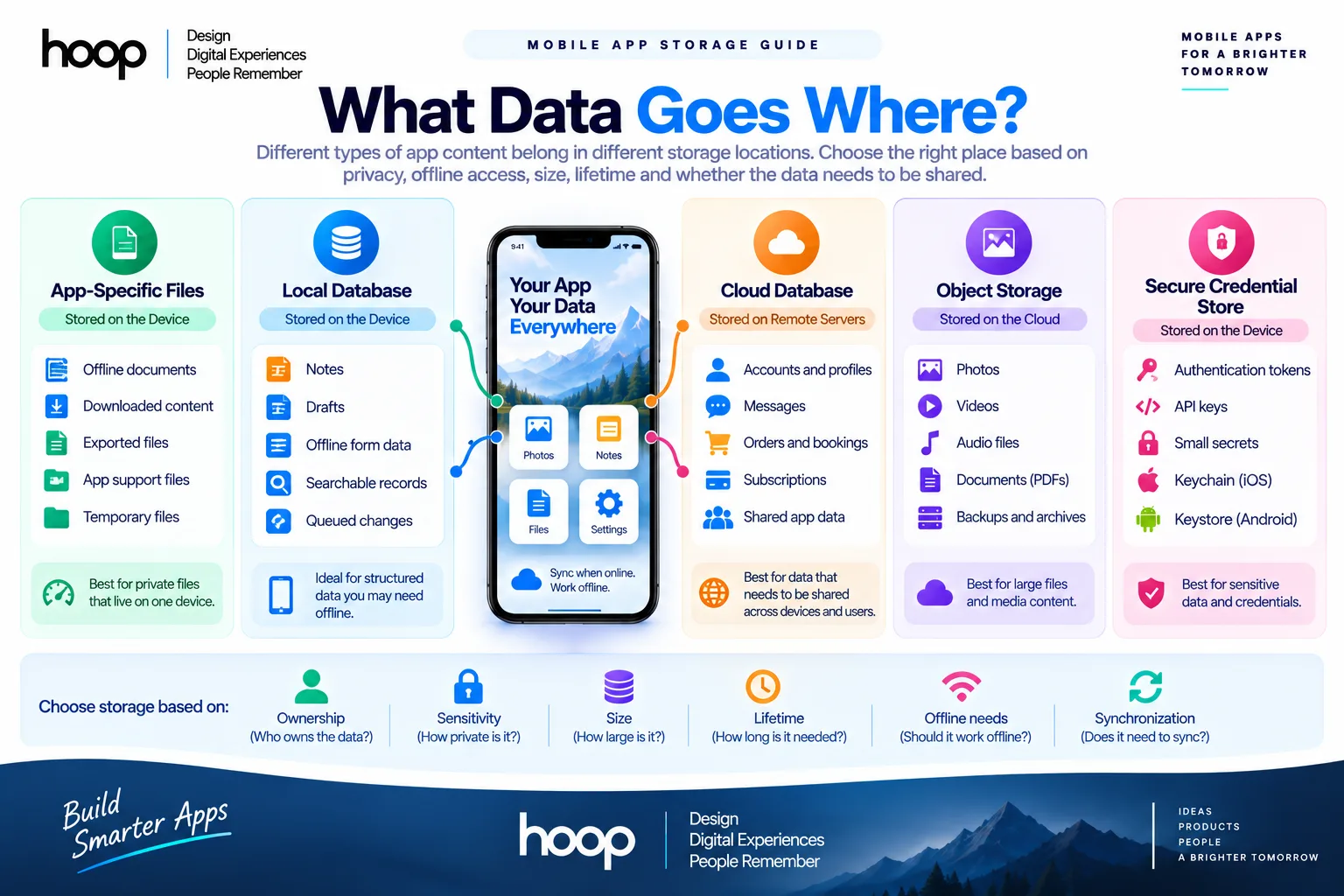
Choose storage by ownership, sensitivity, size, lifetime, synchronization, and offline requirements. Start with the data type before choosing technology.
Use local files for private device content
Choose local files for offline documents, generated exports, downloaded resources, and app support files.
Use user-accessible locations when the user should keep a file independently from the application.
Use local databases for searchable offline records
Choose a local database for structured queries, filters, relationships, offline editing, and queued synchronization.
Examples include notes, field inspections, draft orders, downloaded catalog items, and offline forms.
Use cloud databases for shared records
Choose remote databases for accounts, messages, transactions, permissions, inventory, subscriptions, and multi-device state.
The backend should control access and expose records through authenticated APIs.
Use object storage for large media
Choose object storage for photos, videos, audio, archives, and documents.
Store metadata such as owner, file type, upload date, and permissions in the main database.
Use secure storage for credentials
Store small secrets through platform security systems such as Apple Keychain or Android Keystore-backed solutions.
Never place passwords, private keys, or long-lived production secrets inside ordinary files or application source code.
How Does Storage Architecture Affect App Quality?
Storage architecture directly affects speed, security, offline behavior, synchronization, and maintenance. Poor storage choices create user-facing problems quickly.
Fast apps avoid unnecessary network requests
Local caching and databases let interfaces render quickly while the app refreshes remote information in the background.
A thoughtful synchronization strategy prevents users from waiting for every screen to download from scratch.
Reliable apps handle network loss safely
Offline-capable apps queue local changes and synchronize after connectivity returns.
Conflict handling matters when the same record changes on 2 devices before synchronization completes.
Secure apps separate public content from secrets
Public media, private account data, authentication tokens, and encryption keys need different controls.
A mature software development services team treats storage as architecture, not a late implementation detail.
Final Answer: Where Should Mobile App Content Live?
Mobile app content should live where its ownership, access, security, and synchronization requirements fit best. Local storage supports speed and offline use.
Remote databases support shared state. Object storage handles large media. Secure credential stores protect authentication secrets.
A production app usually combines those layers through a backend API instead of choosing only 1 storage location. Hoop’s mobile app development services can help you design the right storage architecture before development begins.
“Permission gives the application technical access. Permission does not automatically upload every accessible item to a company server.”
Key takeaways
- 01Most production apps use three or four storage types together, not one.
- 02Caches must hold only replaceable content — the OS can purge them at any time.
- 03Granting photo permission does not upload a library; application code decides what moves.
- 04Deleting an app clears local data, not server-side account records.
Written by
Sahar
Content Writer
Frequently Asked
Questions
Everything you need to know before booking a strategy call. Can't find your answer? Contact us directly.
Mobile app data can be stored on the device, on remote servers, or across both locations. The correct choice depends on the data.
No. Developers access data the application collects, receives, logs, or stores through permitted functionality and backend systems.
No, not always. App deletion removes local app data, while server-side account records can remain until separately deleted.
Yes. Offline calculators, local note tools, and single-device utilities can operate entirely through local storage.
Use secure platform storage. iOS apps use Keychain services, while Android apps use security systems such as Keystore-backed storage.
Keep reading
All articles →
Why Use Cloud Computing for Mobile App Development?
Sep 5, 2026 · 10 min read
MVP Development Guide: How to Launch Your Startup Idea
Jul 15, 2026 · 11 min read