What Is Mobile App Development? Complete 2026 Business Guide
Mobile app development covers planning, design, coding, backend systems, testing, store release, and long-term maintenance. Most connected apps need both a frontend and a backend, and the technology choice — native, cross-platform, hybrid, or PWA — should follow product requirements rather than preference.
Sahar
Content Writer
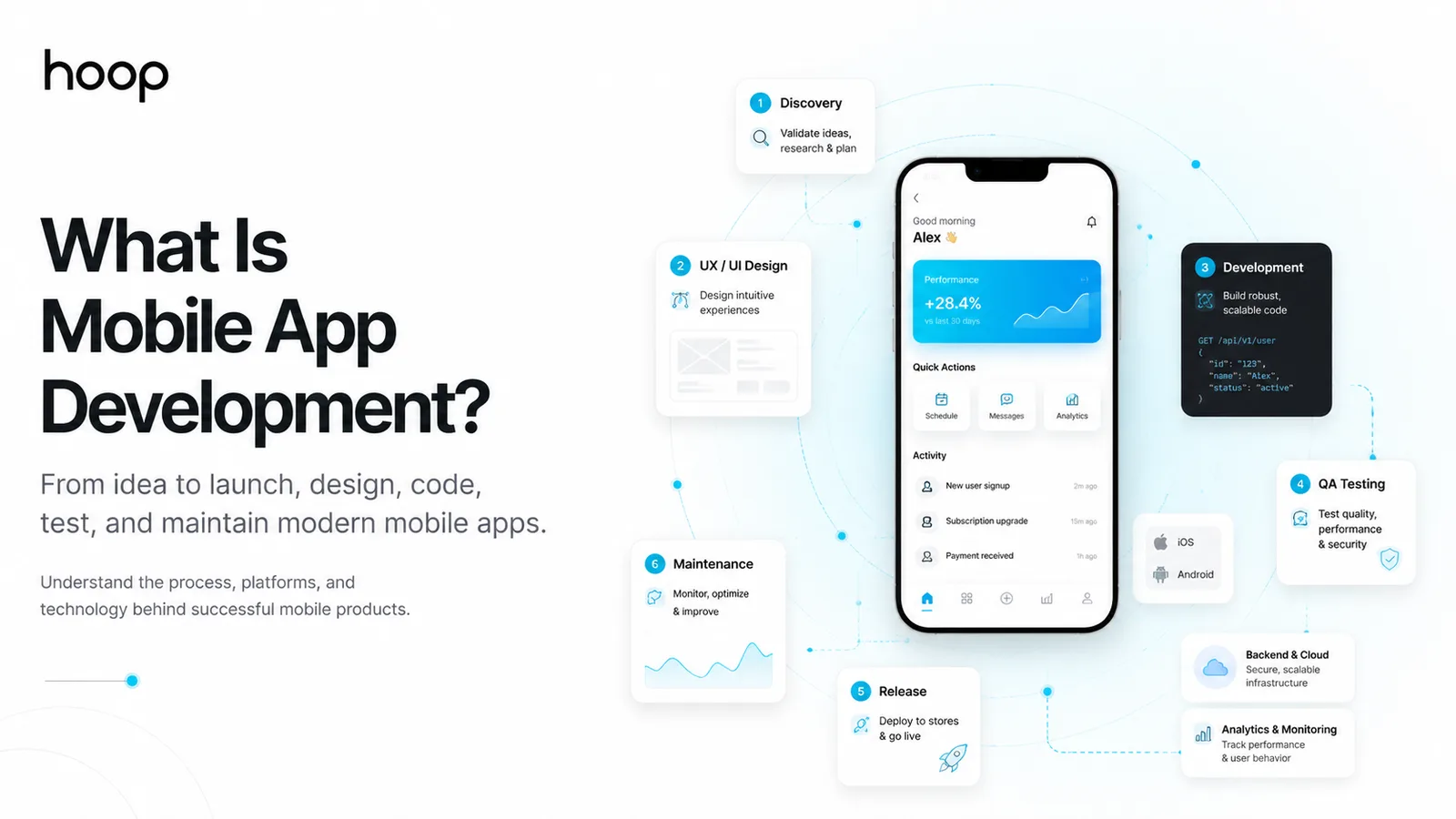
Mobile app development creates software for smartphones, tablets, and other mobile devices. The work covers planning, design, coding, backend systems, testing, store release, analytics, updates, and maintenance.
A mobile app can serve customers, employees, subscribers, drivers, shoppers, patients, or field teams. The right product depends on users, goals, device features, and budget.
Understanding what mobile app development involves helps you see the full product behind the screen. Production apps usually combine interfaces, databases, APIs, authentication, cloud services, monitoring, and release workflows.
What Is Mobile App Development and What Does It Include?
In practice, the process turns a validated idea into reliable mobile software. A complete project includes product decisions, user flows, engineering, quality checks, launch preparation, and support.
Mobile apps combine visible and hidden systems
The frontend includes screens, navigation, forms, buttons, animations, and notifications. Mobile developers build the frontend with native or cross-platform technologies.
The backend handles accounts, databases, payments, messaging, permissions, business rules, and cloud storage. Most connected apps need both layers.
For example, a food-ordering app shows restaurants on the frontend. The backend stores menus, processes orders, and updates delivery status.
Mobile development continues after launch
After release, development becomes a cycle of monitoring, fixing, measuring, and updating.
Teams track crashes, platform changes, reviews, security issues, and user behaviour. Teams improve features from real usage.
A store listing does not end the work. Maintained apps must keep working across new devices and platform changes.
What Does Mobile App Development Look Like From Idea to Launch?
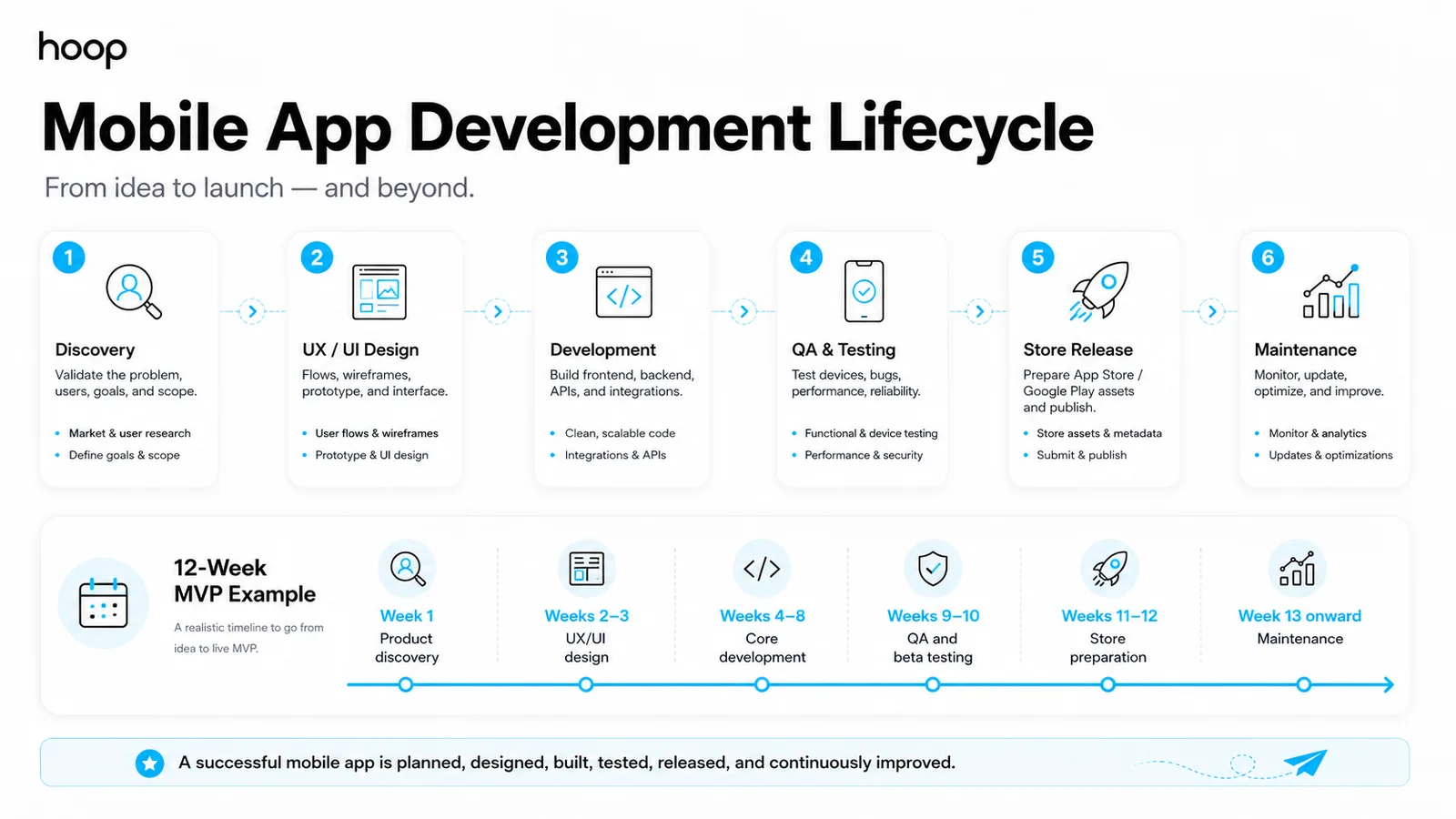
Teams move through discovery, design, development, testing, release, and maintenance. Each phase reduces a different risk.
Product discovery validates the problem
Product discovery defines the user, problem, business goal, feature scope, and platform requirements. Teams should answer those questions before production coding.
A minimum viable product (MVP) limits the first release to core value. Examples include booking, messaging, tracking, ordering, or subscription access.
Discovery also identifies integrations, such as Stripe, maps, customer systems, or existing databases. Clear scope makes later estimates more reliable.
UX and UI design map the experience
User experience (UX) design maps how users move through the product. User interface (UI) design defines screens, components, states, and interactions.
Designers create user flows, wireframes, clickable prototypes, and final screens. Figma commonly supports design reviews and interactive prototypes.
A prototype tests navigation before engineers build production features. Early feedback costs less than rebuilding completed software.
Development, QA, and release create the product
Engineers build the mobile client, backend, databases, APIs, authentication, payments, notifications, and integrations. Quality assurance (QA) engineers test target devices.
Teams also prepare signing, store metadata, privacy details, screenshots, test builds, and release packages. Apple and Google review submitted apps.
The table shows an example 12-week MVP sequence. Complex products need longer schedules.
| Task | Timing | Method | Difficulty |
|---|---|---|---|
| Product discovery | Week 1 | Interviews, requirements, scope | Medium |
| UX and UI design | Weeks 2–3 | Wireframes, prototype, interface design | Medium |
| Core development | Weeks 4–8 | Frontend and backend sprints | High |
| QA and beta testing | Weeks 9–10 | Device tests and bug fixes | High |
| Store preparation | Weeks 11–12 | Signing, metadata, submission | Medium |
| Maintenance | Week 13 onward | Monitoring, updates, releases | Medium |
What Does a Mobile App Development Team Look Like?
Specialists turn requirements into a designed, engineered, tested, and released product. Team size follows product complexity.
Product and design roles define the experience
A product manager turns business goals into priorities, requirements, milestones, and acceptance criteria. A UX designer maps user journeys and flows.
A UI designer creates screens, components, design systems, and visual states. Smaller projects can combine UX and UI responsibilities.
Larger products can also need researchers, business analysts, or technical architects. Each role should own a named output.
Engineering and QA roles build the system
Mobile engineers build iOS, Android, React Native, or Flutter applications. Backend engineers build APIs, databases, authentication, and business logic.
QA engineers test features, permissions, network conditions, and release candidates. DevOps engineers manage cloud environments, builds, secrets, and monitoring.
A broader custom software development engagement can combine mobile, backend, admin, and enterprise requirements under one plan.
Clients provide decisions and access
You do not need to supervise developers in person. You do need to provide decisions, domain knowledge, system access, and feedback.
Clients usually approve scope, user flows, designs, test builds, content, legal text, and store accounts. Clients also provide existing system access.
A reliable team should explain ownership, weekly progress, open risks, and next decisions. You should know the delivery team before signing.
Which Development Approach Should You Choose?
Teams commonly use native, cross-platform, hybrid, or Progressive Web App methods. Each method fits different needs.
Native development targets one operating system
Native iOS development uses Swift, SwiftUI, UIKit, and Xcode. Native Android development commonly uses Kotlin, Jetpack Compose, and Android Studio.
Native apps provide deep platform access and platform-specific behaviour. Targeting both systems requires separate native codebases.
Cross-platform development shares code
Frameworks such as React Native and Flutter let teams share substantial code across iOS and Android. Shared code can reduce duplicated engineering work.
React Native renders through native platform components. Flutter uses its own rendering system and can still call platform services.
Cross-platform projects still require separate testing on iOS and Android.
Hybrid apps and PWAs fit browser-led products
Hybrid apps place web technologies inside a native container. Capacitor is one example that connects web code with native features.
A Progressive Web App (PWA) runs through a browser but can add app-like behaviour. Examples include installation, offline caching, and supported notifications.
A PWA works well when browser access already covers the product’s main requirements.
Native or Cross-Platform: How Do You Decide?
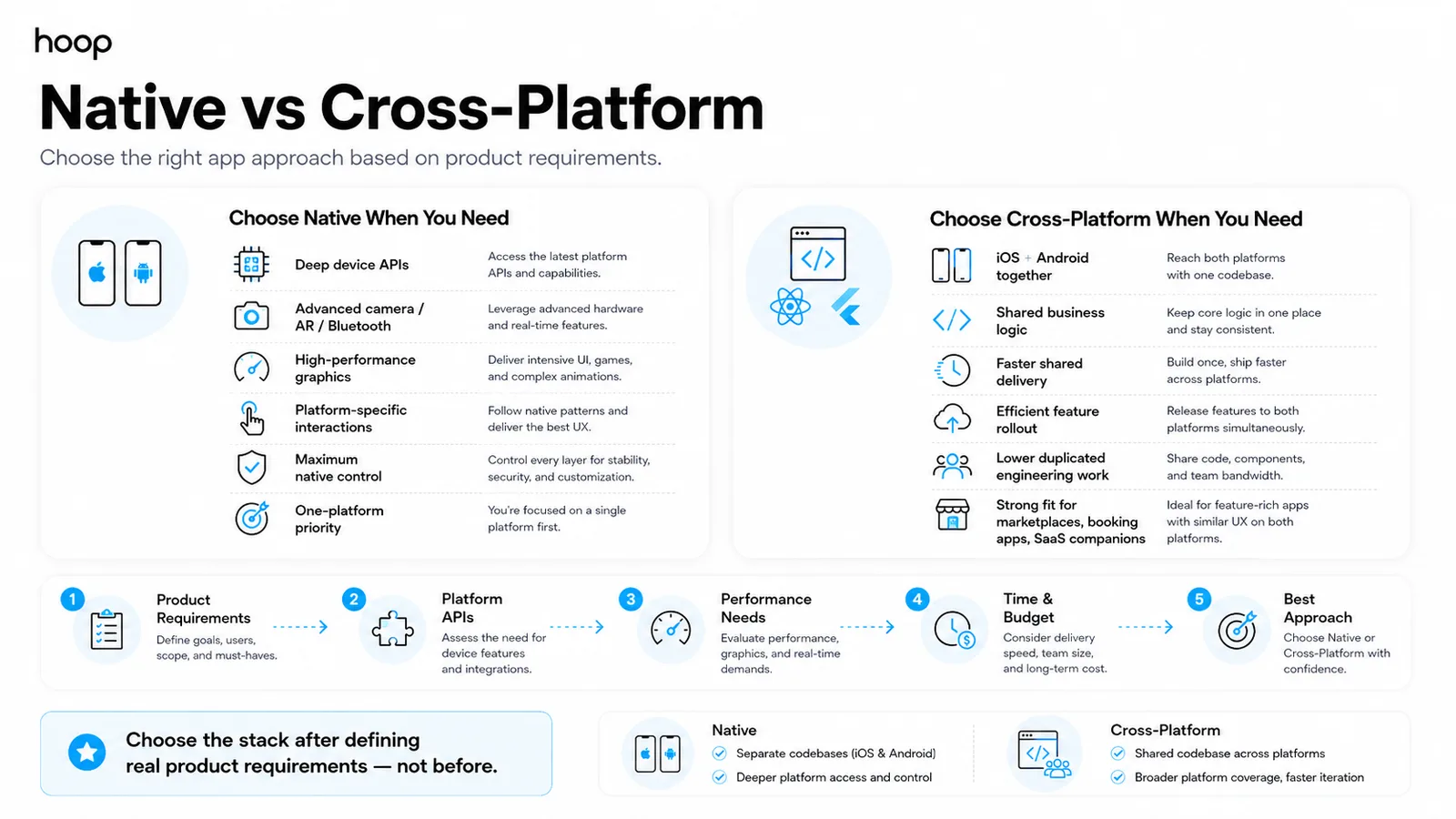
Native development suits deep platform needs, while cross-platform development suits many products targeting iOS and Android together. Requirements should decide the approach.
Choose native for deep platform requirements
Choose native when your product needs advanced platform APIs, intensive graphics, real-time media, or highly platform-specific interactions.
Examples include augmented reality, complex Bluetooth workflows, advanced camera processing, and specialised background services. Native also suits one-platform products.
Choose cross-platform for shared delivery
Choose React Native or Flutter when your product needs both operating systems with shared business logic. Shared delivery can reduce duplicated feature work.
Common examples include marketplaces, booking apps, consumer services, internal tools, and software-as-a-service companion apps.
Choose the stack after defining requirements
Platform debates become guesswork without defined product constraints.
Compare device APIs, performance, team skills, platform coverage, delivery time, maintenance, and future web needs. Then select the stack. The official Android architecture guidance explains how structured architecture supports maintainable Android applications.
What Is the Difference Between Frontend and Backend Mobile Development?
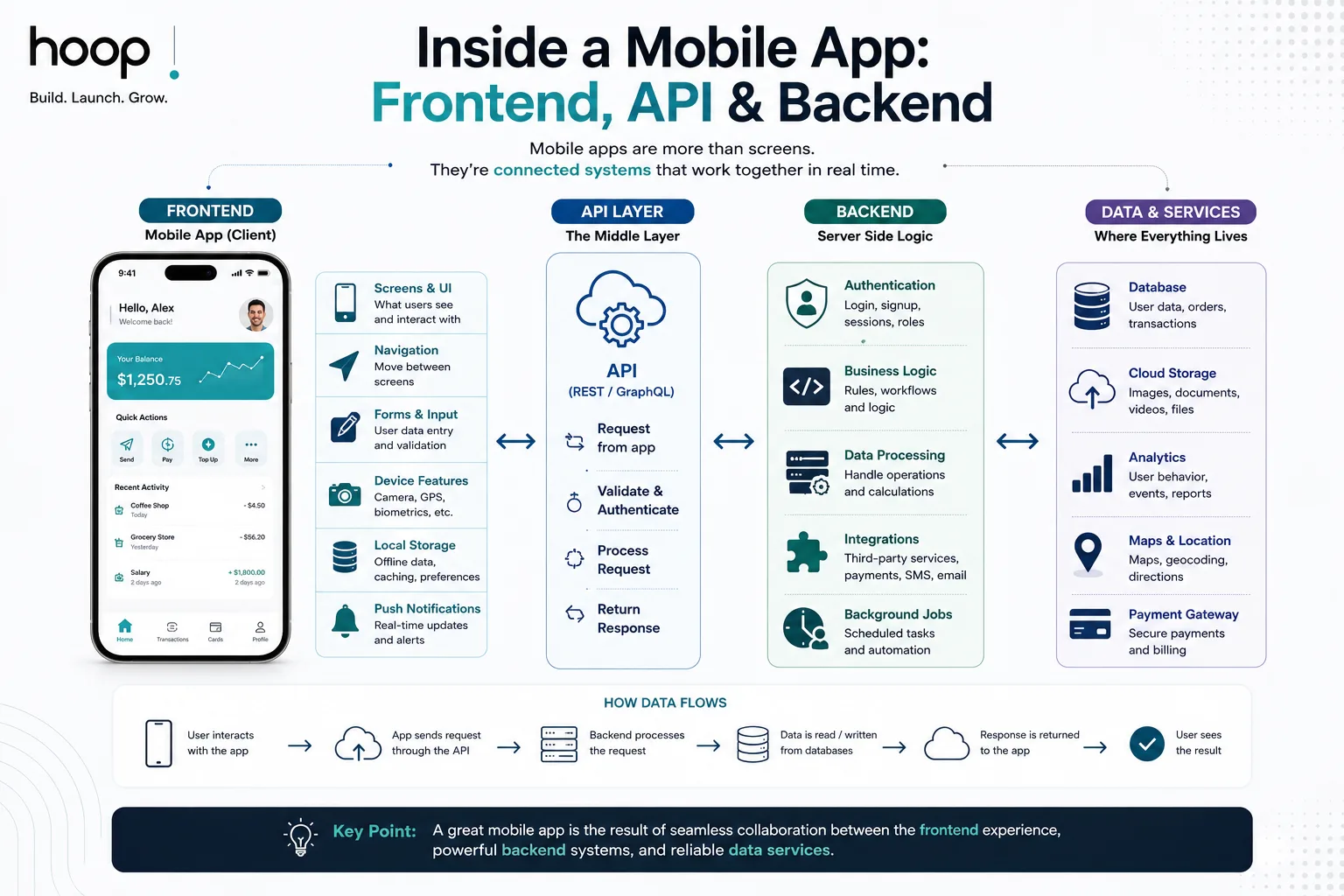
Some simple apps work locally, but most connected products need frontend and backend systems.
Frontend development controls user interaction
The frontend handles screens, navigation, forms, visual states, local storage, and device interactions. Mobile developers build the frontend application.
A delivery app can show a map, driver position, arrival estimate, and support chat. The frontend requests live information from backend services.
Backend development controls data and rules
The backend handles accounts, databases, permissions, payments, orders, subscriptions, and administrative rules. Backend services commonly run in cloud environments.
Databases such as PostgreSQL, Firebase, or Supabase can store user and product records. Node.js or FastAPI can expose application services.
APIs connect both layers
An application programming interface (API) defines how the mobile client requests and changes data. REST and GraphQL are 2 common API styles.
An app can call an API to authenticate users, load profiles, place orders, or send messages. Clear API contracts keep teams aligned.
Mobile App or Web App: Which Should You Build?
Build a mobile app for device-first value and frequent mobile use. Build a web app when browser access meets the requirement.
A responsive web product can simplify distribution and updates when your product only needs forms or dashboards.
Choose a mobile app for device-first experiences
Mobile apps suit products needing cameras, location, Bluetooth, biometric login, background work, offline flows, or frequent push notifications.
Examples include delivery platforms, fitness trackers, field-service tools, social products, banking apps, and mobile games.
Choose a web app for browser-first access
Web apps suit dashboards, portals, internal systems, booking flows, and business tools used across desktops and phones.
A web application development approach also removes app-store distribution from the core delivery path. A PWA can add installation and offline behaviour when a full native product offers limited extra value.
Use both for different user roles
Some products need a mobile app for customers and a web dashboard for administrators. Logistics, healthcare, marketplaces, and SaaS often use that structure. One shared backend can serve both experiences through APIs.
What Technology Does Mobile App Development Use?
The stack combines mobile languages, frameworks, backend services, databases, design tools, testing, and monitoring.
Native stacks use Swift and Kotlin
Apple teams use Swift and SwiftUI for modern interfaces. Xcode provides development, testing, signing, and distribution tools for Apple platforms.
Android teams commonly use Kotlin and Jetpack Compose. Android Studio provides coding, debugging, emulation, profiling, and build tools.
Cross-platform stacks use React Native and Flutter
React Native uses JavaScript or TypeScript with native platform interfaces. Teams often use Expo for development and release workflows.
Flutter uses Dart and supports shared code across iOS, Android, web, and desktop. Flutter can also call Swift or Kotlin code.
Supporting tools handle product operations
Supporting tools include Figma, Firebase, PostgreSQL, Sentry, and GitHub for design, data, monitoring, and source control. Products using language models or agents can pair mobile work with AI development services.
Why Is Mobile App Development Harder Than It Looks?
Production apps must handle devices, operating systems, permissions, lifecycle states, stores, and installed versions.
Devices and operating systems create variation
Android apps can run across phones, tablets, foldables, watches, cars, and other form factors. Apple apps also span different device sizes.
Teams test layouts, performance, memory use, network behaviour, and hardware access across representative devices. Physical testing still catches real-world issues.
Permissions and lifecycle require planning
Mobile apps move between active, background, suspended, and terminated states. Teams must preserve state and handle interruptions correctly.
Permissions control cameras, locations, microphones, contacts, notifications, and other protected features. Operating-system updates can change permission behaviour.
Offline workflows add another requirement. Teams must decide which data stays local and how later synchronisation works.
Releases must support older installed versions
Web teams can deploy one server update for every visitor. Mobile users can keep older app versions for long periods.
Teams must protect backend compatibility while users upgrade at different speeds. Store review and policy requirements also shape releases.
How Long Does Mobile App Development Take?
A lean MVP can target 8–12 weeks. A fuller consumer app can require 16–24 weeks.
A lean MVP can target 8–12 weeks
A focused MVP usually contains one primary journey. Examples include booking, account access, messaging, ordering, or tracking.
Cross-platform development can support both major mobile systems together when requirements allow shared code.
A complete consumer app can take 16–24 weeks
A fuller product can add custom backend services, push notifications, payments, admin tools, analytics, and advanced integrations.
Complex features add design, engineering, testing, and security work. Examples include video, real-time chat, geofencing, and multi-role permissions.
Scope controls delivery time
Three common schedule risks are unclear requirements, changing scope, and external integrations. Legacy systems, compliance work, or store rejection can add time.
Milestones give you review points before later work depends on earlier decisions.
What Happens After Launch?
Teams monitor stability, behaviour, compatibility, security, reviews, and feature performance.
Teams monitor crashes and user behaviour
Crash monitoring identifies failed sessions, affected devices, and error patterns. Product analytics tracks onboarding, searches, purchases, messages, or subscriptions.
Teams should connect technical metrics with business outcomes. A fast app still fails when users cannot complete the core task.
Teams maintain operating-system compatibility
Apple and Google release operating-system and platform changes regularly. Updates can affect permissions, notifications, payments, background tasks, or interfaces.
Teams test platform changes before customers depend on them. Maintenance also covers security patches, dependencies, and backend changes. A broader software development services team can maintain mobile, backend, cloud, and connected products under one roadmap.
Teams improve the product from usage data
User behaviour reveals valuable features and frustrating flows. Teams can improve onboarding, navigation, performance, messaging, and retention using real evidence. Post-launch work turns a first release into a stable product.
When Should You Hire a Mobile App Development Company?
A coordinated team covers product, design, mobile engineering, backend, QA, launch, and maintenance.
Hire a team for multi-discipline products
A dedicated team fits apps needing custom UX, payments, real-time data, cloud infrastructure, security, or store support.
A founder can still test a smaller prototype first. Prototype feedback can reduce wasted scope before production development.
Ask specific questions before signing
Ask who owns product management, design, frontend, backend, QA, release, and support. Ask who owns source code and platform accounts.
Ask how the team handles changes, reporting, testing, security, and store rejection. Clear answers reveal the delivery process.
What Should You Do Next?
The right answer depends on users, platform needs, backend complexity, and long-term product goals. Start with the smallest product that proves core value. Then choose technology around real requirements. Explore Hoop Interactive’s mobile app development services to scope a production-ready iOS, Android, React Native, or Flutter product.
“A store listing does not end the work. Maintained apps must keep working across new devices and platform changes.”
Key takeaways
- 01A lean MVP can target 8–12 weeks; a fuller consumer app usually needs 16–24 weeks.
- 02Native suits deep platform APIs; React Native and Flutter suit shared iOS and Android delivery.
- 03Mobile users keep old versions for months, so backend compatibility must be protected.
- 04A store listing is the start of the work, not the end of it.
Written by
Sahar
Content Writer
Frequently Asked
Questions
Everything you need to know before booking a strategy call. Can't find your answer? Contact us directly.
Yes, production mobile development can become technically demanding. Teams manage devices, permissions, lifecycle states, backend systems, testing, and store rules.
No, not always. React Native and Flutter can share substantial code, while native builds use separate platform codebases.
Yes, one developer can build a focused app or prototype. Larger products usually benefit from design, backend, QA, and infrastructure specialists.
Yes. Mobile skills remain useful for products needing device APIs, offline workflows, native performance, or app-store distribution.
No. Build a mobile app only when mobile-specific capabilities or repeat mobile use create clear user value.
Keep reading
All articles →
Mobile App Development Costs in 2025: A Complete Guide for Businesses
Aug 3, 2026 · 7 min read
A Software Engineering Model for Mobile App Development
Sep 4, 2026 · 10 min read