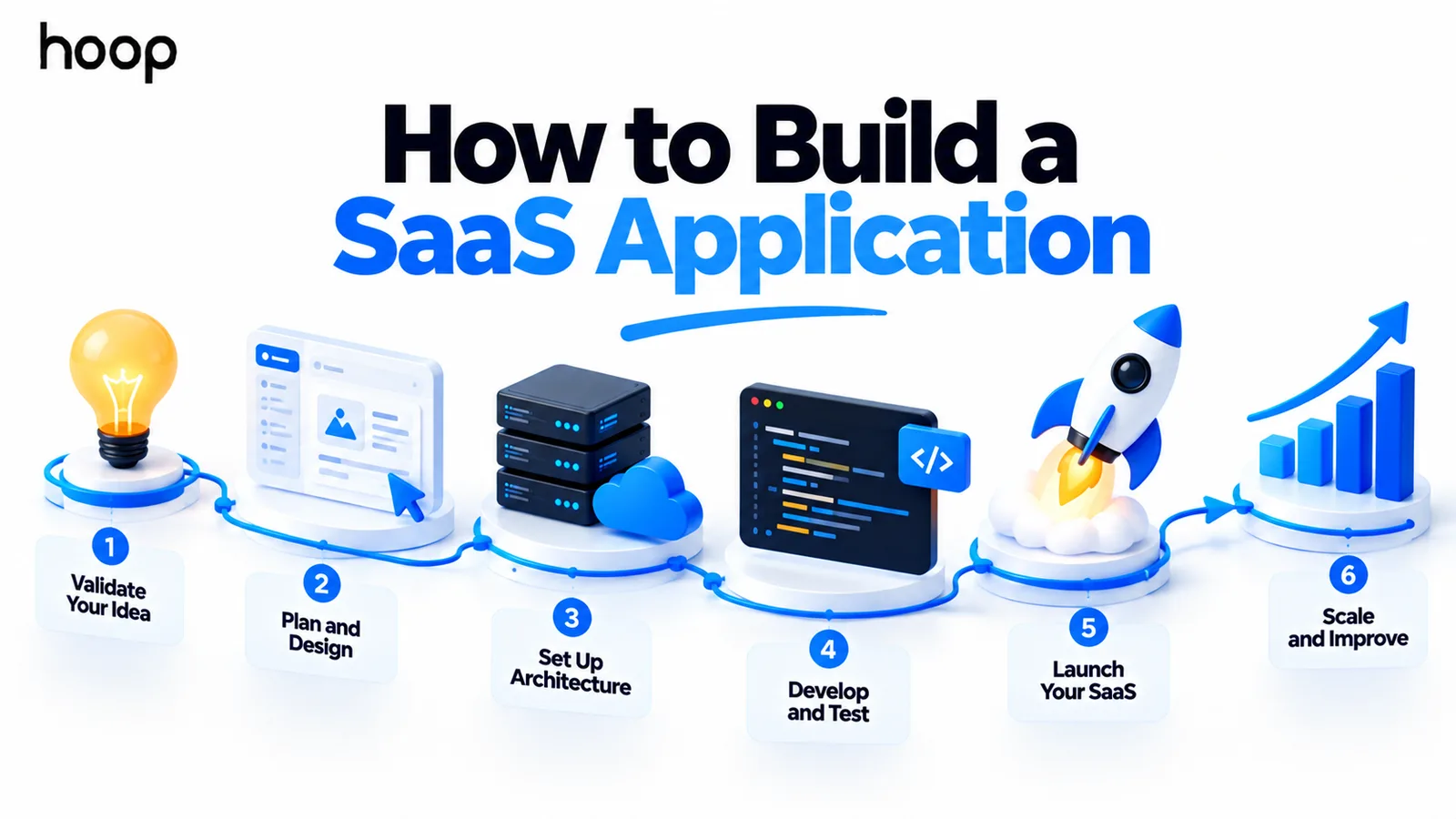
How to Build a SaaS Application
Building SaaS is building an operating model, not just a feature. Validate willingness to pay, scope an MVP around one complete customer journey, then add tenancy, identity, billing, deployment, and monitoring in that order.
Sahar
Content Writer
To build a SaaS application, validate a recurring problem, define a focused MVP, and design the product around multiple customers. Then add secure identity, billing, tenant isolation, deployment, monitoring, and a measured launch process.
The difficult part is not only coding the main feature. A real SaaS product also needs systems for signup, payments, collaboration, tenant isolation, and safe ongoing updates.
Need this done right?
Hoop builds the strategy, design and development behind sites like this one — talk to us about yours.
What Is a SaaS Application?
A SaaS application is software customers access as an ongoing service, usually through a browser or API. The provider operates one evolving product while many customers use it under subscriptions or usage-based plans.
That model changes the engineering problem. You are not shipping a one-time website. You are operating a product that must support customer accounts, recurring access, data protection, upgrades, support, and continuous releases.
Hoop provides SaaS development services for teams needing architecture, multi-tenancy, billing, dashboards, and launch infrastructure.
What Do You Need Before Building a SaaS Application?
Before writing code, define the customer, the painful workflow, and the outcome they already want. A problem is stronger when it happens repeatedly and has a visible cost in time, money, risk, or missed revenue.
Separate product risk from software risk. Product risk asks whether customers will pay. Software risk asks whether the product can be built securely and maintained reliably. Solve product risk first whenever possible.
Talk to likely users, study their current workflow, and test whether they will commit to a pilot. Interest is helpful, but willingness to pay is stronger evidence.
Step 1: Validate the SaaS Problem Before Coding
To validate the problem, learn how customers solve it today. Ask what they use, where work slows down, and what happens when the problem remains unsolved.
Do not ask only whether an idea sounds useful. Ask whether the buyer would switch tools, approve a budget, or join a paid pilot. Those questions expose weak demand earlier.
A manual service can also test the workflow. If customers value the result when humans perform part of the process, automation has a stronger foundation.
Step 2: Define a SaaS MVP That Completes One Customer Journey
A minimum viable product should prove the main value with the smallest complete experience. It should not become a stripped-down collection of unrelated features.
For many products, the first journey runs from discovery to signup, onboarding, core action, payment, and continued access. Every screen should support that path.
A practical SaaS MVP often needs these foundations:
- A clear landing page and signup path.
- Authentication and account recovery.
- One core workflow that delivers the promised value.
- Tenant-aware data storage and permissions.
- Subscription or payment handling.
- Basic onboarding and transactional email.
- Error tracking, backups, and simple product analytics.
- A small operator dashboard for support and account control.
Features outside that journey can wait. A focused MVP helps you learn faster because usage patterns are easier to interpret.
Step 3: Choose the SaaS Business and Pricing Model
Pricing affects architecture earlier than many founders expect. A per-seat plan needs seat counts and membership rules. Usage pricing needs metering. Tiered plans need feature entitlements.
Choose the value unit before building billing screens. Decide whether customers pay per workspace, per user, per transaction, per usage amount, or through a hybrid model.
Keep the first pricing structure understandable. Complex packaging is difficult to sell, support, measure, and implement before you know how customers use the product.
Step 4: Choose a Multi-Tenant Architecture
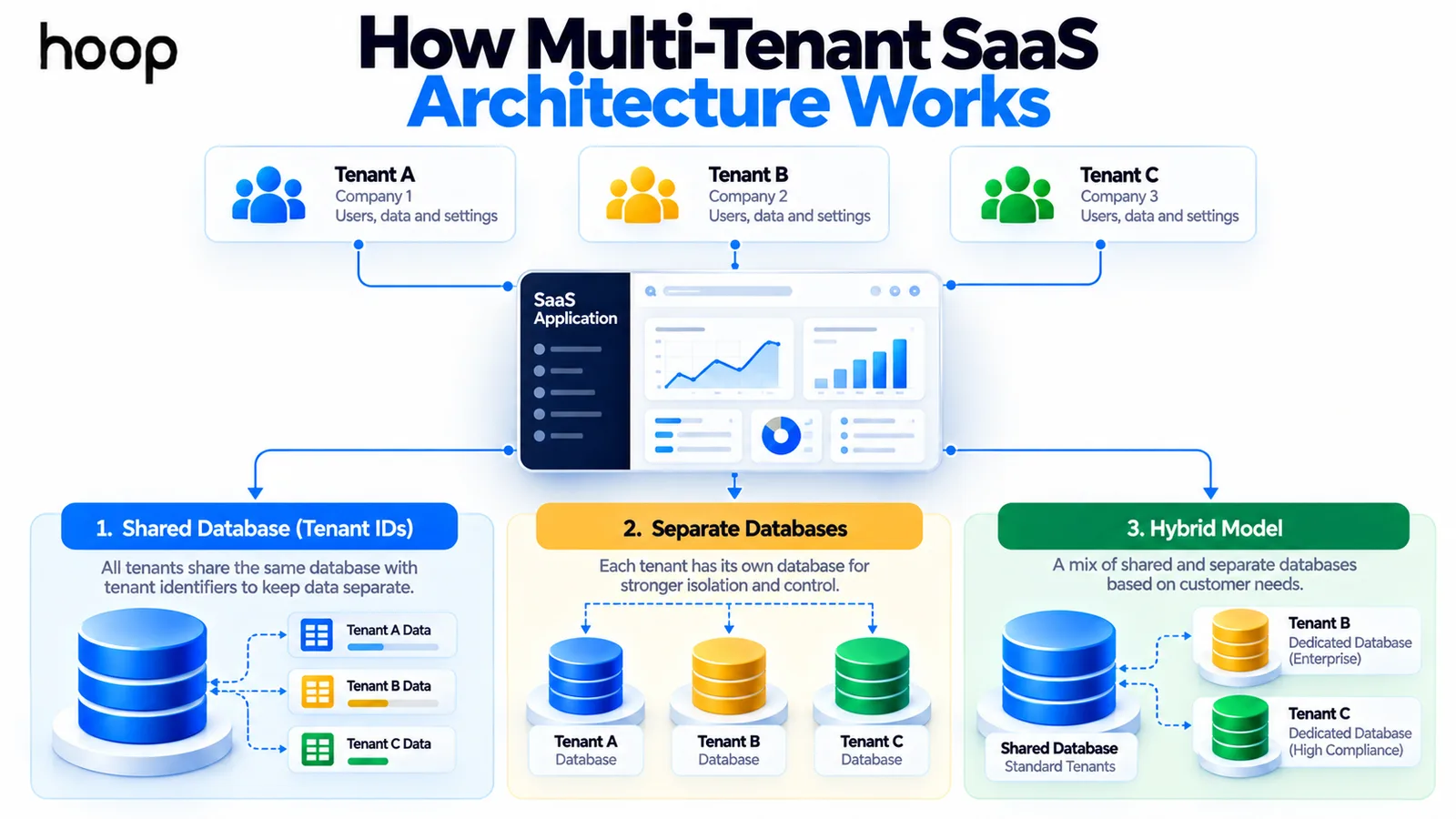
Multi-tenancy lets one SaaS product serve many customers while keeping each customer’s data and permissions separate. This decision influences databases, authentication, logging, billing, support, and compliance.
A shared database with tenant identifiers is efficient for many SaaS products. Separate databases can provide stronger isolation for some customers. Hybrid models combine both approaches.
Choose based on customer count, compliance needs, data sensitivity, operating cost, and expected enterprise requirements. Avoid adding database isolation that customers do not actually need.
Step 5: Design Authentication, Organizations, and Permissions
Authentication answers who the user is. Authorization defines what that user can do. Tenancy defines which customer resources the user can reach.
Model users, organizations, memberships, and roles separately. This supports people who belong to more than one workspace and administrators with different responsibilities.
Most teams should use a proven identity provider instead of building password security from zero. Your product still owns role logic, tenant context, and access decisions.
Step 6: Design the SaaS Database Around Tenant Boundaries
A SaaS database should make tenant ownership explicit. Every tenant-scoped record needs a reliable connection to the customer that owns it.
Indexes should support common tenant queries. Migrations need a safe release process. Backups need regular testing rather than existing only as a checkbox.
Treat cross-tenant access as a security failure. Test requests that intentionally use another tenant’s identifiers, records, files, or API routes.
Step 7: Build Subscription Billing and Product Entitlements
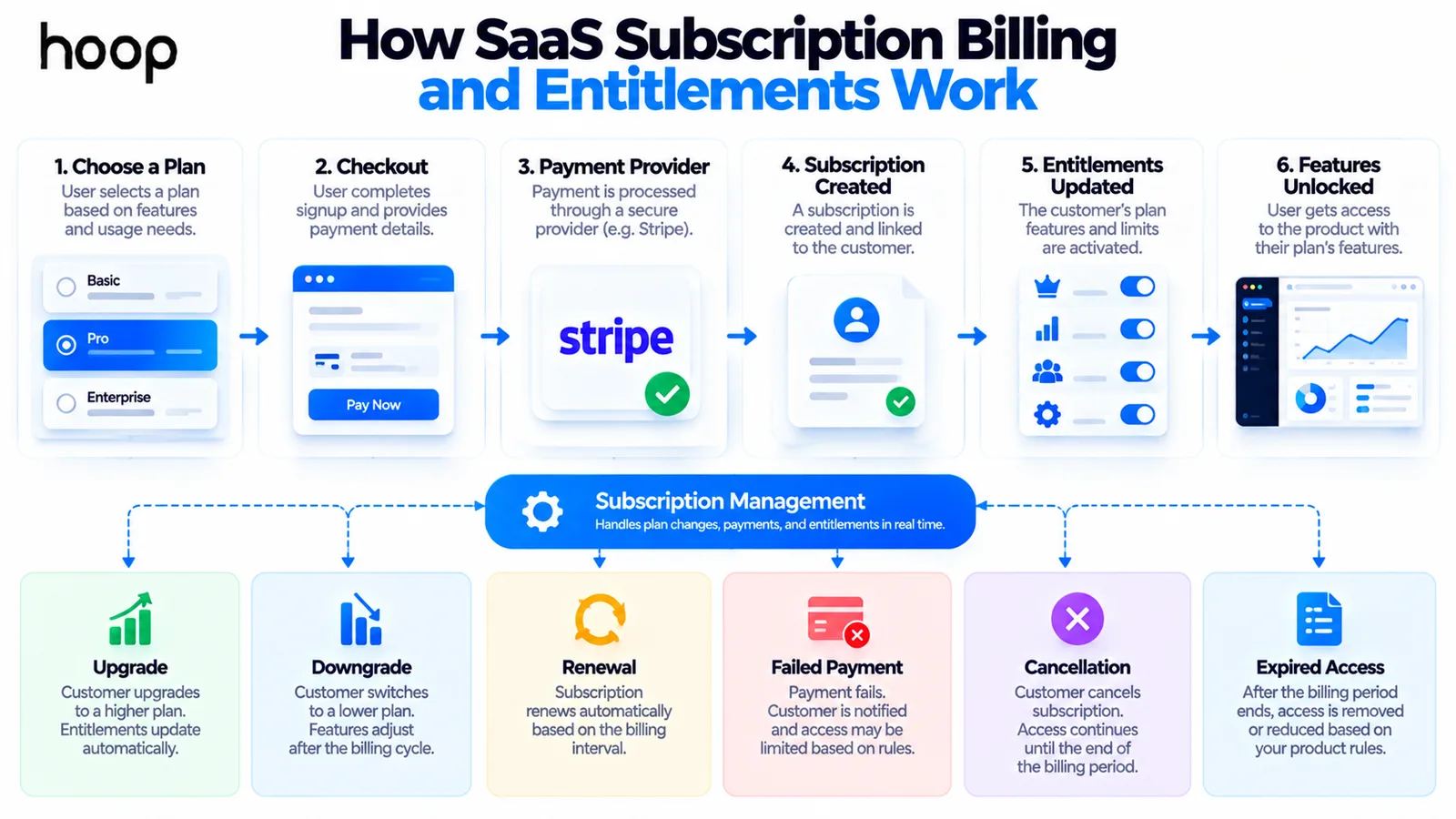
Billing is more than a checkout page. Your application needs rules for trials, active subscriptions, upgrades, downgrades, failed payments, cancellations, and expired access.
Keep billing state centralized. Product features should read clear entitlements rather than repeating price-plan conditions throughout the codebase.
Webhook events need verification, retry handling, and idempotent processing. A duplicated billing event should not create duplicated credits, invoices, or access changes.
Step 8: Build the Core SaaS Product
Now build the workflow that makes customers care. Protect engineering time for the differentiated feature instead of recreating commodity systems without a clear reason.
The customer-facing product still follows core web application development principles. These include responsive UX, APIs, performance, validation, and maintainable frontend code.
Use real customer workflows during design reviews. A technically correct feature can still fail if it adds steps, hides context, or forces users into unnatural processes.
Step 9: Build Tenant and Platform Admin Experiences
A tenant administrator manages one customer workspace. A platform administrator manages the SaaS business across customers. Those are different roles and should not share unrestricted access by accident.
Tenant admins may invite users, manage roles, review usage, and control workspace settings. Platform admins may inspect subscriptions, suspend tenants, review incidents, and support accounts.
Support tooling reduces risky database edits after launch. It also creates a clearer audit trail when staff help customers.
Step 10: Build APIs and Integrations Deliberately
APIs connect your interface, mobile clients, automation, and external systems. Design tenant context and authorization into each endpoint from the beginning.
Third-party integrations also create failure modes. Tokens expire, rate limits change, webhooks arrive late, and external services become unavailable.
Wrap external services behind clear application boundaries. That approach makes replacements and testing easier when vendors or requirements change.
Step 11: Set Up Cloud Infrastructure and CI/CD
Create development, staging, and production environments before release pressure becomes intense. Keep secrets outside source code and automate repeatable deployments. If those terms are new, start with what CI/CD is and how cloud infrastructure works.
Hoop also provides cloud SaaS application development for teams needing multi-tenant infrastructure, scaling, containers, and cloud operations.
Start with simple managed services when they meet the requirements. A small SaaS MVP rarely needs Kubernetes, many microservices, or a complex event platform.
Clean module boundaries are still valuable. They make later scaling easier without forcing distributed-system complexity before the product earns it.
Step 12: Test the SaaS Application Before Launch
SaaS testing needs more than happy-path feature checks. Test the boundaries that could expose data, money, or customer trust.
Create automated checks for authorization, tenant isolation, billing state, data validation, and critical workflows. Test backups by restoring data into a safe environment.
Load testing should target the paths most likely to become bottlenecks. A small MVP does not need artificial tests for traffic it may never receive.
Step 13: Add Monitoring and Product Analytics
Production monitoring should tell you whether the product is healthy and which customers are affected. Include tenant context in logs where privacy rules allow it.
Track errors, latency, background jobs, billing events, and external integration failures. Set alerts for conditions that require action, not every harmless technical event.
Product analytics answers a different question. It shows whether users activate, reach the core value, return, upgrade, or abandon onboarding.
Step 14: Prepare Security, Privacy, and Data Controls
Security work should follow the product architecture. Protect tenant boundaries, use least-privilege access, validate inputs, rotate secrets, and rate-limit sensitive endpoints.
Map the personal data you collect before drafting privacy documents. Record why data exists, where it lives, who processes it, and how deletion works.
Compliance requirements depend on customers, industry, geography, and data type. Avoid promising certifications before the controls and evidence actually exist.
Step 15: Launch to a Small Group of Real Customers
Launch first with customers who understand the problem and are willing to give direct feedback. A controlled release makes product and support failures easier to diagnose.
Watch users complete onboarding without coaching. The places where they stop, ask questions, or misunderstand labels usually reveal higher-value fixes than another feature.
Start distribution while you build. Publish useful content, contact likely buyers, collect a waitlist, and schedule customer conversations before the product feels finished.
Step 16: Improve Activation, Retention, and Unit Economics
A SaaS launch starts the learning cycle. Improve the steps that move new accounts from signup to the first valuable outcome.
Retention matters because recurring revenue depends on continued value. Study churn reasons, repeated support requests, feature adoption, and customer success patterns.
Track infrastructure and support cost by customer segment where possible. Revenue growth can hide weak unit economics if expensive accounts consume disproportionate resources.
How to Build a SaaS Application With AI
AI tools can accelerate interface scaffolding, code generation, schema drafts, test creation, debugging, and documentation. They are useful when the developer can review the output.
AI does not remove responsibility for architecture, data access, billing logic, security, or operations. Generated code can still expose another tenant’s data or mishandle subscription state.
Use AI as a development accelerator rather than an invisible engineering team. Keep source control, reviews, tests, and deployment gates around AI-assisted work.
How to Build a SaaS Application Without Coding
A nontechnical founder can validate some SaaS ideas with no-code tools, AI builders, manual workflows, or hired development support. The right route depends on product complexity.
No-code is strongest when the first product uses standard forms, workflows, dashboards, and integrations. Complex permissions, unusual data models, or high-scale processing may need custom engineering earlier.
The goal is not to avoid code forever. The goal is to spend the least money needed to prove demand without creating unacceptable security or maintenance risk.
What Tech Stack Should You Use for a SaaS Application?
Choose technology your team can secure, test, deploy, monitor, and maintain. Popular choices can help hiring, documentation, library support, and troubleshooting.
A common SaaS stack may use React or Next.js, PostgreSQL, managed identity, Stripe, and a major cloud provider. That is one option, not a rule.
Prefer boring technology that solves the requirement clearly. Novel infrastructure rarely creates customer value by itself.
Should You Use Microservices for a SaaS MVP?
Usually no. A modular monolith is simpler to deploy, debug, test, and operate while the product and domain model are still changing.
Split services when independent scaling, ownership, reliability, or deployment needs justify the operational cost. Do not adopt microservices because successful SaaS companies use them at a different scale.
How Long Does It Take to Build a SaaS Application?
A focused SaaS MVP can often be built in several weeks, while a complex product can take many months. Scope, integrations, compliance, migration, and design quality change the timeline.
A useful schedule includes discovery, UX, architecture, implementation, testing, deployment, and pilot feedback. Coding time alone does not represent the full path to launch.
Hoop commonly frames SaaS MVP engagements around an 8 to 16 week range, depending on scope and technical requirements.
How Much Does It Cost to Build a SaaS Application?
SaaS cost depends on product scope, team structure, integrations, design depth, compliance, and infrastructure needs. Two products with similar screens can have very different backend complexity.
The biggest cost drivers often sit behind the interface. Multi-tenancy, permissions, billing, integrations, migration, security, monitoring, and quality assurance all require engineering time.
Estimate the smallest product that can prove commercial value. Then budget separately for post-launch fixes, support, infrastructure, and the next product iteration.
Common SaaS Development Mistakes
Many SaaS failures come from sequencing decisions poorly rather than choosing the wrong framework. Watch for these patterns:
- Building for months before validating willingness to pay.
- Packing too many features into the first release.
- Treating authentication as proof of tenant isolation.
- Building passwords, billing, or email infrastructure without a strong reason.
- Scattering pricing rules throughout product code instead of using entitlements.
- Choosing microservices before operational complexity is justified.
- Launching without an operator dashboard, staging environment, or recovery plan.
- Ignoring failed payments, cancelled subscriptions, and webhook retries.
- Tracking traffic while ignoring activation, retention, and customer value.
- Waiting until launch to start customer acquisition and distribution.
Build the SaaS Around the Customer and the Operating Model
Learning how to build a SaaS application means learning more than feature development. You are creating a recurring service with customers, data boundaries, subscriptions, releases, support, and ongoing operating costs.
Start with a validated problem and one complete customer journey. Add only the architecture needed to serve that journey securely and reliably.
Then launch with real customers, measure what they do, and improve the product around evidence. That approach keeps engineering connected to revenue and customer value.
“You are not shipping a one-time website. You are operating a product that must support customer accounts, recurring access, data protection, upgrades, support, and continuous releases.”
Key takeaways
- 01Solve product risk before software risk — a paid pilot is stronger evidence than enthusiasm.
- 02Multi-tenancy shapes your database, auth, logging, billing, and compliance, so choose the isolation model early.
- 03Keep billing state central and read entitlements, instead of scattering plan checks through product code.
- 04A modular monolith beats microservices for an MVP; split services only when operations justify the cost.
Written by
Sahar
Content Writer
Frequently Asked
Questions
Everything you need to know before booking a strategy call. Can't find your answer? Contact us directly.
Yes. One person can build a focused SaaS MVP, especially with managed services and AI assistance. Product scope still needs strict control.
Not always. No-code tools can validate some products, but custom engineering becomes valuable as security, integrations, or workflow complexity increases.
The hardest part is usually combining product demand with reliable operations. A strong feature still needs billing, isolation, onboarding, support, and retention.
It can. Shared databases work well for many products when tenant isolation is designed carefully. Some regulated or enterprise customers may need stronger separation.
Start testing willingness to pay as early as practical. Paid pilots reveal stronger demand than compliments, surveys, or free signups alone.
Keep reading
All articles →
What Is a SaaS Product? Software as a Service Explained
Oct 12, 2026 · 10 min read
What Is PaaS? Platform as a Service Explained Simply
Oct 12, 2026 · 9 min read