What Is Sales Automation? How It Works, Examples, and Benefits
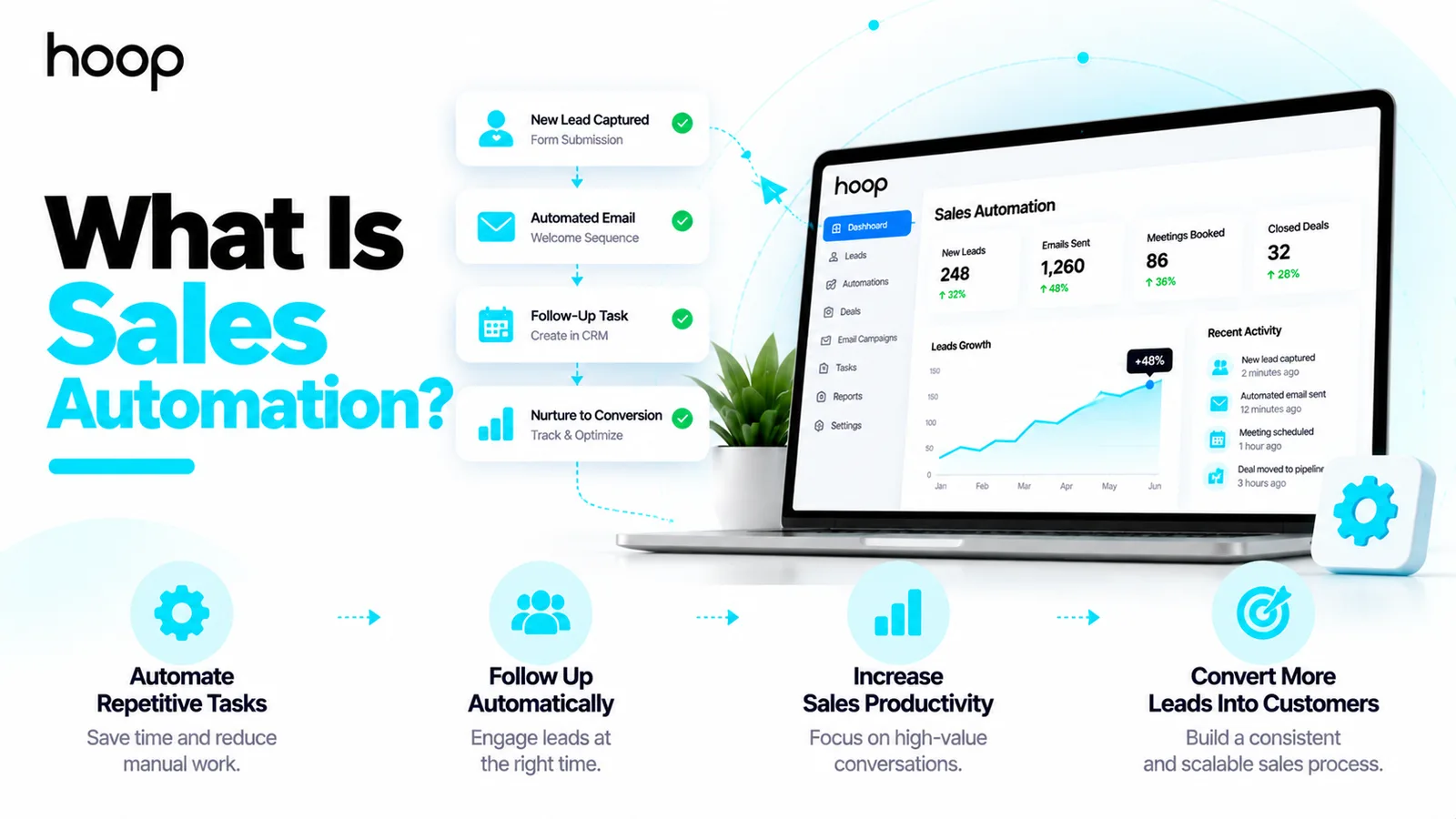
Sales automation runs the coordination — assignment, reminders, record updates — so salespeople keep the judgment calls. A trigger fires, a rule checks the case, the system acts.
Sahar
Content Writer
Sales automation uses software to complete repetitive sales tasks without requiring someone to perform each step manually. Sales teams use automation to assign leads, schedule follow-ups, update records, and track deals. The goal is to reduce administrative work while keeping meaningful customer conversations personal.
For example, a potential customer submits a demo request. Your system records the inquiry, assigns a salesperson, sends confirmation, and creates a follow-up task. The salesperson then reviews the customer’s needs and conducts the conversation. That sequence shows what sales automation looks like in practice: software handles repeatable steps, while people handle judgment.
Need this done right?
Hoop builds the strategy, design and development behind sites like this one — talk to us about yours.
What Does Sales Automation Actually Mean?
Sales automation means connecting sales activities to predefined rules or useful signals. Each workflow follows a simple structure: a trigger starts an action, a rule checks the circumstances, and the system completes an approved task. A customer relationship management (CRM) platform often stores the data required for these steps.
A trigger might be a form submission, a booked meeting, a quote request, or a change in deal stage. An action might create a task, send a relevant message, or alert a manager. You can automate routine coordination without asking software to make every sales decision.
Sales automation versus a CRM
A CRM stores contacts, company profiles, conversations, sales opportunities, and activity history. Sales automation uses that information to trigger next steps. A CRM can support automation, but a contact database alone does not automatically manage follow-ups.
Sales automation versus marketing automation
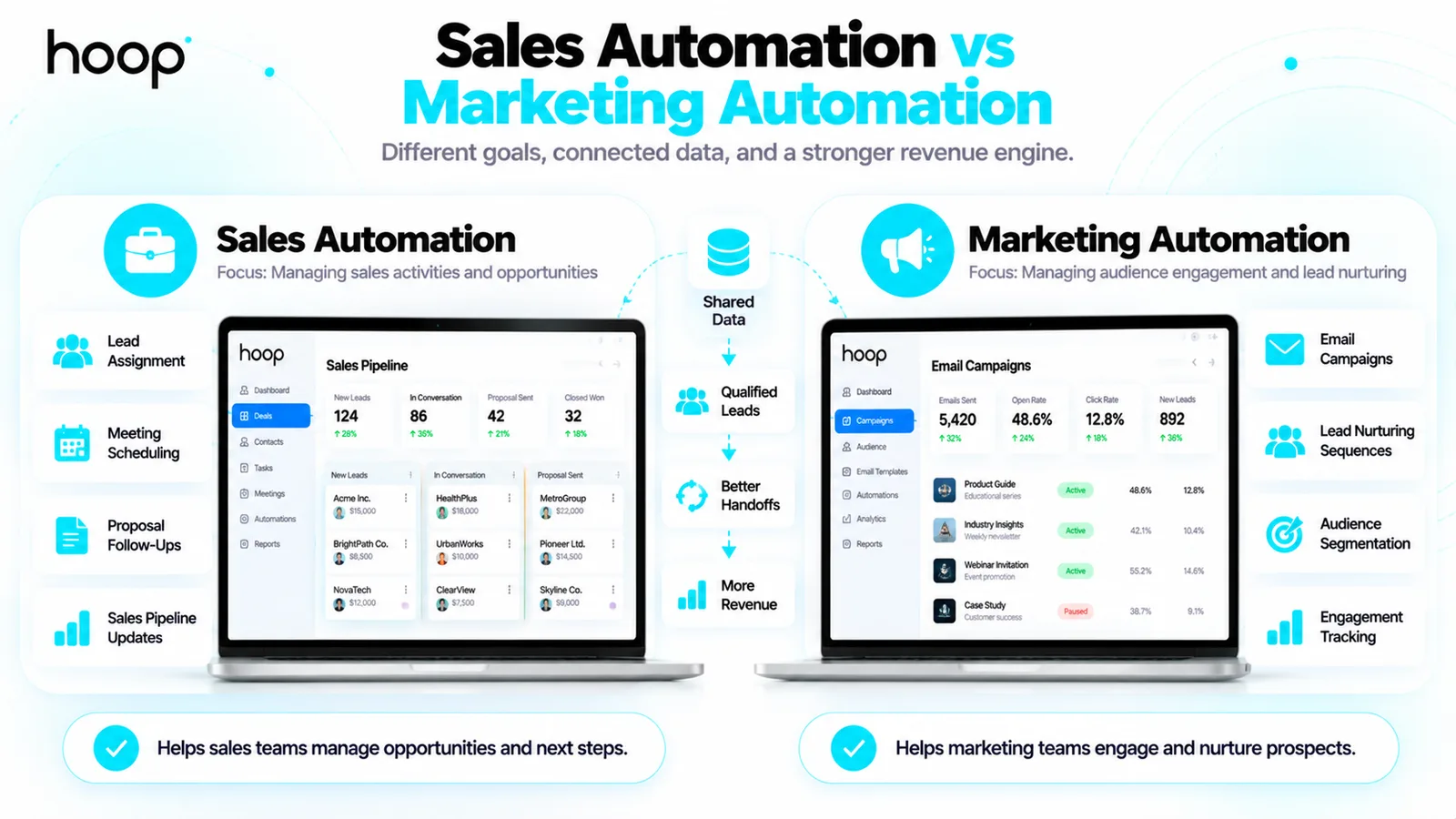
Marketing automation usually manages audience campaigns, lead nurturing, and engagement before a sales conversation. Sales automation concentrates on assignments, meetings, proposals, opportunity stages, and salesperson tasks. Both systems can share data and coordinate handoffs.
For example, marketing can send a helpful product guide. Sales automation can alert an account executive when a prospect requests a quote. The distinction follows the purpose of the action, not simply the software brand.
How Does Sales Automation Work Step by Step?
To understand how sales automation works, follow a prospective customer through 5 connected steps. Every step needs clear ownership and a fallback when contact data or integrations fail.
1. Capture a lead from a defined source
A lead can enter through a website form, an inbound phone call, a webinar signup, or a sales referral. The system creates or updates a contact record. A duplicate check helps prevent competing records for the same person.
2. Check the lead information
Your workflow can confirm required fields, record consent preferences, and flag missing data. A scoring rule can prioritize high-intent inquiries, such as requests for a proposal. A score should guide human review rather than automatically reject every lower-scoring prospect.
3. Route the lead to the right owner
Assignment rules can use territory, account ownership, product interest, or team availability. For example, enterprise inquiries can go to a specialist. Smaller accounts can enter a separate queue. Every route needs a default owner for unmatched cases.
4. Trigger timely follow-up actions
The system can create a call task, send an acknowledgment, or schedule a relevant email. A reply or booked meeting should stop conflicting reminders. Sending repeated messages after a response damages trust and wastes sales time.
5. Update the opportunity and report outcomes
Activity logs document meetings, notes, open proposals, and next steps. Managers can inspect response times and stalled deals. A reliable workflow records errors and allows staff to override inaccurate information.
Which Sales Tasks Should You Automate First?
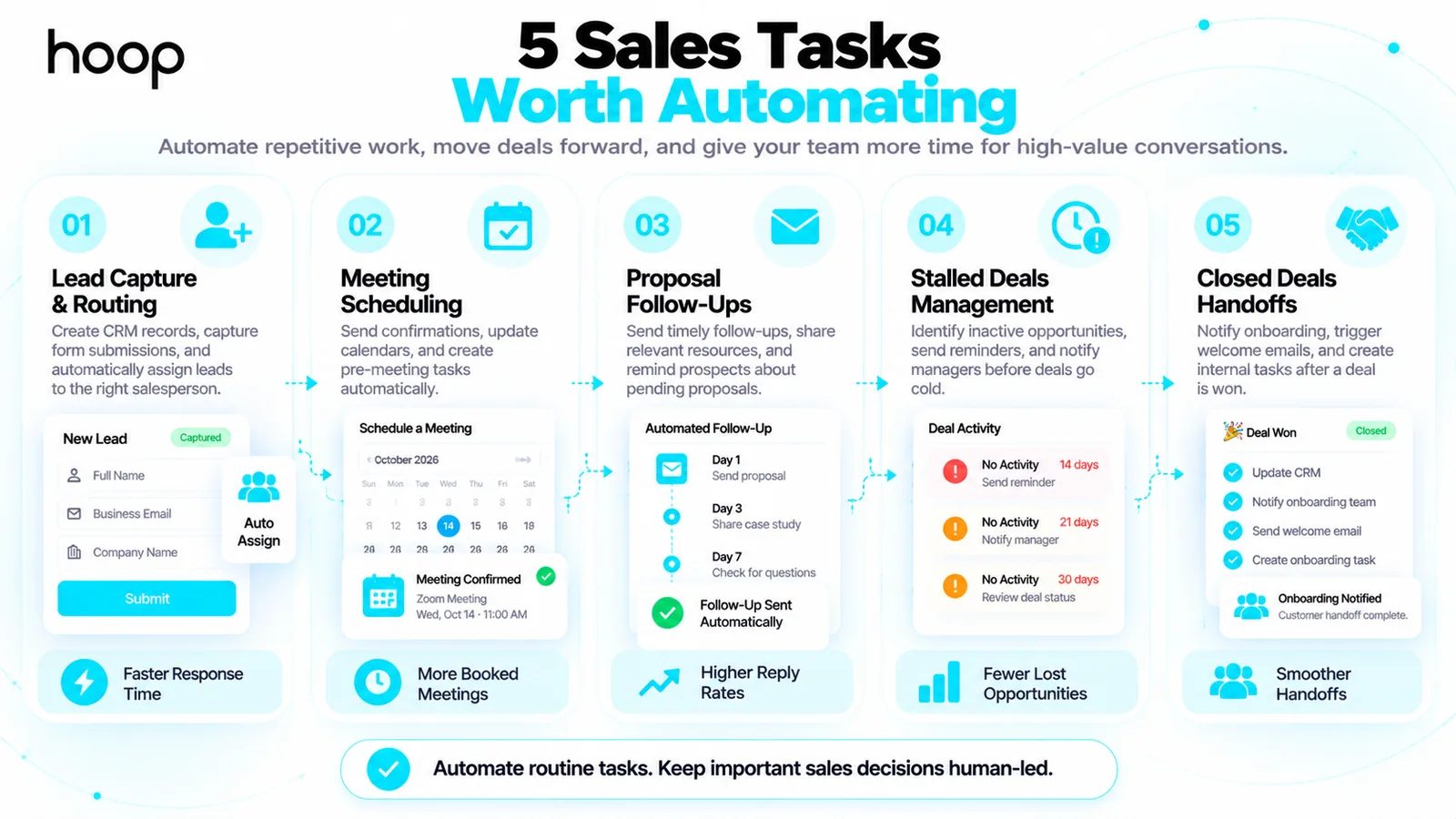
Start with work that repeats often, follows clear rules, and consumes measurable time. A 1-person sales operation benefits from smaller workflows before adopting a complicated automation platform.
| Task | Suggested trigger | Automated action | Human check |
|---|---|---|---|
| New inbound inquiry | Form submitted | Create record and notify owner | Verify fit |
| Meeting booked | Calendar event created | Send confirmation and create preparation task | Prepare discovery |
| Proposal sent | Quote status updated | Schedule polite follow-up reminder | Review buyer context |
| Deal stalled | No activity for defined period | Flag opportunity for review | Choose next action |
| Closed-won deal | Stage changed | Notify onboarding team | Confirm scope |
Automate contact and activity logging
Re-entering the same contact details across email, CRM, and spreadsheets creates avoidable errors. Connect approved data sources and map fields carefully. Keep the contact owner, communication history, and last activity date consistent.
Automate follow-up reminders before automated messages
A task reminder is often safer than an automatic email. A salesperson can check whether the customer replied through another channel. After the team trusts the reminder process, it can test a limited sequence for suitable situations.
Automate lead assignment and handoffs
Unassigned leads often experience inconsistent follow-up. Route each inquiry to an accountable person. Record assignment failures, especially outside business hours or when a salesperson leaves the team.
What Are Practical Sales Automation Examples?
The most useful examples connect a real sales bottleneck to a measurable change. Your first automation should solve a specific problem, not simply increase message volume.
Example 1: A small agency handles consultation requests
A design agency receives 30 inquiries each month. Staff previously copied details from forms and manually emailed appointment options. The agency connects its form, CRM, and scheduling tool. New inquiries now create a contact, notify an owner, and offer a booking link.
Staff still review project requirements and decide whether to prepare a proposal. The agency measures time to first response and qualified meetings, not merely the number of confirmations sent.
Example 2: A solo salesperson follows up on quotations
One salesperson manages product demonstrations and open quotes. A CRM rule creates a reminder 3 business days after sending a proposal. A completed call or customer reply closes the reminder. The salesperson decides whether another message adds value.
The workflow protects follow-up discipline without forcing every customer through the same generic sequence.
Example 3: A software company routes technical buyers
A software company offers 2 products with different implementation needs. The inquiry form captures product interest and company size. Routing rules send integration questions to a solutions consultant. Standard pricing questions go to the commercial team.
A manager reviews unmatched inquiries daily. The process improves ownership without pretending that form answers reveal the full purchase decision.
What Are the Main Benefits of Sales Automation?
The main benefits include less repetitive administration, more consistent follow-up, clearer deal ownership, and better pipeline visibility. Outcomes depend on the quality of your process and contact data.
Less time on manual administration
Automation reduces routine copying, calendar coordination, and status updates. Your team can spend the saved time on discovery calls, proposal quality, and customer relationships. Measure actual hours saved before claiming productivity gains.
More reliable response and handoff
Defined assignment rules reduce dependence on memory. A new inquiry receives a known owner, and the owner receives the right context. Escalation alerts help managers catch records that nobody handled.
Cleaner reporting and deal visibility
Consistent records make it easier to identify missed follow-ups, aging opportunities, and conversion by source across your sales pipeline. Sales automation does not repair inaccurate inputs by itself. Data audits remain necessary.
What Sales Automation Tools Do Businesses Use?
Businesses commonly use CRM platforms, workflow connectors, scheduling products, and communication tools. Examples include HubSpot, Salesforce, Zoho CRM, Pipedrive, Zapier, and Make. Choose software based on required workflows and integration quality rather than feature count.
CRM platforms for sales records and workflows
HubSpot, Zoho CRM, Salesforce, and Pipedrive offer different levels of deal management and automation. Compare required fields, assignment controls, permissions, reporting, and pricing tiers. Ask vendors to demonstrate your actual workflow before buying.
Hoop Interactive offers CRM setup and management for teams that need platform selection, configuration, and adoption support.
Integrations for connected business systems
Zapier and Make connect common applications through supported actions. Complex requirements can require application programming interfaces (APIs), webhooks, and custom field mappings. Reliable SaaS integration services help connect CRM data with quoting, billing, or internal operations.
Communication and meeting tools
Calendar scheduling software can collect meeting details and create reminders. Email tools can manage approved sequences and stop messaging after replies. Connect activity records carefully so multiple tools do not contact the same prospect twice.
How Do You Set Up Sales Automation Without Overcomplicating It?
To set up sales automation, identify 1 repeated task, document its current steps, and automate the smallest reliable part. Test the workflow before expanding across your sales team.
Map the manual process and assign ownership
Write down the starting event, required data, next action, and responsible person. For a proposal reminder, define when a proposal counts as sent. Also decide what closes the reminder and who handles errors.
Build safeguards into every workflow
Check for duplicate contacts, invalid addresses, replies, unsubscribes, and failed integrations. Respect consent requirements and applicable privacy laws. Put sensitive pricing changes, unusual offers, and contractual decisions behind human approval.
Test with real scenarios before launch
Run tests for new inquiries, returning contacts, missing fields, booked meetings, and canceled opportunities. Verify the CRM updates once per event. Review each automated message for accuracy, timing, and relevance.
Expand only after measuring the first result
Compare response time, missed tasks, qualified meeting rates, and hours spent on administration. Improve the first workflow before adding 5 more. A smaller reliable system usually helps more than an extensive collection of untested rules.
What Should You Avoid Automating in Sales?
Avoid fully automating work that depends on judgment, trust, or sensitive customer information. Salespeople should lead complex discovery, handle objections, negotiate terms, and approve unusual promises.
Mass outreach creates additional risks. Large generic email sequences can cause complaints and undermine sender reputation. Personalize relevant messages based on verified information, not fabricated familiarity or guessed personal details.
A poor workflow can also amplify bad data. For example, an inaccurate deal stage can trigger an inappropriate discount email. Regular audits and simple stop conditions reduce these risks.
How Do You Measure Sales Automation Success?
Measure sales outcomes alongside operational efficiency. A high number of automated messages does not prove that your sales process improved.
- Time to first response: the delay between a qualified inquiry and first meaningful contact.
- Follow-up completion rate: completed follow-ups divided by follow-ups due.
- Lead-to-meeting conversion: meetings booked divided by eligible incoming leads.
- Meeting-to-opportunity conversion: qualified opportunities divided by held meetings.
- Sales cycle length: elapsed time from qualified opportunity to closed decision.
- Workflow error rate: failed or incorrect automation runs divided by total runs.
Suppose 80 eligible inquiries result in 20 booked meetings. The lead-to-meeting rate equals 25%. If the updated workflow produces 24 meetings from 80 comparable inquiries, the rate reaches 30%. Compare lead sources and qualification standards before attributing every change to automation.
How Much Does Sales Automation Cost?
Cost depends on contact volume, user seats, workflow complexity, integrations, and support. Simple reminders can use capabilities already included in a CRM subscription. Complex custom integrations involve configuration, testing, maintenance, and security work.
Calculate total cost rather than subscription price alone. Include setup labor, data cleanup, training, integrations, ongoing administration, and the consequences of failed messages. Start with 1 high-value workflow and measure results before expanding spending.
How Can You Keep Automated Outreach Personal?
Personal sales communication requires accurate context, reasonable timing, and a useful purpose. Set up separate sequences for prospect categories such as new demo requests, active proposals, and existing customers. A person requesting a product demonstration needs scheduling details. Someone reviewing a proposal needs answers about implementation and pricing. Sending the same message to both groups ignores the reason for contact.
Use contact fields only when the information is reliable and relevant. Company name, requested service, and agreed meeting date can improve clarity. Avoid pretending to know someone personally because a software system collected public information. Include a clear way to reply, change preferences, or stop messages. Keep your team responsible for sensitive conversations.
How do you prevent automation from creating more work?
Assign one owner to each automation and document what success looks like. Record the trigger, required fields, action, stop condition, and escalation contact. Without ownership, teams struggle to diagnose duplicate emails, missing notifications, and incorrect assignments.
Review failed runs and exceptions on a regular schedule. Check whether integration permissions expired, contact fields changed, or multiple systems created the same task. Keep a simple manual fallback while correcting errors. Monitor complaints and customer replies rather than focusing only on whether the software completed an action.
Train each salesperson on the rules behind the workflow. Team members should know how to pause messages, update deal ownership, correct a contact record, and request a workflow change. Automation only saves time when people trust the information and know how to intervene.
When should you build custom sales automation?
Standard CRM workflows suit common needs such as form capture, follow-up tasks, appointment notices, and lead assignments. Custom automation makes more sense when essential processes span multiple disconnected systems or require uncommon approval rules. For example, a software provider may need to link deal approval with inventory availability, billing records, and an implementation schedule.
Document the operational requirements before commissioning a custom build. Identify data owners, security permissions, integration limits, error recovery, and maintenance responsibility. Compare development cost with a simpler configurable workflow. Build only the additional logic that produces a clear operational benefit.
Build a Sales Process That Saves Time Without Losing Trust
Sales automation works best when software handles predictable coordination and people handle customer decisions. Start with reliable contact data, 1 measurable workflow, and clear human oversight.
If your team needs connected lead nurturing and handoffs, review Hoop Interactive’s marketing automation services to plan a system aligned with your sales process.
“Sending repeated messages after a response damages trust and wastes sales time.”
Key takeaways
- 01Start with lead assignment and follow-up reminders: clear triggers, low risk, measurable.
- 02A task reminder is usually safer than an automatic email.
- 03Every route needs a default owner, and every sequence needs a stop condition.
- 04Never automate discovery, objection handling, negotiation, or unusual promises.
Written by
Sahar
Content Writer
Frequently Asked
Questions
Everything you need to know before booking a strategy call. Can't find your answer? Contact us directly.
No. A CRM stores and organizes customer information. Sales automation uses triggers and rules to act on that information.
Yes. A small business can start with automatic lead assignment, appointment reminders, and follow-up tasks. Complex software is not required for every workflow.
No. Automation handles repeatable administration. Salespeople still assess business needs, establish relationships, negotiate, and make judgment-based decisions.
Yes. Approved workflows can send timely messages and stop after replies, bookings, or opt-outs. The team should review personalization and delivery rules.
Start with lead assignment or follow-up reminders. Both tasks have clear triggers, measurable results, and relatively low implementation complexity.