
How Does Browser Caching Affect Web Design?
Browser caching can make a website feel faster and more polished, but poor settings may leave visitors seeing outdated styles. Cache stable, versioned assets for a long time and keep changeable documents revalidated.
Sahar
Content Writer
Browser caching can make a well-designed website feel almost instant on a return visit. It can also make a freshly redesigned site appear outdated, unstyled, or broken when old files remain in a visitor’s browser. Both outcomes come from the same basic feature: the browser saves reusable resources so it does not need to download them every time.
For web design, caching is therefore more than a background technical setting. It affects how quickly typography appears, how smoothly images load, whether layouts shift, and whether users see the latest colours, spacing, navigation, or interactive behaviour after an update. A sound caching strategy improves performance without forcing visitors to clear their history or perform a hard refresh.
The key is to cache stable, versioned assets for a long time while ensuring frequently changing content can be revalidated. When design and development teams plan this together, caching strengthens the experience instead of becoming a launch-day problem.
Need this done right?
Hoop builds the strategy, design and development behind sites like this one — talk to us about yours.
What Is Browser Caching?
Browser caching is the local storage of previously downloaded website resources. On a first visit, the browser may request the page’s HTML, stylesheets, scripts, fonts, logos, photographs, icons, and other files. If the server allows those resources to be cached, the browser can reuse its copies during later visits rather than transferring every byte again.
The server communicates caching instructions through HTTP response headers. Cache-Control can specify how long a response remains fresh and whether a browser or shared cache may store it. Validators such as ETag and Last-Modified allow the browser to ask whether a saved resource is still current. When it has not changed, the server may respond with 304 Not Modified without resending the full file.
Browser caching is different from server caching and CDN caching. Server caching reduces the work needed to generate a page. A content delivery network stores resources closer to users. Browser caching reuses files on the visitor’s own device. A fast website may use all three layers, but each layer needs its own rules and invalidation plan.
How Browser Caching Affects Web Design

It makes repeat visits feel faster
Speed changes how people perceive design. A layout that appears quickly feels more polished and easier to use than the same layout arriving in fragments. When cached fonts, CSS, JavaScript, icons, and images can be reused, the browser performs fewer transfers. Returning visitors may see the visual structure and interactive controls sooner, particularly on slower connections or mobile devices.
Caching does not make heavy assets harmless. Oversized images still slow the first visit, and excessive JavaScript still needs to be parsed and executed. It works best alongside responsive imagery, efficient fonts, clean front-end code, and careful performance testing. Hoop’s website performance optimisation service can address those factors as one connected experience rather than treating caching as a standalone fix.
It improves visual stability
Cached design resources can reduce the time during which a page looks incomplete. When a stylesheet or font is already available, the browser may apply the intended spacing, type, colours, and components sooner. This can reduce flashes of unstyled content and some forms of layout movement, although font-display choices, image dimensions, and script behaviour still need attention.
Visual stability matters because unexpected movement can interrupt reading or cause a visitor to select the wrong control. A design should reserve space for media, use predictable component dimensions, and avoid relying on late-loading scripts for essential layout. Caching supports those decisions, but it cannot replace them.
It can display an old design after an update
The most visible caching problem occurs when a stylesheet, script, font, or image changes while its URL remains the same and the previous response is still considered fresh. The browser has no reason to request the new version. A visitor may then receive updated HTML that expects new CSS or JavaScript while their device continues using an older file.
The result can look dramatic: menus may stop opening, icons may disappear, columns may collapse, colours may remain unchanged, or new components may appear without the correct styling. Even a small brand update can seem inconsistent if some assets update while others do not. Asking every visitor to clear their cache only hides the deployment mistake; it is not a reliable release process.
It changes how images and fonts behave
Images and web fonts are often substantial files, so they benefit from sensible caching. Returning users can view logos, product imagery, interface icons, and brand fonts without downloading identical copies. This is especially valuable when the same assets appear across many pages.
Problems arise when a replacement image or font is published under the old URL with a long cache lifetime. Some users may continue seeing the previous logo or typeface until the cached response expires. Versioned filenames solve this cleanly: the updated file receives a new URL, while the unchanged file can remain cached.
It influences mobile experience
Mobile users often face variable bandwidth, latency, data limits, and less powerful hardware. Reusing assets reduces network work, which can make navigation between pages feel faster. However, caching should not encourage one oversized design asset for every device. Responsive images, appropriately subsetted fonts, and lightweight interaction remain essential.
A mobile-first web design approach prioritises the constrained environment from the beginning. Caching then reinforces an efficient design instead of masking resources that were unnecessarily large.
What Should Be Cached and for How Long?
There is no universal duration for every resource. The right policy depends on how frequently a file changes, whether its URL changes when its content changes, and how serious it would be for a user to receive an older version. The following pattern is a useful starting point rather than a rule to copy without testing.
| Resource | Typical approach | Design benefit | Main risk |
|---|---|---|---|
| HTML | Short freshness or revalidation | Delivers current page structure | Old HTML may reference obsolete assets |
| Versioned CSS and JS | Long-lived and immutable | Speeds repeat views and navigation | Unsafe if filenames do not change |
| Images and icons | Long-lived when versioned | Faster visual rendering | Old branding may remain visible |
| Web fonts | Long-lived with stable versions | Faster branded typography | Licensing, CORS, or outdated files |
| API responses | Based on data sensitivity and change rate | Faster dynamic interfaces | Stale prices, availability, or account data |
| Service-worker cache | Explicit strategy and version cleanup | Offline and app-like experiences | Old UI can persist outside normal HTTP rules |
How Cache-Control and Revalidation Work
Cache-Control contains instructions for browsers and shared caches. A max-age value indicates how long a stored response remains fresh. While fresh, the browser can normally reuse it without contacting the server. The immutable directive can tell the browser that a versioned resource will never change at that URL, avoiding unnecessary validation.
The term no-cache is widely misunderstood. It does not simply mean “do not store this file.” It generally means the response may be stored but must be validated before reuse. The no-store directive is the stronger instruction that prevents storage, and it is appropriate only where the content and privacy requirements justify it.
Once a cached response becomes stale, an ETag or Last-Modified validator can support a conditional request. If the file is unchanged, a 304 response avoids retransmitting its body. If it has changed, the server sends the new version. For detailed technical behaviour, consult MDN’s HTTP caching guide, which explains freshness, validation, versioned URLs, and recommended combinations of headers.
Cache Busting Prevents Stale Design Assets
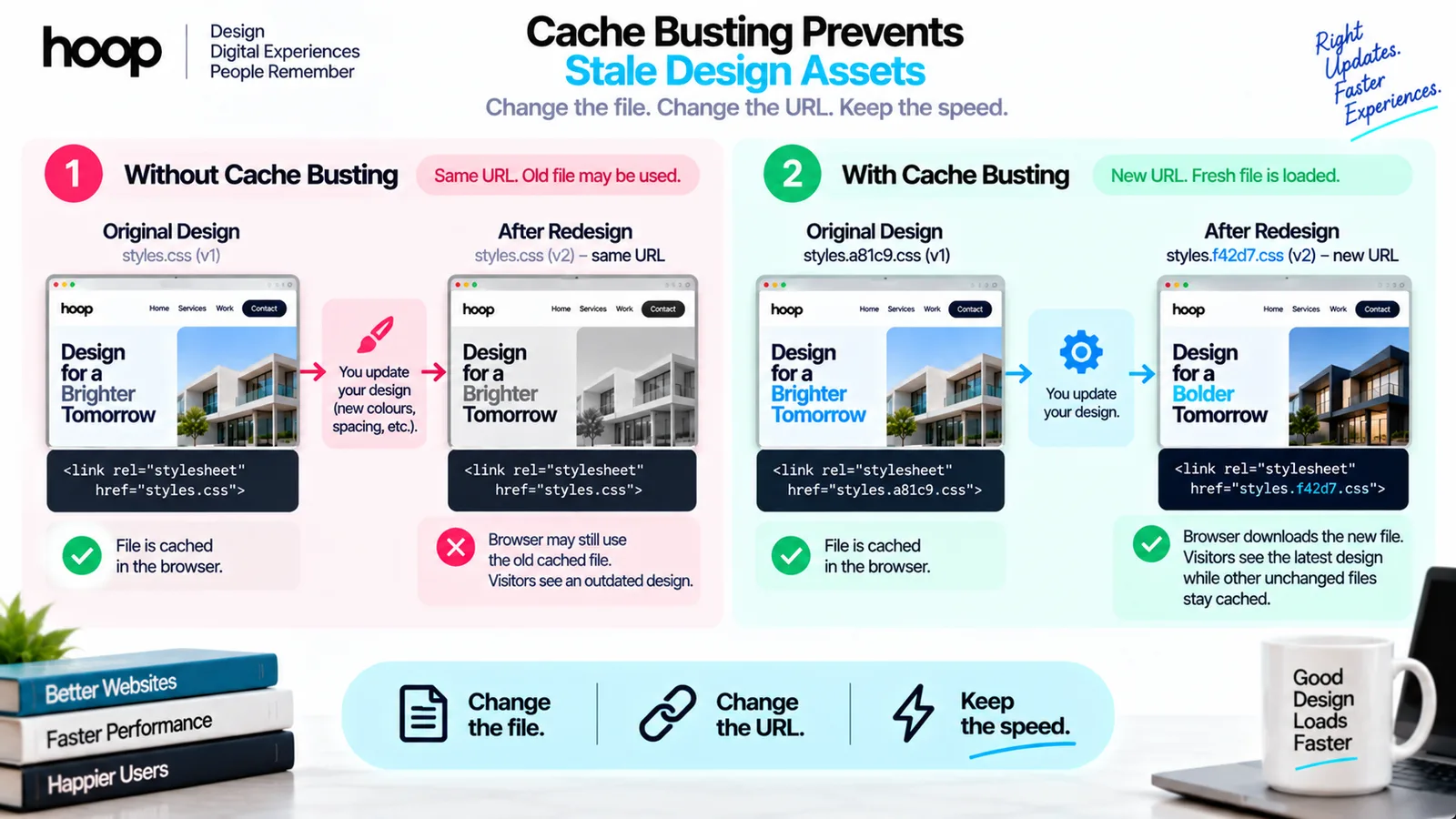
Cache busting means changing a resource URL whenever its content changes. Modern build systems commonly add a content hash to generated filenames, producing names such as styles.a81c9.css or app.42bd7.js. When the file changes, the hash and URL change. The browser downloads the new resource because it has never seen that URL, while older unchanged assets remain safely cached.
A manually updated query parameter, such as styles.css?v=2, can also create a different cache key, but it relies on someone remembering to update the value and on every caching layer treating the URL as expected. Content hashing is more dependable because the build process connects the filename directly to the file contents.
HTML needs different treatment because the public page URL should remain stable. A sound pattern is to revalidate HTML while giving long lifetimes to fingerprinted subresources. The latest HTML then points to the latest filenames. Visitors receive the current design automatically without losing the speed advantage of cached assets.
Browser Cache Versus Cookies
Cache and cookies are both stored by the browser, but they serve different purposes. The cache primarily keeps copies of responses so resources can load more efficiently. Cookies store small values that may be sent with matching requests, commonly supporting sessions, preferences, authentication, or measurement.
Clearing cookies can sign a user out or remove preferences. Clearing cached files usually forces the browser to download site resources again. Support instructions should distinguish the two; telling a visitor to erase everything can create an unnecessary account problem when the real issue is one stale stylesheet.
Service Workers Need a Separate Update Plan
Progressive web apps may use a service worker and the Cache Storage API to control requests, provide offline access, or serve an app shell quickly. This cache is related to the website experience but follows application-defined logic rather than relying only on ordinary HTTP caching.
A poorly managed cache-first strategy can preserve an old interface even after server files have changed. Teams should version named caches, remove obsolete versions during activation, define which requests use cache-first or network-first behaviour, and test what happens when an update is available while a user already has the app open. Offline capability is valuable only when the update experience remains understandable and reliable.
How Caching Affects Website Redesigns
A redesign often replaces many interdependent resources at once: CSS, JavaScript, templates, images, fonts, icons, and component markup. Releasing them without coordinated versioning can create mixed states. One visitor may receive the complete new design, while another receives new markup with an old stylesheet and reports a broken website.
Before launch, the team should map every caching layer, confirm that generated assets receive new names, revalidate the page documents, purge relevant CDN entries, and test with a browser profile that has the current production site cached. A private window is useful for checking the first-visit experience, but it does not reproduce the upgrade path of an existing user.
If a legacy site has accumulated conflicting plugins, static filenames, or unclear cache rules, Hoop’s website redesign service can address visual design, front-end architecture, performance, and release quality together.
A Practical Caching Checklist for Design Teams
Caching decisions should be reviewed before the final launch rather than left until users report that the design looks wrong. A focused checklist keeps the work manageable:
- List the HTML, CSS, JavaScript, fonts, images, API responses, CDN rules, and service-worker caches used by the site.
- Use content-hashed filenames for build assets that can safely receive long cache lifetimes.
- Keep stable public HTML URLs current through revalidation rather than applying an inflexible long lifetime.
- Test both a completely new visit and an upgrade from the previously deployed version.
- Check important pages on desktop and mobile with normal refresh, hard refresh, and offline conditions where relevant.
- Verify font loading, responsive images, navigation, forms, animation, and other design-critical interactions.
- Document how to roll back a release, purge shared caches, and remove obsolete service-worker entries.
How to Diagnose a Design That Will Not Update
When a change does not appear, first confirm that the new file reached the production server. Then use the browser’s Network panel to inspect the requested URL, response status, Cache-Control header, validators, age, and whether the resource came from memory cache, disk cache, a service worker, or the network. Compare the filename referenced by the current HTML with the filename produced by the build.
Temporarily disabling the browser cache while developer tools are open can help isolate the problem, but it is a diagnostic step, not the fix. If disabling cache reveals the correct layout, investigate versioning and response headers. If it does not, the issue may be the deployment, CDN, server cache, CSS specificity, build output, or a service worker.
A reliable web development partner should be able to trace the full request path rather than repeatedly asking users to clear their browsing data.
Common Browser Caching Mistakes
- Giving an unversioned stylesheet or script a one-year lifetime.
- Using
no-storeeverywhere and sacrificing useful repeat-visit performance. - Purging a CDN while forgetting that browsers or service workers may still hold older files.
- Testing only in a private window and missing the returning-user update path.
- Replacing a logo or font under the same long-cached URL.
- Treating cache clearing as the standard solution for every customer.
Make Caching Part of the Design Strategy
Browser caching affects web design by shaping speed, stability, consistency, and the transition between old and new releases. Used well, it allows returning visitors to reuse heavy visual resources and reach a polished interface faster. Used carelessly, it can preserve outdated branding or combine incompatible versions of the page.
The best approach is deliberate: revalidate changeable documents, cache fingerprinted assets for longer, coordinate CDN and service-worker rules, and test the real returning-user journey. If your website feels slow or design updates do not reach every visitor consistently, explore Hoop’s web design and development services to create a faster, more dependable digital experience.
“Asking every visitor to clear their cache only hides the deployment mistake; it is not a reliable release process.”
Key takeaways
- 01A stale stylesheet under an unchanged URL is what makes a new design look broken.
- 02Content-hashed filenames are the reliable fix; a manual ?v=2 depends on someone remembering.
- 03Revalidate HTML, cache fingerprinted assets for longer — the newest HTML names the newest files.
- 04Test the upgrade path of a returning visitor, not just a private window.
Written by
Sahar
Content Writer
Frequently Asked
Questions
Everything you need to know before booking a strategy call. Can't find your answer? Contact us directly.
Caching does not intentionally redesign a page, but it affects which versions of CSS, JavaScript, fonts, and images are used. Incorrect rules can leave visitors seeing old or mismatched design resources.
The previous stylesheet may still be fresh in the HTTP cache, a CDN may hold an older response, or a service worker may be serving it. Confirm the requested URL and headers, then implement automatic asset versioning.
No. A normal deployment should deliver new asset URLs and current HTML automatically. Clearing cache may help diagnose a problem, but it should not be required for ordinary visitors.
Content-hashed CSS and JavaScript can usually receive long-lived caching because a changed file receives a new URL. Unversioned files require shorter freshness or revalidation to prevent stale interfaces.
No-cache normally allows storage but requires validation before reuse. No-store tells caches not to store the response. The correct choice depends on freshness, privacy, and performance needs.
Caching can contribute to faster repeat experiences and more efficient resource delivery, but it is only one performance factor. Search visibility also depends on content, crawlability, technical quality, mobile usability, and many other signals.
No. It may bypass or revalidate saved resources for that visit, but other users can still receive the stale file. The permanent fix belongs in asset versioning, cache headers, CDN rules, or service-worker logic.
Keep reading
All articles →
Website Development in 2025: Complete Guide to Modern Web Solutions
Aug 5, 2026 · 7 min read
What Is a Hero in Web Design? Create Clearer Pages
Sep 11, 2026 · 9 min read