
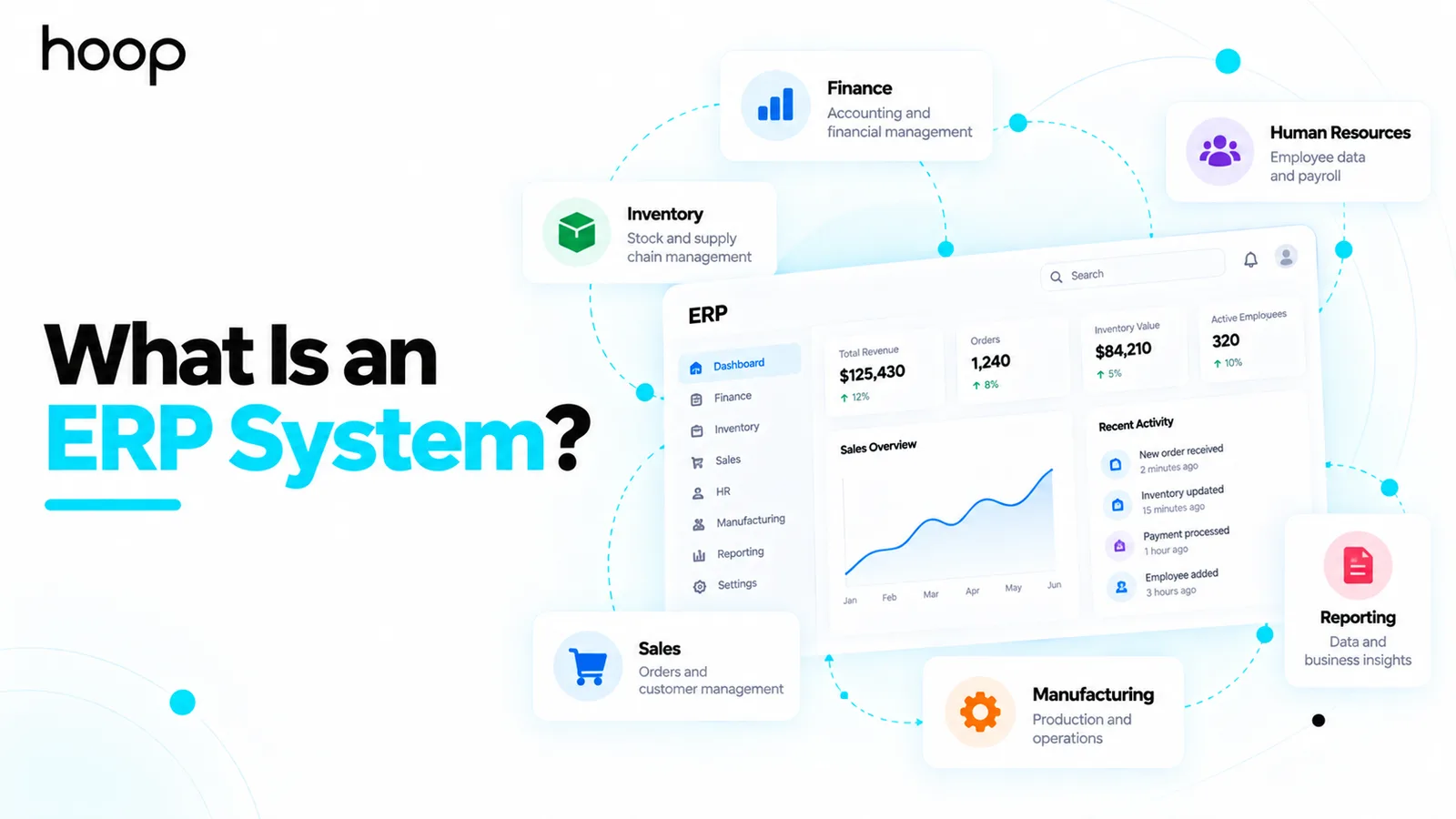
What Is an ERP System? How Enterprise Resource Planning Works
ERP connects separate business functions to shared records, so one transaction updates sales, inventory, purchasing, finance, and fulfillment together. The hard part is the process work, not the software.
Sahar
Content Writer
What is an ERP system? It is software that connects a company’s core business processes through shared data and workflows.
ERP stands for Enterprise Resource Planning. The system gives connected teams a shared operational view of the business.
Need this done right?
Hoop builds the strategy, design and development behind sites like this one — talk to us about yours.
What Is an ERP System?
Instead of each department keeping separate records, ERP modules work from connected information. One transaction can therefore update several parts of the organization.
A customer order can reduce available inventory, create purchasing demand, update financial records, and give fulfillment teams work to complete.
That connected flow is the main reason businesses use ERP software. The system becomes an operational backbone rather than another isolated business application.
What Does ERP Stand For?
ERP stands for Enterprise Resource Planning. The name reflects software designed to plan and manage resources across an organization.
Those resources can include cash, inventory, materials, employees, equipment, supplier capacity, production time, and customer demand.
The phrase sounds abstract because modern ERP does much more than planning. It also records transactions, enforces workflows, manages approvals, and supports reporting.
How Does an ERP System Work?
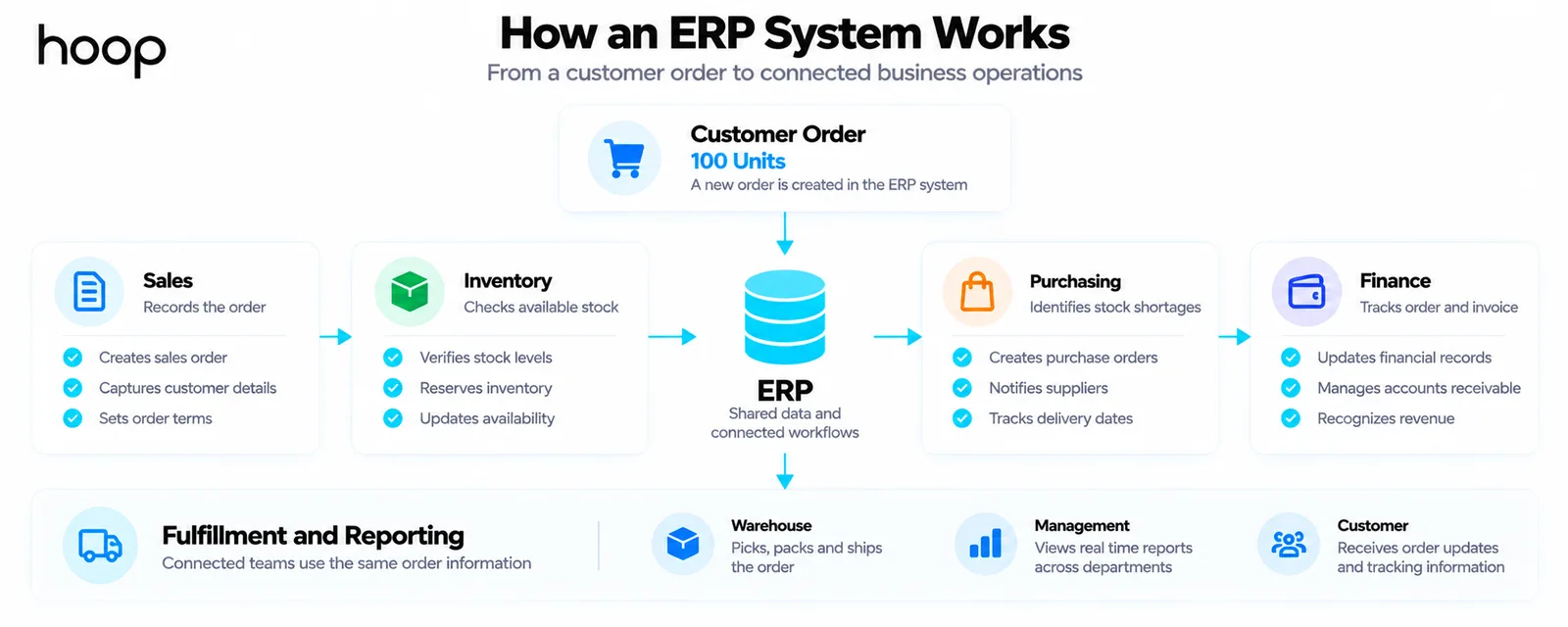
An ERP system works by connecting business functions to shared records. Different modules handle different activities while using related data.
Consider a company that receives an order for 100 units. Sales records the order, and inventory checks whether enough stock is available.
If stock is short, the system can expose purchasing or production demand. Finance can see the order value and later recognize the invoice.
Warehouse teams can see fulfillment work without retyping the sales transaction. Managers can then report on the same order across departments.
The practical flow is simple. A business event creates shared data, connected modules react, workflows move forward, and reporting reflects the results.
Why Does ERP Use Shared Data?
Businesses struggle when departments maintain different versions of the same fact. Finance may report one inventory value while warehouse records show another.
Sales may keep customer information in one system while support maintains separate records. Managers then spend time reconciling exports instead of making decisions.
ERP reduces this problem by giving connected processes a common source of business data. The goal is consistency, not merely database centralization.
A shared source of truth also improves traceability. Teams can follow how an order, purchase, payment, or inventory movement affected later transactions.
What Is an ERP Module?
An ERP module is a focused part of the platform built for a particular business function. Modules separate responsibilities without recreating data silos.
Finance users need different screens from warehouse teams. Both groups may still depend on the same supplier, product, purchase, or transaction records.
Companies can deploy only the modules they need. They can also add more capabilities as processes become more complex.
What Are the Main ERP Modules?
Common modules cover finance, procurement, inventory, manufacturing, human resources, sales, projects, supply chain, and reporting. The exact mix depends on the business.
A manufacturer may prioritize material planning and production scheduling. A distributor may care more about warehouses, purchasing, orders, and supplier performance.
A services company may focus on projects, staffing, expenses, billing, and resource planning. ERP should reflect how value moves through the organization.
What Does an ERP System Actually Do?
ERP software records transactions and coordinates dependencies between departments. It can also automate approvals, controls, alerts, and recurring operational tasks.
For example, a purchase order can move through approval, receiving, inventory updates, invoice matching, and payment without repeated manual entry.
The important point is not speed alone. ERP links steps that depend on one another so later work uses information created earlier.
This connection is what allows reporting to reflect actual operations rather than a collection of manually combined spreadsheets.
What Is an ERP System Used For?
It coordinates transactions, resources, approvals, planning, and reporting across connected departments.
A finance team may use ERP for payables, receivables, budgets, and closing. Operations may use the same platform for orders, stock, purchasing, and fulfillment.
Manufacturing teams can use ERP to connect demand with materials and production capacity. HR teams may manage employee records, payroll inputs, leave, or workforce planning.
Leaders use ERP reporting to understand current performance without waiting for several departments to combine separate spreadsheets. The exact use depends on the modules deployed.
The central idea stays consistent: ERP turns separate operational activities into connected business processes with traceable data and controlled handoffs.
ERP vs Accounting Software
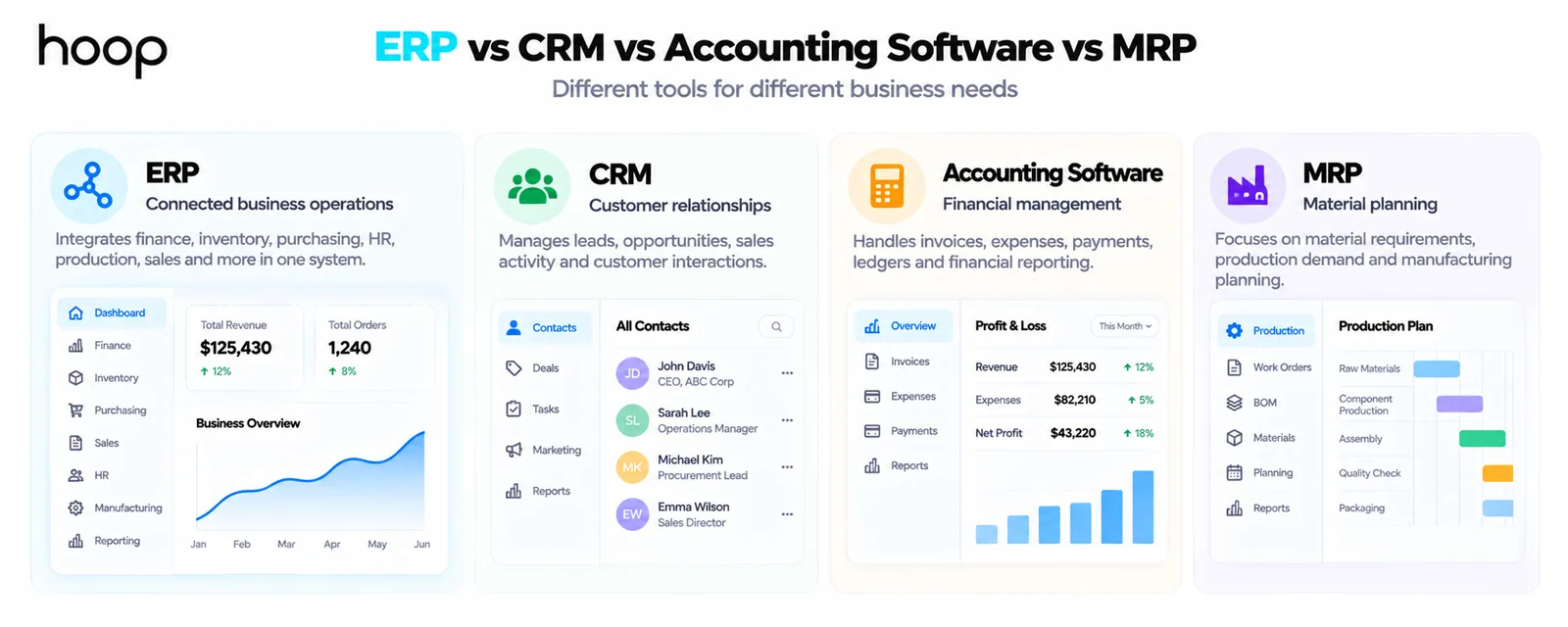
Accounting software primarily manages financial transactions and reporting. It may handle the general ledger, payables, receivables, expenses, tax, and statements.
ERP connects those financial records to operational processes such as inventory, procurement, production, HR, and fulfillment.
Imagine a supplier invoice for materials. Accounting software can record the invoice, but ERP can connect it to the purchase order and goods received.
That connection helps the business confirm three things: what was ordered, what arrived, and what the supplier wants paid.
ERP vs CRM
ERP and Customer Relationship Management software overlap, but their primary focus differs. ERP usually centers on internal resources, transactions, and operations.
CRM usually centers on leads, opportunities, accounts, sales activity, and customer relationships. Modern platforms may combine both sets of capabilities.
A sales opportunity might begin inside CRM. Once it becomes an order, ERP can manage inventory, fulfillment, invoicing, purchasing, and financial effects.
ERP vs MRP
Material Requirements Planning focuses more narrowly on materials, production demand, and manufacturing planning. ERP expanded that planning idea across the wider enterprise.
A manufacturer may still use MRP logic inside its ERP platform. The ERP then connects production planning with finance, procurement, inventory, sales, and other functions.
Who Uses ERP Systems?
ERP systems are used by manufacturers, distributors, retailers, service companies, healthcare organizations, construction firms, and many other businesses.
The need depends more on operational complexity than company size. A smaller distributor with several warehouses may need stronger integration than a larger simple business.
ERP becomes more useful as transactions, locations, products, approvals, departments, and reporting requirements become harder to coordinate with separate tools.
Does a Small Business Need an ERP?
The answer depends on whether integration solves problems that simpler tools cannot manage efficiently.
Not every small business needs ERP. Separate accounting, ecommerce, CRM, and inventory tools may be enough while workflows remain simple.
ERP becomes more attractive when those systems create repeated reconciliation, duplicate entry, delayed reporting, weak visibility, or growing integration problems.
The decision should be based on process complexity and operational pain. Employee count alone is a poor reason to buy an ERP system.
How Do You Know a Business May Need ERP?
Several recurring problems suggest that disconnected tools are becoming difficult to manage:
- Different departments report conflicting numbers for the same inventory, order, customer, or financial data.
- Employees repeatedly enter the same information into several systems or spreadsheets.
- Monthly reporting requires significant manual reconciliation before leaders trust the numbers.
- Approvals, purchasing, fulfillment, and other workflows depend heavily on email or personal follow-up.
- Adding locations, products, warehouses, or teams makes existing tools increasingly difficult to coordinate.
- Managers cannot see current operational information without requesting exports from several departments.
A growing spreadsheet problem is especially revealing. Spreadsheets are useful tools, but they often become unofficial systems when core software does not fit operations.
What Are the Benefits of an ERP System?
The main ERP benefits come from connected operations. Shared records reduce duplicate entry and make cross-department workflows easier to coordinate.
ERP can improve inventory visibility, purchasing decisions, financial control, operational reporting, approval consistency, and planning. It can also reduce manual reconciliation.
The value becomes clearer when one transaction supports several teams. A confirmed order can inform stock, production, purchasing, fulfillment, finance, and management reporting.
ERP can also support growth because standardized workflows are easier to repeat across new teams or locations than informal processes.
What Are the Disadvantages of ERP?
ERP systems can be expensive and difficult to implement. The software must often reflect many existing business rules, dependencies, controls, and historical exceptions.
Data migration can expose years of inconsistent records. Integrations may require significant engineering work. Employees also need training and time to change established habits.
Customization can solve real gaps, but excessive customization creates long-term maintenance problems. Upgrades become harder when core behavior differs heavily from the standard platform.
ERP centralizes complexity. It does not make complex business operations disappear.
Why Are ERP Implementations Difficult?
ERP implementation combines technology with organizational change. Teams must agree on how processes should work before the system can represent them reliably.
A company may discover that two departments perform the same process differently. It may also find duplicated suppliers, inconsistent item codes, or undocumented approval rules.
The implementation team must decide which workflows to standardize, which exceptions are legitimate, and which old practices should disappear.
That is why process mapping matters before configuration or development begins. A weak process model simply moves existing confusion into new software.
Why Does ERP Data Quality Matter?
ERP decisions are only as reliable as the data supporting them. Incorrect inventory creates bad purchasing and fulfillment decisions.
Duplicate suppliers distort spending reports. Wrong lead times damage planning. Inconsistent customer records weaken billing and service workflows.
Data migration therefore involves more than copying old records. Teams often need to clean, deduplicate, map, validate, and sometimes archive historical information.
User behavior matters after launch too. If employees bypass ERP and maintain unofficial spreadsheets, the shared data model quickly loses value.
What Is Cloud ERP?
Cloud ERP runs on infrastructure delivered through cloud services and is usually accessed through a browser or connected applications.
Cloud deployment can reduce local infrastructure responsibilities and make updates easier to distribute. It can also support teams working across different locations.
On-premise ERP runs on infrastructure controlled more directly by the organization. Some businesses choose this model for regulatory, integration, or operational reasons.
Hybrid environments combine cloud and on-premise systems. The right model depends on security, compliance, cost, integration, and operating requirements.
Packaged ERP vs Custom ERP
Packaged ERP platforms provide standardized modules and established implementation ecosystems. They work well when a business can operate within their process models.
A company may consider ERP software development when standard platforms create major workflow compromises or costly workarounds. Custom systems can follow unusual operations more closely.
Custom ERP also requires deeper responsibility for architecture, testing, maintenance, security, and future changes. Custom does not automatically mean better.
The real decision is whether the business should adapt to a standard platform. Unique workflows may justify software built around them instead.
What Are Examples of ERP Systems?
Well-known ERP platforms include SAP, Oracle ERP, Microsoft Dynamics 365, NetSuite, and Odoo. Different products target different company sizes and industries.
Businesses should compare process fit, implementation ecosystem, integrations, customization needs, deployment model, total cost, and long-term ownership requirements.
Product popularity alone does not guarantee fit. The right platform must support the company’s critical workflows without creating unnecessary operational friction.
Does ERP Replace Every Business Application?
No. ERP often becomes the operational backbone, but modern companies still use specialized applications around it.
A business may keep dedicated ecommerce, CRM, payroll, warehouse, analytics, or industry-specific software and connect those systems to ERP.
The important question is which system owns each important record and business rule. Clear ownership prevents duplicate sources of truth.
ERP also sits inside the wider category of enterprise software, where departments depend on shared processes, permissions, and data. Hoop builds those platforms through enterprise software development.
How Long Does ERP Implementation Take?
ERP implementation can take months or longer because the project includes more than software installation. Process mapping, configuration, migration, integration, testing, and training all require time.
A focused rollout with a limited module scope can move faster than replacing several core systems at once. Phased implementation can also reduce organizational disruption.
The correct timeline depends on business complexity, data condition, integration requirements, customization, user count, and rollout strategy.
What Are Common ERP Mistakes?
ERP projects often struggle because implementation decisions focus on software before the business understands its own processes.
- Buying software before mapping the workflows and problems the system must solve.
- Migrating poor-quality data without cleaning duplicates, old records, or inconsistent structures.
- Customizing every historical process instead of questioning whether the process still makes sense.
- Ignoring user experience and training until the system is ready to launch.
- Replacing every business application at once when a phased rollout would reduce risk.
- Assuming ERP will improve operations even when employees continue using unofficial parallel spreadsheets.
The safest projects treat ERP as a business transformation supported by software. Technology alone cannot resolve unclear ownership or weak processes.
Should You Build or Buy an ERP System?
Buy when standard ERP products already fit the core workflows and the company benefits from an established vendor ecosystem.
Consider custom development when critical operations remain difficult to model, user licensing becomes restrictive, or integrations require extensive workarounds.
A broader custom software development approach can also make sense when ERP is one part of a larger operational platform.
The decision should compare total ownership costs, implementation risk, future flexibility, support needs, and the value of preserving unique workflows.
Choosing ERP Around the Business, Not the Acronym
An ERP system creates a connected operational model of the business. It links transactions, resources, workflows, and reporting across departments.
The strongest ERP projects begin with process clarity, reliable data, realistic scope, and clear ownership. Those foundations matter more than feature counts.
ERP can reduce duplicate work and improve visibility, but it cannot repair broken operations automatically. Poor processes simply become digitized poor processes.
Choose ERP when connected data and coordinated workflows solve real operational problems. Then select the platform and rollout model around those requirements.
“ERP centralizes complexity. It does not make complex business operations disappear.”
Key takeaways
- 01Need is driven by operational complexity, not headcount — small businesses with many moving parts can need it more than large simple ones.
- 02Accounting software records the invoice; ERP connects it to the purchase order and the goods received.
- 03Migration usually exposes years of duplicate suppliers, inconsistent codes, and undocumented approval rules.
- 04ERP digitises whatever process you give it. Poor processes become digitised poor processes.
Written by
Sahar
Content Writer
Frequently Asked
Questions
Everything you need to know before booking a strategy call. Can't find your answer? Contact us directly.
No. Smaller companies can use ERP when operational complexity justifies connected processes. Business size alone does not determine whether ERP is appropriate.
No. Accounting software focuses primarily on financial records. ERP connects finance with operational areas such as inventory, procurement, HR, manufacturing, and fulfillment.
Sometimes. Some ERP suites include customer and sales modules, while other businesses connect a separate CRM platform to their ERP system.
Yes, modern architectures can distribute services and data. The important goal is consistent ownership and synchronized business information across connected processes.
No. Spreadsheets remain useful for analysis and temporary work. ERP should reduce spreadsheets used as unofficial systems for critical operational records.
Keep reading
All articles →
What Is Enterprise Software? How Enterprise Applications Work
Oct 12, 2026 · 11 min read
How to Build a SaaS Application
Oct 12, 2026 · 10 min read