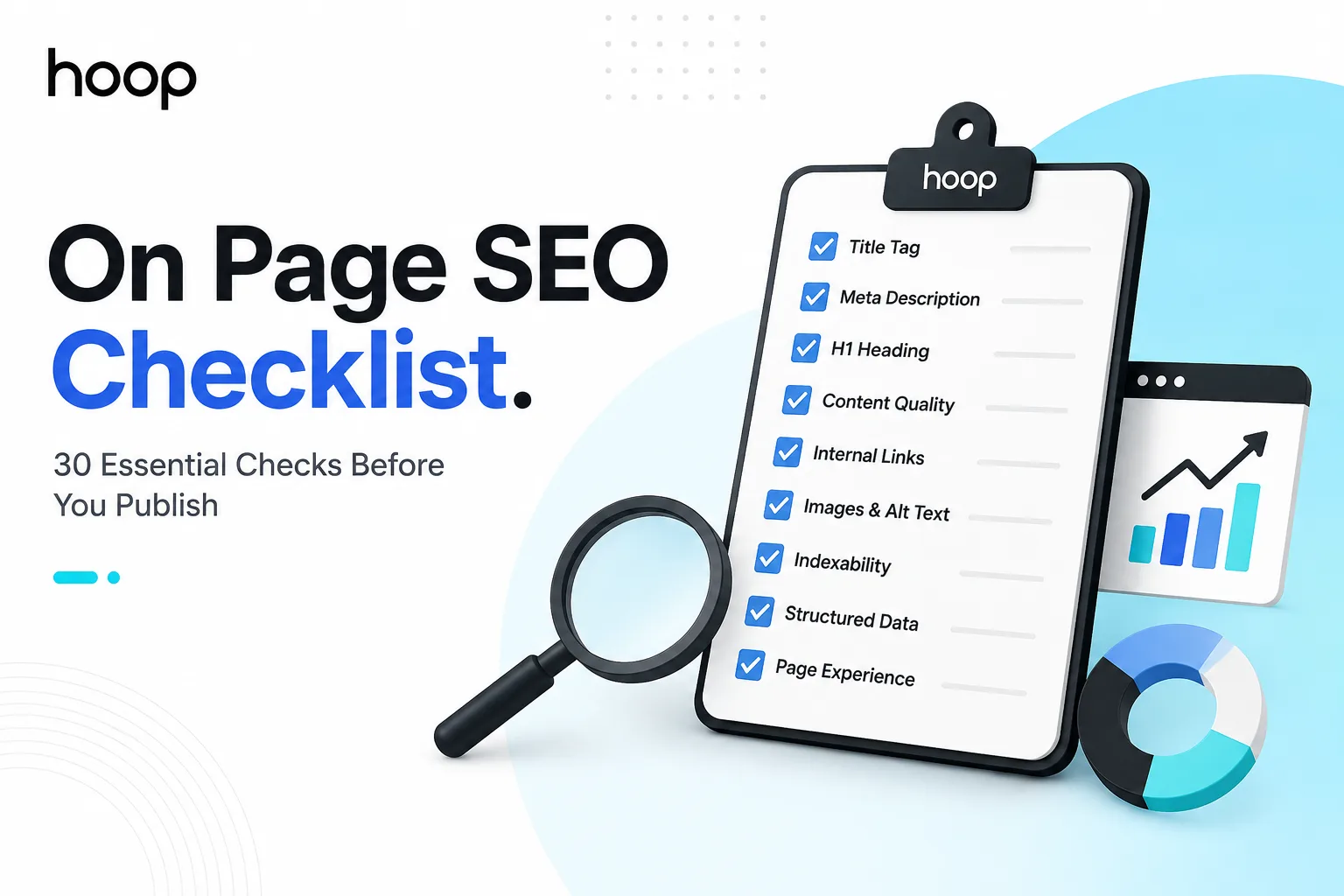
On Page SEO Checklist: 30 Checks Before You Publish
Run the checklist in priority order: confirm the page goal, match search intent, and verify indexability before touching anything cosmetic. A blocked page cannot benefit from perfect copy, and a perfect tag cannot rescue the wrong page type.
Sahar
Content Writer
An on page SEO checklist helps you verify every controllable page element before search engines and users judge the page. The strongest checklist prioritizes search intent, indexability, content, links, media, and page experience.
Use the checklist before publishing, refreshing, or redesigning a page. Run it before approval.
What Should You Check First?
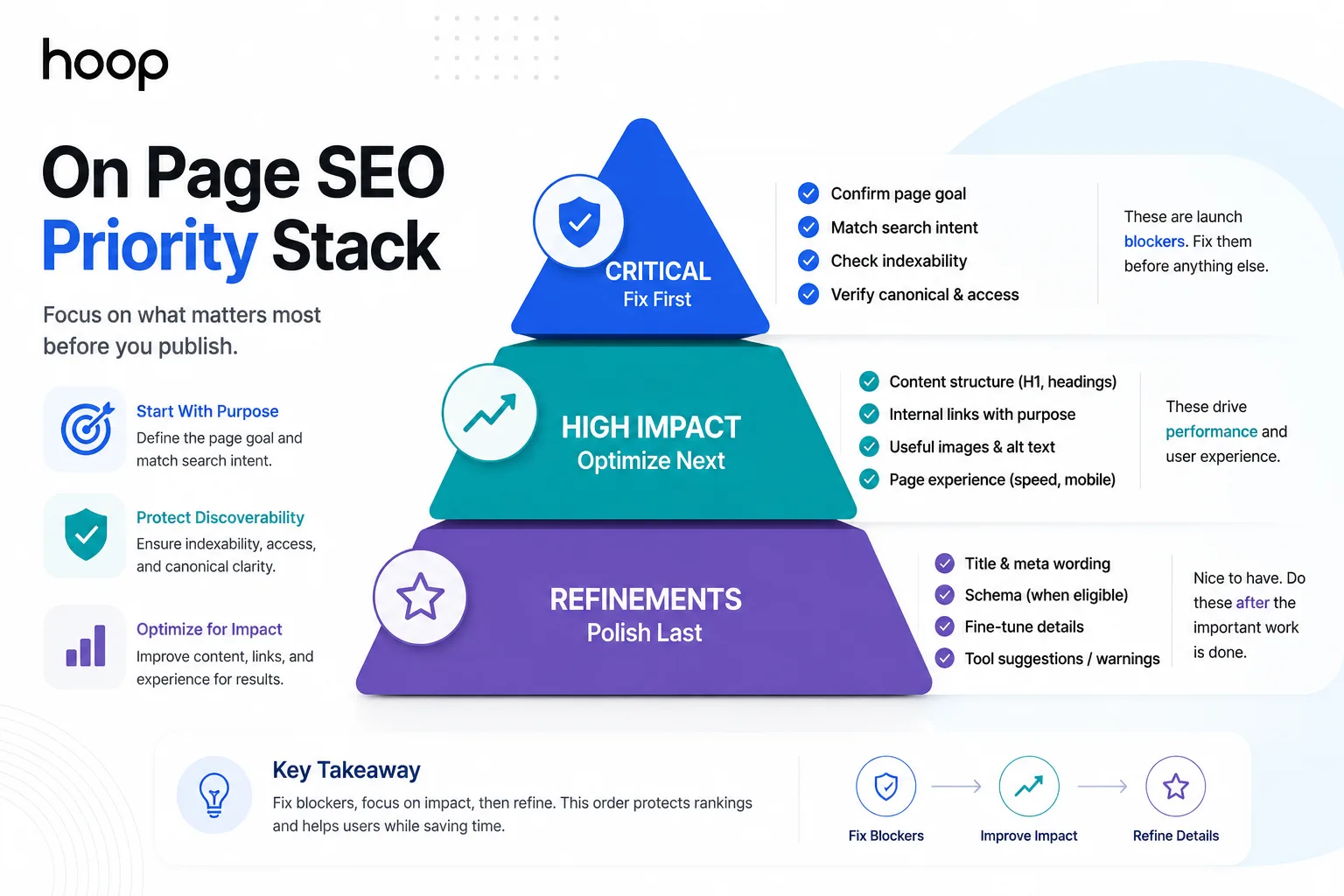
Start with the page goal, search intent, and indexability. Those 3 checks shape later optimization.
A useful checklist separates blockers from refinements. Fix inaccessible pages before changing meta-description wording. Use the table below to schedule work by impact.
| Task | Timing | Method | Difficulty |
|---|---|---|---|
| Search intent | Before drafting | Compare ranking page types and user needs | Medium |
| Indexability | Before publishing | Check robots directives, canonical, and page access | Medium |
| Content structure | During drafting | Build H1, H2, H3, answers, and examples | Medium |
| Internal links | Before publishing | Add contextual links from relevant pages | Easy |
| Images and schema | Before publishing | Compress media and add eligible markup | Medium |
| Performance review | After publishing | Check Search Console and analytics | Medium |
Confirm one page goal
Define one primary outcome for the page. Examples include answering a question, generating a lead, selling a product, or booking a consultation.
Choose one primary topic supporting that outcome. Unrelated topics weaken relevance and focus.
Match the dominant search intent
Study the current search engine results page before writing. Compare ranking formats such as guides, category pages, service pages, product pages, and comparison pages.
Match the format that satisfies the searcher’s likely task. A service query needs commercial information, while a definition query needs a direct explanation.
Separate blockers from refinements
Mark each task as critical, high, medium, or refinement. Critical checks include indexability, canonical setup, page access, and severe content mismatch.
How Do You Match Search Intent Before Optimizing a Page?
To match search intent, identify the dominant result format, user task, and depth. Build around those signals.
Search intent belongs near the top of every on page SEO checklist. Perfect tags cannot rescue the wrong page type.
Inspect the current result types
Search the primary query and classify the leading pages. Note whether Google favors tutorials, lists, products, tools, local pages, or service pages.
Record repeated subtopics from strong results. Repeated questions reveal expectations. Your page still needs original value.
Map one primary topic to one page
Assign one main query cluster to one suitable URL. Avoid creating 3 pages that compete for the same intent without a clear purpose.
Use keyword mapping to separate topics. Examples include “SEO audit,” “technical SEO audit,” and “local SEO audit.” Hoop’s complete SEO guide explains how on-page, off-page, and technical work support search visibility together.
Answer the main need immediately
Put the direct answer near the beginning. Readers should understand the page’s value quickly.
Follow the direct answer with evidence, steps, examples, or decision criteria. That structure helps readers complete the task without searching again.
Which Title, H1, and Meta Checks Matter Most?
Your title tag, H1, and meta description should describe the same page promise. Each element serves a different presentation role.
Add these checks to every on page SEO checklist because mismatched labels can confuse readers before the content earns attention.
Write a specific title tag
Write a unique title that identifies the page topic and expected benefit. Keep the wording natural, specific, and aligned with the actual page.
Avoid empty modifiers. A useful title tells readers what they will learn, compare, calculate, or accomplish.
Use one descriptive H1
Use one primary visible heading that clearly names the page subject. The H1 can match the title closely without copying every word.
Build H2 and H3 headings around distinct subquestions. Clear headings help users scan content and help systems understand topic structure.
Write a useful meta description
Write a concise description that explains the page benefit and supports a relevant click. Avoid promises that the page cannot support.
Google can select different snippet text for a query. Your description still gives searchers and editors a clear summary of the page.
How Should You Optimize Content Without Keyword Stuffing?
To optimize content without keyword stuffing, cover the topic completely and use the primary phrase naturally. Support clarity with related concepts.
The checklist should measure usefulness before repetition. A page needs enough detail to solve the user’s task, not a fixed keyword count.
Cover the complete task or question
List the decisions a reader must make after landing on the page. Answer each necessary decision with a focused section.
Remove paragraphs that repeat earlier points without adding evidence, examples, instructions, or useful distinctions. Strong content earns space through function.
Use related terms naturally
Use related terms such as title tag, internal linking, canonical URL, structured data, and search intent.
Ignore unrelated tool suggestions. Topic relevance matters more than filling a recommended term list. Hoop’s content marketing services connect search intent, content structure, editorial quality, and measurable business goals.
Add evidence and named examples
Support factual claims with reliable sources where evidence matters. The Google SEO Starter Guide explains how Google recommends helping search engines understand content.
Use named examples after broad categories. Examples include Google Search Console for search data, Screaming Frog for crawling, and Schema.org for structured-data vocabulary.
Which URL, Canonical, and Indexing Checks Prevent Bigger Problems?
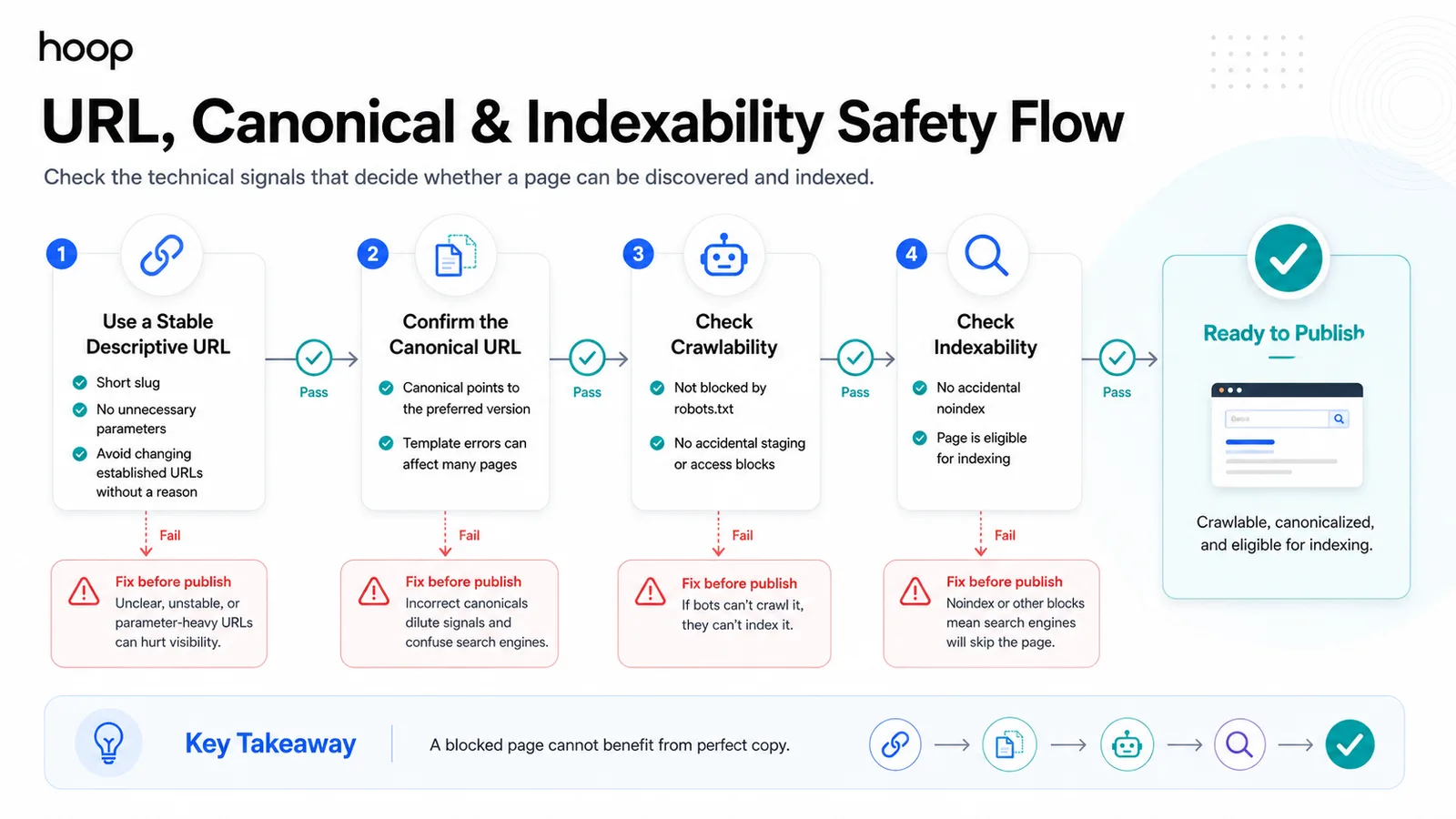
Check the URL, canonical signal, crawl access, and indexability before approval. A blocked page cannot benefit from perfect copy.
These checks give the checklist a technical safety layer. They do not replace a full technical audit.
Use a stable descriptive URL
Choose a short, descriptive slug that reflects the page topic. Avoid dates, tracking parameters, and unnecessary folders unless the site structure requires them.
Do not change an established URL without a reason. URL changes require redirects and can create avoidable migration work.
Confirm the canonical URL
Check whether the page references the preferred canonical version. Canonical signals help search systems understand duplicate or closely related URLs.
Review templates when many pages show the wrong canonical. One template error can affect an entire section.
Check crawlability and indexability
Confirm that robots directives do not block the intended page. Confirm that the page does not carry an accidental noindex directive.
Use Hoop’s technical audit checklist when crawl, rendering, sitemap, or sitewide indexation problems extend beyond one page.
How Should You Build Internal Links and Page Architecture?
To build internal links and page architecture, connect relevant pages with descriptive anchors and logical paths. Avoid isolated URLs.
Internal links belong on every on page SEO checklist because links help users discover related content and clarify site relationships.
Link from relevant established pages
Find pages that already discuss the new topic. Add contextual links where readers naturally need the destination.
Choose source pages by relevance, not raw traffic. A closely related page provides stronger context.
Use descriptive anchor text
Write anchors that describe the destination topic in 3 or 4 natural words. Avoid vague anchors such as “click here” or “read more.”
Vary anchors when context changes. The destination should remain clear without forcing the exact primary keyword into every link.
Prevent orphan pages
Confirm that at least one crawlable internal page links to every important new page. Navigation, category pages, and contextual links can provide discovery paths.
Review internal links after deleting or redirecting content. Old links can create unnecessary redirects or dead ends for users.
What Image, Schema, and Accessibility Checks Matter?
Optimize media for usefulness, loading, and accessibility. Add structured data only when the page qualifies.
A complete checklist should connect visual optimization with page meaning instead of adding keywords to every filename.
Optimize useful images
Use images that explain, prove, compare, or demonstrate something. Examples include screenshots, diagrams, product photographs, charts, and process visuals.
Compress large files before publishing. Serve dimensions that match the displayed image where practical.
Add alternative text for meaning
Write alternative text when an image carries meaningful information. Describe the useful content rather than stuffing target phrases into the attribute.
Leave decorative images without redundant descriptions when accessibility implementation supports that choice. Meaning should drive the text.
Use structured data only when eligible
Match structured data to visible page content. Examples include Article, Product, BreadcrumbList, LocalBusiness, and VideoObject when the page meets requirements.
Validate markup after deployment. Structured data should describe real content rather than invent ratings, prices, authors, or other unsupported details.
Which Page Experience Checks Belong on the List?
Check mobile readability, loading, layout stability, and conversion friction before approval. Search visibility has less value when users cannot act.
Test mobile readability
Open the page on a small screen and read every section. Check typography, spacing, navigation, forms, tables, buttons, and embedded media.
Keep paragraphs scannable and headings descriptive. Mobile users should find answers without zooming or navigating around broken layouts.
Check loading and layout stability
Review major media, scripts, fonts, and third-party embeds that delay visible content. Remove unnecessary resources or defer noncritical elements where appropriate.
Check whether content shifts during loading. Unstable layouts can create accidental clicks and make pages harder to use.
Protect the conversion path
Make the next action clear on commercial pages. Examples include requesting a quote, booking a call, starting checkout, or downloading a resource.
Use Hoop’s conversion optimization services when forms, calls to action, or funnels limit results.
What Changes for a New Website Launch?
A new launch needs stronger crawl, indexation, discovery, and tracking checks. Launch errors can affect many URLs at once.
Remove accidental crawl blocks
Check robots.txt, page-level robots directives, password protection, staging restrictions, and canonical tags before launch.
Remove development controls that should not reach production. Keep private sections blocked when the production plan requires that treatment.
Submit clean discovery signals
Publish a current XML sitemap that contains preferred indexable URLs. Link important pages through navigation, categories, hubs, or contextual paths.
Check status codes for key URLs. Important pages should return the intended final response without avoidable redirect chains.
Verify analytics before promotion
Test analytics events before campaigns send traffic. Track important actions such as form submissions, calls, purchases, sign-ups, and booked consultations.
Clean tracking creates a baseline. Missing measurement makes post-launch diagnosis slower and less reliable.
What Changes During a Website Redesign?
A redesign requires URL preservation, redirect mapping, internal-link review, and pre-launch crawling. Design approval alone cannot protect visibility.
Map old URLs to new URLs
Create a list of existing indexable URLs before launch. Map changed URLs to the closest relevant new destination using permanent redirects.
Avoid redirecting unrelated deleted pages to the homepage. Preserve user intent whenever a suitable replacement exists.
Preserve valuable internal links
Update internal links to point directly to final destination URLs. Direct links reduce unnecessary hops and keep site architecture clean.
Check navigation, breadcrumbs, footer links, category pages, and contextual links. Template changes can affect many links at once.
Crawl the redesigned site before launch
Crawl the staging site when access controls permit authorized testing. Find broken links, missing titles, wrong canonicals, duplicate headings, and accidental noindex tags.
Repeat the crawl after launch. Production differences can introduce issues that staging tests did not reveal.
What Should You Check After Publishing?
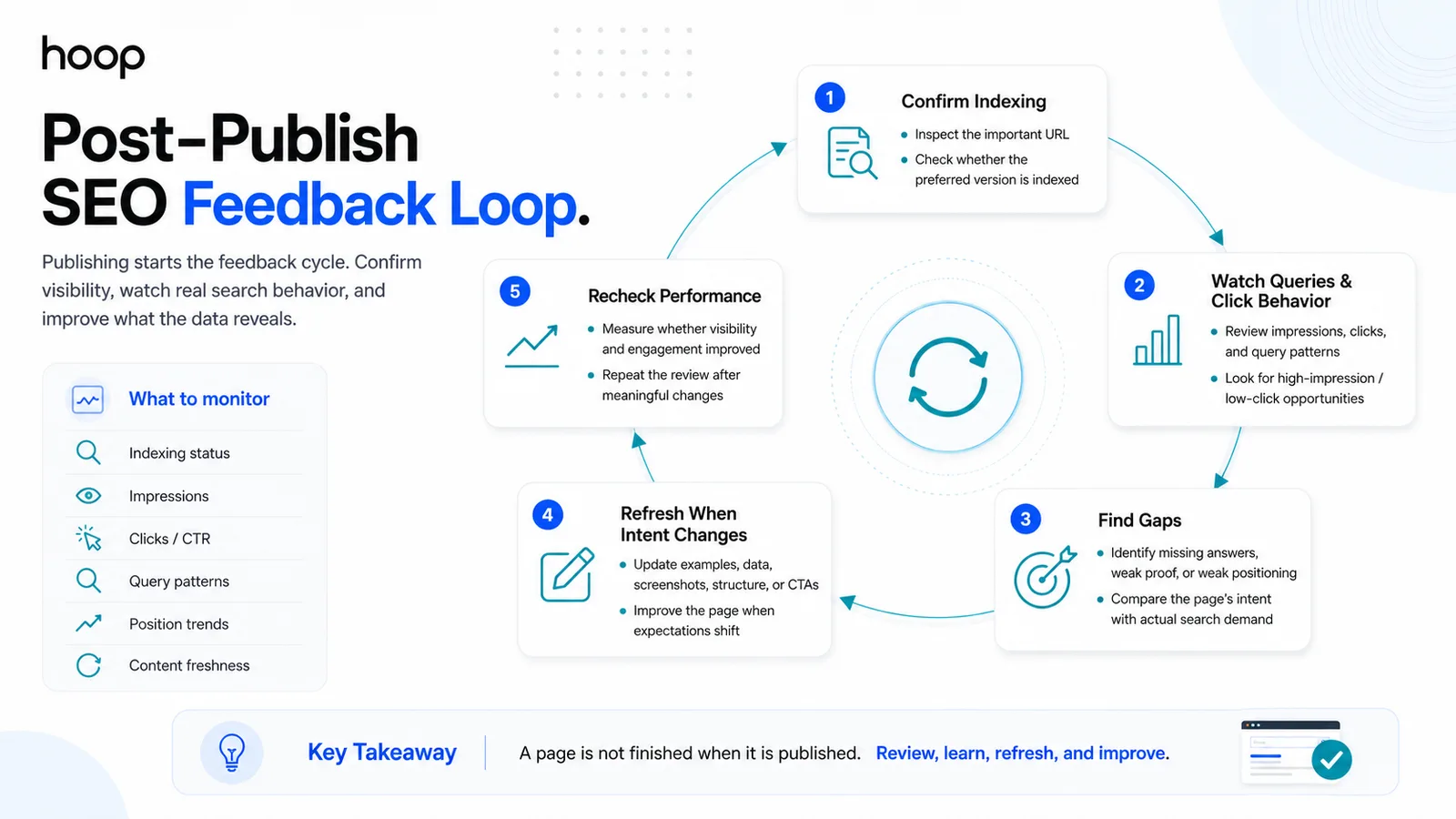
After publishing, confirm indexation, monitor queries, and improve gaps revealed by performance. Publication starts the feedback cycle.
Confirm indexing
Inspect important URLs in Google Search Console. Check whether Google can access the page and whether the preferred URL appears as expected.
Investigate unexpected exclusion before changing content. Indexation problems require a different diagnosis from weak rankings.
Watch queries and click behavior
Review impressions, clicks, average position, and query patterns. Compare search demand with the page’s intended topic.
Look for high-impression queries that expose missing answers. Look for weak clicks when titles or page positioning fail to match expectations.
Refresh pages when intent changes
Update the page when results, products, laws, statistics, interfaces, or user expectations change. Replace obsolete examples and remove unsupported claims.
Use the checklist during every meaningful refresh. Consistent review prevents small quality problems from accumulating across the site.
Which Checklist Items Should You Stop Obsessing Over?
Stop treating every crawler warning and cosmetic score as equally important. Focus on user value, access, relevance, and business impact.
Stop treating every tool warning equally
Tools detect conditions without understanding every business context. Review affected pages, likely impact, and implementation cost before acting.
Prioritize problems that block discovery, create wrong signals, damage usability, or weaken important commercial pages.
Stop forcing exact keywords everywhere
Use the primary phrase where the wording helps clarity. Avoid forcing the same wording into every heading, image description, anchor, and sentence.
Use natural language for related questions and concepts. Search-focused writing still needs human readability and editorial control.
Stop delaying publication for cosmetic perfection
Publish once critical checks pass and the content solves the intended task. Improve secondary details after real performance data arrives.
Make the Checklist a Publishing Standard
A reliable on page SEO checklist gives you a repeatable publishing standard without creating box-ticking work. Fix intent and indexability first. Then improve content, links, media, experience, and measurement. Use Hoop’s SEO service strategy to prioritize the highest-impact pages and build a measurable search plan.
“A blocked page cannot benefit from perfect copy. Fix access before you fix adjectives.”
Key takeaways
- 01Critical blockers first — indexability, canonical, page access, and severe intent mismatch.
- 02One primary topic per URL; avoid three pages competing for the same intent.
- 03Every important page needs at least one crawlable internal link pointing to it.
- 04Publishing starts the feedback cycle — confirm indexing, then watch queries and refresh.
Written by
Sahar
Content Writer
Frequently Asked
Questions
Everything you need to know before booking a strategy call. Can't find your answer? Contact us directly.
No. A checklist prevents page-level mistakes. Rankings also depend on competition, authority, technical health, and content value.
No. Use the exact phrase where the wording remains clear. Supporting headings should answer distinct subquestions naturally.
No. Add structured data only when the page content matches an eligible type and the markup describes visible information accurately.
Both. Run it before publishing, then repeat relevant checks after indexing and performance data become available.
No. Tools find conditions quickly, while a human reviewer must judge search intent, content usefulness, priority, context, and business impact.